
comod


Compartmental modelling Python package
Preview
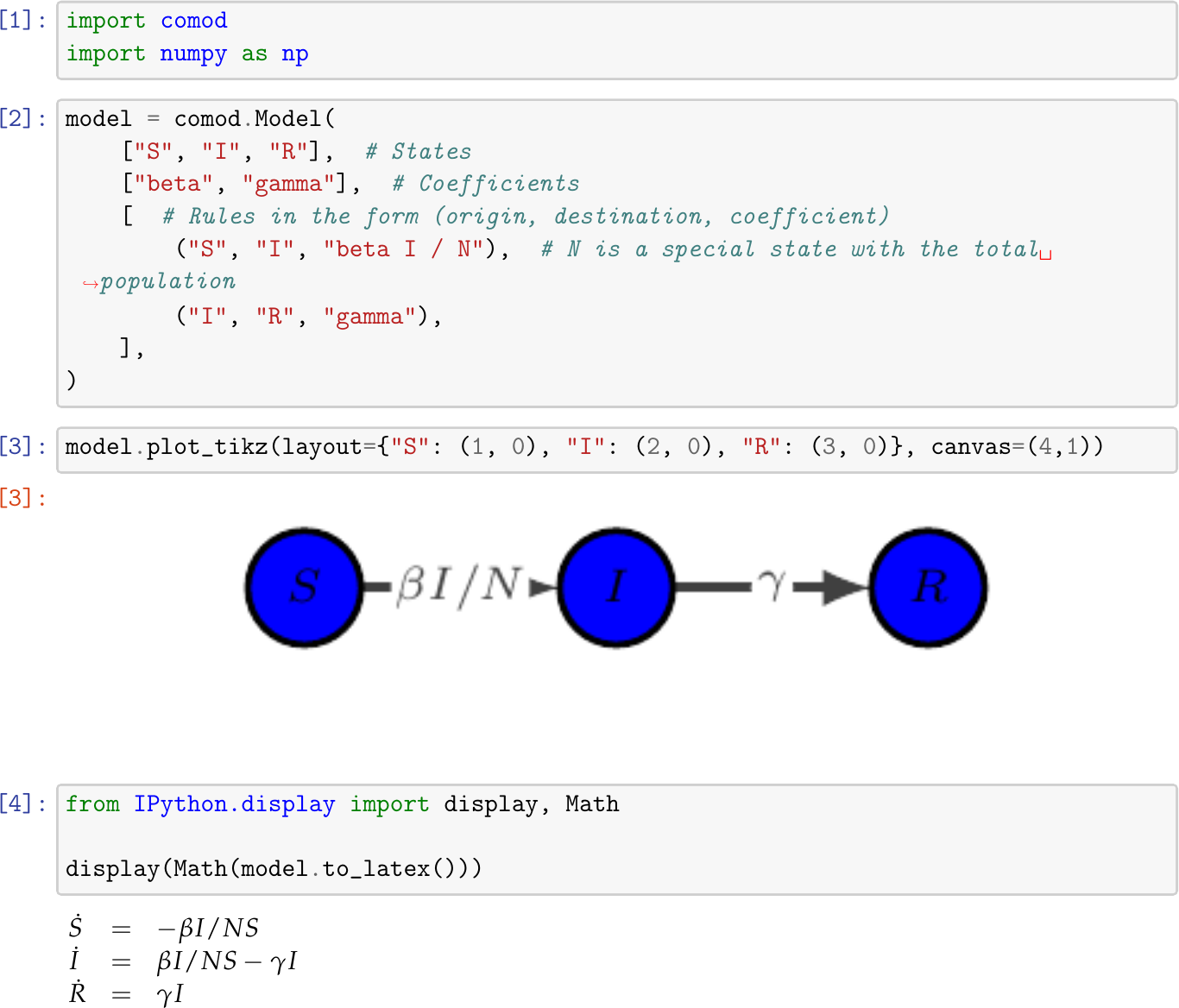
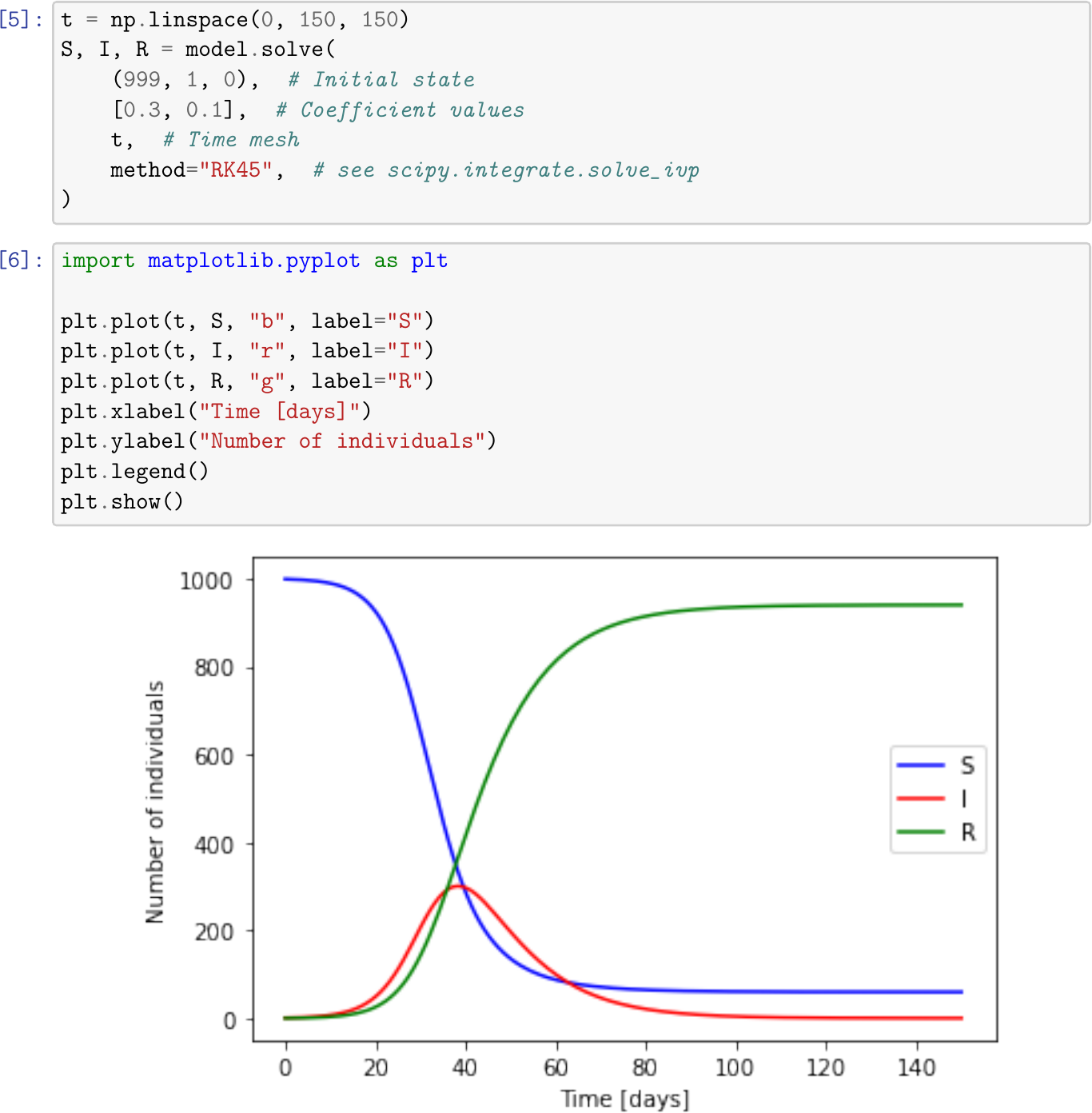
Check the docs to see more.
Features
- Define a model with simple rules as strings or with custom functions.
- Pre-defined models like SIR, SIS, SEIR, ...
- Community-extensions of models.
- Solve numerically for fixed or time-dependent parameters.
- Best-fit to existing data, posibly using time windows.
- Create compartment graphs.
- Export LaTeX.
- Export to Wolfram Language (Mathematica).
Installation
Assuming you have a Python3 distribution with pip, the latest pypi release can be installed with:
pip3 install comod
To install the optional dependencies you can run
pip3 install 'comod[extras]'
Mind the quotes.
Developer information
Instalation
To install a development version, cd to the directory with this file and:
pip3 install -e '.[test]'
As an alternative, a virtualenv might be used to install the package:
# Prepare a clean virtualenv and activate it
virtualenv -p /usr/bin/python3.6 venv
source venv/bin/activate
# Install the package
pip3 install -e '.[test]'
Documentation
To generate the documentation, the docs extra dependencies must be installed.
To generate an html documentation with sphinx run:
make docs
To generate a PDF documentation using LaTeX:
make pdf
Test
To run the unitary tests:
make test
1 maintainer

Metadata
1 maintainer
Release files for comod 0.2.1
For a detailed explanation of source distributions (sdists) and built distributions (wheels), please see the package formats documentation.
Source distribution (sdist)
| File | Size | Uploaded | |
|---|---|---|---|
| comod-0.2.1.tar.gz | 15.2 kB | Details |
Built distribution (wheel)
| File | Interpreter | ABI | Platform | Reset |
|---|---|---|---|---|
| comod-0.2.1-py2.py3-none-any.whl | Python 2, Python 3 | none | any | Details |
Total release size: 30.2 kB
Release files / comod-0.2.1.tar.gz
| Download URL | comod-0.2.1.tar.gz |
|---|---|
| Size | 15.2 kB |
| Tags | Source |
|
SHA-256 checksum How to use checksums |
5f2a596d5a36b09f021b2383f038d5aeb7155b304ad1e10181214ce56b1a2a8b
|
|
BLAKE2b-256 checksum How to use checksums |
2ce6009c81ea2df6b29b946e186122c41671ef0f81640053803d2c0512a61e1b
|
| Upload date | |
|
Uploaded using Trusted Publishing? What is trusted publishing? |
No |
| Uploaded via |
twine/3.7.1 importlib_metadata/4.9.0 pkginfo/1.8.2 requests/2.26.0 requests-toolbelt/0.9.1 tqdm/4.62.3 CPython/3.9.9
|
Release files / comod-0.2.1-py2.py3-none-any.whl
| Download URL | comod-0.2.1-py2.py3-none-any.whl |
|---|---|
| Size | 15.0 kB |
| Tags | Python 2 Python 3 |
|
SHA-256 checksum How to use checksums |
f008a3ca3394b7d05faf8e04f4a4b946b5b5282b7323a40c9d74c5d9b603e5d1
|
|
BLAKE2b-256 checksum How to use checksums |
555de2b905aebad4d89d287318d487bf4e1efcd35efb097906d1a776939888ba
|
| Upload date | |
|
Uploaded using Trusted Publishing? What is trusted publishing? |
No |
| Uploaded via |
twine/3.7.1 importlib_metadata/4.9.0 pkginfo/1.8.2 requests/2.26.0 requests-toolbelt/0.9.1 tqdm/4.62.3 CPython/3.9.9
|














