
compose-watcher
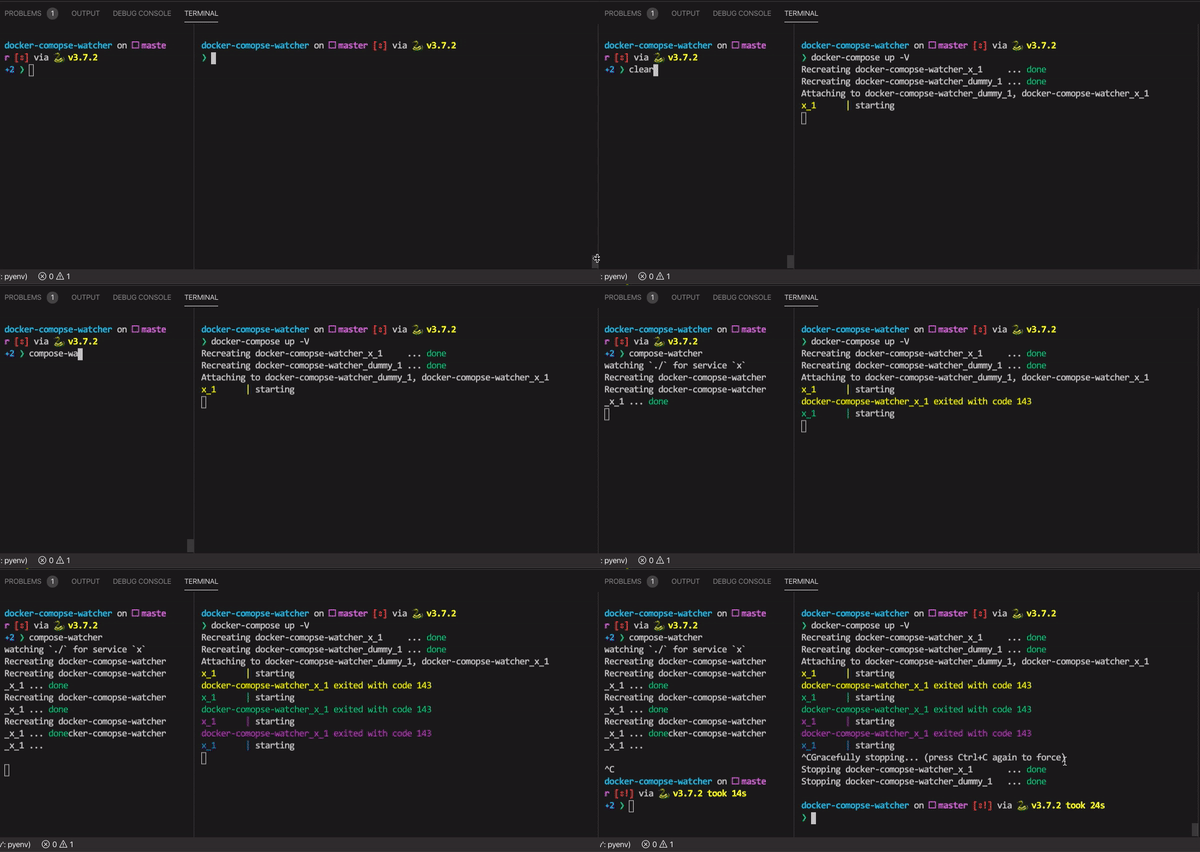
Cli that restarts you docker compose services when a file inside one of its volumes changes.
Useful for faster developement with containers that expose behaviour based on mounted files.
To use with compiled languages place the compilation step in the command field.
Example usage
- graphql api restart when schema file changes
- graphql api mocks based on schema file (like this one)
- Every container that generates code and exposes a server based on a config file
- Nodejs container restarts when the src folder changes, recompiling with tsc
- Mongoke restarts when config schema changes
Install
pip3 install compose-watcher
Usage
Use the directories you want to track as service volumes.
Also consider using init: true in the compose service definition for faster killing of processes.
To not stop the docker-compose logs command, there should be always a running container.
version: '3'

services:
  api:
    build: node_api
    command: sh -c 'tsc --incremental && node index.js'
    volumes:
      - ./node_api/src:/src
Then execute compose-watcher to watch changes.
compose-watcher -f docker-compose.yml --timeout 5
TODO add extension filter TODO dont block the event receiving thread when restarting
How it works
After running the compose-watcher command all the volumes mounted on every service are tracked for change, when a change happens the service where the volume is mounted is restarted toghether with the services in the depends_on filed. Then the other services that have the restarted service as a dependency in depends_on are restarted too.
1 maintainer

Metadata
1 maintainer
Release files for compose-watcher 1.2.4
For a detailed explanation of source distributions (sdists) and built distributions (wheels), please see the package formats documentation.
Source distribution (sdist)
| File | Size | Uploaded | Provenance | Actions |
|---|---|---|---|---|
| compose-watcher-1.2.4.tar.gz | 5.1 kB | Without provenance | Details for compose-watcher-1.2.4.tar.gz |
Release files / compose-watcher-1.2.4.tar.gz
| Download URL | compose-watcher-1.2.4.tar.gz |
|---|---|
| Size | 5.1 kB |
| Tags | Source |
|
SHA-256 checksum How to use checksums |
9f1c7e2049c30af025062f099cbdf823f66ba0d4c0b75b92dd17eff12d66a146
|
|
BLAKE2b-256 checksum How to use checksums |
1fa97f9810e03028a531abdd64d43cbdccc88ad19c6ad702561cf7f812ef2a15
|
| Upload date | |
|
Uploaded using Trusted Publishing? What is trusted publishing? |
No |
| Uploaded via |
twine/1.13.0 pkginfo/1.5.0.1 requests/2.21.0 setuptools/40.8.0 requests-toolbelt/0.9.1 tqdm/4.31.1 CPython/3.6.8
|
Security for compose-watcher 1.2.4
Provenance
Provenance describes where a file came from. On PyPI, provenance is shared via attestations, which provide a verifiable record of the build or publishing details. View details, limitations and caveats.
No provenance found
None of the files in this release were uploaded with provenance metadata.
A note on package security
PyPI is a repository for distributing packages, not a service for auditing them. While third-party security researchers and our staff do their best to detect and remove malicious packages, PyPI cannot guarantee the quality, security or suitability of any given package.
To learn more about protecting yourself from malicious actors, visit our package security documentation.














