
Library to improve the display of your code in the console.
By adding only a few lines of code at strategic places in your program, you will get a nice console display that will let you know what stage your code is at.
fork of context-printer:
This project is a fork of the context_printer project. The philosophy of this project is strictly the same as the original project. Nevertheless, this project offers the following improvements:
Support for the with keyword (context manager).
Formatting of exceptions for better debugging.
Added decorator behavior.
Possibility to implicitly name a section.
More formatting possible (adding highlighting and flashing).
No conflicts between thread and process (clients send text to a single server).
Integrated timer for display the sections duration.
Basic usage example:
from context_verbose import printer as ctp
with ctp('Main Section', color='blue'):
    ctp.print('Text in main section')
    for i in range(3):
        with ctp(f'Subsection {i}'):
            ctp.print('Text in subsection')
            ctp.print('Text in subsection')
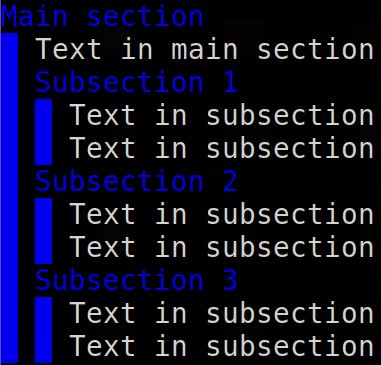
The above example will print the following:
Exaustive example of usage:
from context_verbose import printer as ctp

@ctp
def decorated_func(x):
    return x**x**x

def error_func():
    with ctp('Section that will fail'):
        return 1/0

ctp.print('we will enter the main section')
with ctp('Main Section', color='cyan'):
    ctp.print('text in main section')
    try:
        with ctp('Subsection 1'):
            for x in [1, 8]:
                decorated_func(x)
            error_func()
    except ZeroDivisionError:
        pass
    with ctp('Subsection 2', color='magenta'):
        ctp.print('text in bold', bold=True)
        ctp.print('underlined text', underline=True)
        ctp.print('blinking text', blink=True)
        ctp.print('yellow text', color='yellow')
        ctp.print('text highlighted in blue', bg='blue')
        ctp.print('text in several ', end='')
        ctp.print('parts', print_headers=False)
        ctp.print('''text in several
                     lines''')
    with ctp(color='green'):
        ctp.print('this subsection is automatically named')
ctp.print('we are out of the main section')
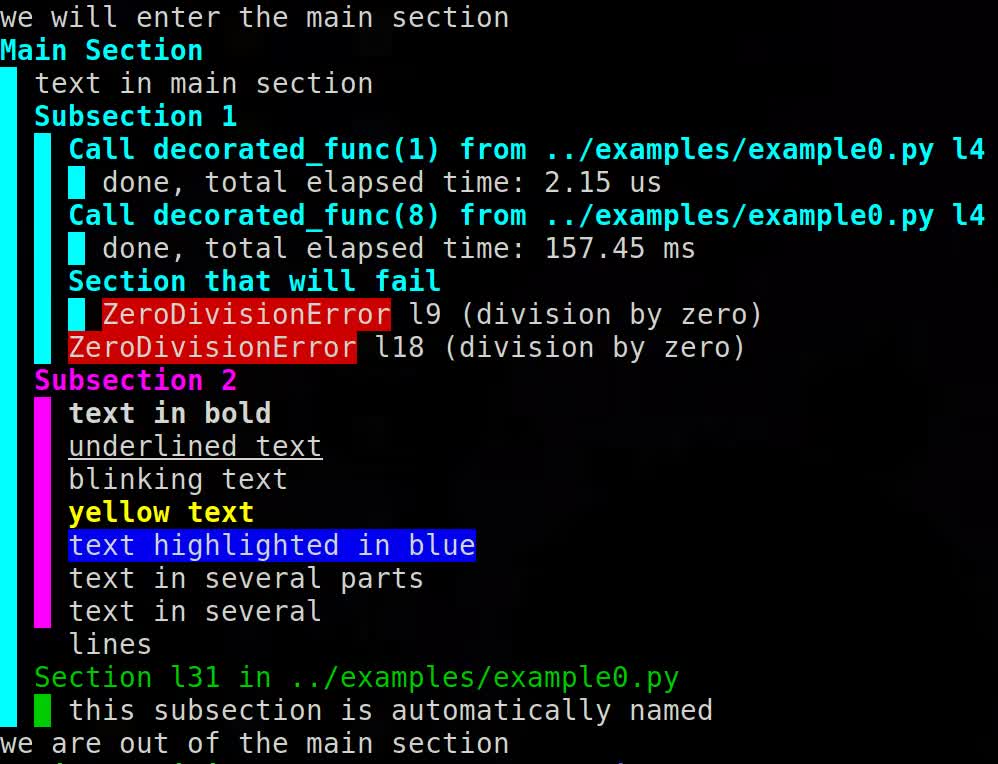
The above example will print the following:
See Also
1 maintainer

Metadata
1 maintainer
Release files for context-verbose 2.2.3
For a detailed explanation of source distributions (sdists) and built distributions (wheels), please see the package formats documentation.
Source distribution (sdist)
| File | Size | Uploaded | Provenance | Actions |
|---|---|---|---|---|
| context_verbose-2.2.3.tar.gz | 52.1 kB | Without provenance | Details for context_verbose-2.2.3.tar.gz |
Built distribution (wheel)
| File | Interpreter | ABI | Platform | Actions Reset |
|---|---|---|---|---|
| context_verbose-2.2.3-py3-none-any.whl | Python 3 | none | any | Details for context_verbose-2.2.3-py3-none-any.whl |
Total release size: 94.8 kB
Release files / context_verbose-2.2.3.tar.gz
| Download URL | context_verbose-2.2.3.tar.gz |
|---|---|
| Size | 52.1 kB |
| Tags | Source |
|
SHA-256 checksum How to use checksums |
1e6c25d988ce6ac77459fcebe85537fcae0315d77ab2c7dbfd85232b1baedd21
|
|
BLAKE2b-256 checksum How to use checksums |
ef51357b5b72697d333d8b56de09954a9b5e6ed32c671498a360e6f393d3f62a
|
| Upload date | |
|
Uploaded using Trusted Publishing? What is trusted publishing? |
No |
| Uploaded via |
twine/6.2.0 CPython/3.14.0
|
Release files / context_verbose-2.2.3-py3-none-any.whl
| Download URL | context_verbose-2.2.3-py3-none-any.whl |
|---|---|
| Size | 42.6 kB |
| Tags | Python 3 |
|
SHA-256 checksum How to use checksums |
4eec5fdafaf65a3f60e1c4f0fcd7eff165956cd08364536bc25c4ac62bc116a8
|
|
BLAKE2b-256 checksum How to use checksums |
91cafc0271e7391e8316b35acf9c7541411f834b77383e8a0b58857f6d37b3a0
|
| Upload date | |
|
Uploaded using Trusted Publishing? What is trusted publishing? |
No |
| Uploaded via |
twine/6.2.0 CPython/3.14.0
|
Security for context-verbose 2.2.3
Provenance
Provenance describes where a file came from. On PyPI, provenance is shared via attestations, which provide a verifiable record of the build or publishing details. View details, limitations and caveats.
No provenance found
None of the files in this release were uploaded with provenance metadata.
A note on package security
PyPI is a repository for distributing packages, not a service for auditing them. While third-party security researchers and our staff do their best to detect and remove malicious packages, PyPI cannot guarantee the quality, security or suitability of any given package.
To learn more about protecting yourself from malicious actors, visit our package security documentation.














