
Python Package Generator
















Create Python Projects swiftly, and enjoy streamlined "DevOps" using a powerful CI/CD Pipeline.
Documentation available at https://python-package-generator.readthedocs.io/.
What's included?
- Generator of Python Project (see Quickstart), with CLI for Linux, MacOS, and Windows
- Option to Generate Python Package designed as
module,module+cli, orpytest-plugin! - Scaffold over 24 files, from Template, to have a
ready-to-developProject equipped with:- Fully-featured CI/CD Pipeline, running on Github Actions, defined in
.github/ - Continuous Delivery to PyPI (i.e. pypi.org, test.pypi.org) and Dockerhub
- Continuous Integration, with Test Suite running pytest, located in the
testsdir - Continuous Documentation, building with
mkdocsorsphinx, and hosting onreadthedocs, located in thedocsdir - Static Type Checking, using mypy
- Lint Check and
Applycommands, using the fast Ruff linter, along with standard isort, and black - Build Command, using the build python package
- Fully-featured CI/CD Pipeline, running on Github Actions, defined in
What to expect?
You can be up and running with a new Python Package, and run workflows on Github Actions, such as:
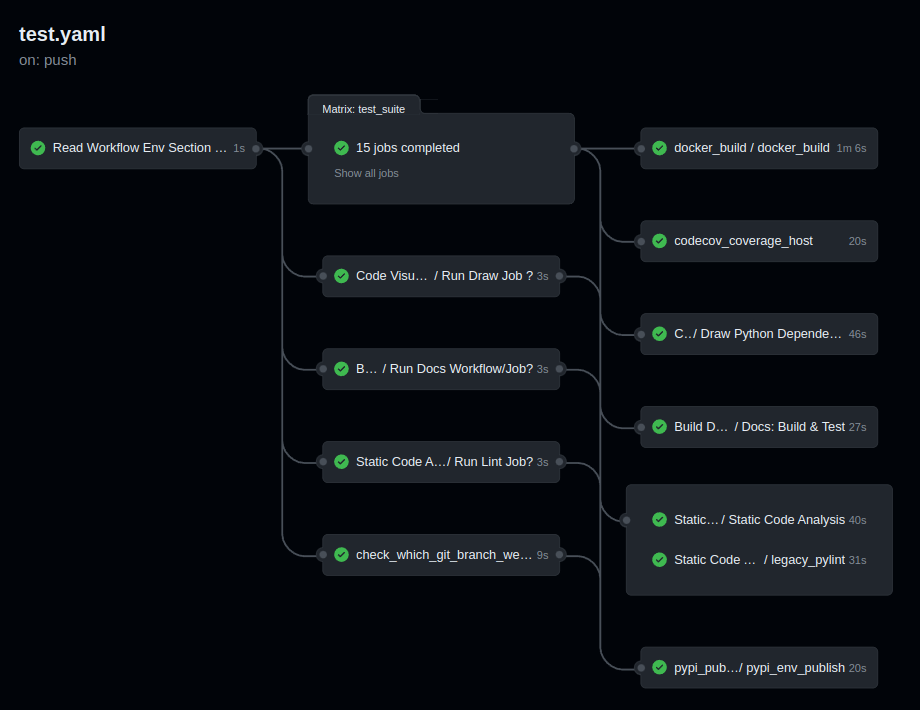
- CI Pipeline, running on Github Actions, defined in
.github/- Job Matrix, spanning different
platforms andpython versions:- Platforms:
ubuntu-latest,macos-latest - Python Interpreters:
3.8,3.9,3.10,3.11,3.12
- Platforms:
- Parallel Job execution, generated from the
matrix, that runs theTest Suite - Artifact store of Source and Wheel Distributions, factoring Platform and Python Version
- Job Matrix, spanning different
Auto Generated Sample Package Biskotaki
Check the Biskotaki Python Package Project on github, which is Continuously generated by this CLI, for a taste of how a project looks and the files this Template can generate!
- Source Code hosted on Github at https://github.com/boromir674/biskotaki
- Python Package hosted on pypi.org at https://pypi.org/project/biskotaki/
- Live Documentation hosted on readthedocs at https://python-package-generator.readthedocs.io/
- CI Pipeline hosted on Github Actions at https://github.com/boromir674/biskotaki/actions
Quickstart
To install the latest Generator in your environment, run:
pip install cookiecutter-python
The generate-python CLI should become available in your environment.
Next, create a file, let's call it gen-config.yml, with the following
content:
default_context:
    project_name: Demo Generated Project
    project_slug: demo-project
    project_type: module+cli
    full_name: John Doe
    email: john.doe@something.org
    github_username: john-doe
    project_short_description: 'Demo Generated Project Description'
    initialize_git_repo: no
    interpreters: {"supported-interpreters": ["3.8", "3.9", "3.10", "3.11"]}
To generate a Python Package Project, run:
mkdir gen-demo-dir
cd gen-demo-dir

generate-python --config-file ../gen-config.yml --no-input
Now, you should have generated a new Project for a Python Package, based on the Template!
The Project should be located in the newly created demo-generated-project directory.
To leverage all out-of-the-box development operations (ie scripts), install tox:
python3 -m pip install --user 'tox<4'
To verify tox available in your environment, run: tox --version
cd demo-project
To run the Test Suite, run:
tox -e dev
All Tests should pass, and you should see a coverage report!
To run Type Checking against the Source Code, run:
tox -e type
All Type Checks should pass!
To setup a Git Repository, run:
git init
git add .
git checkout -b main
git commit -m "Initial commit"
To setup a Remote Repository, run for example:
git remote add origin <remote-repository-url>
git push -u origin main
To trigger the CI/CD Pipeline, run:
git push
Navigate to your github.com/username/your-repo/actions page, to see the CI Pipeline running!
Develop your package's Source Code (business logic) inside src/my_great_python_package :)
Develop your package's Test Suite (ie unit-tests, integration tests, etc) inside tests dir :-)
Read the Documentation's Use Cases section for more on how to leverage your generated Python Package features.
Next Steps
To prepare for an Open Source Project Development Lifecycle, you should visit the following websites:
- PyPI, test.pypi.org, Dockerhub, and Read the Docs, for setting up Release and Documentation Pipelines
- github.com/your-account to configure Actions, through the web UI
- Codecov, Codacy, and Codeclimate, for setting up Automated Code Quality, with CI Pipelines
- https://www.bestpractices.dev/ for registering your Project for OpenSSF Best Practices Badge
Happy Developing!
License
Free/Libre and Open Source Software (FLOSS)
1 maintainer

Metadata
1 maintainer
Release files for cookiecutter-python 2.7.1
For a detailed explanation of source distributions (sdists) and built distributions (wheels), please see the package formats documentation.
Source distribution (sdist)
| File | Size | Uploaded | |
|---|---|---|---|
| cookiecutter_python-2.7.1.tar.gz | 343.4 kB | Details |
Built distributions (wheels)
| File | Interpreter | ABI | Platform | Reset |
|---|---|---|---|---|
| cookiecutter_python-2.7.1-py3-none-any.whl | Python 3 | none | any | Details |
| cookiecutter_python-2.7.1-py2.py3-none-any.whl | Python 3, Python 2 | none | any | Details |
Total release size: 690.8 kB














