
English | Português | Русский | Українська
Count Files 


A command-line interface (CLI) utility written in Python to help you counting or searching files with a specific extension, files without an extension or all files regardless of the extension, in the specified directory.
Documentation
Dependencies
To run this application, you need to have a working Python 3.6+ installation.
Installation
On regular desktop operating systems
Count Files is a platform-independent application that run in Python and can be easily installed using pip:
pip3 install count-files
If you are interested in the current development version, you can simply clone this git repository and install it using pip3 install -e. Please notice, however, that only released versions are expected to be stable and usable. The development code is often unstable or buggy, for the simple reason that it is a work in progress.
On iPhone or iPad (in Pythonista 3 for iOS)
It may also be used on iOS (iPhone/iPad) using the StaSh command-line in the Pythonista 3 app. Please see documentation for further instructions.
How to use
To check the list of available options and their usage, you just need to use one of the following commands:
count-files -h
count-files --help
By default, the program counts or searches for files recursively in current working directory and all of its subdirectories. Any hidden files or folders will be ignored.
The names of extensions are case insensitive by default. The results for ini and INI will be the same.
Optionally, you can pass it a path to the directory to scan, choose non-recursive counting or searching, process the file extensions with case-sensitive mode and enable search or counting in hidden files and folders.
You can get additional information about the size of each found file and see a short preview for text files.
See more about CLI arguments.
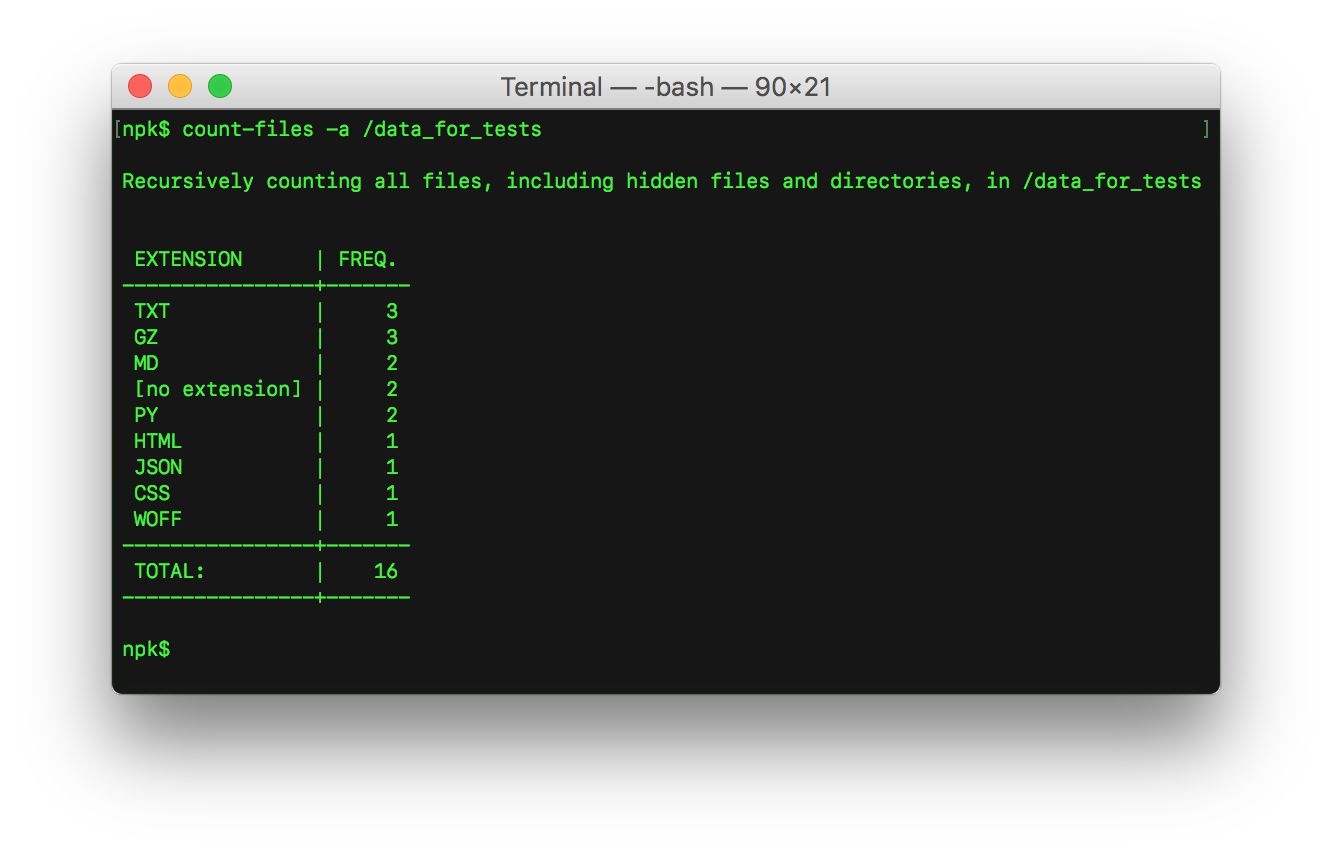
The most simple form of usage is to type a simple command in the shell, without any arguments. It will display a table showing the frequency for each file extension (e.g.: .txt, .py, .html, .css) and the total number of files found.
count-files
Another main feature of this application consists in searching files by a given extension, which presents to the user a list of all found files paths.
count-files -fe txt [path]
count-files --file-extension txt [path]
You can also count the total number of files with a certain extension, without listing them.
count-files -t py [path]
count-files --total py [path]
For information about files without an extension, specify a single dot as the extension name.
count-files -fe . [path]
count-files --file-extension . [path]
count-files -t . [path]
count-files --total . [path]
If you need to list or to count all the files, regardless of the extension, specify two dots as the extension name.
count-files -fe .. [path]
count-files --file-extension .. [path]
count-files -t .. [path]
count-files --total .. [path]
Did you find a bug or do you have a suggestion?
Please, open a new issue or a pull request to the repository.
1 maintainer

Metadata
1 maintainer
Release files for count-files 1.5.0
For a detailed explanation of source distributions (sdists) and built distributions (wheels), please see the package formats documentation.
Source distribution (sdist)
| File | Size | Uploaded | Provenance | Actions |
|---|---|---|---|---|
| count-files-1.5.0.tar.gz | 21.4 kB | Without provenance | Details for count-files-1.5.0.tar.gz |
Built distribution (wheel)
| File | Interpreter | ABI | Platform | Actions Reset |
|---|---|---|---|---|
| count_files-1.5.0-py3-none-any.whl | Python 3 | none | any | Details for count_files-1.5.0-py3-none-any.whl |
Total release size: 45.3 kB
Release files / count-files-1.5.0.tar.gz
| Download URL | count-files-1.5.0.tar.gz |
|---|---|
| Size | 21.4 kB |
| Tags | Source |
|
SHA-256 checksum How to use checksums |
4ff8f6e22c6d45c13a912f3c85ff095dc0c7e24ea212bd6cf1375e86dd82ef0b
|
|
BLAKE2b-256 checksum How to use checksums |
bd3fa6565c81983763d65e283fcb2642455315318c9defd52eb29bf84223e1aa
|
| Upload date | |
|
Uploaded using Trusted Publishing? What is trusted publishing? |
No |
| Uploaded via |
twine/1.13.0 pkginfo/1.5.0.1 requests/2.22.0 setuptools/41.0.1 requests-toolbelt/0.9.1 tqdm/4.33.0 CPython/3.8.0b3
|
Release files / count_files-1.5.0-py3-none-any.whl
| Download URL | count_files-1.5.0-py3-none-any.whl |
|---|---|
| Size | 23.9 kB |
| Tags | Python 3 |
|
SHA-256 checksum How to use checksums |
ab8026a2bf82404fe6a4e5475b080055305e6bafa31878661a7213822db351e7
|
|
BLAKE2b-256 checksum How to use checksums |
a18d12e987a87a5047809422f5d2587ce2a0a320efecfdf94ad229f66244a793
|
| Upload date | |
|
Uploaded using Trusted Publishing? What is trusted publishing? |
No |
| Uploaded via |
twine/1.13.0 pkginfo/1.5.0.1 requests/2.22.0 setuptools/41.0.1 requests-toolbelt/0.9.1 tqdm/4.33.0 CPython/3.8.0b3
|
Security for count-files 1.5.0
Provenance
Provenance describes where a file came from. On PyPI, provenance is shared via attestations, which provide a verifiable record of the build or publishing details. View details, limitations and caveats.
No provenance found
None of the files in this release were uploaded with provenance metadata.
A note on package security
PyPI is a repository for distributing packages, not a service for auditing them. While third-party security researchers and our staff do their best to detect and remove malicious packages, PyPI cannot guarantee the quality, security or suitability of any given package.
To learn more about protecting yourself from malicious actors, visit our package security documentation.














