
cube-scramble-cli




A CLI for pyTwistyScrambler, to generate random states for Rubik's cubes/twisty puzzles.
Installation
Requires python3.6+
$ pip3 install cube-scramble-cli
Run
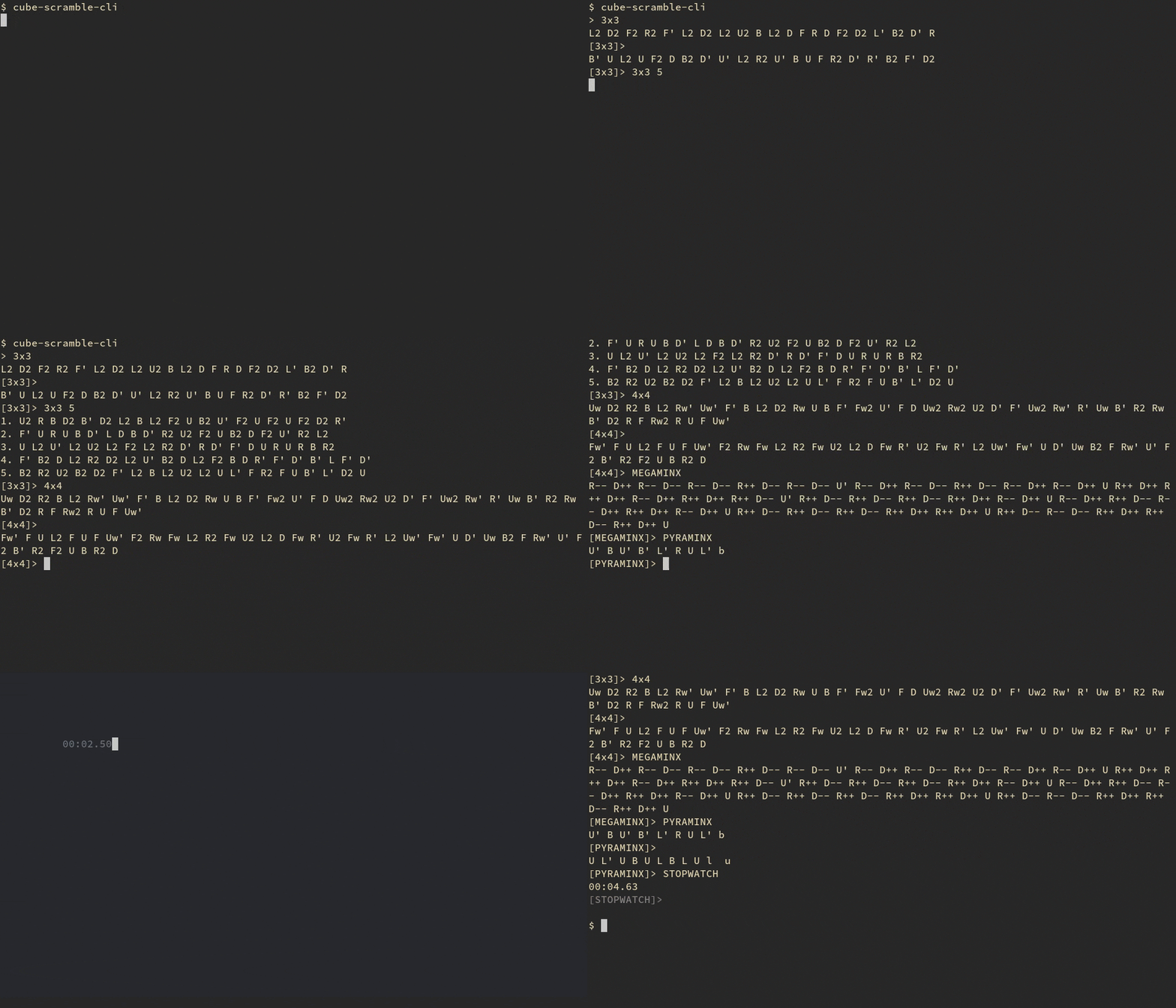
$ cube-scramble-cli
❯ cube-scramble-cli -h
usage: cube-scramble-cli [-h] [-s] [-H]

A command line based stopwatch and twisty puzzle scramble generator

optional arguments:
  -h, --help            show this help message and exit
  -s, --print-symbols   Print a list of the supported symbols
  -H, --hide-stopwatch  When using the stopwatch, don't display the time while
                        solving
Supported Symbols:
3x3 WCA Scramble                           3x3
2x2 WCA Scramble                           2x2
4x4 WCA Scramble                           4x4
5x5 WCA Scramble                           5x5
6x6 WCA Scramble                           6x6
7x7 WCA Scramble                           7x7
Pyraminx Scramble                          PYRAMINX
Megaminx Scramble                          MEGAMINX
Square-1 Scramble                          SQUARE ONE
Skewb Scramble                             SKEWB
Clock scramble                             CLOCK
Last Layer Scramble                        LAST LAYER
First 2 Layers Scramble                    FIRST 2 LAYERS
<MU>-Last Six Edges Scramble               LAST SIX EDGES
<RU>-gen Scramble                          RU SCRAMBLE
Last Slot and Last Layer Scramble          LAST SLOT AND LAST LAYER
[Stopwatch]                                STOPWATCH
[Print Help]                               HELP
[Quit]                                     QUIT
You can press tab to scroll through the symbols at the prompt, and arrow keys scroll through history (stored at ~/.scramble_history.txt. You can change this location by setting the SCRAMBLE_HISTORY environment variable describing a different path.)
After selecting a scramble, you may repeatedly press return/enter to generate another scramble of the same type, or enter a number to generate that many scrambles of the selected type; e.g. 3x3 3
Use Ctrl+C or Ctrl+D, or type QUIT to quit
The STOPWATCH command will start a stopwatch that stops when any key is pressed. You can use the -H flag when starting cube-scramble-cli to hide the timer while solving.
If you provide 'user input' as command line arguments, its prints the results and exits without entering interactive mode:
$ cube-scramble-cli 3x3 3
R' B2 L2 F2 D2 B2 R U2 R' F2 R' U' R B' R2 U2 F' L D R2
U2 B2 L2 F2 U L2 D' F2 D' U B R B U' R' U B D L'
D' R' U F2 L' U2 L F' U' D B2 U L2 B2 D' L2 B2 U' F2 R
This is also accessible through python3 -m cube_scramble_cli
1 maintainer

Metadata
1 maintainer
Release files for cube-scramble-cli 0.4.7
For a detailed explanation of source distributions (sdists) and built distributions (wheels), please see the package formats documentation.
Source distribution (sdist)
| File | Size | Uploaded | Provenance | Actions |
|---|---|---|---|---|
| cube scramble cli-0.4.7.tar.gz | 8.0 kB | Without provenance | Details for cube scramble cli-0.4.7.tar.gz |
Built distribution (wheel)
| File | Interpreter | ABI | Platform | Actions Reset |
|---|---|---|---|---|
| cube_scramble_cli-0.4.7-py3-none-any.whl | Python 3 | none | any | Details for cube_scramble_cli-0.4.7-py3-none-any.whl |
Total release size: 15.1 kB
Release files / cube scramble cli-0.4.7.tar.gz
| Download URL | cube scramble cli-0.4.7.tar.gz |
|---|---|
| Size | 8.0 kB |
| Tags | Source |
|
SHA-256 checksum How to use checksums |
0d22859ed7b693d95c9a2d8d220b664da9cc3f49aa63625aadbf5989030c2183
|
|
BLAKE2b-256 checksum How to use checksums |
e0da8577fb19e07d4cf0a701c21e06024d9984713f511ce98e171ba930845c8c
|
| Upload date | |
|
Uploaded using Trusted Publishing? What is trusted publishing? |
No |
| Uploaded via |
twine/3.2.0 pkginfo/1.5.0.1 requests/2.24.0 setuptools/50.3.0 requests-toolbelt/0.9.1 tqdm/4.50.0 CPython/3.8.6
|
Release files / cube_scramble_cli-0.4.7-py3-none-any.whl
| Download URL | cube_scramble_cli-0.4.7-py3-none-any.whl |
|---|---|
| Size | 7.2 kB |
| Tags | Python 3 |
|
SHA-256 checksum How to use checksums |
e3873b8ae15fd2156c1a0d598b1ffea4e98ba94a062d82ac7395884f8d6ca25d
|
|
BLAKE2b-256 checksum How to use checksums |
2ee16ed545554872f452d51f2211e89a2ceb1ec0c500a06cca91d958ce60fa56
|
| Upload date | |
|
Uploaded using Trusted Publishing? What is trusted publishing? |
No |
| Uploaded via |
twine/3.2.0 pkginfo/1.5.0.1 requests/2.24.0 setuptools/50.3.0 requests-toolbelt/0.9.1 tqdm/4.50.0 CPython/3.8.6
|
Security for cube-scramble-cli 0.4.7
Provenance
Provenance describes where a file came from. On PyPI, provenance is shared via attestations, which provide a verifiable record of the build or publishing details. View details, limitations and caveats.
No provenance found
None of the files in this release were uploaded with provenance metadata.
A note on package security
PyPI is a repository for distributing packages, not a service for auditing them. While third-party security researchers and our staff do their best to detect and remove malicious packages, PyPI cannot guarantee the quality, security or suitability of any given package.
To learn more about protecting yourself from malicious actors, visit our package security documentation.














