
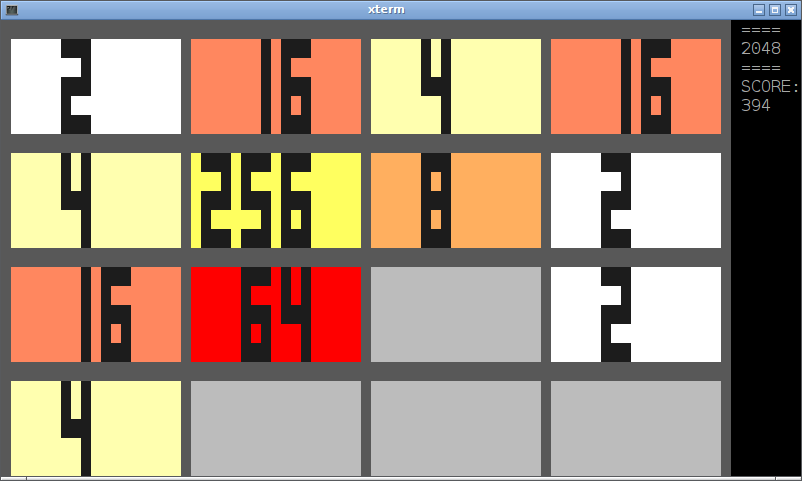
A terminal/ncurses/python version of the original game at http://gabrielecirulli.github.io/2048
Free software: GPL license
Install
Open your terminal and type:
$ pip install curses-2048or
$ easy_install curses-2048Usage
$ 2048256 colors
If your terminal has support for 256 colors you will see colors mimicking the original game, something like the screenshot above. If your terminal only supports 16 colors, you will se something like this:
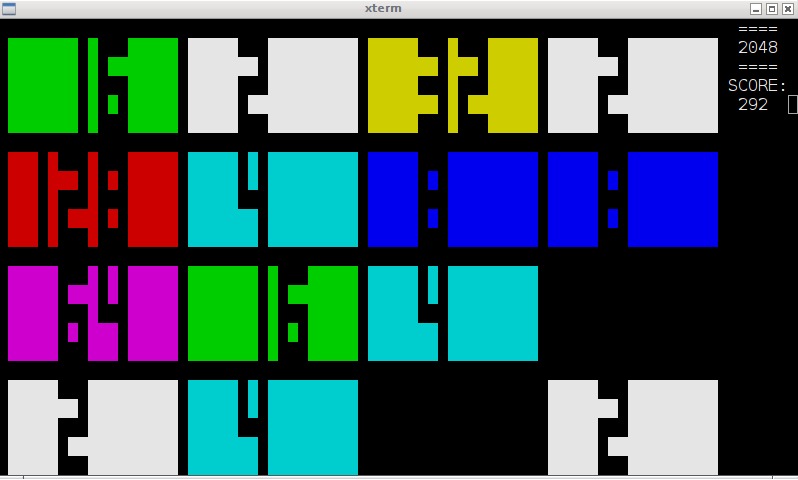
Recent versions of xterm and gnome terminal are known to support 256 colors, if you do not see them, probably your environment variable TERM is not set accordingly. Do
$ export TERM=xterm-256coloror, if you are using screen or tmux
$ export TERM=screen-256colorto enjoy curses-2048 in full 256 colors glory.
Use the cursor keys to move and join tiles. Get to the 2048 tile!
History
1.0 (2014-05-20)
First release as a module. Packaged for pypi by Henrique Pereira. Uploaded to pypi
1.1 (2014-05-21)
Proper initialization of curses colors and hide terminal cursor, by Chris Seymour
1.2 (2014-05-21)
Added support for 256 color terminals mimicking the original web game
1.3 (2014-05-22)
adapt tile height to terminal window height and adjust dynamically if resized
1.4 (2014-05-24)
Dynamically handle resizing onto smaller than 80x24 terminal size, by Chris Seymour
1 maintainer

Metadata
1 maintainer
Release files for curses-2048 1.4
For a detailed explanation of source distributions (sdists) and built distributions (wheels), please see the package formats documentation.
Source distribution (sdist)
| File | Size | Uploaded | Provenance | Actions |
|---|---|---|---|---|
| curses-2048-1.4.tar.gz | 8.6 kB | Without provenance | Details for curses-2048-1.4.tar.gz |
Release files / curses-2048-1.4.tar.gz
| Download URL | curses-2048-1.4.tar.gz |
|---|---|
| Size | 8.6 kB |
| Tags | Source |
|
SHA-256 checksum How to use checksums |
36fa8caf76ec864221f8d7c8b2f6f80150bc8e5fcae2dbcdc60232b5685c1711
|
|
BLAKE2b-256 checksum How to use checksums |
dbb5fad52096b961a5e8b0dba73d65faa85a9850ea206d8f9d8a381606194cf3
|
| Upload date | |
|
Uploaded using Trusted Publishing? What is trusted publishing? |
No |
Security for curses-2048 1.4
Provenance
Provenance describes where a file came from. On PyPI, provenance is shared via attestations, which provide a verifiable record of the build or publishing details. View details, limitations and caveats.
No provenance found
None of the files in this release were uploaded with provenance metadata.
A note on package security
PyPI is a repository for distributing packages, not a service for auditing them. While third-party security researchers and our staff do their best to detect and remove malicious packages, PyPI cannot guarantee the quality, security or suitability of any given package.
To learn more about protecting yourself from malicious actors, visit our package security documentation.














