
Minimalist terminal digital clock

Project description
darshell-clock





:warning: Please use pip3 or python3 instead of pip and python
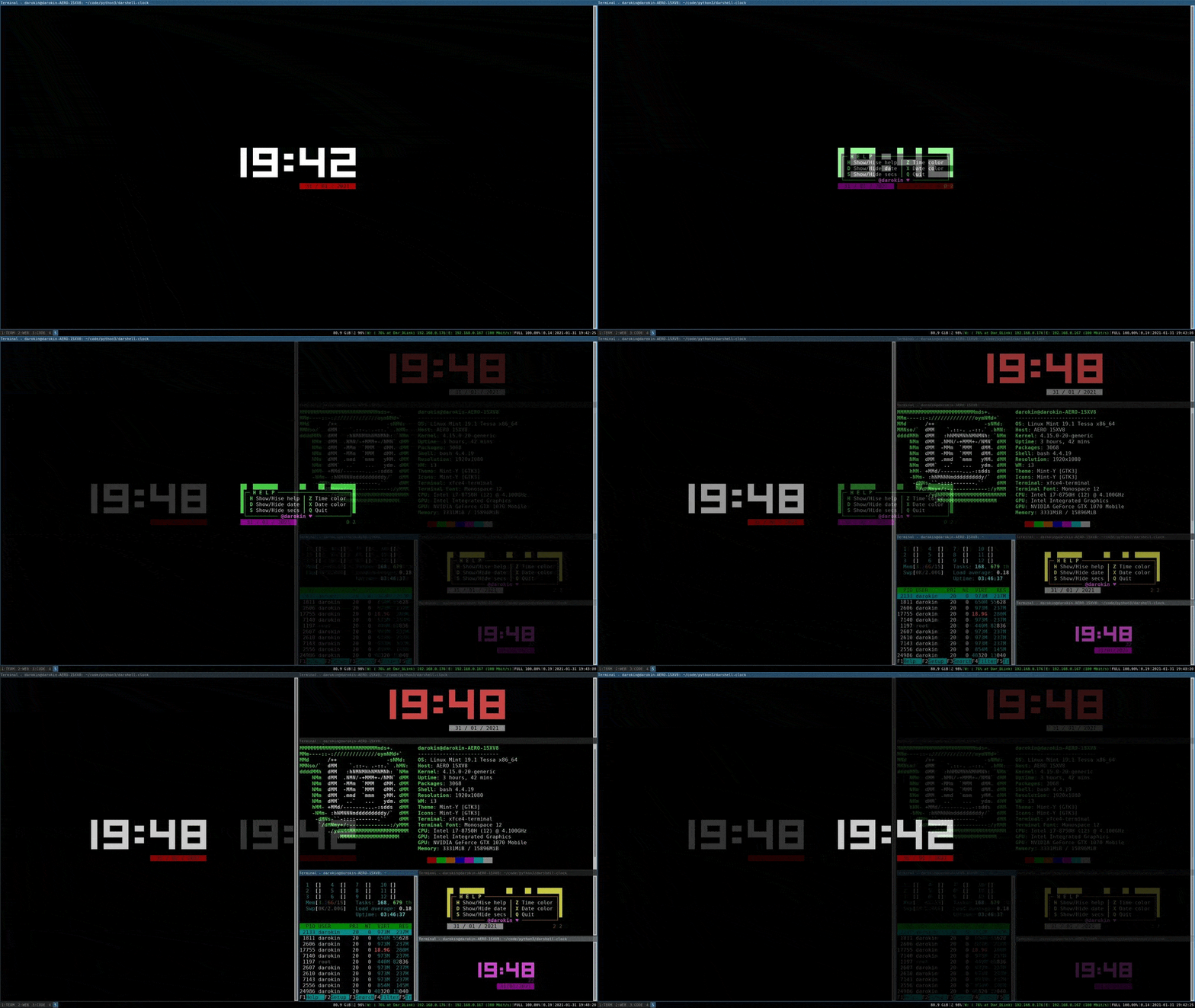
darshellclock is a MINIMALIST console application to display time and date with nice ASCII digits in your terminal. Uses curses
Here is a demo but mostly you would use this in a small persistant terminal. (More on "why this project?" in the side notes at the end)
Features
Suitable for quite small terminal sizes. Useful for having a clock sitting around if you use a tiling window manager or tmux for example.
- Nice 'blocky' ASCII digits :purple_heart:
- Localised date format :airplane:
- 2 sizes of digits, smaller digits for smaller term
- Autoresizing and centering
- Color selection of the time or the date
- Possibility to hide the date and/or the seconds
- Autoclosing (if wanted, see arguments in 'Usage and keys')
- All the parameters are saved upon exit :+1:
Usage and keys
The usual arguments are here + a 'stop' argument for the autoclosing functionnality
-h --help        Show help
-v --version     Show version number
-i --info        Show info [ASCII ♥]
-s --stop STOP   Quit the application after <STOP> seconds
While in the app, use these keys to change the configuration :
| Key | Purpose |
|---|---|
| h | Show or hide help |
| q | Quit |
| z | Change time color |
| x | Change date color |
| d | Show or hide date |
| s | Show or hide secs |
Installing and starting
Use Python 3.x
:warning: Please use pip3 or python3 instead of pip and python
Install using pip3:
 pip3 install darshellclock 	# installing
 darshellclock			# lauching
Or if you want to do it manually you can clone or downlad and extract the project:
$ git clone https://github.com/darokin/darshell-clock.git
$ cd darshell-clock
$ python3 darshellclock           # to launch/test ; or you can install it :
$ python3 setup.py install --user # to install
$ darshellclock                   # to launch installed version
Side notes
:information_desk_person: This program was mainly made to try out a whole life cycle of a simple python app and to grasp new skills around github/CI/python package distribution/etc. The discussion section is open if needed.
If you encounter any problem or have any suggestions, please open an issue or send a pull request.


Download files
Download the file for your platform. If you're not sure which to choose, learn more about installing packages.
Source Distribution
Built Distribution
Filter files by name, interpreter, ABI, and platform.
If you're not sure about the file name format, learn more about wheel file names.
Copy a direct link to the current filters
File details
Details for the file darshellclock-1.1.2.tar.gz.
File metadata
- Download URL: darshellclock-1.1.2.tar.gz
- Upload date:
- Size: 10.3 kB
- Tags: Source
- Uploaded using Trusted Publishing? No
- Uploaded via: twine/3.3.0 pkginfo/1.7.0 requests/2.25.1 setuptools/52.0.0 requests-toolbelt/0.9.1 tqdm/4.56.0 CPython/3.6.8
File hashes
| Algorithm | Hash digest | |
|---|---|---|
| SHA256 |
9b534e57d33067f95e5869e0334859783a4c28c031e913f2e03f50e4358d4fdc
|
|
| MD5 |
702f3d508017400077806a18ebff1eae
|
|
| BLAKE2b-256 |
50d2e1473cc30b568bd8847b0122cec2c240964604df53523a8b501509393419
|
File details
Details for the file darshellclock-1.1.2-py3-none-any.whl.
File metadata
- Download URL: darshellclock-1.1.2-py3-none-any.whl
- Upload date:
- Size: 12.3 kB
- Tags: Python 3
- Uploaded using Trusted Publishing? No
- Uploaded via: twine/3.3.0 pkginfo/1.7.0 requests/2.25.1 setuptools/52.0.0 requests-toolbelt/0.9.1 tqdm/4.56.0 CPython/3.6.8
File hashes
| Algorithm | Hash digest | |
|---|---|---|
| SHA256 |
58c1e91c598c0695cd17eac5bcfbe2486ce56617162d7189865c4f6611528621
|
|
| MD5 |
695d54622a5dbfd91a58be8be14bd41d
|
|
| BLAKE2b-256 |
1f490c577aee19b4c2e13181e6470cc652f537635ed604e3b30b68bb6075015b
|






