
Overview
dasher: Generate interactive plotly dash dashboards in an instant
Installation
pip install dasher
You can also install the in-development version with:
pip install https://github.com/mfaafm/dasher/archive/master.zip
First steps
Creating a simple, interactive dashboard with a nice layout is as easy as this:
from dasher import Dasher
import dash_html_components as html

app = Dasher(__name__, title="My first dashboard")


@app.callback(
    _name="My first callback",
    _desc="Try out the widgets!",
    _labels=["Greeting", "Place"],
    text="Hello",
    place=["World", "Universe"],
)
def my_callback(text, place):
    msg = "{} {}!".format(text, place)
    return [html.H1(msg)]


if __name__ == "__main__":
    app.run_server(debug=True)
The resulting dashboard looks like this:
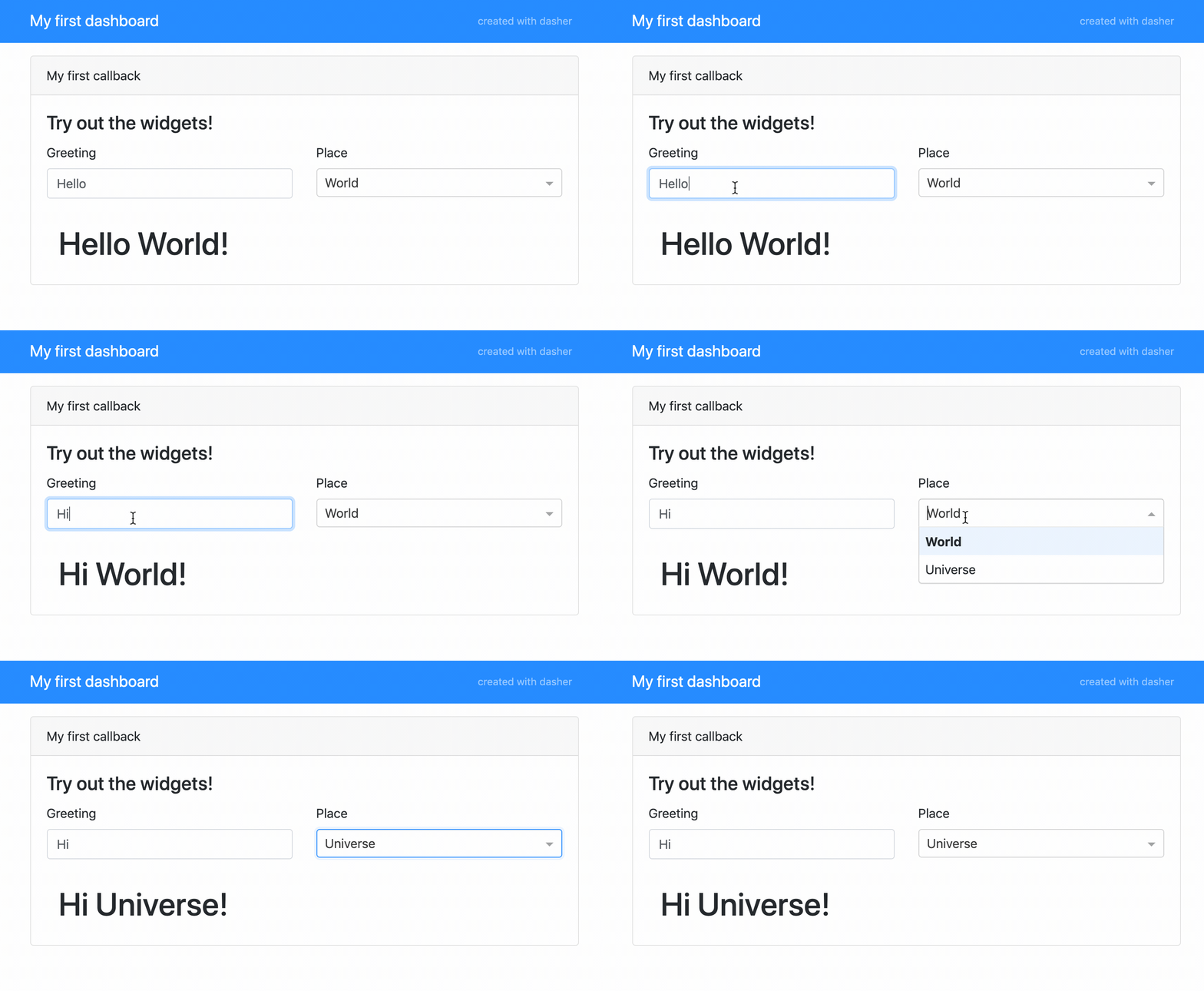
The code for this dashboard can be found in examples/readme_example.py.
Documentation
To view the full project documentation, visit https://dasher.readthedocs.io/.
License
Free software, MIT License
Development
To run the all tests run:
tox
Note, to combine the coverage data from all the tox environments run:
Windows |
set PYTEST_ADDOPTS=--cov-append tox |
|---|---|
Other |
PYTEST_ADDOPTS=--cov-append tox |
Changelog
0.3.1 (2019-12-17)
Update and fix documentation.
Fix documentation build using .readthedocs.yml.
0.3.0 (2019-12-15)
Generate id property from name for every callback. The id is now used to identify the callback, while name is used in the layout for displaying.
0.2.0 (2019-11-03)
Use cookiecutter to create a proper project structure.
Refactor core functionality into dasher.Api.
Combine widget factory and template logic into unified layout implementation.
Fix resizing bug when switching tabs by using callback-based tab switching.
Add support of fully custom widgets.
Add documentation.
Add more examples.
0.1.2 (2019-07-16)
Add _labels argument to the callback decorator to enable customization of widget labels.
0.1.1 (2019-06-10)
Add credits argument to DasherStandardTemplate to toggle whether to show credits in the navbar.
Update docstrings and documentation.
Add margin to navbar.
1 maintainer

Metadata
1 maintainer
Release files for dasher 0.3.1
For a detailed explanation of source distributions (sdists) and built distributions (wheels), please see the package formats documentation.
Source distribution (sdist)
| File | Size | Uploaded | Provenance | Actions |
|---|---|---|---|---|
| dasher-0.3.1.tar.gz | 510.4 kB | Without provenance | Details for dasher-0.3.1.tar.gz |
Built distribution (wheel)
| File | Interpreter | ABI | Platform | Actions Reset |
|---|---|---|---|---|
| dasher-0.3.1-py2.py3-none-any.whl | Python 2, Python 3 | none | any | Details for dasher-0.3.1-py2.py3-none-any.whl |
Total release size: 527.6 kB
Release files / dasher-0.3.1.tar.gz
| Download URL | dasher-0.3.1.tar.gz |
|---|---|
| Size | 510.4 kB |
| Tags | Source |
|
SHA-256 checksum How to use checksums |
c885baa89840e7316c36d56339928a6c41d804d0f1002bf526088040e7582d98
|
|
BLAKE2b-256 checksum How to use checksums |
a9e7ec9aaac9f6ab0d6efb52ca8eaf8607aae1a72feb223131f93f0d11b4b8b8
|
| Upload date | |
|
Uploaded using Trusted Publishing? What is trusted publishing? |
No |
| Uploaded via |
twine/1.13.0 pkginfo/1.5.0.1 requests/2.22.0 setuptools/41.0.1 requests-toolbelt/0.9.1 tqdm/4.32.2 CPython/3.7.3
|
Release files / dasher-0.3.1-py2.py3-none-any.whl
| Download URL | dasher-0.3.1-py2.py3-none-any.whl |
|---|---|
| Size | 17.2 kB |
| Tags | Python 2 Python 3 |
|
SHA-256 checksum How to use checksums |
12d666cb3f9a9e62258f6c3c24ea7a65604c9452d0cbd1acc95d6682d46c884b
|
|
BLAKE2b-256 checksum How to use checksums |
067771b4662a88b4ed41ed0a90679ced73ad1a5bf7713a35236a9c700385a6d3
|
| Upload date | |
|
Uploaded using Trusted Publishing? What is trusted publishing? |
No |
| Uploaded via |
twine/1.13.0 pkginfo/1.5.0.1 requests/2.22.0 setuptools/41.0.1 requests-toolbelt/0.9.1 tqdm/4.32.2 CPython/3.7.3
|
Security for dasher 0.3.1
Provenance
Provenance describes where a file came from. On PyPI, provenance is shared via attestations, which provide a verifiable record of the build or publishing details. View details, limitations and caveats.
No provenance found
None of the files in this release were uploaded with provenance metadata.
A note on package security
PyPI is a repository for distributing packages, not a service for auditing them. While third-party security researchers and our staff do their best to detect and remove malicious packages, PyPI cannot guarantee the quality, security or suitability of any given package.
To learn more about protecting yourself from malicious actors, visit our package security documentation.














