
Tokern Lineage Engine





Tokern Lineage Engine is fast and easy to use application to collect, visualize and analyze column-level data lineage in databases, data warehouses and data lakes in AWS and GCP.
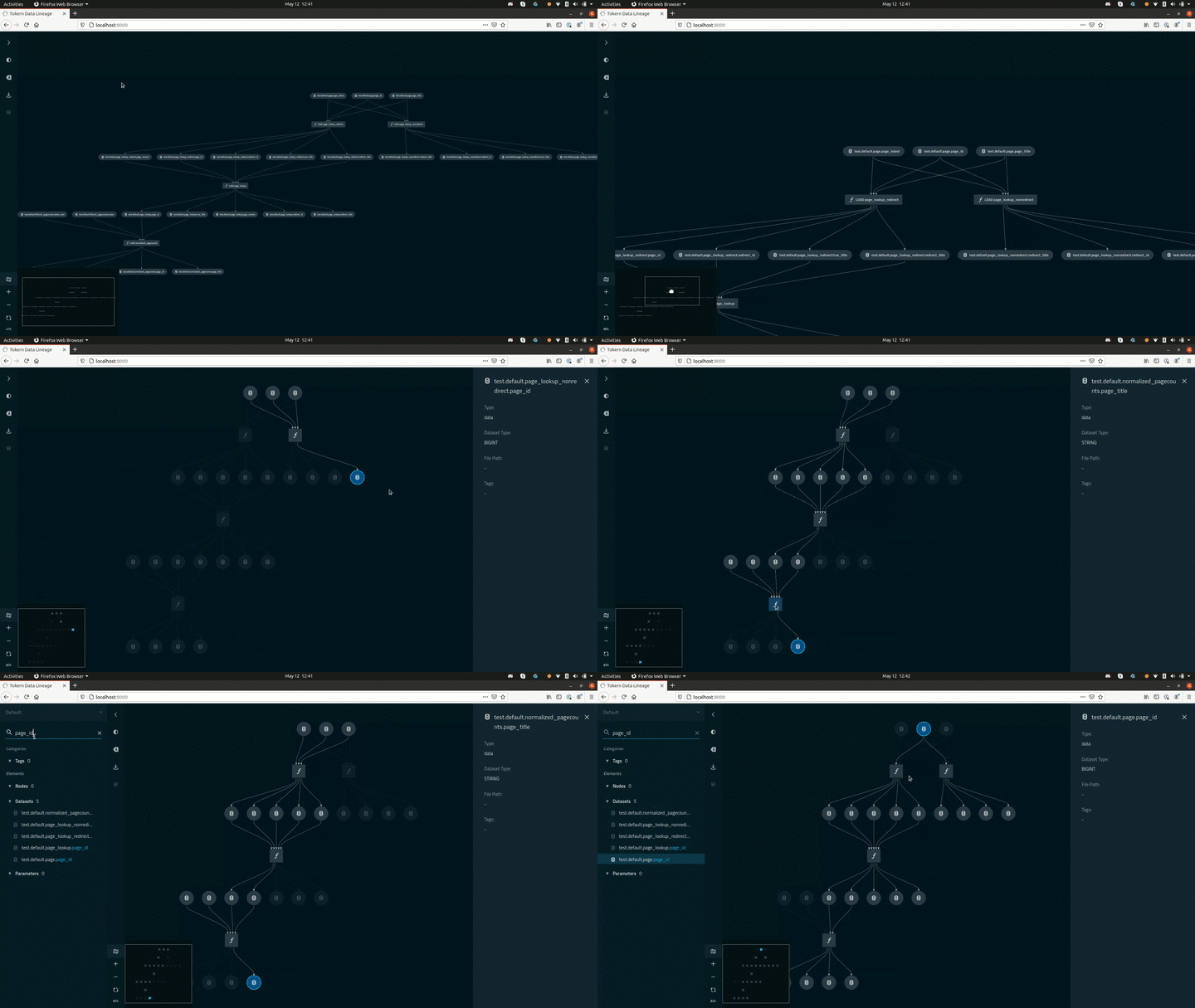
Tokern Lineage helps you browse column-level data lineage
- visually using kedro-viz
- analyze lineage graphs programmatically using the powerful networkx graph library
Resources
- Demo of Tokern Lineage App
-
Checkout an example data lineage notebook.
-
Check out the post on using data lineage for cost control for an example of how data lineage can be used in production.
Quick Start
Install a demo of using Docker and Docker Compose
Download the docker-compose file from Github repository.
# in a new directory run
wget https://raw.githubusercontent.com/tokern/data-lineage/master/install-manifests/docker-compose/catalog-demo.yml
# or run
curl https://raw.githubusercontent.com/tokern/data-lineage/master/install-manifests/docker-compose/tokern-lineage-engine.yml -o docker-compose.yml
Run docker-compose
docker-compose up -d
Check that the containers are running.
docker ps
CONTAINER ID   IMAGE                                    CREATED        STATUS       PORTS                    NAMES
3f4e77845b81   tokern/data-lineage-viz:latest   ...   4 hours ago    Up 4 hours   0.0.0.0:8000->80/tcp     tokern-data-lineage-visualizer
1e1ce4efd792   tokern/data-lineage:latest       ...   5 days ago     Up 5 days                             tokern-data-lineage
38be15bedd39   tokern/demodb:latest             ...   2 weeks ago    Up 2 weeks                            tokern-demodb
Try out Tokern Lineage App
Head to http://localhost:8000/ to open the Tokern Lineage app
Install Tokern Lineage Engine
# in a new directory run
wget https://raw.githubusercontent.com/tokern/data-lineage/master/install-manifests/docker-compose/tokern-lineage-engine.yml
# or run
curl https://raw.githubusercontent.com/tokern/data-lineage/master/install-manifests/docker-compose/catalog-demo.yml -o tokern-lineage-engine.yml
Run docker-compose
docker-compose up -d
If you want to use an external Postgres database, change the following parameters in tokern-lineage-engine.yml:
- CATALOG_HOST
- CATALOG_USER
- CATALOG_PASSWORD
- CATALOG_DB
You can also override default values using environement variables.
CATALOG_HOST=... CATALOG_USER=... CATALOG_PASSWORD=... CATALOG_DB=... docker-compose -f ... up -d
For more advanced usage of environment variables with docker-compose, refer to docker-compose docs
Pro-tip
If you want to connect to a database in the host machine, set
CATALOG_HOST: host.docker.internal # For mac or windows
#OR
CATALOG_HOST: 172.17.0.1 # Linux
Supported Technologies
- Postgres
- AWS Redshift
- Snowflake
Coming Soon
- SparkSQL
- Presto
Documentation
For advanced usage, please refer to data-lineage documentation
Survey
Please take this survey if you are a user or considering using data-lineage. Responses will help us prioritize features better.


Release files for data-lineage 0.9.0
For a detailed explanation of source distributions (sdists) and built distributions (wheels), please see the package formats documentation.
Source distribution (sdist)
| File | Size | Uploaded | Provenance | |
|---|---|---|---|---|
| data-lineage-0.9.0.tar.gz | 19.4 kB | Without provenance | Details |
Built distribution (wheel)
| File | Interpreter | ABI | Platform | Reset |
|---|---|---|---|---|
| data_lineage-0.9.0-py3-none-any.whl | Python 3 | none | any | Details |
Total release size: 40.2 kB
Release files / data-lineage-0.9.0.tar.gz
| Download URL | data-lineage-0.9.0.tar.gz |
|---|---|
| Size | 19.4 kB |
| Tags | Source |
|
SHA-256 checksum How to use checksums |
1eccc329579cbcf8a7e81c98afc3b68c78ad0699fa8bbae89f8750febb86c170
|
|
BLAKE2b-256 checksum How to use checksums |
7c0368282a2ecfbff10d97d7b6141a3cc3f436c3f115a4eaa1d59f862c3bb207
|
| Upload date | |
|
Uploaded using Trusted Publishing? What is trusted publishing? |
No |
| Uploaded via |
poetry/1.1.7 CPython/3.8.11 Linux/5.11.0-1022-aws
|
Release files / data_lineage-0.9.0-py3-none-any.whl
| Download URL | data_lineage-0.9.0-py3-none-any.whl |
|---|---|
| Size | 20.8 kB |
| Tags | Python 3 |
|
SHA-256 checksum How to use checksums |
27efedb6b3862026b6d3eb9457e6d1154388121a7ae075822e26237fea7e10c9
|
|
BLAKE2b-256 checksum How to use checksums |
7719107c770e4e47e0b5e7b9885728f23fa76f90a0b35b90944b713edc4c1992
|
| Upload date | |
|
Uploaded using Trusted Publishing? What is trusted publishing? |
No |
| Uploaded via |
poetry/1.1.7 CPython/3.8.11 Linux/5.11.0-1022-aws
|
Security for data-lineage 0.9.0
Provenance
Provenance describes where a file came from. On PyPI, provenance is shared via attestations, which provide a verifiable record of the build or publishing details. View details, limitations and caveats.
No provenance found
None of the files in this release were uploaded with provenance metadata.
A note on package security
PyPI is a repository for distributing packages, not a service for auditing them. While third-party security researchers and our staff do their best to detect and remove malicious packages, PyPI cannot guarantee the quality, security or suitability of any given package.
To learn more about protecting yourself from malicious actors, visit our package security documentation.














