
dataArtist - …scientific data processing made easy.


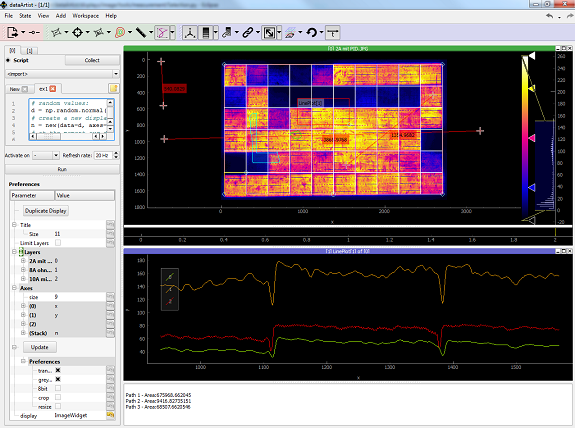
About
Please cite *dataArtist* as follows:
K.G. Bedrich et al., “Electroluminescence Imaging of PV Devices: Camera Calibration and Image Correction”, Proc. 43rd IEEE Photovoltaic Specialists Conference, Portland, 2016.
Manuals
Online Tutorials
Supported file types
Data is imported through drag n’drop.
Images
Common used (TIF, BMP, PNG, JPG, CSV, TXT, MAT)
RAW, if data type and image shape are known
Numpy arrays
Plots
CSV, TXT, numpy arrays
Installation
a) Portable version
dataArtist runs out of the box. No installation needed (currently Windows only). See section Releases.
b) Installation into existing Python installation using pip
After installing Python2.7 and ensuring that ‘pip’ is a recognised command in the command shell (Windows: CMD.exe). you need to install the following packages BEFORE installing dataArtist:
PyQt4
OpenCV2.4
OPTIONAL: RabbitMQ (for inter-program communication)
Please refer to the USER manual for more information.
Once these packages are installed, open a command shell and type:
pip install dataArtist
Now start dataArtist from the command shell:
dataArtist
To launch dataArtist into the system tray type:
dataArtist -s
To open a dataArtist session directly type:
dataArtist -o /path/to/my/session.da
Scripting, Automation, Modding
Main dependencies
Package |
Description |
|---|---|
Scientific Graphics and GUI Library based on Qt (Fork) |
|
General propose image processing libary |
|
Base packages for apps, based on Qt |
|
A collection of fancy widgets, based on Qt |
|
A collection of useful not-GUI tools |
Example: Electroluminescence imaging
Camera calibration
For camera calibration all needed images are dropped into dataArtist and the matching tool is executed. The calibration results are hereinafter saved to a calibration file. The determination of the point spread function is exemplary shown in the following figure:
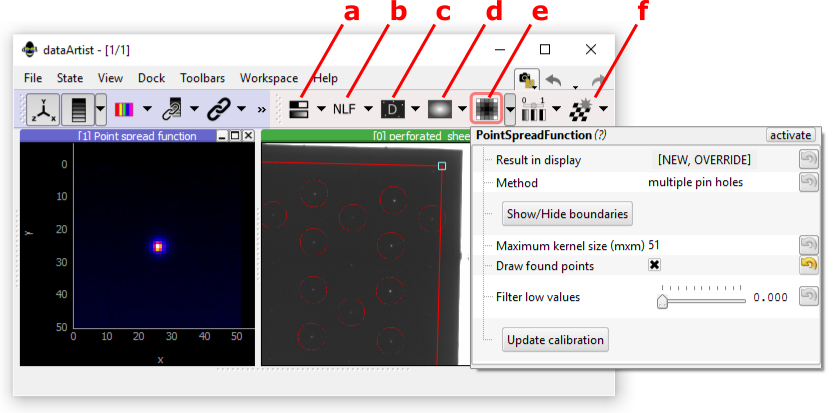
dataArtist screenshot - toolbar ‘calibration’. a: Best focus determination; b: noise-level-function measurement; c: Dark current mapping; d: Flat field mapping; e: PSF estimation (selected): f: lens distortion measurement
Image correction
The correction of EL image is shown in the following figure. Perspective correction (red box) can be done either using the outline of the PV device (automatically detected or manually defined) or using a reference image.
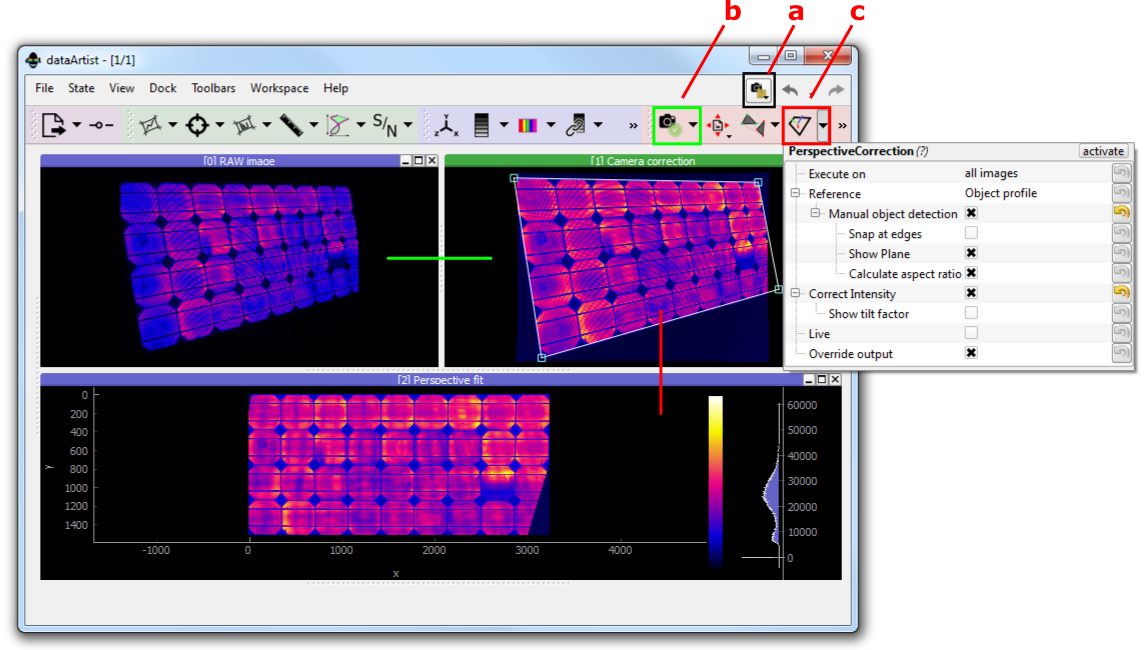
dataArtist screenshot - a: tool ‘CalibrationFile’; b: tool ‘CorrectCamera’; c: tool ‘PerspectiveCorrection’green line: Camera correction; red line: Perspective correction
1 maintainer

Metadata
1 maintainer
Release files for dataArtist 0.1.15
For a detailed explanation of source distributions (sdists) and built distributions (wheels), please see the package formats documentation.
Built distribution (wheel)
| File | Interpreter | ABI | Platform | Reset |
|---|---|---|---|---|
| dataArtist-0.1.15-py2.py3-none-any.whl | Python 2, Python 3 | none | any | Details |
Release files / dataArtist-0.1.15-py2.py3-none-any.whl
| Download URL | dataArtist-0.1.15-py2.py3-none-any.whl |
|---|---|
| Size | 2.2 MB |
| Tags | Python 2 Python 3 |
|
SHA-256 checksum How to use checksums |
506f92770034324e42fb3977f60589a433307c5867fb79f4d3f6ce98f1b28d93
|
|
BLAKE2b-256 checksum How to use checksums |
03557067ed32ca154b19df2ab8b862cfa18014bb925776ee43423bc0aa36266f
|
| Upload date | |
|
Uploaded using Trusted Publishing? What is trusted publishing? |
No |














