
The Python Package for DataHerb
A DataHerb Core Service to Create and Load Datasets.
Install
pip install dataherb
The DataHerb Command-Line Tool
Requires Python 3
The DataHerb cli provides tools to create dataset metadata, validate metadata, search dataset in flora, and download dataset.
Search and Download
Search by keyword
dataherb search covid19
# Shows the minimal metadata
Search by dataherb id
dataherb search -i covid19_eu_data
# Shows the full metadata
Download dataset by dataherb id
dataherb download covid19_eu_data
# Downloads this dataset: http://dataherb.io/flora/covid19_eu_data
Create Dataset Using Command Line Tool
We provide a template for dataset creation.
Before creating a dataset, it is recommended that the user reads the intro.
Use the following command line tool to create the metadata template.
dataherb create
Use DataHerb in Your Code
Load Data into DataFrame
# Load the package
from dataherb.flora import Flora

# Initialize Flora service
# The Flora service holds all the dataset metadata
dataherb = Flora()

# Search datasets with keyword(s)
geo_datasets = dataherb.search("geo")
print(geo_datasets)

# Get a specific file from a dataset and load as DataFrame
tz_df = dataherb.herb(
    "geonames_timezone"
).leaves.get(
    "dataset/geonames_timezone.csv"
).data
print(tz_df)
The DataHerb Project
What is DataHerb
DataHerb is an open data initiative to make the access of open datasets easier.
- A DataHerb or Herb is a dataset. A dataset comes with the data files, and the metadata of the data files.
- A DataHerb Leaf or Leaf is a data file in the DataHerb.
- A Flora is the combination of all the DataHerbs.
In many data projects, finding the right datasets to enhance your data is one of the most time consuming part. DataHerb adds flavor to your data project.
What is DataHerb Flora
We desigined the following workflow to share and index datasets.
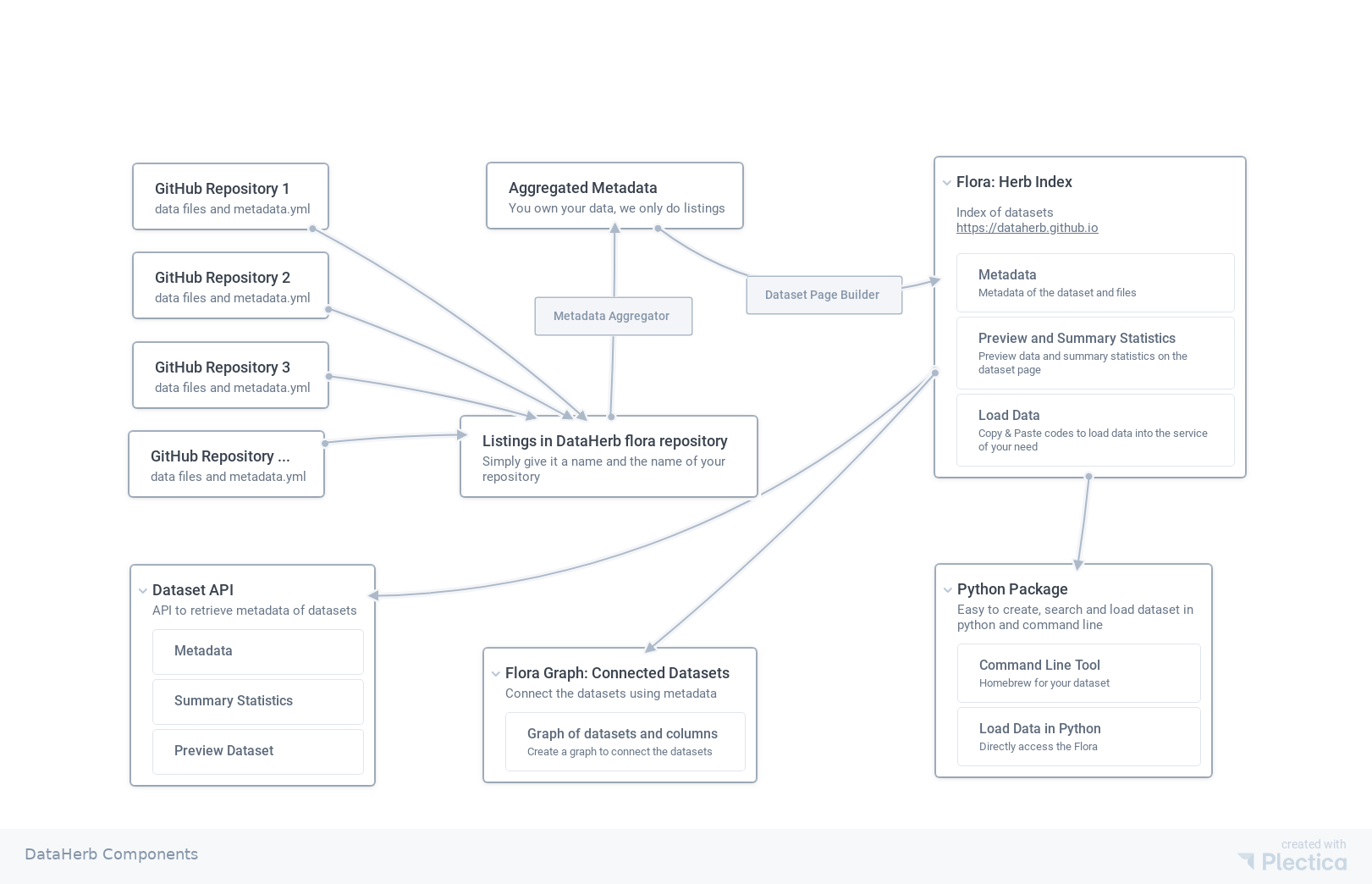
This repository is being used for listing of datasets (Listings in DataHerb flora repository).
How to Add Your Dataset
Simply create a yml file in the flora folder to link to your dataset repository. Your dataset repository should have a .dataherb folder and a metadata.yml file in it.
The indexing part will be done by GitHub Actions.
Development
- Create a conda environment.
- Install requirements:
pip install -r requirements.txt
Documentation
The documentation for this package is located at docs.
HISTORY.rst is used to list changes of the package.
1 maintainer

Metadata
1 maintainer
Release files for dataherb 0.1.0
For a detailed explanation of source distributions (sdists) and built distributions (wheels), please see the package formats documentation.
Source distribution (sdist)
| File | Size | Uploaded | Provenance | Actions |
|---|---|---|---|---|
| dataherb-0.1.0.tar.gz | 18.2 kB | Without provenance | Details for dataherb-0.1.0.tar.gz |
Built distribution (wheel)
| File | Interpreter | ABI | Platform | Actions Reset |
|---|---|---|---|---|
| dataherb-0.1.0-py3-none-any.whl | Python 3 | none | any | Details for dataherb-0.1.0-py3-none-any.whl |
Total release size: 41.6 kB
Release files / dataherb-0.1.0.tar.gz
| Download URL | dataherb-0.1.0.tar.gz |
|---|---|
| Size | 18.2 kB |
| Tags | Source |
|
SHA-256 checksum How to use checksums |
17200cb10ac9dd74af3d866804225308fb6efc79e0194988f39d9282a8644c1a
|
|
BLAKE2b-256 checksum How to use checksums |
9b5aeba77af5fc31e5734736a960d23a4e82869dc3cf29e4488045b3c5204841
|
| Upload date | |
|
Uploaded using Trusted Publishing? What is trusted publishing? |
No |
| Uploaded via |
twine/3.4.2 importlib_metadata/4.5.0 pkginfo/1.6.1 requests/2.24.0 requests-toolbelt/0.9.1 tqdm/4.62.0 CPython/3.7.9
|
Release files / dataherb-0.1.0-py3-none-any.whl
| Download URL | dataherb-0.1.0-py3-none-any.whl |
|---|---|
| Size | 23.5 kB |
| Tags | Python 3 |
|
SHA-256 checksum How to use checksums |
62f4c57c34d7c44170acc9b2b279eaa1893838c6afe4706194fd1328c652cb92
|
|
BLAKE2b-256 checksum How to use checksums |
89c822fe98f3aafa8ab7ad545898fdc2ae76fb0c156f4c831bee800ff9194497
|
| Upload date | |
|
Uploaded using Trusted Publishing? What is trusted publishing? |
No |
| Uploaded via |
twine/3.4.2 importlib_metadata/4.5.0 pkginfo/1.6.1 requests/2.24.0 requests-toolbelt/0.9.1 tqdm/4.62.0 CPython/3.7.9
|
Security for dataherb 0.1.0
Provenance
Provenance describes where a file came from. On PyPI, provenance is shared via attestations, which provide a verifiable record of the build or publishing details. View details, limitations and caveats.
No provenance found
None of the files in this release were uploaded with provenance metadata.
A note on package security
PyPI is a repository for distributing packages, not a service for auditing them. While third-party security researchers and our staff do their best to detect and remove malicious packages, PyPI cannot guarantee the quality, security or suitability of any given package.
To learn more about protecting yourself from malicious actors, visit our package security documentation.














