
# datareports
A python/jquery/mysql stack for paginated tabular data over webapi.
## python install
```
pipenv install datareports
npm install datareports
```
## jQuery Plugin Configuration
```
<link rel="stylesheet" href="/node_modules/datareports/dist/css/datareports.css" />
<script src="/node_modules/datareports/dist/js/datareports.js"></script>
<script>
$(".data-report").datareports({'uid':'example_1'}); //the UID used in the python definition...
</script>
```
## json configuration description
```
name # The internal name of this report
display # The Displayed name of this report (html H1 Title)
entity # The company / division / entity that owns this report ( Future use for report segregation)
group # The group that this report falls in (Future use, menu generation, links, breadcrumbs)
ordinal # The sort weight of this (Future Use for internal menu generation)
uid # The unique ID of this report. All reports are looked up via this field
multi_search # can multiple columns/properties be searched vi the global search field
active # is this report active, if not it cannot be seenor used
query # The manual query for the default data collection of this report
properties # An array of property[] This is the core structure definition
###
---
property:
- name # The internal name of this property
- display # The display name of this property, if none given the internal name is used
- ordinal # The display order of this property in the table ui
- visible # Is this property visible in the ui
- search # Can this property be searched individually
- multi_search # Is this property available in the milti sort
- sortable # Is this property sortable
- default_sort # IS this property a default sort, on report init
- default_sort_asc # If this is a default sortable property, is the default sort directiopn of this property ASC
- default_sort_ordinal # If this is a default sortable property, what is it's order in sort application
- width # The pixel width of the table field in the UI
```
#python environment variables
- DATA_REPORT_DB_USER='datareports_user'
- DATA_REPORT_DB_PASS='datareports_password'
- DATA_REPORT_DB_HOST='localhost:3306'
- DATA_REPORT_DB_NAME='datareports_test'
## Python Use
```
from datareports.api import api
from datareports.api_static import api as api_static
from datareports.api import data_report_configs
from flask import Flask
app = Flask(__name__, static_url_path='')
app.register_blueprint(api)
app.register_blueprint(api_static)
# Json definition of the report for data_reports
data_report_configs['example_1']={
'name' : 'report_1',
'display' : 'Example Report Results',
'entity' : 'Company',
'group' : 'Development',
'ordinal' : 0,
'uid' : 'example_1', ##important this is the identifer used to pull your report
'multi_search' : True,
'active' : True,
'query' : """SELECT `id`,`first`,`last`,`item`,`cost`,`loc` FROM `example_table` """,
'properties':[
{ 'name': 'id' , 'display': 'id' ,'ordinal': 0, 'visible': True , 'search': True , 'multi_search': True , 'sortable': True , 'default_sort': True , 'default_sort_asc': True , 'default_sort_ordinal': 0, 'width': 200 },
{ 'name': 'first' , 'display': 'First' ,'ordinal': 1, 'visible': False, 'search': True , 'multi_search': True , 'sortable': True , 'default_sort': False, 'default_sort_asc': False, 'default_sort_ordinal': 0, 'width': 100 },
{ 'name': 'last' , 'display': 'Last' ,'ordinal': 2, 'visible': False, 'search': True , 'multi_search': True , 'sortable': True , 'default_sort': False, 'default_sort_asc': False, 'default_sort_ordinal': 0, 'width': 100 },
{ 'name': 'item' , 'display': 'Item' ,'ordinal': 3, 'visible': False, 'search': True , 'multi_search': True , 'sortable': True , 'default_sort': False, 'default_sort_asc': False, 'default_sort_ordinal': 0, 'width': 100 },
{ 'name': 'cost' , 'display': 'Cost' ,'ordinal': 4, 'visible': True , 'search': True , 'multi_search': True , 'sortable': True , 'default_sort': False, 'default_sort_asc': False, 'default_sort_ordinal': 0, 'width': 50 },
{ 'name': 'loc' , 'display': 'Location','ordinal': 5, 'visible': True , 'search': True , 'multi_search': True , 'sortable': True , 'default_sort': False, 'default_sort_asc': False, 'default_sort_ordinal': 0, 'width': 50 },
] }
#set environment variables for DB
os.environ['DATA_REPORT_DB_USER']='datareports_user'
os.environ['DATA_REPORT_DB_PASS']='datareports_password'
os.environ['DATA_REPORT_DB_HOST']='localhost:3306'
os.environ['DATA_REPORT_DB_NAME']='datareports_test'
if __name__ == "__main__":
app.run()
```
## Demo
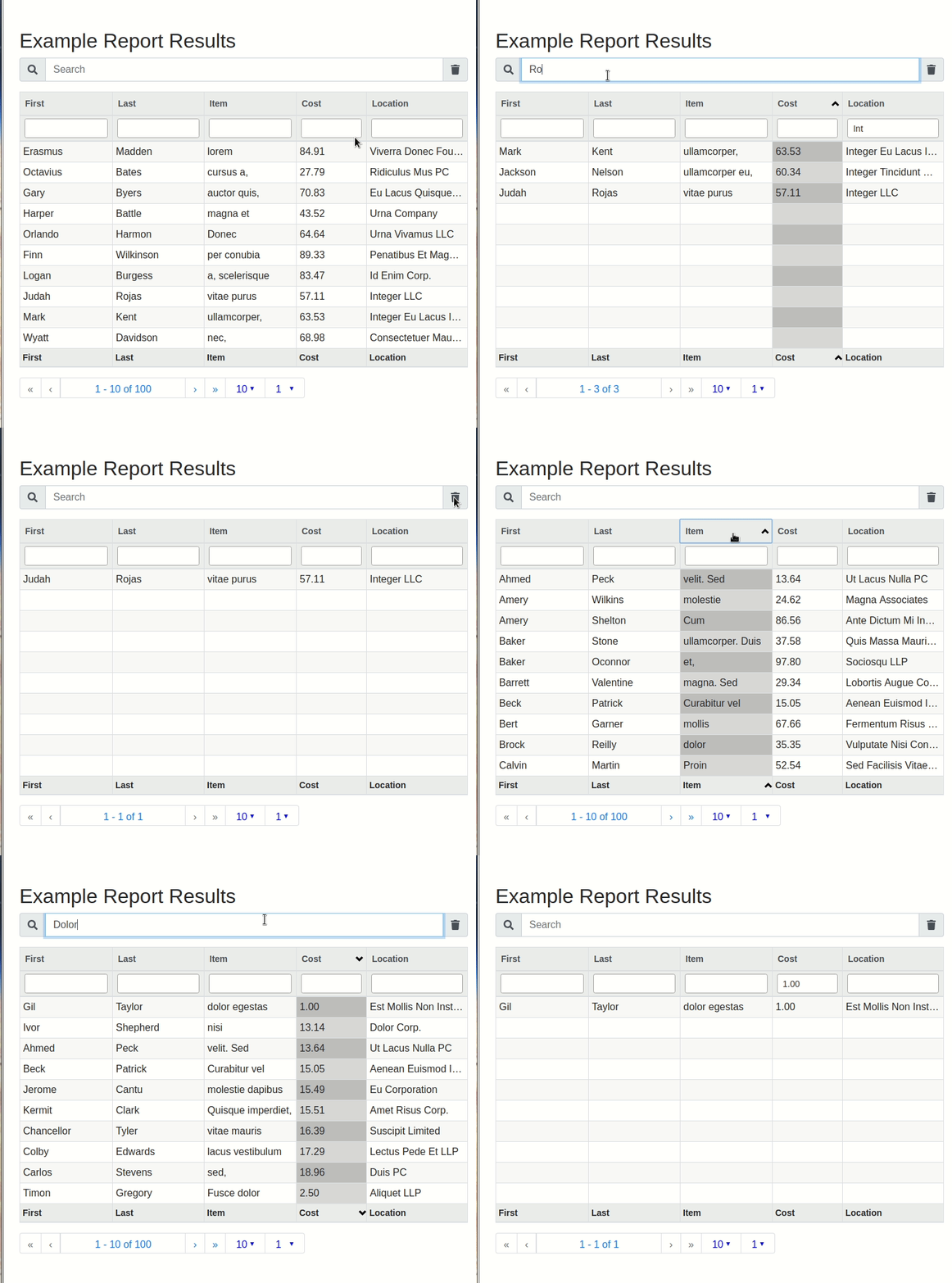
A python/jquery/mysql stack for paginated tabular data over webapi.
## python install
```
pipenv install datareports
npm install datareports
```
## jQuery Plugin Configuration
```
<link rel="stylesheet" href="/node_modules/datareports/dist/css/datareports.css" />
<script src="/node_modules/datareports/dist/js/datareports.js"></script>
<script>
$(".data-report").datareports({'uid':'example_1'}); //the UID used in the python definition...
</script>
```
## json configuration description
```
name # The internal name of this report
display # The Displayed name of this report (html H1 Title)
entity # The company / division / entity that owns this report ( Future use for report segregation)
group # The group that this report falls in (Future use, menu generation, links, breadcrumbs)
ordinal # The sort weight of this (Future Use for internal menu generation)
uid # The unique ID of this report. All reports are looked up via this field
multi_search # can multiple columns/properties be searched vi the global search field
active # is this report active, if not it cannot be seenor used
query # The manual query for the default data collection of this report
properties # An array of property[] This is the core structure definition
###
---
property:
- name # The internal name of this property
- display # The display name of this property, if none given the internal name is used
- ordinal # The display order of this property in the table ui
- visible # Is this property visible in the ui
- search # Can this property be searched individually
- multi_search # Is this property available in the milti sort
- sortable # Is this property sortable
- default_sort # IS this property a default sort, on report init
- default_sort_asc # If this is a default sortable property, is the default sort directiopn of this property ASC
- default_sort_ordinal # If this is a default sortable property, what is it's order in sort application
- width # The pixel width of the table field in the UI
```
#python environment variables
- DATA_REPORT_DB_USER='datareports_user'
- DATA_REPORT_DB_PASS='datareports_password'
- DATA_REPORT_DB_HOST='localhost:3306'
- DATA_REPORT_DB_NAME='datareports_test'
## Python Use
```
from datareports.api import api
from datareports.api_static import api as api_static
from datareports.api import data_report_configs
from flask import Flask
app = Flask(__name__, static_url_path='')
app.register_blueprint(api)
app.register_blueprint(api_static)
# Json definition of the report for data_reports
data_report_configs['example_1']={
'name' : 'report_1',
'display' : 'Example Report Results',
'entity' : 'Company',
'group' : 'Development',
'ordinal' : 0,
'uid' : 'example_1', ##important this is the identifer used to pull your report
'multi_search' : True,
'active' : True,
'query' : """SELECT `id`,`first`,`last`,`item`,`cost`,`loc` FROM `example_table` """,
'properties':[
{ 'name': 'id' , 'display': 'id' ,'ordinal': 0, 'visible': True , 'search': True , 'multi_search': True , 'sortable': True , 'default_sort': True , 'default_sort_asc': True , 'default_sort_ordinal': 0, 'width': 200 },
{ 'name': 'first' , 'display': 'First' ,'ordinal': 1, 'visible': False, 'search': True , 'multi_search': True , 'sortable': True , 'default_sort': False, 'default_sort_asc': False, 'default_sort_ordinal': 0, 'width': 100 },
{ 'name': 'last' , 'display': 'Last' ,'ordinal': 2, 'visible': False, 'search': True , 'multi_search': True , 'sortable': True , 'default_sort': False, 'default_sort_asc': False, 'default_sort_ordinal': 0, 'width': 100 },
{ 'name': 'item' , 'display': 'Item' ,'ordinal': 3, 'visible': False, 'search': True , 'multi_search': True , 'sortable': True , 'default_sort': False, 'default_sort_asc': False, 'default_sort_ordinal': 0, 'width': 100 },
{ 'name': 'cost' , 'display': 'Cost' ,'ordinal': 4, 'visible': True , 'search': True , 'multi_search': True , 'sortable': True , 'default_sort': False, 'default_sort_asc': False, 'default_sort_ordinal': 0, 'width': 50 },
{ 'name': 'loc' , 'display': 'Location','ordinal': 5, 'visible': True , 'search': True , 'multi_search': True , 'sortable': True , 'default_sort': False, 'default_sort_asc': False, 'default_sort_ordinal': 0, 'width': 50 },
] }
#set environment variables for DB
os.environ['DATA_REPORT_DB_USER']='datareports_user'
os.environ['DATA_REPORT_DB_PASS']='datareports_password'
os.environ['DATA_REPORT_DB_HOST']='localhost:3306'
os.environ['DATA_REPORT_DB_NAME']='datareports_test'
if __name__ == "__main__":
app.run()
```
## Demo

1 maintainer

Metadata
1 maintainer
Release files for datareports 1.1.75
For a detailed explanation of source distributions (sdists) and built distributions (wheels), please see the package formats documentation.
Source distribution (sdist)
| File | Size | Uploaded | |
|---|---|---|---|
| datareports-1.1.75.tar.gz | 9.2 kB | Details |
Release files / datareports-1.1.75.tar.gz
| Download URL | datareports-1.1.75.tar.gz |
|---|---|
| Size | 9.2 kB |
| Tags | Source |
|
SHA-256 checksum How to use checksums |
da2a8c515ce57e2b72dcb79d2aa9268fbb2c5df202b427239a618f34d1fcb1b6
|
|
BLAKE2b-256 checksum How to use checksums |
b9fe4ae730f1039ce8987f1da82849af28ea2329eb021bf5e8650e44026b1b89
|
| Upload date | |
|
Uploaded using Trusted Publishing? What is trusted publishing? |
No |
| Uploaded via |
twine/1.9.1 pkginfo/1.3.2 requests/2.18.4 setuptools/39.2.0 requests-toolbelt/0.8.0 tqdm/4.19.6 CPython/3.6.6
|














