
DBloy
A Databricks deployment CLI tool to enable Continuous Delivery of PySpark Notebooks based jobs.
Installation
$ pip install dbloy
Usage
Authenticate with Databricks using authentication token:
$ dbloy configure
Update Databricks Job
$ dbloy apply --deploy-yml deploy.yml --configmap-yml configmap.yml --version <my_version_number>
where deploy.yml and configmap.yml contain the Job specification. The Job version is specified in <my_version_number>
Workflow
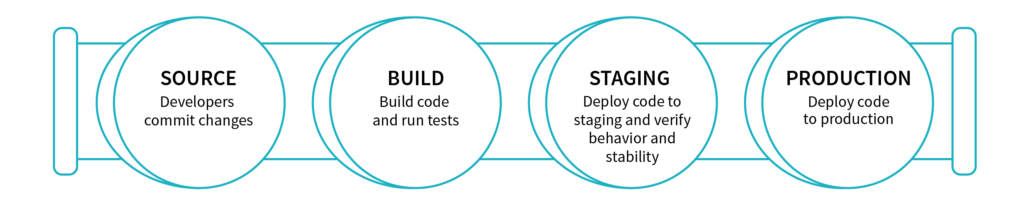
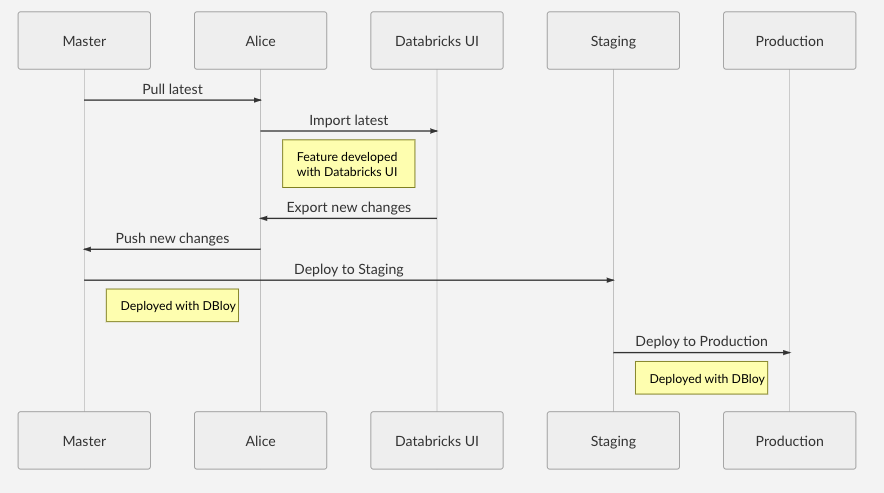
Example Usage
See example/gitlab_my-etl-job for a example ETL repository using Gitlab's CI/CD.
A Deployment requires the following:
- Deployment manifest
- Configuration manifest
- A main Databricks Notebook source file available locally.
- (Optional) Attached python library containing the core logic. This allows easier unit testing of
Creating a Deployment
deploy.yml
kind: Deployment
metadata:
  name: my-etl-job
  workspace: Shared
template:
  job:
    name: My ETL Job
  notifications:
    email:
      no_alert_for_skipped_runs: true
      on_failure :
        - my_email@my_org.com
  base_notebook: main
  notebooks:
    - EPHEMERAL_NOTEBOOK_1: notebook_name1
    - EPHEMERAL_NOTEBOOK_2: notebook_name2
  libraries:
    - egg_main: dbfs:/python35/my_python_lib/my_python_lib-VERSION-py3.5.egg
    - egg: dbfs:/python35/static_python_lib.egg
    - pypi:
        package: scikit-learn==0.20.3
    - pypi:
        package: statsmodels==0.10.1
    - pypi:
        package: prometheus-client==0.7.1
    - jar: dbfs:/FileStore/jars/e9b87e4c_c754_4707_a62a_44ef47535b39-azure_cosmosdb_spark_2_4_0_2_11_1_3_4_uber-38021.jar
  run:
    max_concurrent_runs: 1
    max_retries: 1
    min_retry_interval_millis: 600000
    retry_on_timeout: true
    timeout_seconds: 10800
configmap.yml
kind: ConfigMap
metadata:
  namespace: production
params:
  DB_URL: production_db_url_1
  DB_PASSWORD: production_password123
job:
  id: 289
  schedule:
    quartz_cron_expression: "0 0 0 * * ?"
    timezone_id: "Europe/Berlin"
  max_retries: "1"
cluster:
  spark_version: "5.3.x-scala2.11"
  node_type_id: "Standard_DS3_v2"
  driver_node_type_id: "Standard_DS3_v2"
  autoscale:
    min_workers: 1
    max_workers: 2
  spark_env_vars:
    PYSPARK_PYTHON: "/databricks/python3/bin/python3"
In this example:
- Job id
289on Databricks, indicated by the.job.idfield inconfigmap.yml, will be updated with the nameMy ETL Job, indicated by the.template.job.namefield indeploy.yml. - A cluster will be created on demand which is specified by the field
.clusterinconfigmap.yml. See https://docs.databricks.com/api/latest/clusters.html#request-structure for a complete list of cluster settings. Note: Setting.cluster.existing_cluster_idwill use an existing cluster. - Libraries specified by the field
.template.librariesin.deploy.ymlwill be installed on the cluster. See https://docs.databricks.com/api/latest/libraries.html#library. Note: The field.template.libraries.egg_mainis reserved for python.eggfile that is versioned with the ETL job. For example when the main logic of the ETL job is put into a library. The.eggversion number is expected to be the same as the ETL version number. - The main task notebook that will be executed by the job is defined by the field
.template.base_notebookindeploy.yml. Task parameters are specified by the field.paramsinconfigmap.ymlwhich will be accessible in the Notebooks viadbutils. - The notebook
main, indicated by the field.template.base_notebookis the Task notebook. This notebook should be found in the workspace/Shared/my-etl-job/<my_version_number>/mainspecified by the fields.metadataand.template.base_notebookindeploy.yml. The version number<my_version_number>will be specified in the CLI command. - Two ephemeral notebooks are available under
/Shared/my-etl-job/<my_version_number>/notebook_name1and/Shared/my-etl-job/<my_version_number>/notebook_name2. This allows the main task to execute nested Notebooks, e.g.
notebook_path_1 = dbutils.widgets.get("EPHEMERAL_NOTEBOOK_1")
dbutils.notebook.run(notebook_path_1)
Create the Deployment by running the following command:
$ dbloy apply --deploy-yml deploy.yml --configmap-yml configmap.yml --version <my_version_number>
1 maintainer

Release files for dbloy 0.3.0
For a detailed explanation of source distributions (sdists) and built distributions (wheels), please see the package formats documentation.
Source distribution (sdist)
| File | Size | Uploaded | |
|---|---|---|---|
| dbloy-0.3.0.tar.gz | 5.5 kB | Details |
Release files / dbloy-0.3.0.tar.gz
| Download URL | dbloy-0.3.0.tar.gz |
|---|---|
| Size | 5.5 kB |
| Tags | Source |
|
SHA-256 checksum How to use checksums |
b757ce138ab254fbeab17c83f4fee3d58bf974dfbb08173b11a3cfac769aafd9
|
|
BLAKE2b-256 checksum How to use checksums |
365d852215b182841bb3e96d9e62859a94ccc18ba54f91a4ff7546d6fc15da18
|
| Upload date | |
|
Uploaded using Trusted Publishing? What is trusted publishing? |
No |
| Uploaded via |
twine/1.13.0 pkginfo/1.5.0.1 requests/2.22.0 setuptools/39.1.0 requests-toolbelt/0.9.1 tqdm/4.35.0 CPython/3.6.5
|













