





Table of contents
- Description
- Installation
- CLI
- login
- create
- deploy
- apps
- How generate token to login deepchain?
- Getting started with App
- License
deepchain-apps package documentation
This Package provide a cli for creating a personnal app to deploy on the DeepChain platform. More informations on app To leverage the apps capability, take a look at the bio-transformers and bio-datasets package, which provide functionnality to download biological dataset and easily use pre-trained transformers.
1. Installation
It is recommended to work with conda environnements in order to manage the specific dependencies of the package.
  conda create --name deepchain-env python=3.7 -y
  conda activate deepchain-env
  pip install deepchain-apps
2. CLI commands
The CLI provides 5 main commands:
-
login : you need to supply the token provide on the plateform (PAT: personnal access token).
deepchain login -
create : create a folder with a template app file
deepchain create my_application -
deploy : the code and checkpoint are deployed on the plateform, you can select your app in the interface on the plateform.
-
with checkpoint upload
deepchain deploy my_application --checkpoint -
Only the code
deepchain deploy my_application
-
-
apps :
-
Get info on all local/upload apps
deepchain apps --infos -
Remove all local apps (files & config):
deepchain apps --reset -
Remove a specific application (files & config):
deepchain apps --delete my_application -
List all public apps:
deepchain apps --public
-
-
download :
- Download locally an app deployed on deepchain hub
deepchain download user.name@mail.com/AppName AppName
How generate token to login deepchain?
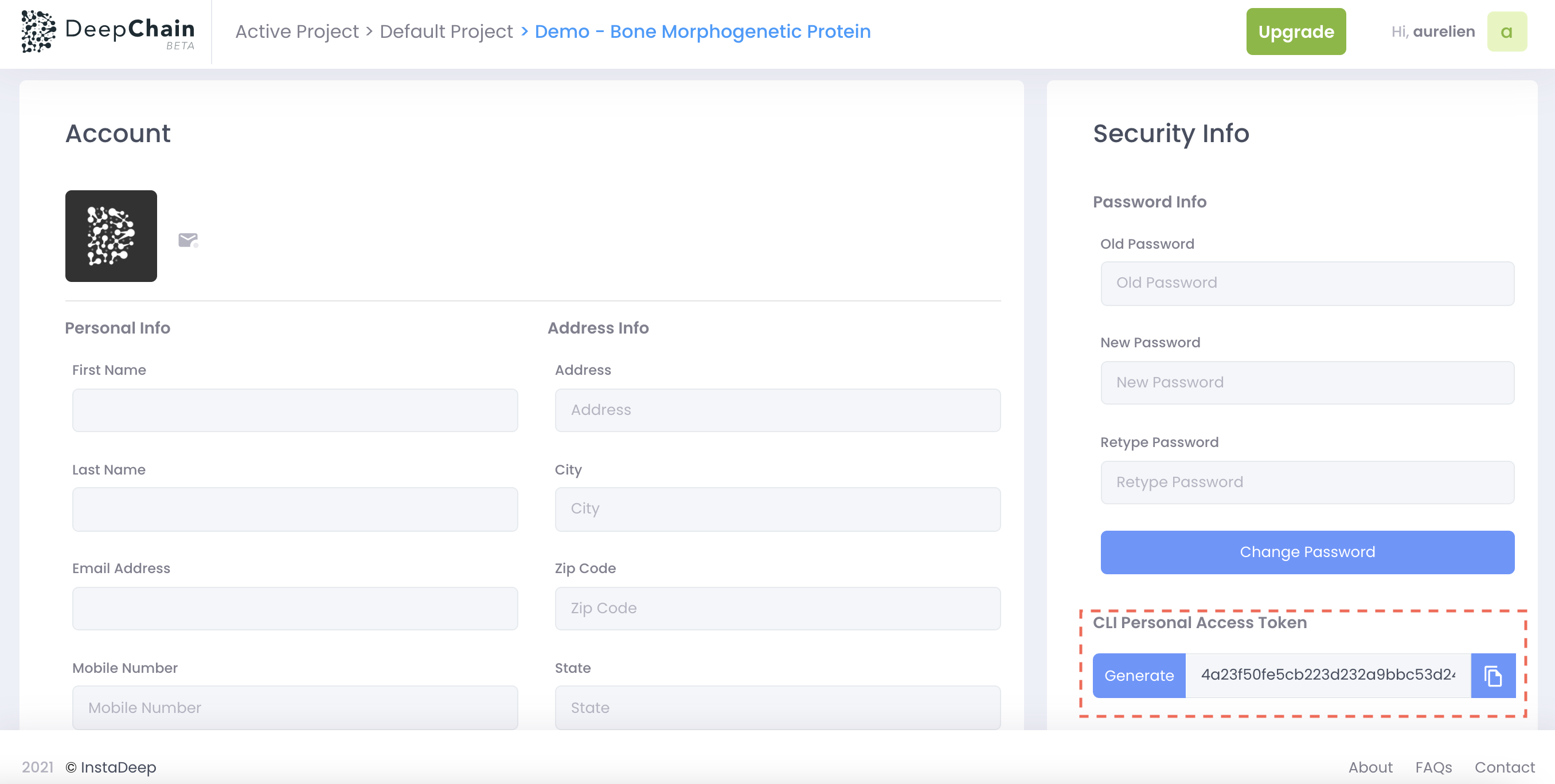
If you want to deploy biology app on deepchain, you should first create a personal account on deepchain and go to the user profile section. As you can see below, you will be able to generate a PAT (personal access token) that you can use with the CLI command:
deepchain login
3. Getting started with App
- deepchain-apps template located at: https://github.com/DeepChainBio/deep-chain-apps
- create new folder when using
deepchain create myapp - app structure:
.
├── README.md # explain how to create an app
├── __init__.py # __init__ file to create python module
├── checkpoint
│   ├── __init__.py
│   └── Optionnal : model.pt # optional: model to be used in app must be placed there
├── examples
│   ├── app_with_checkpoint.py # example: app example with checkpoint
│   └── torch_classifier.py # example: show how to train a neural network with pre-trained embeddings
└── src
    ├── DESC.md # Desciption file of the application
    ├── __init__.py
    ├── app.py # main application script. Main class must be named App.
    └── tags.json # file to register the tags on the hub.
License
This source code is licensed under the Apache 2 license found in the LICENSE file in the root directory.
1 maintainer

Metadata
1 maintainer
Release files for deepchain-apps 0.1.12
For a detailed explanation of source distributions (sdists) and built distributions (wheels), please see the package formats documentation.
Source distribution (sdist)
| File | Size | Uploaded | |
|---|---|---|---|
| deepchain-apps-0.1.12.tar.gz | 28.0 kB | Details |
Built distribution (wheel)
| File | Interpreter | ABI | Platform | Reset |
|---|---|---|---|---|
| deepchain_apps-0.1.12-py3-none-any.whl | Python 3 | none | any | Details |
Total release size: 63.4 kB
Release files / deepchain-apps-0.1.12.tar.gz
| Download URL | deepchain-apps-0.1.12.tar.gz |
|---|---|
| Size | 28.0 kB |
| Tags | Source |
|
SHA-256 checksum How to use checksums |
6ec8738c9f5d3fb49c6481e46ddcd65c10267eae316db71756f9071877494059
|
|
BLAKE2b-256 checksum How to use checksums |
0415ad20a7684d8731964bca619065393cd1e1720c54d303a686542038a317ac
|
| Upload date | |
|
Uploaded using Trusted Publishing? What is trusted publishing? |
No |
| Uploaded via |
twine/3.8.0 pkginfo/1.8.2 readme-renderer/34.0 requests/2.27.1 requests-toolbelt/0.9.1 urllib3/1.26.9 tqdm/4.63.0 importlib-metadata/4.11.3 keyring/23.5.0 rfc3986/2.0.0 colorama/0.4.4 CPython/3.7.13
|
Release files / deepchain_apps-0.1.12-py3-none-any.whl
| Download URL | deepchain_apps-0.1.12-py3-none-any.whl |
|---|---|
| Size | 35.4 kB |
| Tags | Python 3 |
|
SHA-256 checksum How to use checksums |
2748c534b2839eb6f7ba179b84d391e8aef85fdd76839e66f441cd4374d118ef
|
|
BLAKE2b-256 checksum How to use checksums |
40ecf96fa7afa1cce3eba118c8ac0c37e8ccfcb3ab076fb4c0c4d9e77988260d
|
| Upload date | |
|
Uploaded using Trusted Publishing? What is trusted publishing? |
No |
| Uploaded via |
twine/3.8.0 pkginfo/1.8.2 readme-renderer/34.0 requests/2.27.1 requests-toolbelt/0.9.1 urllib3/1.26.9 tqdm/4.63.0 importlib-metadata/4.11.3 keyring/23.5.0 rfc3986/2.0.0 colorama/0.4.4 CPython/3.7.13
|














