



Deeplite Profiler
To be able to use a deep learning model in research and production, it is essential to understand different performance metrics of the model beyond just the model's accuracy. deeplite-profiler helps to easily and effectively measure the different performance metrics of a deep learning model. In addition to the existing metrics in the deeplite-profiler, users could seamlessly contribute any custom metric to measure using the profiler. deeplite-profiler could also be used to compare the performance between two different deep learning models, for example, a teacher and a student model. deeplite-profiler currently supports PyTorch and TensorFlow Keras (v1) as two different backend frameworks.
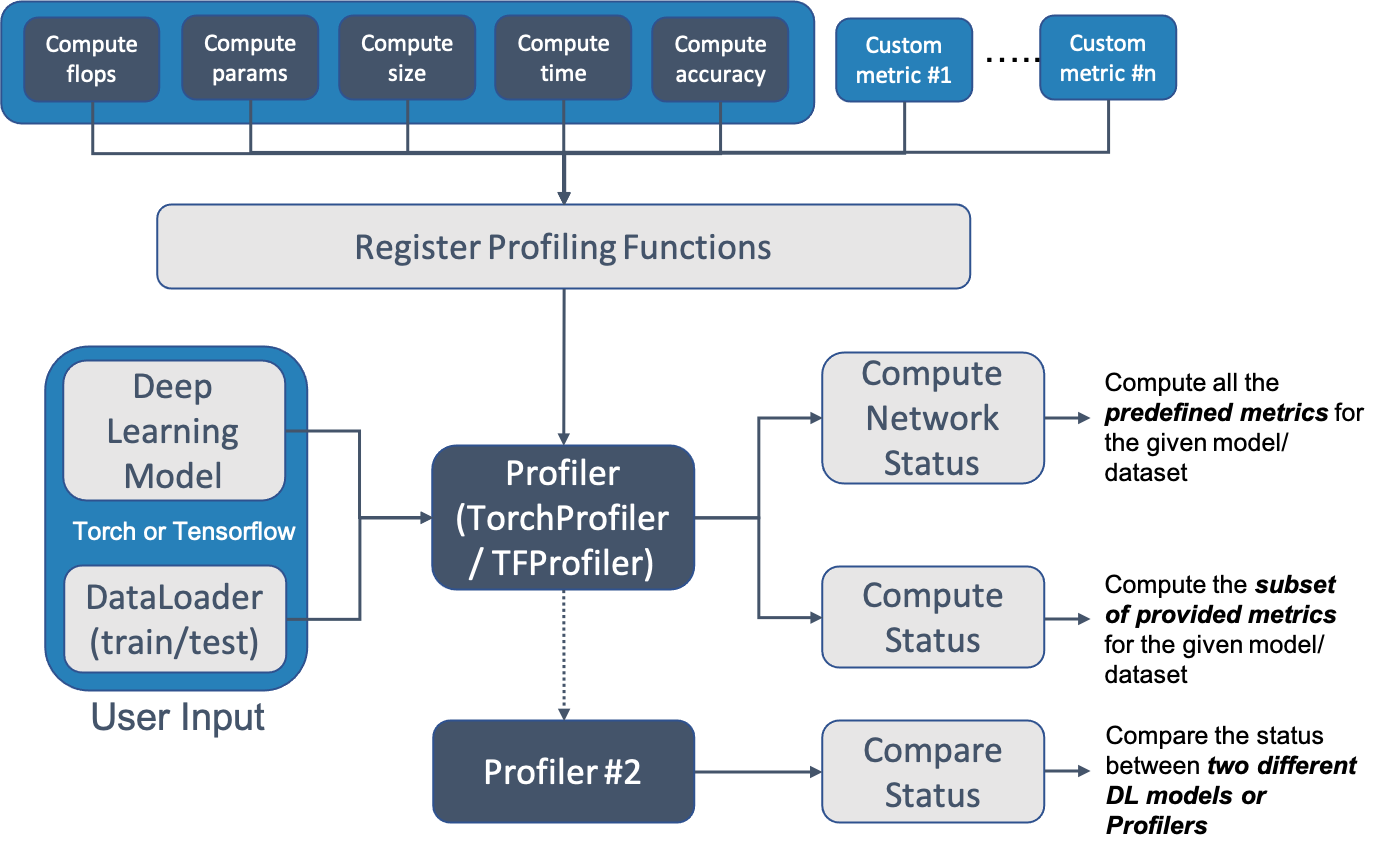
Installation
Install using pip
Use following command to install the package from our internal PyPI repository.
$ pip install --upgrade pip
$ pip install deeplite-profiler[`backend`]
Install from source
$ git clone https://github.com/Deeplite/deeplite-profiler.git
$ pip install .[`backend`]
One can install specific backend modules, depending on the required framework and compute support. backend could be one of the following values
torch: to install atorchspecific profilertf: to install aTensorFlowspecific profiler (this supports only CPU compute)tf-gpu: to install aTensorFlow-gpuspecific profiler (this supports both CPU and GPU compute)all: to install bothtorchandTensorFlowspecific profiler (this supports only CPU compute for TensorFlow)all-gpu: to install bothtorchandTensorFlow-gpuspecific profiler (for GPU environment) (this supports both CPU and GPU compute for TensorFlow)
Install in Dev mode
$ git clone https://github.com/Deeplite/deeplite-profiler.git
$ pip install -e .[`backend`]
$ pip install -r requirements-test.txt
To test the installation, one can run the basic tests using pytest command in the root folder.
NOTE: Currently, we support Tensorflow 1.14 and 1.15 versions, for Python 3.6 and 3.7. We do not support Python 3.8+.
How to Use
For a PyTorch Model
# Step 1: Define native pytorch dataloaders and model
# 1a. data_splits = {"train": train_dataloder, "test": test_dataloader}
data_splits = /* ... load iterable data loaders ... */
model = /* ... load native deep learning model ... */

# Step 2: Create Profiler class and register the profiling functions
data_loader = TorchProfiler.enable_forward_pass_data_splits(data_splits)
profiler = TorchProfiler(model, data_splits, name="Original Model")
profiler.register_profiler_function(ComputeComplexity())
profiler.register_profiler_function(ComputeExecutionTime())
profiler.register_profiler_function(ComputeEvalMetric(get_accuracy, 'accuracy', unit_name='%'))

# Step 3: Compute the registered profiler metrics for the PyTorch Model
profiler.compute_network_status(batch_size=1, device=Device.CPU, short_print=False,
                                                 include_weights=True, print_mode='debug')

# Step 4: Compare two different models or profilers.
profiler2 = profiler.clone(model=deepcopy(model)) # Creating a dummy clone of the current profiler
profiler2.name = "Clone Model"
profiler.compare(profiler2, short_print=False, batch_size=1, device=Device.CPU, print_mode='debug')
For a TensorFlow Model
# Step 1: Define native tensorflow dataloaders and model
# 1a. data_splits = {"train": train_dataloder, "test": test_dataloader}
data_splits = /* ... load iterable data loaders ... */
model = /* ... load native deep learning model ... */

# Step 2: Create Profiler class and register the profiling functions
data_loader = TFProfiler.enable_forward_pass_data_splits(data_splits)
profiler = TFProfiler(model, data_splits, name="Original Model")
profiler.register_profiler_function(ComputeFlops())
profiler.register_profiler_function(ComputeSize())
profiler.register_profiler_function(ComputeParams())
profiler.register_profiler_function(ComputeLayerwiseSummary())
profiler.register_profiler_function(ComputeExecutionTime())
profiler.register_profiler_function(ComputeEvalMetric(get_accuracy, 'accuracy', unit_name='%'))

# Step 3: Compute the registered profiler metrics for the Tensorflow Keras Model
profiler.compute_network_status(batch_size=1, device=Device.CPU, short_print=False,
                                                 include_weights=True, print_mode='debug')

# Step 4: Compare two different models or profilers.
profiler2 = profiler.clone(model=model) # Creating a dummy clone of the current profiler
profiler2.name = "Clone Model"
profiler.compare(profiler2, short_print=False, batch_size=1, device=Device.CPU, print_mode='debug')
Output Display
An example output of the deeplite-profiler for resnet18 model using the standard CIFAR100 dataset using PyTorch backend looks as follows
+---------------------------------------------------------------+
|                    deeplite Model Profiler                    |
+-----------------------------------------+---------------------+
|             Param Name (Original Model) |                Value|
|                   Backend: TorchBackend |                     |
+-----------------------------------------+---------------------+
|                   Evaluation Metric (%) |              76.8295|
|                         Model Size (MB) |              42.8014|
|     Computational Complexity (GigaMACs) |               0.5567|
|             Total Parameters (Millions) |              11.2201|
|                   Memory Footprint (MB) |              48.4389|
|                     Execution Time (ms) |               2.6537|
+-----------------------------------------+---------------------+
- Evaluation Metric: Computed performance of the model on the given data
- Model Size: Memory consumed by the parameters (weights and biases) of the model
- Computational Complexity: Summation of Multiply-Add Cumulations (MACs) per single image (batch_size=1)
- #Total Parameters: Total number of parameters (trainable and non-trainable) in the model
- Memory Footprint: Total memory consumed by parameters and activations per single image (batch_size=1)
- Execution Time: On
NVIDIA TITAN V <https://www.nvidia.com/en-us/titan/titan-v/>_ GPU, time required for the forward pass per single image (batch_size=1)
Examples
A list of different examples to use deeplite-profiler to profiler different PyTorch and TensorFlow models can be found here
Contribute a Custom Metric
NOTE: If you looking for an SDK documentation, please head over here.
We always welcome community contributions to expand the scope of deeplite-profiler and also to have additional new metrics. Please refer to the documentation for the detailed steps on how to design a new metrics. In general, we follow the fork-and-pull Git workflow.
- Fork the repo on GitHub
- Clone the project to your own machine
- Commit changes to your own branch
- Push your work back up to your fork
- Submit a Pull request so that we can review your changes
NOTE: Be sure to merge the latest from "upstream" before making a pull request!
1 maintainer

Release files for deeplite-profiler 1.2.3
For a detailed explanation of source distributions (sdists) and built distributions (wheels), please see the package formats documentation.
Built distributions (wheels)
Total release size: 24.8 MB
Release files / deeplite_profiler-1.2.3-cp39-cp39-manylinux2010_x86_64.whl
| Download URL | deeplite_profiler-1.2.3-cp39-cp39-manylinux2010_x86_64.whl |
|---|---|
| Size | 3.2 MB |
| Tags | CPython 3.9 Linux glibc 2.12+ x86-64 |
|
SHA-256 checksum How to use checksums |
3df9df974c9ce1adc462ef6a83d632561e67f20fde33eca10cbf1e2ac34e3b04
|
|
BLAKE2b-256 checksum How to use checksums |
a0c3ce4cf6b62dadb2cadbcc6f79d800d401bae61c97094c72bba0e360575483
|
| Upload date | |
|
Uploaded using Trusted Publishing? What is trusted publishing? |
No |
| Uploaded via |
twine/4.0.1 CPython/3.9.6
|
Release files / deeplite_profiler-1.2.3-cp39-cp39-manylinux1_x86_64.whl
| Download URL | deeplite_profiler-1.2.3-cp39-cp39-manylinux1_x86_64.whl |
|---|---|
| Size | 3.2 MB |
| Tags | CPython 3.9 Linux glibc 2.5+ x86-64 |
|
SHA-256 checksum How to use checksums |
8ce099481fbc89c10c0bf9435afc5d0a7f7f1ac60bd33c68d1f0c1ffe0e43e3e
|
|
BLAKE2b-256 checksum How to use checksums |
5fd18929d1fd4dd1909b4db19d552a0e851c462e4b864ca656eb56be6f4df651
|
| Upload date | |
|
Uploaded using Trusted Publishing? What is trusted publishing? |
No |
| Uploaded via |
twine/4.0.1 CPython/3.9.6
|
Release files / deeplite_profiler-1.2.3-cp38-cp38-manylinux2010_x86_64.whl
| Download URL | deeplite_profiler-1.2.3-cp38-cp38-manylinux2010_x86_64.whl |
|---|---|
| Size | 3.5 MB |
| Tags | CPython 3.8 Linux glibc 2.12+ x86-64 |
|
SHA-256 checksum How to use checksums |
ec39bc082ece643c9603954b62cdffc143af0a8ba4d8cfd632cec7e249945e34
|
|
BLAKE2b-256 checksum How to use checksums |
d67281712713068cf916f3936739d34c241a6c3318b119877f72d65f315ee3f9
|
| Upload date | |
|
Uploaded using Trusted Publishing? What is trusted publishing? |
No |
| Uploaded via |
twine/4.0.1 CPython/3.8.13
|
Release files / deeplite_profiler-1.2.3-cp38-cp38-manylinux1_x86_64.whl
| Download URL | deeplite_profiler-1.2.3-cp38-cp38-manylinux1_x86_64.whl |
|---|---|
| Size | 3.5 MB |
| Tags | CPython 3.8 Linux glibc 2.5+ x86-64 |
|
SHA-256 checksum How to use checksums |
783adfcf34108788948e1806d10bab4fe8974f924df15306e675107b1c876717
|
|
BLAKE2b-256 checksum How to use checksums |
19db8966a1d9257526152bd025bf6337d931c86a9d57e4ada8b26fe95974f973
|
| Upload date | |
|
Uploaded using Trusted Publishing? What is trusted publishing? |
No |
| Uploaded via |
twine/4.0.1 CPython/3.8.13
|
Release files / deeplite_profiler-1.2.3-cp37-cp37m-manylinux2010_x86_64.whl
| Download URL | deeplite_profiler-1.2.3-cp37-cp37m-manylinux2010_x86_64.whl |
|---|---|
| Size | 2.9 MB |
| Tags | CPython 3.7 CPython 3.7 pymalloc Linux glibc 2.12+ x86-64 |
|
SHA-256 checksum How to use checksums |
74ec02abe5e66172c978a550c003d3fa0ada7509a947972202a054b3c561be8f
|
|
BLAKE2b-256 checksum How to use checksums |
8366f5a26b52f182f22f05a0c4d51de2b0b7109f75d6f08cef923f39d0d18737
|
| Upload date | |
|
Uploaded using Trusted Publishing? What is trusted publishing? |
No |
| Uploaded via |
twine/4.0.1 CPython/3.7.9
|
Release files / deeplite_profiler-1.2.3-cp37-cp37m-manylinux1_x86_64.whl
| Download URL | deeplite_profiler-1.2.3-cp37-cp37m-manylinux1_x86_64.whl |
|---|---|
| Size | 2.9 MB |
| Tags | CPython 3.7 CPython 3.7 pymalloc Linux glibc 2.5+ x86-64 |
|
SHA-256 checksum How to use checksums |
9fdb280ea3aca2c4a9e695a228985efbe57476b5ee33be77756aeb7499b6f64f
|
|
BLAKE2b-256 checksum How to use checksums |
824edb97aceaeccc3ae457aec3c3b5b07eff59a00da8d20e19e549ad85824882
|
| Upload date | |
|
Uploaded using Trusted Publishing? What is trusted publishing? |
No |
| Uploaded via |
twine/4.0.1 CPython/3.7.9
|
Release files / deeplite_profiler-1.2.3-cp36-cp36m-manylinux2010_x86_64.whl
| Download URL | deeplite_profiler-1.2.3-cp36-cp36m-manylinux2010_x86_64.whl |
|---|---|
| Size | 2.9 MB |
| Tags | CPython 3.6 CPython 3.6 pymalloc Linux glibc 2.12+ x86-64 |
|
SHA-256 checksum How to use checksums |
41adfea7fccaf6d351e73517c8bd3a594fad1e5157f2e0d9d0073493131c57d7
|
|
BLAKE2b-256 checksum How to use checksums |
99b93d98c67c8609fc19b205d72f96a4723ac06bd76842f53f7dcc157b652680
|
| Upload date | |
|
Uploaded using Trusted Publishing? What is trusted publishing? |
No |
| Uploaded via |
twine/3.8.0 pkginfo/1.8.3 readme-renderer/34.0 requests/2.27.1 requests-toolbelt/0.10.1 urllib3/1.26.12 tqdm/4.64.1 importlib-metadata/4.8.3 keyring/23.4.1 rfc3986/1.5.0 colorama/0.4.5 CPython/3.6.7
|
Release files / deeplite_profiler-1.2.3-cp36-cp36m-manylinux1_x86_64.whl
| Download URL | deeplite_profiler-1.2.3-cp36-cp36m-manylinux1_x86_64.whl |
|---|---|
| Size | 2.9 MB |
| Tags | CPython 3.6 CPython 3.6 pymalloc Linux glibc 2.5+ x86-64 |
|
SHA-256 checksum How to use checksums |
4bb7ee926ad42819d3307dba10b9ebf2552dca8660190f586561957f3b74c1ce
|
|
BLAKE2b-256 checksum How to use checksums |
127722d4efa13fab9880b7c9ad84ae89a6e821ce9178f8630c26d4620d78633e
|
| Upload date | |
|
Uploaded using Trusted Publishing? What is trusted publishing? |
No |
| Uploaded via |
twine/3.8.0 pkginfo/1.8.3 readme-renderer/34.0 requests/2.27.1 requests-toolbelt/0.10.1 urllib3/1.26.12 tqdm/4.64.1 importlib-metadata/4.8.3 keyring/23.4.1 rfc3986/1.5.0 colorama/0.4.5 CPython/3.6.7
|














