
This project aims at showcasing some Deep Learning use cases in terms of image analysis, especially regarding semantic segmentation.
If you want to get more details on Oslandia activities around this topic, feel free to visit our blog. You certainly want to discover some of our results in the associated web application:
Content
The project contains the following folders:
- deeposlandia contains the main Python modules to train and test convolutional neural networks
- docs contains some markdown files for documentation purpose
- examples contains some Jupyter notebooks that aim at describing data and building basic neural networks
- images contains some example images to illustrate the Mapillary dataset as well as some preprocessing analysis results
- tests;
pytestis used to launch several tests from this folder.
Additionally, running the code may generate extra subdirectories in the chosen data repository.
Installation
Requirements
The code has been run with Python 3. The dependencies are specified in
setup.py file, and additional dependencies for developing purpose are listed
in requirements-dev.txt.
From source
$ git clone https://github.com/Oslandia/deeposlandia
$ cd deeposlandia
$ virtualenv -p /usr/bin/python3 venv
$ source venv/bin/activate
(venv)$ pip install -r requirements-dev.txt
GDAL
As a particular case, GDAL is not included into the setup.py file.
For Ubuntu distributions, the following operations are needed to install this
program:
sudo apt-get install libgdal-dev
sudo apt-get install python3-gdal
The GDAL version can be verified by:
gdal-config --version
After that, a simple pip install GDAL may be sufficient, however considering
our own experience it is not the case on Ubuntu. One has to retrieve a GDAL
for Python that corresponds to the GDAL of system:
pip install --global-option=build_ext --global-option="-I/usr/include/gdal" GDAL==`gdal-config --version`
python3 -c "import osgeo;print(osgeo.__version__)"
For other OS, please visit the GDAL installation documentation.
Running the code
A command-line interface is proposed with 4 available actions (datagen,
train, infer and geoinfer), callable as follows:
deepo [command] --options
Some files document the command use:
- Preprocessed dataset generation
- Train a model
- Infer labels
- Infer results for geographic datasets
- Run your own web app instance
Supported datasets
Mapillary
In this project we use a set of images provided by Mapillary, in order to investigate on the presence of some typical street-scene objects (vehicles, roads, pedestrians...). Mapillary released this dataset on July 2017, it is available on its website and may be downloaded freely for a research purpose.
As inputs, Mapillary provides a bunch of street scene images of various sizes
in a images repository, and the same images after filtering process in
instances and labels repositories.
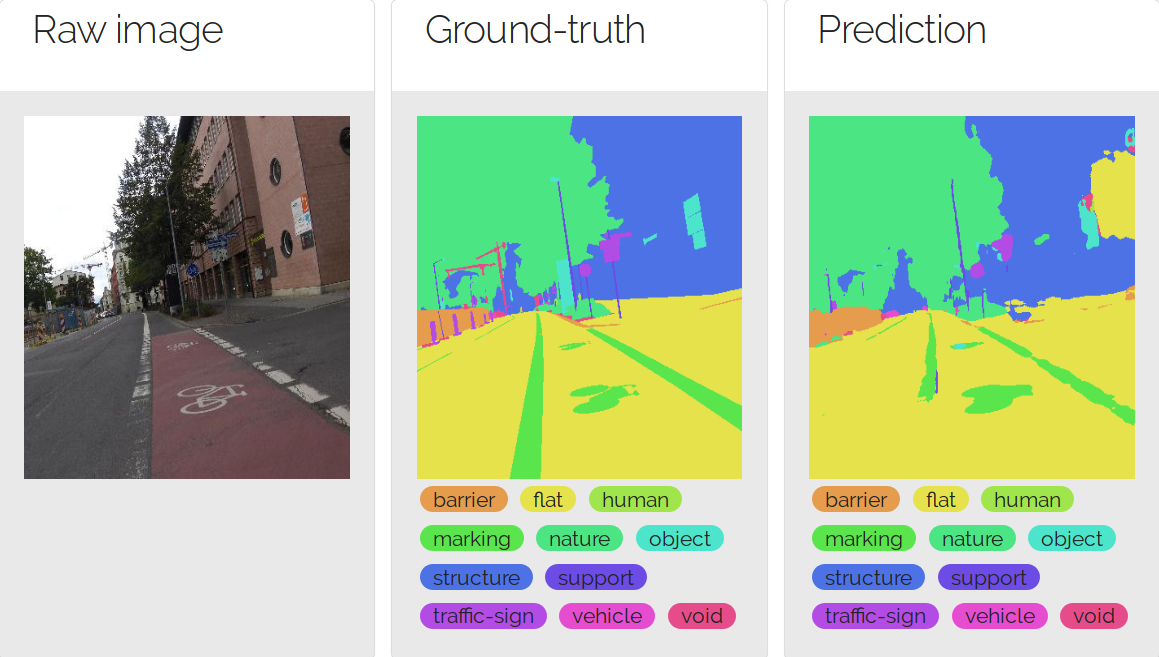
There are 18000 images in the training set, 2000 images in the validation set, and 5000 images in the testing set. The testing set is proposed only for a model test purpose, it does not contain filtered versions of images. The raw dataset contains 66 labels, splitted into 13 categories. The following figure depicts a prediction result over the 13-labelled dataset version.
AerialImage (Inria)
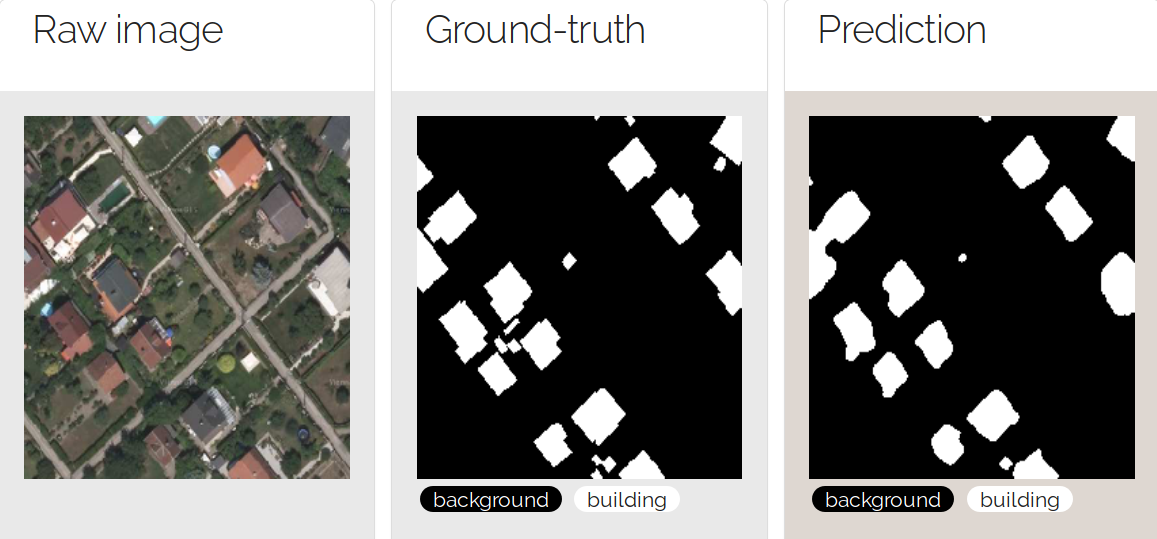
In the Aerial image dataset,
there are only 2 labels, i.e. building or background and consequently the
model aims at answering one single question for each image pixel: does this
pixel belongs to a building?
The dataset contains 360 images, one half for training one half for
testing. Each of these images are 5000*5000 tif images. Amongst the 180
training images, we assigned 15 training images to validation. One example of
this image from this dataset is depicted below.
Open AI Tanzania
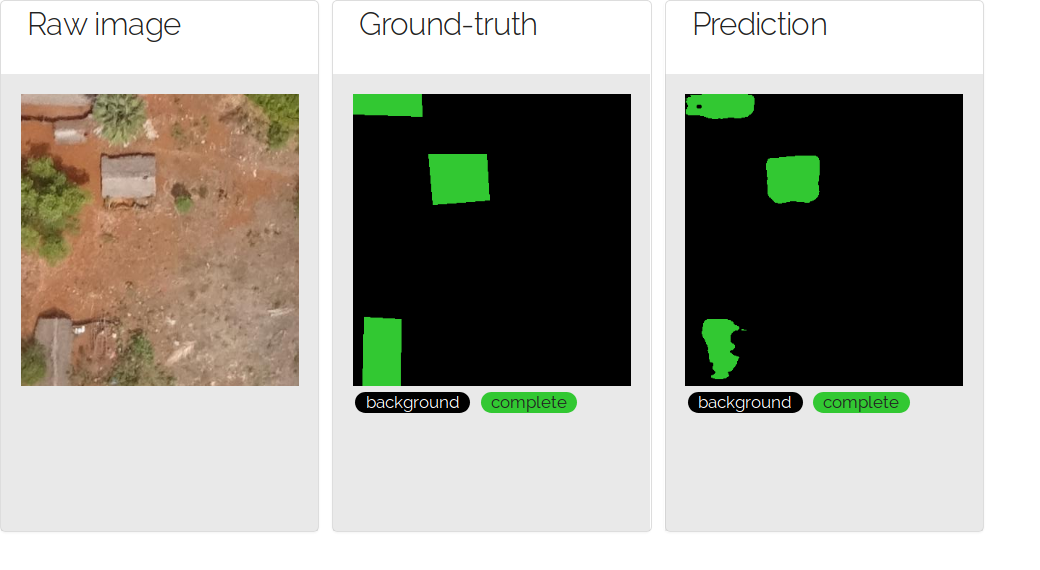
This dataset comes from the Tanzania challenge, that took place at the autumn 2018. The dataset contains 13 labelled images (2 of them were assigned to validation in this project), and 9 additional images for testing purpose. The image resolution is very high (6~8 cm per pixel), that allowing a fine data preprocessing step.
In such a dataset, one tries to automatically detect building footprints by distinguishing complete buildings, incomplete buildings and foudations.
Shapes
To complete the project, and make the test easier, a randomly-generated shape model is also available. In this dataset, some simple coloured geometric shapes are inserted into each picture, on a total random mode. There can be one rectangle, one circle and/or one triangle per image, or neither of them. Their location into each image is randomly generated (they just can't be too close to image borders). The shape and background colors are randomly generated as well.
How to add a new dataset?
If you want to contribute to the repo by adding a new dataset, please consult the following instructions.
Pre-trained models
This project implies non-commercial use of datasets, anyway we can work with the dataset emitters to get commercial licences if it fits your demand. May you be interested in any pre-trained models, please contact us at infos+data@oslandia.com!
License
The program license is described in LICENSE.md.
Oslandia, April 2018
1 maintainer

Metadata
1 maintainer
Release files for deeposlandia 0.8.0
For a detailed explanation of source distributions (sdists) and built distributions (wheels), please see the package formats documentation.
Source distribution (sdist)
| File | Size | Uploaded | Provenance | |
|---|---|---|---|---|
| deeposlandia-0.8.0.tar.gz | 62.0 kB | Without provenance | Details |
Built distribution (wheel)
| File | Interpreter | ABI | Platform | Reset |
|---|---|---|---|---|
| deeposlandia-0.8.0-py3-none-any.whl | Python 3 | none | any | Details |
Total release size: 144.7 kB
Release files / deeposlandia-0.8.0.tar.gz
| Download URL | deeposlandia-0.8.0.tar.gz |
|---|---|
| Size | 62.0 kB |
| Tags | Source |
|
SHA-256 checksum How to use checksums |
bb0a263c5f3a56d38dba807c890c2a6502e8f607f723e455a46b54f3f8ecedf5
|
|
BLAKE2b-256 checksum How to use checksums |
1330a15d0901d42cf1ed3bfc082a84a2761482e6c34b758e92a4fc61de3cc214
|
| Upload date | |
|
Uploaded using Trusted Publishing? What is trusted publishing? |
No |
| Uploaded via |
twine/3.7.1 importlib_metadata/4.10.0 pkginfo/1.8.2 requests/2.25.1 requests-toolbelt/0.9.1 tqdm/4.62.3 CPython/3.9.5
|
Release files / deeposlandia-0.8.0-py3-none-any.whl
| Download URL | deeposlandia-0.8.0-py3-none-any.whl |
|---|---|
| Size | 82.7 kB |
| Tags | Python 3 |
|
SHA-256 checksum How to use checksums |
8f203fccc753fb0bc96ccd66dbaab44a3d2b703b4b00ee1e27465b21285ae707
|
|
BLAKE2b-256 checksum How to use checksums |
00c05661ec15b82509cd2b6ad0dad806ec8a67b4686c87eb3475fe70f329fdeb
|
| Upload date | |
|
Uploaded using Trusted Publishing? What is trusted publishing? |
No |
| Uploaded via |
twine/3.7.1 importlib_metadata/4.10.0 pkginfo/1.8.2 requests/2.25.1 requests-toolbelt/0.9.1 tqdm/4.62.3 CPython/3.9.5
|
Security for deeposlandia 0.8.0
Provenance
Provenance describes where a file came from. On PyPI, provenance is shared via attestations, which provide a verifiable record of the build or publishing details. View details, limitations and caveats.
No provenance found
None of the files in this release were uploaded with provenance metadata.
A note on package security
PyPI is a repository for distributing packages, not a service for auditing them. While third-party security researchers and our staff do their best to detect and remove malicious packages, PyPI cannot guarantee the quality, security or suitability of any given package.














