
DeepQuantum






DeepQuantum is a platform that integrates artificial intelligence (AI) and quantum computing (QC). It is an efficient programming framework designed for quantum machine learning and photonic quantum computing. By leveraging the PyTorch deep learning platform for QC, DeepQuantum provides a powerful and easy-to-use tool for creating and simulating quantum circuits and photonic quantum circuits. This makes it ideal for developers to quickly get started and explore the field in depth. It also serves as a valuable learning platform for quantum computing enthusiasts.
Key Features

- AI-Enhanced Quantum Computing Framework: Seamlessly integrated with PyTorch, it utilizes technologies such as automatic differentiation, vectorized parallelism, and GPU acceleration for efficiency. It facilitates the easy construction of hybrid quantum-classical models, enabling end-to-end training and inference.
- User-Friendly API Design: The API is designed to be simple and intuitive, making it easy to initialize quantum neural networks and providing flexibility in data encoding.
- Photonic Quantum Computing Simulation: The Photonic module includes Fock, Gaussian and Bosonic backends, catering to different simulation needs in photonic quantum computing. It comes with built-in optimizers to support on-chip training of photonic quantum circuits.
- Large-Scale Quantum Circuit Simulation: Leveraging tensor network techniques, DeepQuantum enables approximate simulation of circuits with over 100 qubits on a single laptop. Through a distributed parallel architecture and PyTorch's native communication protocol, it efficiently utilizes multi-node, multi-GPU computational power to boost large-scale quantum simulations. These capabilities allow DeepQuantum to deliver industry-leading performance in both simulation scale and efficiency.
- Advanced Architecture for Cutting-Edge Algorithm Exploration: The first framework to support algorithm design and mapping for time-domain-multiplexed photonic quantum circuits, and the first to realize closed-loop integration of quantum circuits, photonic quantum circuits, and MBQC, enabling robust support for both specialized and universal photonic quantum algorithm design.
Installation
1. Prerequisites (PyTorch)
DeepQuantum requires PyTorch 2. We recommend installing it manually first to ensure compatibility with your system and CUDA version.
- (Optional) Install uv.
We strongly recommend using
uvinstead of standardpipfor lightning-fast package installations. - Install Miniconda or Anaconda.
- Create and activate a conda environment.
For example, run
conda create -n <ENV_NAME> python=3.12andconda activate <ENV_NAME>. - Install PyTorch following the official instructions.
For example, run
pip install torchoruv pip install torch.
(Tip: Avoid using conda install with uv)
2. Install DeepQuantum
For Users (Stable Version)
To install DeepQuantum with uv or standard pip, run
uv pip install deepquantum

# Or use a mirror site for faster download
uv pip install deepquantum -i https://pypi.tuna.tsinghua.edu.cn/simple

# Fallback for standard pip
pip install deepquantum
For Developers (Source Installation)
If you intend to contribute to DeepQuantum or run unit tests, we strongly recommend installing from source.
Note on Dependencies:
strawberryfieldsandthewalruson PyPI are outdated and may have compatibility issues with modern environments. For development, our project is configured to automatically pull their latest GitHubmasterbranches.
Option A: Using uv (Recommended)
Since you have uv installed, it will automatically handle the Git branch overrides defined in our pyproject.toml.
git clone https://github.com/TuringQ/deepquantum.git
cd deepquantum

uv pip install -e ".[dev]"

# Or use a mirror site for faster download
uv pip install -e ".[dev]" -i https://pypi.tuna.tsinghua.edu.cn/simple
Option B: Using standard pip
If you prefer not to use uv, you must use our requirements-dev.txt to explicitly enforce the necessary Git overrides.
git clone https://github.com/TuringQ/deepquantum.git
cd deepquantum

pip install -e .
pip install -r requirements-dev.txt

# Or use a mirror site for faster download
pip install -e . -i https://pypi.tuna.tsinghua.edu.cn/simple
pip install -r requirements-dev.txt -i https://pypi.tuna.tsinghua.edu.cn/simple
Getting Started
To begin, please start with the tutorials (CN) on basics and photonic basics.
Below are some minimal examples to help you get started.
- Quantum circuit
import deepquantum as dq

cir = dq.QubitCircuit(2)
cir.h(0)
cir.cnot(0, 1)
cir.rx(1, 0.2)
cir.observable(0)
print(cir())
print(cir.expectation())
- Quantum circuit based on matrix product state
You can simply set mps=True in QubitCircuit and adjust the bond dimension chi to control the complexity.
cir = dq.QubitCircuit(2, mps=True, chi=4)
cir.h(0)
cir.cnot(0, 1)
cir.rx(1, 0.2)
cir.observable(0)
print(cir())
print(cir.expectation())
- Photonic quantum circuit with the Fock backend, based on Fock basis state
cir = dq.QumodeCircuit(2, [1, 1])
cir.dc([0, 1])
cir.ps(0, 0.1)
cir.bs([0, 1], [0.2, 0.3])
print(cir())
print(cir.measure())
- Photonic quantum circuit with the Fock backend, based on Fock state tensor
cir = dq.QumodeCircuit(2, [(1, [1, 1])], basis=False)
cir.dc([0, 1])
cir.ps(0, 0.1)
cir.bs([0, 1], [0.2, 0.3])
print(cir())
print(cir.measure())
- Photonic quantum circuit with the Gaussian backend
cir = dq.QumodeCircuit(2, 'vac', cutoff=10, backend='gaussian')
cir.s(0, 0.1)
cir.d(1, 0.1)
cir.bs([0, 1], [0.2, 0.3])
print(cir())
print(cir.measure())
print(cir.photon_number_mean_var(wires=0))
print(cir.measure_homodyne(wires=1))
- Photonic quantum circuit with the Bosonic backend
cir = dq.QumodeCircuit(2, 'vac', backend='bosonic')
cir.cat(0, 0.5, 0.0)
cir.gkp(1, 0.5, 0.5)
cir.bs([0, 1], [0.2, 0.3])
print(cir())
print(cir.photon_number_mean_var(wires=0))
print(cir.measure_homodyne(wires=1))
- Pattern of measurement-based quantum computation
pattern = dq.Pattern(2)
# Hadamard gate on qubit 1
pattern.n(2)
pattern.e(1, 2)
pattern.m(1)
pattern.x(2, domain=1)
# CNOT
pattern.n([3, 4])
pattern.e(2, 3)
pattern.e(0, 3)
pattern.e(3, 4)
pattern.m(2)
pattern.m(3)
pattern.x(4, domain=3)
pattern.z(4, domain=2)
pattern.z(0, domain=2)
print(abs(pattern().full_state))
- Transpile quantum circuit to MBQC pattern
cir = dq.QubitCircuit(2)
cir.h(0)
cir.cnot(0, 1)
cir.rx(1, 0.2)
pattern = cir.pattern()
print(cir())
print(pattern().full_state)
print(cir() / pattern().full_state)
- Distributed simulation of quantum circuit
import torch

# OMP_NUM_THREADS=2 torchrun --nproc_per_node=4 main.py
backend = 'gloo'  # for CPU
# torchrun --nproc_per_node=4 main.py
backend = 'nccl'  # for GPU
rank, world_size, local_rank = dq.setup_distributed(backend)
if backend == 'nccl':
    device = f'cuda:{local_rank}'
elif backend == 'gloo':
    device = 'cpu'
data = torch.arange(4, dtype=torch.float, device=device, requires_grad=True)
cir = dq.DistributedQubitCircuit(4)
cir.rylayer(encode=True)
cir.cnot_ring()
cir.observable(0)
cir.observable(1, 'x')
if backend == 'nccl':
    cir.to(f'cuda:{local_rank}')
state = cir(data).amps
result = cir.measure(with_prob=True)
exp = cir.expectation().sum()
exp.backward()
if rank == 0:
    print(state)
    print(result)
    print(exp)
    print(data.grad)
dq.cleanup_distributed()
- Distributed simulation of photonic quantum circuit
# OMP_NUM_THREADS=2 torchrun --nproc_per_node=4 main.py
backend = 'gloo'  # for CPU
# torchrun --nproc_per_node=4 main.py
backend = 'nccl'  # for GPU
rank, world_size, local_rank = dq.setup_distributed(backend)
nmode = 4
cutoff = 4
data = torch.arange(14, dtype=torch.float) / 10
cir = dq.DistributedQumodeCircuit(nmode, [0] * nmode, cutoff)
for i in range(nmode):
    cir.s(i, encode=True)
for i in range(nmode - 1):
    cir.bs([i, i + 1], encode=True)
if backend == 'nccl':
    data = data.to(f'cuda:{local_rank}')
    cir.to(f'cuda:{local_rank}')
state = cir(data).amps
result = cir.measure(with_prob=True)
if rank == 0:
    print(state)
    print(result)
dq.cleanup_distributed()
Contributing
We welcome contributions from the community! To maintain high code quality and consistent style, we use a modern development workflow.



Please refer to our CONTRIBUTING.md for detailed instructions on:
- Linting & Formatting: Our coding standards using Ruff.
- Notebook Management: How we sync
.ipynband.pyfiles using Jupytext. - Pull Request Process: How to link issues and submit your changes.
Before your first commit, remember to run pre-commit install in your local environment.
Citation
If you use DeepQuantum in your research, please cite our paper:
@article{he2025deepquantum,
  title={DeepQuantum: A PyTorch-based Software Platform for Quantum Machine Learning and Photonic Quantum Computing},
  author={He, Jun-Jie and Hu, Ke-Ming and Zhu, Yu-Ze and Yan, Guan-Ju and Liang, Shu-Yi and Zhao, Xiang and Wang, Ding and Guo, Fei-Xiang and Lan, Ze-Feng and Shang, Xiao-Wen and others},
  journal={arXiv preprint arXiv:2512.18995},
  year={2025}
}
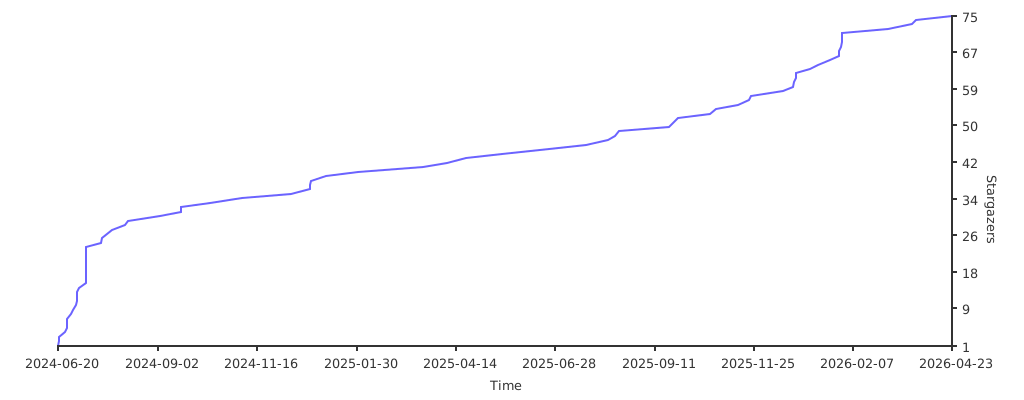
Star History
License
DeepQuantum is open source, released under the Apache License, Version 2.0.
1 maintainer

Metadata
1 maintainer
Release files for deepquantum 4.5.0
For a detailed explanation of source distributions (sdists) and built distributions (wheels), please see the package formats documentation.
Source distribution (sdist)
| File | Size | Uploaded | |
|---|---|---|---|
| deepquantum-4.5.0.tar.gz | 226.6 kB | Details |
Built distribution (wheel)
| File | Interpreter | ABI | Platform | Reset |
|---|---|---|---|---|
| deepquantum-4.5.0-py3-none-any.whl | Python 3 | none | any | Details |
Total release size: 456.0 kB
Release files / deepquantum-4.5.0.tar.gz
| Download URL | deepquantum-4.5.0.tar.gz |
|---|---|
| Size | 226.6 kB |
| Tags | Source |
|
SHA-256 checksum How to use checksums |
9c0350dbf563c708d685695c88be60b1fbf4b1659bd08ae821f75dca78f660ab
|
|
BLAKE2b-256 checksum How to use checksums |
7f9b7c363f55b3f640d55e7dea61df750dbe6b759ae4373d99570ecb82e3ab36
|
| Upload date | |
|
Uploaded using Trusted Publishing? What is trusted publishing? |
Yes |
| Uploaded via |
twine/6.1.0 CPython/3.13.12
|
Provenance
Provenance describes where a file came from. On PyPI, provenance is shared via attestations, which provide a verifiable record of the build or publishing details. View details, limitations and caveats.


PyPI Publish Attestation
PyPI verified that this artifact, at this checksum, originated from the publisher listed below.
Signed by GitHub Actions, verified by PyPI on Apr 24, 2026.
Transparency logRelease files / deepquantum-4.5.0-py3-none-any.whl
| Download URL | deepquantum-4.5.0-py3-none-any.whl |
|---|---|
| Size | 229.5 kB |
| Tags | Python 3 |
|
SHA-256 checksum How to use checksums |
94c6904d8ee301fa868b3f90af50211b97539f95df5e8f58df3574cd0b34802c
|
|
BLAKE2b-256 checksum How to use checksums |
a8d4b58ed36ed34239d6bb1eb2c8547112ab81a824ef6cdae40be28a3c2367d9
|
| Upload date | |
|
Uploaded using Trusted Publishing? What is trusted publishing? |
Yes |
| Uploaded via |
twine/6.1.0 CPython/3.13.12
|
Provenance
Provenance describes where a file came from. On PyPI, provenance is shared via attestations, which provide a verifiable record of the build or publishing details. View details, limitations and caveats.
PyPI Publish Attestation
PyPI verified that this artifact, at this checksum, originated from the publisher listed below.
Signed by GitHub Actions, verified by PyPI on Apr 24, 2026.
Transparency log













