
An agent-native intelligent learning companion with multi-agent collaboration and RAG

Project description


DeepTutor: Agent-Native Personalized Tutoring











Features · Get Started · Explore · TutorBot · CLI · Multi-User · Community
🤝 We welcome any kinds of contributing! Vote on roadmap items or propose new ones at
Roadmap, and see our Contributing Guide for branching strategy, coding standards, and how to get started.
📦 Releases
[2026.5.22] v1.4.0 — GA cut of v1.4: Auto Mode, three-layer Memory, agentic Deep Research / Solve / Question, LlamaIndex RAG refactor, Visualize/Animator merge, plus reasoning-effort normalization, tool-schema fallback, and restart-safe turn runtime.
[2026.5.21] v1.4.0-beta — Three-layer Memory workbench (L1/L2/L3), every chat capability rebuilt on a single agentic engine, LlamaIndex-only RAG, and a unified Settings + Capabilities surface.
[2026.5.10] v1.3.10 — Remote Docker CORS recovery,
DISABLE_SSL_VERIFYacross SDK providers, safer code-block citations, and optional Matrix E2EE add-on.
[2026.5.9] v1.3.9 — TutorBot Zulip and NVIDIA NIM support, safer thinking-model routing,
deeptutor start, sidebar tooltips, and session-store parity.
Past releases (more than 2 weeks ago)
[2026.5.8] v1.3.8 — Optional multi-user deployments with isolated user workspaces, admin grants, auth routes, and scoped runtime access.
[2026.5.4] v1.3.7 — Thinking-model/provider fixes, visible Knowledge index history, and safer Co-Writer clear/template editing.
[2026.5.3] v1.3.6 — Catalog-based model selection for chat and TutorBot, safer RAG re-indexing, OpenAI Responses token-limit fixes, and Skills editor validation.
[2026.5.2] v1.3.5 — Smoother local launch settings, safer RAG queries, cleaner local embedding auth, and Settings dark-mode polish.
[2026.5.1] v1.3.4 — Book page chat persistence and rebuild flows, chat-to-book references, stronger language/reasoning handling, RAG document extraction hardening.
[2026.4.30] v1.3.3 — NVIDIA NIM + Gemini embedding support, unified Space context for chat history/skills/memory, session snapshots, RAG re-index resilience.
[2026.4.29] v1.3.2 — Transparent embedding endpoint URLs, RAG re-index resilience for invalid persisted vectors, memory cleanup for thinking-model output, Deep Solve runtime fix.
[2026.4.28] v1.3.1 — Stability: safer RAG routing & embedding validation, Docker persistence, IME-safe input, Windows/GBK robustness.
[2026.4.27] v1.3.0 — Versioned KB indexes with re-index workflow, rebuilt Knowledge workspace, embedding auto-discovery with new adapters, Space hub.
[2026.4.25] v1.2.5 — Persistent chat attachments with file-preview drawer, attachment-aware capability pipelines, TutorBot Markdown export.
[2026.4.25] v1.2.4 — Text/code/SVG attachments, one-command Setup Tour, Markdown chat export, compact KB management UI.
[2026.4.24] v1.2.3 — Document attachments (PDF/DOCX/XLSX/PPTX), reasoning thinking-block display, Soul template editor, Co-Writer save-to-notebook.
[2026.4.22] v1.2.2 — User-authored Skills system, chat input performance overhaul, TutorBot auto-start, Book Library UI, visualization fullscreen.
[2026.4.21] v1.2.1 — Per-stage token limits, Regenerate response across all entry points, RAG & Gemma compatibility fixes.
[2026.4.20] v1.2.0 — Book Engine "living book" compiler, multi-document Co-Writer, interactive HTML visualizations, Question Bank @-mention.
[2026.4.18] v1.1.2 — Schema-driven Channels tab, RAG single-pipeline consolidation, externalized chat prompts.
[2026.4.17] v1.1.1 — Universal "Answer now", Co-Writer scroll sync, unified settings panel, streaming Stop button.
[2026.4.15] v1.1.0 — LaTeX block math overhaul, LLM diagnostic probe, Docker + local LLM guidance.
[2026.4.14] v1.1.0-beta — Bookmarkable sessions, Snow theme, WebSocket heartbeat & auto-reconnect, embedding registry overhaul.
[2026.4.13] v1.0.3 — Question Notebook with bookmarks & categories, Mermaid in Visualize, embedding mismatch detection, Qwen/vLLM compatibility, LM Studio & llama.cpp support, and Glass theme.
[2026.4.11] v1.0.2 — Search consolidation with SearXNG fallback, provider switch fix, and frontend resource leak fixes.
[2026.4.10] v1.0.1 — Visualize capability (Chart.js/SVG), quiz duplicate prevention, and o4-mini model support.
[2026.4.10] v1.0.0-beta.4 — Embedding progress tracking with rate-limit retry, cross-platform dependency fixes, and MIME validation fix.
[2026.4.8] v1.0.0-beta.3 — Native OpenAI/Anthropic SDK (drop litellm), Windows Math Animator support, robust JSON parsing, and full Chinese i18n.
[2026.4.7] v1.0.0-beta.2 — Hot settings reload, MinerU nested output, WebSocket fix, and Python 3.11+ minimum.
[2026.4.4] v1.0.0-beta.1 — Agent-native architecture rewrite (~200k lines): Tools + Capabilities plugin model, CLI & SDK, TutorBot, Co-Writer, Guided Learning, and persistent memory.
[2026.1.23] v0.6.0 — Session persistence, incremental document upload, flexible RAG pipeline import, and full Chinese localization.
[2026.1.18] v0.5.2 — Docling support for RAG-Anything, logging system optimization, and bug fixes.
[2026.1.15] v0.5.0 — Unified service configuration, RAG pipeline selection per knowledge base, question generation overhaul, and sidebar customization.
[2026.1.9] v0.4.0 — Multi-provider LLM & embedding support, new home page, RAG module decoupling, and environment variable refactor.
[2026.1.5] v0.3.0 — Unified PromptManager architecture, GitHub Actions CI/CD, and pre-built Docker images on GHCR.
[2026.1.2] v0.2.0 — Docker deployment, Next.js 16 & React 19 upgrade, WebSocket security hardening, and critical vulnerability fixes.
📰 News
[2026.5.22] 🌐 Our official docs site is live at deeptutor.info — guides, references, and capability tours all in one place.
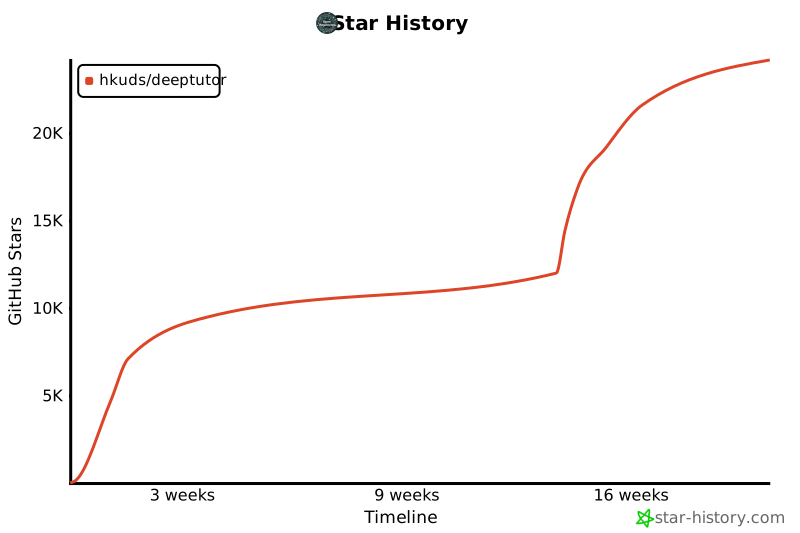
[2026.4.19] 🎉 We've reached 20k stars after 111 days! Thank you for the incredible support — we're committed to continuous iteration toward truly personalized, intelligent tutoring for everyone.
[2026.4.10] 📄 Our paper is now live on arXiv! Read the preprint to learn more about the design and ideas behind DeepTutor.
[2026.4.4] Long time no see! ✨ DeepTutor v1.0.0 is finally here — an agent-native evolution featuring a ground-up architecture rewrite, TutorBot, and flexible mode switching under the Apache-2.0 license. A new chapter begins, and our story continues!
[2026.2.6] 🚀 We've reached 10k stars in just 39 days! A huge thank you to our incredible community for the support!
[2026.1.1] Happy New Year! Join our Discord, WeChat, or Discussions — let's shape the future of DeepTutor together!
[2025.12.29] DeepTutor is officially released!
✨ Key Features
Work surfaces
- Chat — Chat, Solve, Quiz, Research, and Visualize share one session, knowledge base, and citation history, so you can escalate mid-conversation without losing context.
- Co-Writer — split-view Markdown workspace where any selection can be rewritten, expanded, or shortened, optionally grounded by your KB or the web. Drafts save straight to notebooks.
- Book Engine — a multi-agent pipeline compiles your materials into interactive "living books" with 13 block types: quizzes, flash cards, timelines, concept graphs, an embedded GeoGebra viewer, animations, and more. Pages are KB-fingerprinted, so drift is detectable.
Your library
- Knowledge Bases — versioned RAG-ready collections, end-to-end on LlamaIndex. Every (re-)index is tracked, comparable, and rollback-able.
- Space — a personal review library bundling chat history, notebooks, question bank, and user-authored skills (
SKILL.md) that switch DeepTutor's persona. - Three-layer memory — append-only L1 traces, L2 per-surface curated facts with citations, and L3 cross-surface synthesis. An inspectable workbench and a memory graph let you audit why DeepTutor knows what it knows.
Extensibility & control
- Composable tools — RAG, web search, code execution, reasoning, brainstorming, paper search, GeoGebra analysis, and chat helpers (
ask_user,web_fetch,write_note,list_notebook,github_query). MCP servers plug in alongside built-ins. - Personal TutorBots — persistent, autonomous tutors, each with its own workspace, soul, skills, and channels (Telegram, Discord, Slack, Matrix, Zulip, …). Built on nanobot.
- Unified settings — one draft / Apply workbench for appearance, models, embeddings, search, capabilities, memory, MCP servers, and tools, with shared per-call cost tracking.
- Agent-native CLI — every capability, KB, session, and TutorBot is one command away; rich output for humans, structured JSON for agents. Hand any tool-using LLM the
SKILL.mdand it can drive DeepTutor on its own. - Optional authentication — off by default; opt in for multi-user deployments with bcrypt + JWT, an admin dashboard, and an optional PocketBase / OAuth sidecar.
🚀 Get Started
DeepTutor ships four installation paths. They all share one workspace layout: settings live in data/user/settings/ under the directory you launch from (or under DEEPTUTOR_HOME / deeptutor start --home if you set one explicitly). For the full app, the recommended flow is pick a workspace directory → install → deeptutor init → deeptutor start.
✨ v1.4.0 is live.
pip install -U deeptutorpicks up the latest stable. Pre-releases (when available) opt in withpip install --pre -U deeptutor.
Option 1 — Install From PyPI
Full local Web app + CLI, no clone required. Needs Python 3.11+ and a Node.js 20+ runtime on PATH (the packaged Next.js standalone server is spawned by deeptutor start).
mkdir -p my-deeptutor && cd my-deeptutor
pip install -U deeptutor
deeptutor init     # prompts for ports + LLM provider + optional embedding
deeptutor start    # starts backend + frontend; keep the terminal open
deeptutor init prompts for backend port (default 8001), frontend port (default 3782), LLM provider / base URL / API key / model, and an optional embedding provider for Knowledge Base / RAG.
After deeptutor start, open the frontend URL printed in the terminal — by default http://127.0.0.1:3782. Press Ctrl+C in that terminal to stop both backend and frontend. Skipping deeptutor init is fine for a quick trial; the app boots with default ports and empty model settings, configure them later in Settings → Models.
Option 2 — Install From Source
For development against a checkout. Use Python 3.11+ and Node.js 22 LTS to match CI and Docker.
git clone https://github.com/HKUDS/DeepTutor.git
cd DeepTutor

# Create a venv (macOS/Linux). Windows PowerShell:
#   py -3.11 -m venv .venv ; .\.venv\Scripts\Activate.ps1
python3 -m venv .venv && source .venv/bin/activate
python -m pip install --upgrade pip

# Install backend + frontend deps
python -m pip install -e .
( cd web && npm ci --legacy-peer-deps )

deeptutor init
deeptutor start
Source installs run Next.js in dev mode against the local web/ directory; everything else (config layout, ports, stop with Ctrl+C) matches Option 1.
Conda environment (instead of venv)
conda create -n deeptutor python=3.11
conda activate deeptutor
python -m pip install --upgrade pip
Optional install extras — dev / tutorbot / matrix / math-animator
pip install -e ".[dev]"             # tests/lint tools
pip install -e ".[tutorbot]"        # TutorBot engine + channel SDKs
pip install -e ".[matrix]"          # Matrix channel without E2EE/libolm
pip install -e ".[matrix-e2e]"      # Matrix E2EE; requires libolm
pip install -e ".[math-animator]"   # Manim addon; requires LaTeX/ffmpeg/system libs
Frontend dependency tweaks & dev-server troubleshooting
Changing frontend dependencies: run npm install --legacy-peer-deps to refresh web/package-lock.json, then commit both web/package.json and web/package-lock.json.
Stuck dev server: if deeptutor start reports an existing frontend that isn't responding, stop the PID it prints. If no Next.js process is actually running, the lock files are stale — remove them and retry:
rm -f web/.next/dev/lock web/.next/lock
deeptutor start
Option 3 — Docker
One container for the full Web app. Images on GitHub Container Registry:
ghcr.io/hkuds/deeptutor:latest— stable releaseghcr.io/hkuds/deeptutor:pre— pre-release, when available
docker run --rm --name deeptutor \
  -p 127.0.0.1:3782:3782 \
  -p 127.0.0.1:8001:8001 \
  -v deeptutor-data:/app/data \
  ghcr.io/hkuds/deeptutor:latest
⚠️ Map both
3782and8001.3782serves the web UI;8001is the FastAPI backend that your browser calls directly — there is no in-container proxy. Skip the8001mapping and the page still loads, but Settings shows "Backend unreachable" and stays unusable.
Open http://127.0.0.1:3782. The container creates /app/data/user/settings/*.json on first boot; configure model providers from the Web Settings page. Config, API keys, logs, workspace files, memory, and knowledge bases persist in the deeptutor-data volume.
- Different host ports: change the left side of each
-p host:containermapping (e.g.-p 127.0.0.1:8088:3782). If you change container-side ports in/app/data/user/settings/system.json, restart and update the right side of each mapping to match. - Detached: add
-d, thendocker logs -f deeptutorto follow,docker stop deeptutorto stop,docker rm deeptutorbefore reusing the name. Thedeeptutor-datavolume keeps your settings and workspace across restarts.
Connecting to Ollama / LM Studio / llama.cpp / vLLM on the host
Inside Docker, localhost is the container itself, not your host machine. To reach a model service running on the host, use the host gateway (recommended):
docker run --rm --name deeptutor \
  -p 127.0.0.1:3782:3782 -p 127.0.0.1:8001:8001 \
  --add-host=host.docker.internal:host-gateway \
  -v deeptutor-data:/app/data \
  ghcr.io/hkuds/deeptutor:latest
Then in Settings → Models, point the provider Base URL at host.docker.internal:
- Ollama LLM:
http://host.docker.internal:11434/v1 - Ollama embedding:
http://host.docker.internal:11434/api/embed - LM Studio:
http://host.docker.internal:1234/v1 - llama.cpp:
http://host.docker.internal:8080/v1
Docker Desktop (macOS/Windows) usually resolves host.docker.internal without --add-host. On Linux, the flag is the portable way to create that hostname on modern Docker Engine.
Linux alternative — host networking: add --network=host and drop the -p flags. The container shares the host network directly, so open http://127.0.0.1:3782 (or the frontend_port in system.json), and host services can be reached with normal localhost URLs like http://127.0.0.1:11434/v1. Note that host networking exposes container ports directly on the host and may conflict with existing services.
Option 4 — CLI Only
When you don't need the Web UI. The CLI-only package is installed from a source checkout, not from PyPI.
git clone https://github.com/HKUDS/DeepTutor.git
cd DeepTutor

# Create a venv (macOS/Linux). Windows PowerShell:
#   py -3.11 -m venv .venv-cli ; .\.venv-cli\Scripts\Activate.ps1
python3 -m venv .venv-cli && source .venv-cli/bin/activate
python -m pip install --upgrade pip

python -m pip install -e ./packaging/deeptutor-cli
deeptutor init --cli
deeptutor chat
deeptutor init --cli shares the same data/user/settings/ layout as the full app but skips the backend/frontend port prompts and defaults embeddings to off (choose Yes if you plan to use deeptutor kb … or RAG tools). It still writes a complete runtime layout (system.json, auth.json, integrations.json, model_catalog.json, main.yaml, agents.yaml) and still prompts for the active LLM provider and model.
Common commands
deeptutor chat                                          # interactive REPL
deeptutor chat --capability deep_solve --tool rag --kb my-kb
deeptutor run chat "Explain Fourier transform"
deeptutor run deep_solve "Solve x^2 = 4" --tool rag --kb my-kb
deeptutor kb create my-kb --doc textbook.pdf
deeptutor memory show
deeptutor config show
The local deeptutor-cli install ships no Web assets or server dependencies. Keep the source checkout around — the editable install points to it. To add the Web app later, install the PyPI package (Option 1) and run deeptutor init + deeptutor start from the same workspace.
Configuration Reference
Config files under data/user/settings/ — JSON/YAML reference
Everything under data/user/settings/ is plain JSON/YAML. The Settings page in the browser is the recommended editor.
| File | Purpose |
|---|---|
model_catalog.json |
LLM, embedding, and search provider profiles; API keys; active models |
system.json |
Backend/frontend ports, public API base, CORS, SSL verification, attachment directory |
auth.json |
Optional auth toggle, username, password hash, token/cookie settings |
integrations.json |
Optional PocketBase and sidecar integration settings |
interface.json |
UI language / theme / sidebar preferences |
main.yaml |
Runtime behavior defaults and path injection |
agents.yaml |
Capability/tool temperature and token settings |
Project-root .env is not read as an application config file. For a minimal model setup, open Settings → Models, add an LLM profile (Base URL / API key / model name), and save. Add an embedding profile only if you plan to use Knowledge Base / RAG features.
📖 Explore DeepTutor
The v1.4.0-beta refactor reorganises DeepTutor around five core surfaces — Chat, Co-Writer, Book, Knowledge, Space — plus a three-layer Memory that sits underneath all of them and a unified Settings workbench that exposes every knob. Capabilities (Solve / Quiz / Research / Visualize) and tools (RAG, web, code, reason, brainstorm, paper search, ask_user, web_fetch, write_note, list_notebook, github_query) compose freely on top.
💬 Chat — Unified Intelligent Workspace

One thread, five modes, any tool. The capability picker lives in the composer; the same session, knowledge base, attachments, and references travel with you across modes — switch from a casual question into multi-agent solving, into a quiz, into a full research report, without losing context.
What each mode does & what it's built on
| Mode | What it does | Built on |
|---|---|---|
| Chat | Flexible conversation with any tool; pick from RAG, web search, code execution, deep reasoning, brainstorming, paper search, GeoGebra analysis. | LlamaIndex-backed RAG + tool registry |
| Solve | Multi-step plan → investigate → solve → verify, with precise source citations. | Agentic engine (deep_solve) |
| Quiz | Auto-validated question generation grounded in your KB; spawns a follow-up chat composer per question. | Agentic engine (deep_question) |
| Research | Decomposes a topic into subtopics, dispatches parallel agents across RAG / web / arXiv, and produces a cited report with iterative append-mode revisions. | Rebuilt pipeline.py (~45% smaller, citations + iterative reporting preserved) |
| Visualize | Generate SVG diagrams, Chart.js charts, Mermaid graphs, interactive HTML pages, or Manim videos / storyboards — the analyzer picks the right render_type. |
Visualize pipeline (Animator merged in) |
New chat tools shipped with the refactor: ask_user (asks a structured clarifying question mid-turn), web_fetch (pulls a specific URL into context), write_note / list_notebook (saves and lists notebook records from the chat surface), and github_query (issue / PR / repo lookups). Tools stay decoupled from workflows — every mode lets you opt tools in or out per turn.
A session also carries a cumulative source inventory across turns, so citations from earlier RAG / web hits remain reusable later in the same conversation.
✍️ Co-Writer — Multi-Document AI Writing Workspace

Co-Writer is a split-view Markdown workbench (raw editor on the left, live preview on the right) for notes, reports, tutorials, and AI-assisted drafts. Each document lives in its own workspace with autosave, downloadable Markdown, and one-click Save to Notebook.
Select any text and choose Rewrite, Expand, or Shorten — every action runs as a tracked agent edit that can optionally pull from a knowledge base or the web. Co-Writer renders standard Markdown / CommonMark / GFM (tables, code, math, flowcharts, sequence diagrams), supports a HTML tag escape hatch (<sub>, <sup>, <abbr>, <mark>), and ships a starter template tuned for DeepTutor product docs and learning notes.
📖 Book Engine — Interactive "Living Books"

Give DeepTutor a topic, point it at your knowledge base, and it produces a structured, interactive book — not a static export, but a living document you can read, quiz yourself on, and discuss in context.
Behind the scenes, a multi-agent pipeline handles the heavy lifting: proposing an outline, retrieving relevant sources from your KB, synthesising a chapter tree, planning each page, and compiling every block. You stay in control — review the proposal, reorder chapters, and chat alongside any page.
Pages are assembled from 13 block types — text, callout, quiz, flash cards, code, figure, deep dive, animation, interactive demo (now including a GeoGebra viewer), timeline, concept graph, section, and user note — each rendered with its own interactive component. Book pages are fingerprinted against their source KB; deeptutor book health reports drift and deeptutor book refresh-fingerprints clears stale pages when sources change.
📚 Knowledge Bases — RAG-Ready Document Libraries

A dedicated workspace for the document collections that power RAG. Each knowledge base has four tabs:
- Files — Browse uploaded sources, preview PDFs inline, and see per-file size / status.
- Add documents — Drop in PDFs, Office files (DOCX / XLSX / PPTX), Markdown, plain text, and a wide range of code / data file types. Documents are routed through the appropriate extractor automatically.
- Index versions — Every (re-)index is a tracked version. Roll back to an earlier index, compare embedding models, or inspect chunking stats without losing the previous build.
- Settings — Pick the embedding provider / model, chunking parameters, and reranker for the KB. Defaults are inherited from your global LLM and embedding profiles.
Indexing is built on LlamaIndex end-to-end (the previous dual-pipeline split was consolidated in the v1.4 refactor), with retry-safe re-index, embedding-mismatch detection, and resilient handling of corrupt persisted vectors.
🌐 Space — Your Personal Learning Library

Space is the read / review counterpart to the active surfaces. Where Chat / Co-Writer / Book are where you produce, Space is where everything you produce lives, searchable and replayable.
- Chat History — Every conversation across every mode, with title-rename, delete, and resume; deleting individual turns is supported on every entry point.
- Notebooks — Save outputs from Chat, Research, and Co-Writer into categorised, colour-coded notebooks; each record links back to the originating session and surface.
- Question Bank — Every auto-generated quiz question, bookmarkable and @-mention-able in chat to reason over past performance.
- Skills — User-authored
SKILL.mdfiles that define teaching personas (name, description, triggers, body). When active, a skill is injected into the chat system prompt — turning DeepTutor into a Socratic tutor, a research assistant, or any role you design.
🧠 Memory — Three-Layer Architecture

DeepTutor's memory is now a three-layer pipeline with an inspectable workbench at /memory. The two-file v1 SUMMARY.md / PROFILE.md model is gone; everything is migrated into the new layout on first boot.
L1 / L2 / L3 — role and on-disk layout
| Layer | Role | Storage |
|---|---|---|
| L1 · Workspace mirror (LIVE) | Append-only trace of every interaction, per surface, per day. The lossless record of what actually happened. | trace/<surface>/<YYYY-MM-DD>.jsonl |
| L2 · Per-surface summaries (CURATED) | Surface-specific facts extracted by the consolidator. Each fact carries footnote citations back to L1 traces. Supports per-doc Update / Audit / Dedup runs. | L2/<surface>.md |
| L3 · Cross-surface knowledge (SYNTHESIS) | Cross-surface synthesis: your profile, recent timeline, scope of knowledge, and preferences. Hedged claims, each backed by L2 evidence. |
L3/<recent|profile|scope|preferences>.md |
Seven surfaces feed the pipeline: chat, notebook, quiz, kb, book, tutorbot, cowriter. The consolidator is LLM-driven and runs asynchronously (POST /memory/runs/start) — you can fire it from the workbench, watch L1 → L2 → L3 propagate, and edit any layer by hand.

The Memory Graph (/memory/graph) renders all three layers at once: L3 synthesis at the centre, L2 facts in the middle ring, L1 traces on the outside, grouped by surface. Hover any node for an inline preview; click to lock the highlight and trace the L3 → L2 → L1 references inward, so you can audit why DeepTutor "knows" something about you.
⚙️ Settings — Unified Control Center

The settings surface was unified in v1.4 and split by concern, with a draft / Apply model so changes are atomic and can be reverted before save:
- Appearance — UI language and theme (Cream, Snow, Dark, Glass).
- Status — Live health probe across LLM, embedding, search, and storage backends.
- LLM, Embedding, Search — Provider catalog, base URLs, API keys, and active model selection. Active models are picked from the catalog so every surface stays in sync.
- Capabilities — Per-capability tunables (chunking, LLM budget, dedup and reference policies, max iterations) for Chat, Solve, Quiz, Research, Visualize, and Co-Writer. Backed by a unified
emit_capability_resultenvelope and a sharedUsageTrackerthat surfaces per-call cost. - Memory — Toggle consolidator runs, configure cadence and budget, and jump into the memory workbench.
- MCP servers — Register external Model Context Protocol servers; their tools are surfaced alongside built-in tools.
- Tools — Inspect every built-in tool, its parameters, status (enabled / coming-soon), and i18n status copy.
A "Tour" launcher walks new users through the page, and every capability ships a canonical capabilities/prompts/{en,zh}/<name>.yaml so status messages stay consistent in both English and 中文.
🦞 TutorBot — Persistent, Autonomous AI Tutors

TutorBot is not a chatbot — it is a persistent, multi-instance agent built on nanobot. Each TutorBot runs its own agent loop with independent workspace, memory, and personality. Create a Socratic math tutor, a patient writing coach, and a rigorous research advisor — all running simultaneously, each evolving with you.

- Soul Templates — Define your tutor's personality, tone, and teaching philosophy through editable Soul files. Choose from built-in archetypes (Socratic, encouraging, rigorous) or craft your own — the soul shapes every response.
- Independent Workspace — Each bot has its own directory with separate memory, sessions, skills, and configuration — fully isolated yet able to access DeepTutor's shared knowledge layer.
- Proactive Heartbeat — Bots don't just respond — they initiate. The built-in Heartbeat system enables recurring study check-ins, review reminders, and scheduled tasks. Your tutor shows up even when you don't.
- Full Tool Access — Every bot reaches into DeepTutor's complete toolkit: RAG retrieval, code execution, web search, academic paper search, deep reasoning, and brainstorming.
- Skill Learning — Teach your bot new abilities by adding skill files to its workspace. As your needs evolve, so does your tutor's capability.
- Multi-Channel Presence — Connect bots to Telegram, Discord, Slack, Feishu, WeChat Work, DingTalk, Matrix, QQ, WhatsApp, Email, and more. Your tutor meets you wherever you are.
- Team & Sub-Agents — Spawn background sub-agents or orchestrate multi-agent teams within a single bot for complex, long-running tasks.
deeptutor bot create math-tutor --persona "Socratic math teacher who uses probing questions"
deeptutor bot create writing-coach --persona "Patient, detail-oriented writing mentor"
deeptutor bot list                  # See all your active tutors
⌨️ DeepTutor CLI — Agent-Native Interface

DeepTutor is fully CLI-native. Every capability, knowledge base, session, memory, and TutorBot is one command away — no browser required. The CLI serves both humans (with rich terminal rendering) and AI agents (with structured JSON output).
Hand the SKILL.md at the project root to any tool-using agent (nanobot, or any LLM with tool access), and it can configure and operate DeepTutor autonomously.
Example commands — one-shot run, REPL, KB lifecycle, JSON output, session resume
One-shot execution — Run any capability directly from the terminal:
deeptutor run chat "Explain the Fourier transform" -t rag --kb textbook
deeptutor run deep_solve "Prove that √2 is irrational" -t reason
deeptutor run deep_question "Linear algebra" --config num_questions=5
deeptutor run deep_research "Attention mechanisms in transformers"
deeptutor run visualize "Draw the architecture of a transformer"
Interactive REPL — A persistent chat session with live mode switching:
deeptutor chat --capability deep_solve --kb my-kb
# Inside the REPL: /cap, /tool, /kb, /history, /notebook, /config to switch on the fly
Knowledge base lifecycle — Build, query, and manage RAG-ready collections entirely from the terminal:
deeptutor kb create my-kb --doc textbook.pdf       # Create from document
deeptutor kb add my-kb --docs-dir ./papers/         # Add a folder of papers
deeptutor kb search my-kb "gradient descent"        # Search directly
deeptutor kb set-default my-kb                      # Set as default for all commands
Dual output mode — Rich rendering for humans, structured JSON for pipelines:
deeptutor run chat "Summarize chapter 3" -f rich    # Colored, formatted output
deeptutor run chat "Summarize chapter 3" -f json    # Line-delimited JSON events
Session continuity — Resume any conversation right where you left off:
deeptutor session list                              # List all sessions
deeptutor session open <id>                         # Resume in REPL
Full CLI command reference
Top-level
| Command | Description |
|---|---|
deeptutor run <capability> <message> |
Run any capability in a single turn (chat, deep_solve, deep_question, deep_research, math_animator, visualize) |
deeptutor chat |
Interactive REPL with optional --capability, --tool, --kb, --language |
deeptutor serve |
Start the DeepTutor API server |
deeptutor bot
| Command | Description |
|---|---|
deeptutor bot list |
List all TutorBot instances |
deeptutor bot create <id> |
Create and start a new bot (--name, --persona, --model) |
deeptutor bot start <id> |
Start a bot |
deeptutor bot stop <id> |
Stop a bot |
deeptutor kb
| Command | Description |
|---|---|
deeptutor kb list |
List all knowledge bases |
deeptutor kb info <name> |
Show knowledge base details |
deeptutor kb create <name> |
Create from documents (--doc, --docs-dir) |
deeptutor kb add <name> |
Add documents incrementally |
deeptutor kb search <name> <query> |
Search a knowledge base |
deeptutor kb set-default <name> |
Set as default KB |
deeptutor kb delete <name> |
Delete a knowledge base (--force) |
deeptutor memory
| Command | Description |
|---|---|
deeptutor memory show [file] |
View memory (summary, profile, or all) |
deeptutor memory clear [file] |
Clear memory (--force) |
deeptutor session
| Command | Description |
|---|---|
deeptutor session list |
List sessions (--limit) |
deeptutor session show <id> |
View session messages |
deeptutor session open <id> |
Resume session in REPL |
deeptutor session rename <id> |
Rename a session (--title) |
deeptutor session delete <id> |
Delete a session |
deeptutor notebook
| Command | Description |
|---|---|
deeptutor notebook list |
List notebooks |
deeptutor notebook create <name> |
Create a notebook (--description) |
deeptutor notebook show <id> |
View notebook records |
deeptutor notebook add-md <id> <path> |
Import markdown as record |
deeptutor notebook replace-md <id> <rec> <path> |
Replace a markdown record |
deeptutor notebook remove-record <id> <rec> |
Remove a record |
deeptutor book
| Command | Description |
|---|---|
deeptutor book list |
List all books in the workspace |
deeptutor book health <book_id> |
Check KB drift and book health |
deeptutor book refresh-fingerprints <book_id> |
Refresh KB fingerprints and clear stale pages |
deeptutor config / plugin / provider
| Command | Description |
|---|---|
deeptutor config show |
Print current configuration summary |
deeptutor plugin list |
List registered tools and capabilities |
deeptutor plugin info <name> |
Show tool or capability details |
deeptutor provider login <provider> |
Provider auth (openai-codex OAuth login; github-copilot validates an existing Copilot auth session) |
👥 Multi-User — Shared Deployments with Per-User Workspaces

Flip on authentication and DeepTutor turns into a multi-tenant deployment with per-user isolated workspaces and admin-curated resources. The first person to register becomes the admin and configures models, API keys, and knowledge bases on behalf of everyone else. Subsequent accounts are created by the admin (invite-only), each gets their own scoped chat history / memory / notebooks / knowledge bases, and they only see the LLMs, KBs, and skills the admin assigned to them.
Quick start (5 steps):
# 1. Enable auth in data/user/settings/auth.json:
#    {"enabled": true, "token_expire_hours": 24, "cookie_secure": false}

# 2. Restart the web stack.
deeptutor start

# 3. Open http://localhost:3782/register and create the first account.
#    The first registration is the only public one; that user becomes admin
#    and the /register endpoint is closed automatically afterward.

# 4. As admin, navigate to /admin/users → "Add user" to provision teammates.

# 5. For each user, click the slider icon → assign LLM profiles, knowledge
#    bases, and skills. Save. The user can now sign in and start working.
What the admin sees:
- Full Settings page at
/settings— manage LLM / embedding / search providers, API keys, model catalogs, and runtime "Apply". - User management at
/admin/users— create, promote, demote, and delete accounts. The public/registerendpoint is automatically closed once the first admin exists; further accounts go throughPOST /api/v1/auth/users(admin-only). - Grant editor — for each non-admin user, pick the model profiles, knowledge bases, and skills they may use. Grants carry logical IDs only; API keys never cross the grant boundary.
- Audit trail — every grant change and assigned-resource access is appended to
multi-user/_system/audit/usage.jsonl.
What ordinary users get:
- Isolated workspace under
multi-user/<uid>/— their own chat history (chat_history.db), memory (SUMMARY.md/PROFILE.md), notebooks, and personal knowledge bases. Nothing is shared by default. - Read-only access to admin-assigned knowledge bases and skills, surfaced inline next to their own resources with an "Assigned by admin" badge.
- Redacted Settings page — only theme, language, and a summary of granted models. API keys, base URLs, and provider endpoints are never returned for non-admin requests.
- Scoped LLM — chat turns are routed through the admin-assigned model. If no LLM is granted, the turn is rejected up-front (no silent fallback to the admin's keys).
Workspace layout:
multi-user/
├── _system/
│   ├── auth/users.json          # Hashed credentials, roles
│   ├── auth/auth_secret         # JWT signing secret (auto-generated)
│   ├── grants/<uid>.json        # Per-user resource grants (admin-managed)
│   └── audit/usage.jsonl        # Audit trail
└── <uid>/
    ├── user/
    │   ├── chat_history.db
    │   ├── settings/interface.json
    │   └── workspace/{chat,co-writer,book,...}
    ├── memory/{SUMMARY.md,PROFILE.md}
    └── knowledge_bases/...
Configuration reference:
| Setting | Required | Description |
|---|---|---|
data/user/settings/auth.json: enabled |
Yes | Set to true to enable multi-user auth. Default false (single-user mode — admin paths everywhere). |
multi-user/_system/auth/auth_secret |
Recommended | JWT signing secret. Auto-generated on first authenticated boot if missing. |
data/user/settings/auth.json: token_expire_hours |
No | JWT lifetime; defaults to 24. |
data/user/settings/auth.json: username/password_hash |
No | Optional headless single-user bootstrap credential. Leave blank when using browser registration. |
data/user/settings/system.json |
No | deeptutor start derives frontend auth flags and API base from runtime settings. |
⚠️ PocketBase mode (
integrations.pocketbase_urlset) is single-user only. The default PocketBase schema has norolefield onusers(every login resolves torole=user, no admin can be created), andsessions/messages/turnsqueries are not filtered byuser_id. Multi-user deployments must keepintegrations.pocketbase_urlblank and use the default JSON/SQLite backend.
⚠️ Single-process recommendation. The first-user-becomes-admin promotion is protected by an in-process
threading.Lock. Multi-worker deployments should provision the first admin offline (start withauth.json.enabled=false, register the admin via the bootstrap flow, then setauth.json.enabled=true) or back the user store with an external system.
🌐 Community & Ecosystem
DeepTutor stands on the shoulders of outstanding open-source projects:
| Project | Role in DeepTutor |
|---|---|
| nanobot | Ultra-lightweight agent engine powering TutorBot |
| LlamaIndex | RAG pipeline and document indexing backbone |
| ManimCat | AI-driven math animation generation for Math Animator |
From the HKUDS ecosystem:
| ⚡ LightRAG | 🤖 AutoAgent | 🔬 AI-Researcher | 🧬 nanobot |
|---|---|---|---|
| Simple & Fast RAG | Zero-Code Agent Framework | Automated Research | Ultra-Lightweight AI Agent |
🤝 Contributing
We hope DeepTutor becomes a gift for the community. 🎁
See CONTRIBUTING.md for guidelines on setting up your development environment, code standards, and pull request workflow.
⭐ Star History


Release history Release notifications | RSS feed


Download files
Download the file for your platform. If you're not sure which to choose, learn more about installing packages.
Source Distributions
Built Distribution
Filter files by name, interpreter, ABI, and platform.
If you're not sure about the file name format, learn more about wheel file names.
Copy a direct link to the current filters
File details
Details for the file deeptutor-1.4.0-py3-none-any.whl.
File metadata
- Download URL: deeptutor-1.4.0-py3-none-any.whl
- Upload date:
- Size: 26.8 MB
- Tags: Python 3
- Uploaded using Trusted Publishing? Yes
- Uploaded via: twine/6.1.0 CPython/3.13.12
File hashes
| Algorithm | Hash digest | |
|---|---|---|
| SHA256 |
2adb1cdb79078527727e3262bc900aebbbc6dac6d1a427e6ebef2b922768dea4
|
|
| MD5 |
c15aed2cc027f71e2685b3e4e0b44a2f
|
|
| BLAKE2b-256 |
f9febae9793acc4e19a38af0c68dc1929e641f57f5b0bc901a18bcd3495ee69e
|
Provenance
The following attestation bundles were made for deeptutor-1.4.0-py3-none-any.whl:
Publisher:
pypi-release.yml on HKUDS/DeepTutor
-
Statement:
-
Statement type:
https://in-toto.io/Statement/v1 -
Predicate type:
https://docs.pypi.org/attestations/publish/v1 -
Subject name:
deeptutor-1.4.0-py3-none-any.whl -
Subject digest:
2adb1cdb79078527727e3262bc900aebbbc6dac6d1a427e6ebef2b922768dea4 - Sigstore transparency entry: 1602704369
- Sigstore integration time:
-
Permalink:
HKUDS/DeepTutor@6153d8c09293ae10689d79f50941b15bc38345bf -
Branch / Tag:
refs/tags/v1.4.0 - Owner: https://github.com/HKUDS
-
Access:
public
-
Token Issuer:
https://token.actions.githubusercontent.com -
Runner Environment:
github-hosted -
Publication workflow:
pypi-release.yml@6153d8c09293ae10689d79f50941b15bc38345bf -
Trigger Event:
release
-
Statement type:






