Delve: Deep Live Visualization and Evaluation |logo|
|PyPI version| |Tests| |codecov.io| |License: MIT| |DOI|
Delve is a Python package for analyzing the inference dynamics of your model.
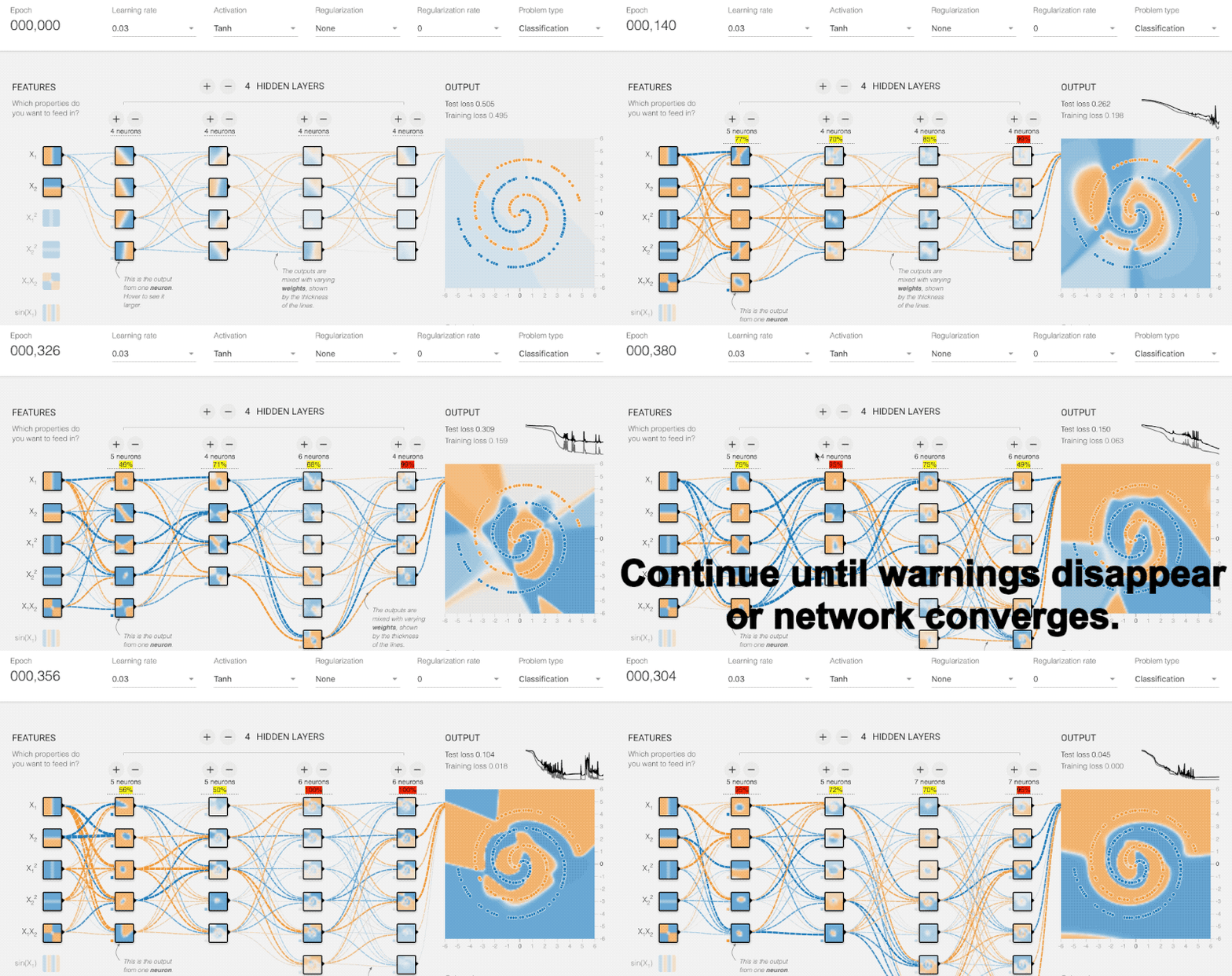
.. image:: https://raw.githubusercontent.com/justinshenk/playground/master/saturation_demo.gif :alt: playground
Use Delve if you need a lightweight PyTorch extension that:
- Gives you insight into the inference dynamics of your architecture
- Allows you to optimize and adjust neural networks models to your dataset without much trial and error
- Allows you to analyze the eigenspaces your data at different stages of inference
- Provides you basic tooling for experiment logging
Motivation
Designing a deep neural network is a trial and error heavy process that mostly revolves around comparing performance metrics of different runs. One of the key issues with this development process is that the results of metrics not really propagate back easily to concrete design improvements. Delve provides you with spectral analysis tools that allow you to investigate the inference dynamic evolving in the model while training. This allows you to spot underutilized and unused layers. Mismatches between object size and neural architecture among other inefficiencies. These observations can be propagated back directly to design changes in the architecture even before the model has fully converged, allowing for a quicker and more guided design process.
This work is closely related to Maithra Raghu (Google Brain) et al's work on SVCCA:
- "Maithra Raghu on the differences between wide and deep networks", 2020
[YouTube] <https://youtu.be/6uPop547u_E?t=970>_ - "SVCCA:Singular Vector Canonical Correlation Analysis for Deep Learning and Interpretability", 2017
[arXiv] <https://arxiv.org/abs/1706.05806>_
Installation
.. code:: bash
pip install delve
Using Layer Saturation to improve model performance
The saturation metric is the core feature of delve. By default
saturation is a value between 0 and 1.0 computed for any convolutional,
lstm or dense layer in the network. The saturation describes the
percentage of eigendirections required for explaining 99% of the
variance. Simply speaking, it tells you how much your data is “filling
up” the individual layers inside your model.

In the image below you can see how saturation portraits inefficiencies
in your neural network. The depicted model is ResNet18 trained on 32
pixel images, which is way to small for a model with a receptive field
exceeding 400 pixels in the final layers.

.. image:: https://raw.githubusercontent.com/delve-team/delve/master/images/resnet.PNG
   :alt: resnet.PNG

To visualize what this poorly chosen input resolution does to the
inference, we trained logistic regressions on the output of every layer
to solve the same task as the model. You can clearly see that only the
first half of the model (at best) is improving the intermedia solutions
of our logistic regression “probes”. The layers following this are
contributing nothing to the quality of the prediction! You also see that
saturation is extremly low for this layers!

We call this a *tail* and it can be removed by either increasing the
input resolution or (which is more economical) reducing the receptive
field size to match the object size of your dataset.

.. figure:: https://raw.githubusercontent.com/delve-team/delve/master/images/resnetBetter.PNG
   :alt: resnetBetter.PNG

We can do this by removing the first two downsampling layers, which
quarters the growth of the receptive field of your network, which
reduced not only the number of parameters but also makes more use of the
available parameters, by making more layers contribute effectivly!

**For more details check our publication on this topics** - `Spectral
Analysis of Latent Representations <https://arxiv.org/abs/1907.08589>`__
- `Feature Space Saturation during
Training <https://arxiv.org/abs/2006.08679>`__ - `(Input) Size Matters
for CNN
Classifiers <https://link.springer.com/chapter/10.1007/978-3-030-86340-1_11>`__
- `Should you go deeper? Optimizing Convolutional Neural Networks
without training <https://arxiv.org/abs/2106.12307>`__ - Go with the
Flow: the distribution of information processing in multi-path networks
(soon)

Demo
----

.. code:: python


   import torch
   from delve import SaturationTracker
   from torch.cuda import is_available
   from torch.nn import CrossEntropyLoss
   from torchvision.datasets import CIFAR10
   from torchvision.transforms import ToTensor, Compose
   from torch.utils.data.dataloader import DataLoader
   from torch.optim import Adam
   from torchvision.models.vgg import vgg16

   # setup compute device
   from tqdm import tqdm

   if __name__ == "__main__":

     device = "cuda:0" if is_available() else "cpu"

     # Get some data
     train_data = CIFAR10(root="./tmp", train=True,
                          download=True, transform=Compose([ToTensor()]))
     test_data = CIFAR10(root="./tmp", train=False, download=True, transform=Compose([ToTensor()]))

     train_loader = DataLoader(train_data, batch_size=1024,
                               shuffle=True, num_workers=6,
                               pin_memory=True)
     test_loader = DataLoader(test_data, batch_size=1024,
                              shuffle=False, num_workers=6,
                              pin_memory=True)

     # instantiate model
     model = vgg16(num_classes=10).to(device)

     # instantiate optimizer and loss
     optimizer = Adam(params=model.parameters())
     criterion = CrossEntropyLoss().to(device)

     # initialize delve
     tracker = SaturationTracker("my_experiment", save_to="plotcsv", modules=model, device=device)

     # begin training
     for epoch in range(10):
       model.train()
       for (images, labels) in tqdm(train_loader):
         images, labels = images.to(device), labels.to(device)
         prediction = model(images)
         optimizer.zero_grad(set_to_none=True)
         with torch.cuda.amp.autocast():
           outputs = model(images)
           _, predicted = torch.max(outputs.data, 1)

           loss = criterion(outputs, labels)
         loss.backward()
         optimizer.step()

       total = 0
       test_loss = 0
       correct = 0
       model.eval()
       for (images, labels) in tqdm(test_loader):
         images, labels = images.to(device), labels.to(device)
         outputs = model(images)
         loss = criterion(outputs, labels)
         _, predicted = torch.max(outputs.data, 1)

         total += labels.size(0)
         correct += torch.sum((predicted == labels)).item()
         test_loss += loss.item()

       # add some additional metrics we want to keep track of
       tracker.add_scalar("accuracy", correct / total)
       tracker.add_scalar("loss", test_loss / total)

       # add saturation to the mix
       tracker.add_saturations()

     # close the tracker to finish training
     tracker.close()

Supported Layers
----------------

* Dense/Linear
* LSTM
* Convolutional

Citation
--------

If you use Delve in your publication, please cite:

.. code-block:: txt

   @software{delve,
   author       = {Justin Shenk and
                     Mats L. Richter and
                     Wolf Byttner and
                     Michał Marcinkiewicz},
   title        = {delve-team/delve: Latest},
   month        = aug,
   year         = 2021,
   publisher    = {Zenodo},
   version      = {v0.1.49},
   doi          = {10.5281/zenodo.5233859},
   url          = {https://doi.org/10.5281/zenodo.5233859}
   }


Why this name, Delve?
~~~~~~~~~~~~~~~~~~~~~

**delve** (*verb*):

-  reach inside a receptacle and search for something
-  to carry on intensive and thorough research for data, information, or
   the like

.. |logo| image:: https://github.com/delve-team/delve/blob/master/images/delve_logo.png
.. |PyPI version| image:: https://badge.fury.io/py/delve.svg
   :target: https://badge.fury.io/py/delve
.. |Tests| image:: https://github.com/delve-team/delve/actions/workflows/tests.yaml/badge.svg
   :target: https://github.com/delve-team/delve/actions/workflows/tests.yaml
.. |codecov.io| image:: https://codecov.io/github/delve-team/delve/coverage.svg?branch=master
   :target: https://codecov.io/github/delve-team/delve/?branch=master
.. |License: MIT| image:: https://img.shields.io/badge/License-MIT-blue.svg
   :target: https://opensource.org/licenses/MIT
.. |DOI| image:: https://zenodo.org/badge/136951823.svg
   :target: https://zenodo.org/badge/latestdoi/136951823


Release files for delve 0.1.50
For a detailed explanation of source distributions (sdists) and built distributions (wheels), please see the package formats documentation.
Source distribution (sdist)
| File | Size | Uploaded | |
|---|---|---|---|
| delve-0.1.50.tar.gz | 28.5 kB | Details |
Built distribution (wheel)
| File | Interpreter | ABI | Platform | Reset |
|---|---|---|---|---|
| delve-0.1.50-py2.py3-none-any.whl | Python 2, Python 3 | none | any | Details |
Total release size: 54.9 kB
Release files / delve-0.1.50.tar.gz
| Download URL | delve-0.1.50.tar.gz |
|---|---|
| Size | 28.5 kB |
| Tags | Source |
|
SHA-256 checksum How to use checksums |
23446f15e600feb8a76f0eb5c444bbc692a98decc9d64176b8d76ad5a8702447
|
|
BLAKE2b-256 checksum How to use checksums |
8eb1af023511d28f96891ac7118800b9a7fbd77b6673d71facbbc75d53bfbb95
|
| Upload date | |
|
Uploaded using Trusted Publishing? What is trusted publishing? |
No |
| Uploaded via |
twine/4.0.2 CPython/3.11.2
|
Release files / delve-0.1.50-py2.py3-none-any.whl
| Download URL | delve-0.1.50-py2.py3-none-any.whl |
|---|---|
| Size | 26.4 kB |
| Tags | Python 2 Python 3 |
|
SHA-256 checksum How to use checksums |
fcd630eb11cbd43f9dada8583a1b8decc1e2bc4c18990083f56edc80f123be4d
|
|
BLAKE2b-256 checksum How to use checksums |
6dca57eecce1256795a3d37fb99031c65bdd15cd61f72fe85ba28cecc2b33460
|
| Upload date | |
|
Uploaded using Trusted Publishing? What is trusted publishing? |
No |
| Uploaded via |
twine/4.0.2 CPython/3.11.2
|