
dep-check


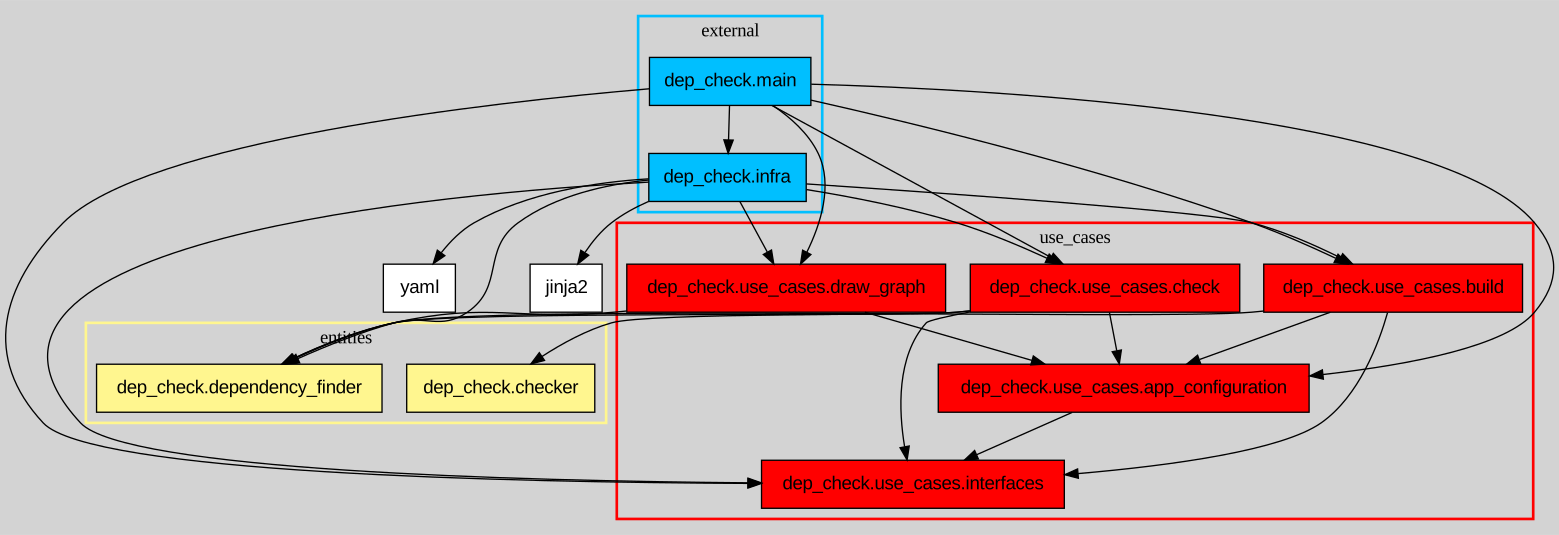
dep-check is a Python dependency checker. It lets you write rules to define what each module can import, dep-check can then parse each source file in your project to verify everything is in order. You can also use it to draw a dependency graph for your project.
Free software: MIT license
Supported languages
By default, the tool assumes it's operating on a Python project.
Installation
To install dep-check, run this command:
pip install dep-check
This is the preferred method to install dep-check, as it always installs the most recent stable release.
If you don't have pip installed, this Python installation guide can guide you through the process.
You can also see other installation methods.
Usage
Build your configuration file
dep_check build <ROOT_DIR> [-o config.yaml] [--lang LANG]
| Argument | Description | Optional | Default |
|---|---|---|---|
| ROOT_DIR | The project root directory, containing the source files | ❌ | N/A |
| -o / --output | The output file (yaml format) | ✔️ | dependency_config.yaml |
| --lang | The language the project is written in | ✔️ | python |
By default, any import is forbidden (denylist). The configuration is an allowlist.
This command lists the imports of each module in a yaml file. Use this file as a starting point to write dependency rules on which module can import what, using wildcards.
Here is an example of additional rules added to the initial yaml file:
---

dependency_rules:
'*':
    - dep_check.models
    - dep_check.dependency_finder
    - dep_check.checker

dep_check.infra.io:
    - dep_check.use_cases%
    - jinja2
    - yaml

dep_check.infra.std_lib_filter:
    - dep_check.use_cases.interfaces

dep_check.use_cases%:
    - dep_check.use_cases.app_configuration
    - dep_check.use_cases.interfaces

dep_check.main:
    - '*'

lang: python
local_init: false
- Use
*to include any string, even an empty one. - Use
%after a module name (e.g.my_module%) to include this module along with its sub-modules.
Here, for instance, the configuration file defines that dep_check.infra.io can import dep_check.use_cases, along with dep_check.use_cases.build, dep_check.use_cases.check, and so on.
To see all the supported wildcards, check the User Manual.
Check your configuration
Once your config file is ready, run
dep_check check <ROOT_DIR> [-c config.yaml] [--lang LANG]
| Argument | Description | Optional | Default |
|---|---|---|---|
| ROOT_DIR | The project root directory, containing the source files | ❌ | N/A |
| -c / --config | The yaml file in which you wrote the dependency rules | ✔️ | dependency_config.yaml |
| --lang | The language the project is written in | ✔️ | python |
The command reads the configuration file, and parses each source file. It then verifies, for each file, that every import is authorized by the rules defined in the configuration file.
When it's done, it writes a report on the console, listing import errors by module and unused rules:

Draw a dependency graph
You need to have graphviz installed to run this command
dep_check graph <ROOT_DIR> [-o file.svg/dot] [-c config.yaml] [--lang LANG]
| Argument | Description | Optional | Default |
|---|---|---|---|
| ROOT_DIR | The project root directory, containing the source files | ❌ | N/A |
| -o / --output | The output file you want (svg or dot format) | ✔️ | dependency_graph.svg |
| -c / --config | The graph configuration file containing options (yaml format) | ✔️ | None |
| --lang | The language the project is written in | ✔️ | python |
Note : if you generate a svg file, a dot file is also created in /tmp/graph.dot
A lot of options are available to customize your graph (hide some modules, add layers etc.). Check the User Manual for more information.
Contributing
If you want to make a contribution, be sure to follow the Contribution guide.
Credits
This package was created with Cookiecutter and the audreyr/cookiecutter-pypackage project template
Authors & contributors
Check out all the Authors and contributors of this project.
1 maintainer

Metadata
1 maintainer
Release files for dep-check 3.3.0
For a detailed explanation of source distributions (sdists) and built distributions (wheels), please see the package formats documentation.
Source distribution (sdist)
| File | Size | Uploaded | Provenance | Actions |
|---|---|---|---|---|
| dep_check-3.3.0.tar.gz | 102.2 kB | Without provenance | Details for dep_check-3.3.0.tar.gz |
Built distribution (wheel)
| File | Interpreter | ABI | Platform | Actions Reset |
|---|---|---|---|---|
| dep_check-3.3.0-py3-none-any.whl | Python 3 | none | any | Details for dep_check-3.3.0-py3-none-any.whl |
Total release size: 195.4 kB
Release files / dep_check-3.3.0.tar.gz
| Download URL | dep_check-3.3.0.tar.gz |
|---|---|
| Size | 102.2 kB |
| Tags | Source |
|
SHA-256 checksum How to use checksums |
155e8295451b84ad92a8136cd1e1ceb260ddcee29c7a552ff98a4ceccb3e7bb0
|
|
BLAKE2b-256 checksum How to use checksums |
5eb3779a0e05ae8c43a95b7eed69396336492212b867c89c2787ae4522f89d8b
|
| Upload date | |
|
Uploaded using Trusted Publishing? What is trusted publishing? |
No |
| Uploaded via |
twine/7.0.0 CPython/3.13.5
|
Release files / dep_check-3.3.0-py3-none-any.whl
| Download URL | dep_check-3.3.0-py3-none-any.whl |
|---|---|
| Size | 93.2 kB |
| Tags | Python 3 |
|
SHA-256 checksum How to use checksums |
3444581b988ee34a40118905bd4b6da9b5a33544ceefc462bdaa84058d96ce0f
|
|
BLAKE2b-256 checksum How to use checksums |
aa443d224bf47659238aeb0fb07abbe904549302d257506eebf9698c31827e59
|
| Upload date | |
|
Uploaded using Trusted Publishing? What is trusted publishing? |
No |
| Uploaded via |
twine/7.0.0 CPython/3.13.5
|
Security for dep-check 3.3.0
Provenance
Provenance describes where a file came from. On PyPI, provenance is shared via attestations, which provide a verifiable record of the build or publishing details. View details, limitations and caveats.
No provenance found
None of the files in this release were uploaded with provenance metadata.
A note on package security
PyPI is a repository for distributing packages, not a service for auditing them. While third-party security researchers and our staff do their best to detect and remove malicious packages, PyPI cannot guarantee the quality, security or suitability of any given package.
To learn more about protecting yourself from malicious actors, visit our package security documentation.














