
Generate a fast, filterable HTML image gallery from a CSV/Json file. Uses pandas syntax
Verified details
These details have been verified by PyPIProject links
GitHub Statistics
Maintainers

Project description
df-gallery



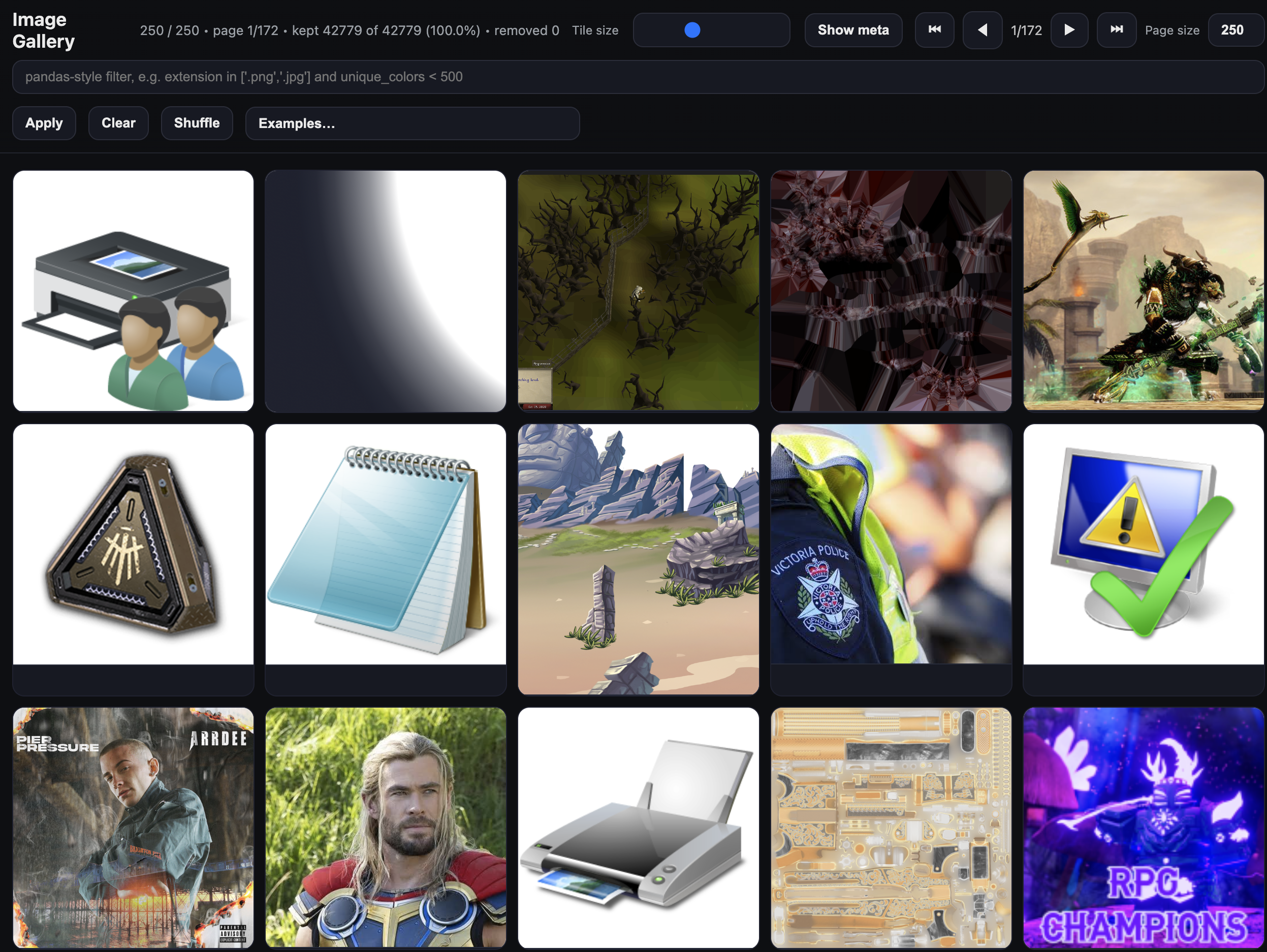
Generate a fast, filterable, shuffleable HTML image gallery from a directory, CSV, or JSON file. Great for exploring large image datasets with pandas-style filters in the browser.
Why
Most image work eventually involves staring at a folder of files and trying to understand what's in it — which ones are broken, which are mislabelled, which have unusual dimensions, which belong to a particular class. Standard tools make this painful: file browsers don't know about your metadata, notebooks require code for every query, and dedicated annotation tools are heavy and opinionated.
df-gallery is a lightweight escape hatch. Point it at a directory and get an instant browsable gallery. Point it at a CSV or JSON with per-image metadata and get a filterable, queryable view of your dataset — with the same pandas-style syntax you're already using. The output is a single self-contained HTML file you can share with anyone, no server required.
Install
pip install df-gallery
Quickstart
Point it at a folder of images:
dfg serve /path/to/images/
The gallery will open automatically in your browser. If it doesn't, navigate to http://127.0.0.1:8010 manually. Use --port to change the port.
Commands
serve — browse a directory or existing gallery
# Serve a directory of images (auto-scans for jpg, png, gif, webp, etc.)
dfg serve /path/to/images/

# Serve a previously built gallery HTML
dfg serve gallery.html

# Serve a directory and extract image dimensions/format (requires Pillow)
dfg serve /path/to/images/ --extract-metadata
build — build a gallery from a CSV or JSON file
Use build when your images already have metadata you care about — class labels, confidence scores, train/val/test splits, annotation flags, anything. You bring the metadata as a CSV or JSON file, and every column becomes a filterable field in the gallery UI.
The typical workflow is: run your pipeline, save results to a CSV alongside your image paths, then point build at that file to get an instant visual audit of what came out. The output is a single portable HTML file — no server needed to view it, just open it in a browser or share it with someone else.
# Basic: CSV with a 'filename' column containing image paths
dfg build annotations.csv --out gallery.html

# If your paths are relative to an image root directory
dfg build annotations.csv \
  --out gallery.html \
  --path-col filename \
  --img-root /path/to/images \
  --relative-to-html \
  --title "My Dataset"

# Build and immediately serve locally
dfg build annotations.csv --out gallery.html --serve

# Build, serve, and auto-rebuild whenever the CSV changes (useful during active labelling)
dfg build annotations.csv --out gallery.html --watch
The CSV or JSON must contain one column with image paths or URLs (default: filename). All other columns become filterable fields in the UI. JSON files should be a top-level array of objects.
Options
build
| Flag | Default | Description |
|---|---|---|
--out, -o |
gallery.html |
Output HTML file |
--path-col |
filename |
Column containing image paths or URLs |
--img-root |
Prefix prepended to each image path | |
--relative-to-html |
Make paths relative to the output HTML location | |
--title |
Image Gallery |
Page title |
--tile |
200 |
Base tile size in px |
--chunk |
500 |
Images rendered per idle batch |
--page-size |
250 |
Images per page |
--show-cols |
all | Subset of columns to show in metadata |
--collapse-meta |
Hide metadata by default | |
--serve |
Start a local server after building | |
--watch |
Rebuild when the source file changes (implies --serve) |
|
--port |
8000 |
Server port |
--host |
127.0.0.1 |
Server host |
--open / --no-open |
open | Open browser on start |
serve
| Flag | Default | Description |
|---|---|---|
--title |
Image Gallery |
Page title (directory mode) |
--extract-metadata |
Extract width, height, format via Pillow | |
--tile |
200 |
Base tile size in px |
--chunk |
500 |
Images rendered per idle batch |
--page-size |
250 |
Images per page |
--show-cols |
all | Subset of columns to show |
--collapse-meta |
Hide metadata by default | |
--port |
8010 |
Server port |
--host |
127.0.0.1 |
Server host |
--open / --no-open |
open | Open browser on start |
Filtering
The filter bar accepts pandas-style expressions evaluated in the browser:
extension in ['.png', '.jpg']
unique_colors < 500
filename.str.icontains('cat')
(width > 512) and (height > 512)
uses_transparency == True
Supported operators: and, or, not, in, is null, is not null, ==, !=, <, >, <=, >=
String methods: .str.contains(), .str.icontains(), .str.lower(), .str.upper()
Features
- Zero runtime dependencies — output is a single self-contained HTML file
- Chunked lazy rendering so large datasets stay responsive
- Tile size slider, pagination, shuffle
- Distributions tab with histograms, bar charts, violin plots, and grouped breakdowns by category
- Works with local paths, absolute paths, or remote URLs
Development
uv venv && uv pip install -e .[dev]
uv run pytest
uv build       # builds wheel + sdist
uv publish     # publish to PyPI (set UV_PUBLISH_TOKEN first)
License
MIT — Copyright (c) 2025 Freddie Lichtenstein
Project details
Verified details
These details have been verified by PyPIProject links
GitHub Statistics
Maintainers
Release history Release notifications | RSS feed


Download files
Download the file for your platform. If you're not sure which to choose, learn more about installing packages.
Source Distribution
Built Distribution
Filter files by name, interpreter, ABI, and platform.
If you're not sure about the file name format, learn more about wheel file names.
Copy a direct link to the current filters
File details
Details for the file df_gallery-0.1.9.tar.gz.
File metadata
- Download URL: df_gallery-0.1.9.tar.gz
- Upload date:
- Size: 18.9 kB
- Tags: Source
- Uploaded using Trusted Publishing? Yes
- Uploaded via: twine/5.1.1 CPython/3.12.13
File hashes
| Algorithm | Hash digest | |
|---|---|---|
| SHA256 |
71af4ffdc427f888d04602c6adce4c9a6630814d0f3242ee7ac8f0fe21ccc45f
|
|
| MD5 |
b3ac5368453ef5ce7ab314c0f3b4efbe
|
|
| BLAKE2b-256 |
d3726faa89d01aeb322234b143793afcacc34e848a28e4784b36fb30a386d5db
|
File details
Details for the file df_gallery-0.1.9-py3-none-any.whl.
File metadata
- Download URL: df_gallery-0.1.9-py3-none-any.whl
- Upload date:
- Size: 19.8 kB
- Tags: Python 3
- Uploaded using Trusted Publishing? Yes
- Uploaded via: twine/5.1.1 CPython/3.12.13
File hashes
| Algorithm | Hash digest | |
|---|---|---|
| SHA256 |
6b22322206fabff1c3f1aca62d7a2f6e9f1991554944aaf2b60c2557c7487014
|
|
| MD5 |
6afbeed0f8193ba188d13d9d900e767e
|
|
| BLAKE2b-256 |
9c961bd159d8ca9207e0b66e79d3fbea95084e2bc72767658a2ab8c1e90bf4f2
|






