

DialogStream Python Package
This repository contains the Python package for DialogStream, a powerful and flexible conversational AI platform.
Installation
To install the DialogStream Python package, you can use pip:
pip install dialogstream
Quick start
python -m venv .venv && source .venv/bin/activate && pip install dialogstream
JSON
python router.py -s "config/stream.json" -p "config/process.json"
Video stream testing
ffplay rtsp://192.168.1.2:554/Preview_01_sub
ffmpeg -i rtsp://192.168.1.2:554/Preview_01_sub -c copy -f segment -segment_time 6 -segment_format mp4 -strftime 1 -reset_timestamps 1 "./recordings/%Y%m%d_%H.mp4" -v debug
Usage
Here's a basic example of how to use the DialogStream package:
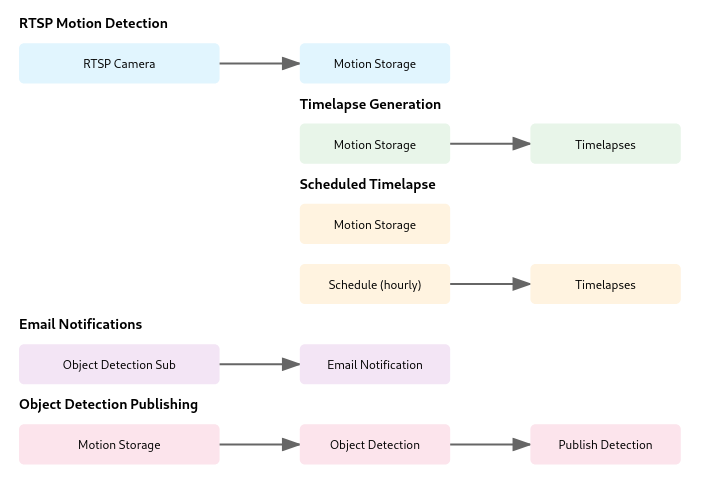
Flow configuration (flows.json)
The config/flows.json file defines video stream flows:
{
  "flows": [
    {
      "name": "RTSP z detekcją ruchu i zapisaniem obrazów",
      "steps": [
        "rtsp://test1234:test1234@192.168.188.225:554/Preview_01_sub",
        "file:///motion"
      ]
    },
    {
      "name": "Timelapse z obrazów",
      "steps": [
        "file:///motion",
        "file:///timelapses"
      ]
    },
    {
      "name": "Timelapse z obrazów co 1 godzine",
      "steps": [
        "file:///motion",
        "schedule://0 */1 * * *",
        "file:///timelapses"
      ]
    },
    {
      "name": "Timelapse z obrazów co 1 godzine",
      "steps": [
        "file:///motion",
        "schedule://0 */1 * * *",
        "file:///timelapses"
      ]
    },
    {
      "name": "Email z powiadamieniem, gdy pojawi się nowy obiekt",
      "steps": [
        "subscribe://object_detected",
        "email:///info@softreck.dev"
      ]
    },
    {
      "name": "Wysyłanie powiadomienia, gdy pojawi się nowy obiekt",
      "steps": [
        "file:///motion",
        "process://detect_object_on_picture",
        "publish://object_detected"
      ]
    }
  ]
}
Each flow contains:
name: A descriptive name for the flowsteps: A list of processing steps, where each step is a URL in the format:rtsp://- RTSP sourceprocess://- Processing step with parametersfile://- Save to file (supports strftime format)
Process configuration (process.json)
The config/process.json file defines processing rules:
[
  {
    "filter": [
      "rtsp",
      "process://motion",
      "file"
    ],
    "run": [
      "shell://ffmpeg -i $1 -c copy -f segment -segment_time 6 -segment_format mp4 -strftime 1 -reset_timestamps 1 $3"
    ]
  },
  {
    "filter": [
      "rtsp",
      "file"
    ],
    "run": [
      "shell://ffmpeg -i $1 -c copy -f segment -segment_time 6 -segment_format mp4 -strftime 1 -reset_timestamps 1 $2"
    ]
  }
]
Each rule contains:
filter: A list of URL patterns to matchrun: A list of shell commands to execute, where:$1, $2, $3...- refer to the corresponding URLs from the filter section- Commands are executed in the order defined in the list
For more detailed information, please refer to the official documentation.
Contributing
Contributions are welcome! If you find any bugs or have suggestions for improvements, please open an issue or submit a pull request on GitHub.
License
This project is licensed under the MIT License - see the LICENSE file for details.
1 maintainer

Metadata
1 maintainer
Release files for dialogstream 1.4.8
For a detailed explanation of source distributions (sdists) and built distributions (wheels), please see the package formats documentation.
Source distribution (sdist)
| File | Size | Uploaded | |
|---|---|---|---|
| dialogstream-1.4.8.tar.gz | 56.1 kB | Details |
Built distribution (wheel)
| File | Interpreter | ABI | Platform | Reset |
|---|---|---|---|---|
| dialogstream-1.4.8-py3-none-any.whl | Python 3 | none | any | Details |
Total release size: 74.4 kB
Release files / dialogstream-1.4.8.tar.gz
| Download URL | dialogstream-1.4.8.tar.gz |
|---|---|
| Size | 56.1 kB |
| Tags | Source |
|
SHA-256 checksum How to use checksums |
cec4eb76387e43d00ee2d216432a03a8e5937ff5b5810d5154e31077e8229965
|
|
BLAKE2b-256 checksum How to use checksums |
63a8f7aac3ab1da4822970871f3bc995daa01147511176638313f7cd07ee21ed
|
| Upload date | |
|
Uploaded using Trusted Publishing? What is trusted publishing? |
No |
| Uploaded via |
twine/5.1.1 CPython/3.11.3
|
Release files / dialogstream-1.4.8-py3-none-any.whl
| Download URL | dialogstream-1.4.8-py3-none-any.whl |
|---|---|
| Size | 18.3 kB |
| Tags | Python 3 |
|
SHA-256 checksum How to use checksums |
e37f59b8f36ceecf4444fcfbcb0bcaffcdc9b249e6ca35f84bf57cd2d77c3206
|
|
BLAKE2b-256 checksum How to use checksums |
c97e797da15def18b8c49a715a77b8e41a6727a49cb388c40fd549d819711525
|
| Upload date | |
|
Uploaded using Trusted Publishing? What is trusted publishing? |
No |
| Uploaded via |
twine/5.1.1 CPython/3.11.3
|














