
Discord Interactive Help

A Discord python framework to display an interactive help easily.


Features •
Usage •
Example •
Advanced
Running in Docker •
Notes
Documentation
Features
- 🔆 Easy to naviguate : Use reactions to naviguate through the Help manual.
- ⚙ Customized reaction : Use any emoji as naviguation icon.
- 🎮 Commands support : Go even further with interactive commands.
Usage
Install the package :
pip install discord-interactive
Import the Page and Help objects into your bot's code, and create your own help manual :
from discord_interactive import Page, Help

# Define each page
root = Page('Welcome !\n')
page_1 = Page('This is page 1')
page_2 = Page('This is page 2')

# Link pages together
page_1.link(page_2, description='Click this icon to access page 2', reaction='💩')
root.link(page_1, description='Click this icon to access page 1')

# Set the root page as the root of other page (so user can come back with a specific reaction)
root.root_of([page_1, page_2])

# Create the Help object
client = discord.Client()
h = Help(client, root)

...

# And display the help !
@client.event
async def on_message(message):
    if message.author != client.user:  # Do not answer to myself
        if message.content.startswith('/help'):
            await h.display(message.author)
Example
You can try the interactive help in this Discord server !
Simply join the server, and type /help in the chat.
Also, take a look at the code for this interactive help ! Check out the script main.py.
Advanced
If you are interested in advanced usage such as interactive commands, take a look at the full documentation.
Example of advanced usage :
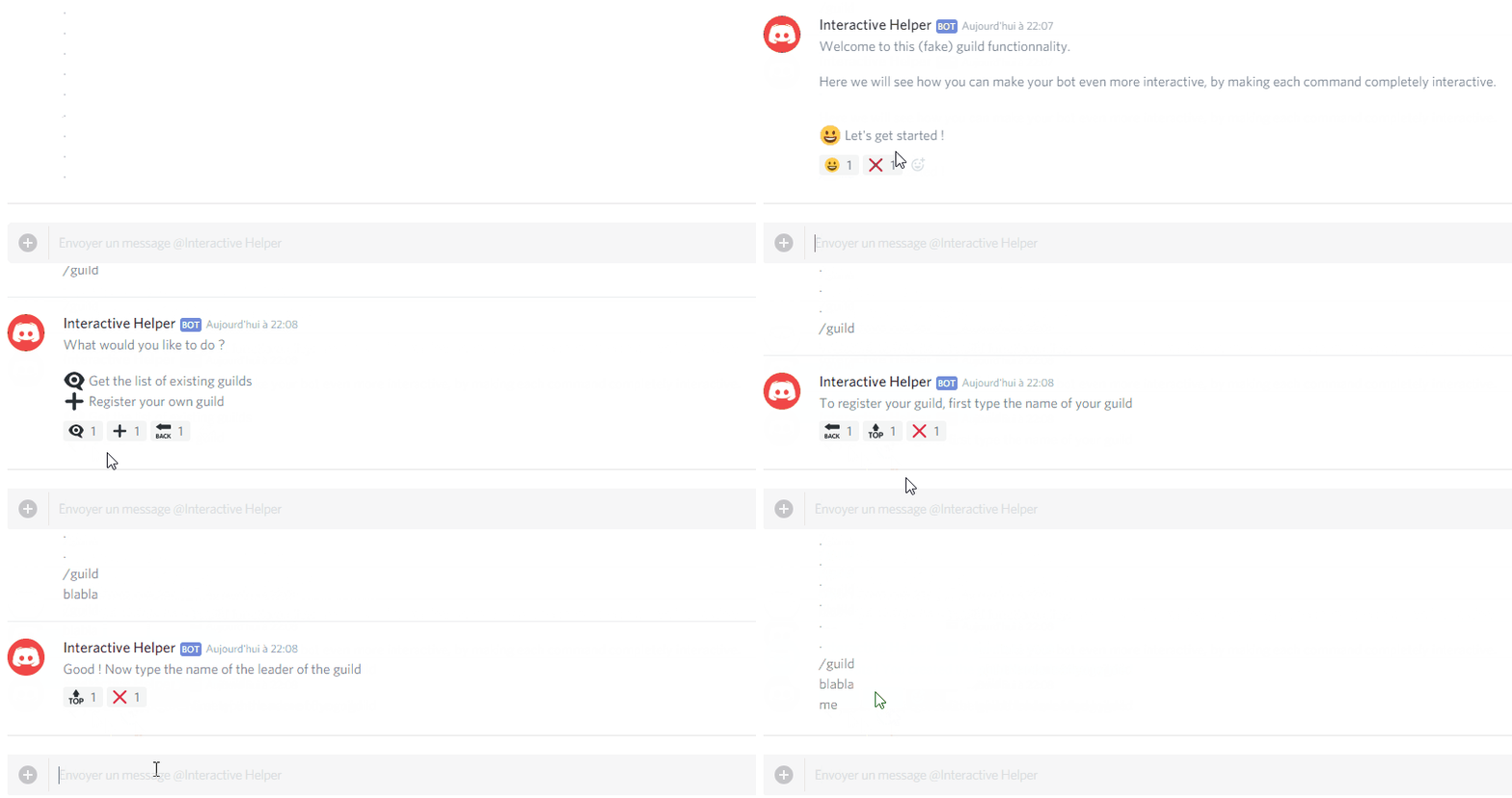
If you can't find what you are looking for, or need help about this library, you can open a discussion thread or an issue, we will be glad to help !
Running in Docker
A Dockerfile is available to run the example easily. Just build the image :
docker build -t discord_interactive_help .
And then start it with your Discord bot token :
DISCORD_BOT_SECRET="<your_token>" docker run -e DISCORD_BOT_SECRET discord_interactive_help
Notes
-
This idea was already known for some time, I didn't get the idea myself. I just wanted to share an easy framework to implement it for your own bot.
-
This is working only with the Python Discord API.
1 maintainer

Metadata
1 maintainer
Release files for discord-interactive 4.1.0
For a detailed explanation of source distributions (sdists) and built distributions (wheels), please see the package formats documentation.
Source distribution (sdist)
| File | Size | Uploaded | Provenance | |
|---|---|---|---|---|
| discord_interactive-4.1.0.tar.gz | 12.1 kB | Without provenance | Details |
Built distribution (wheel)
| File | Interpreter | ABI | Platform | Reset |
|---|---|---|---|---|
| discord_interactive-4.1.0-py3-none-any.whl | Python 3 | none | any | Details |
Total release size: 23.3 kB
Release files / discord_interactive-4.1.0.tar.gz
| Download URL | discord_interactive-4.1.0.tar.gz |
|---|---|
| Size | 12.1 kB |
| Tags | Source |
|
SHA-256 checksum How to use checksums |
bc661c259ecef29db73077e1b5b2a6da5651b839e4026cf010df2f3eca9a8cbb
|
|
BLAKE2b-256 checksum How to use checksums |
64025d2d3a8ededbb4768e70483b395e98d267b4909bc7a088989001e4ceb907
|
| Upload date | |
|
Uploaded using Trusted Publishing? What is trusted publishing? |
No |
| Uploaded via |
twine/4.0.2 CPython/3.11.4
|
Release files / discord_interactive-4.1.0-py3-none-any.whl
| Download URL | discord_interactive-4.1.0-py3-none-any.whl |
|---|---|
| Size | 11.2 kB |
| Tags | Python 3 |
|
SHA-256 checksum How to use checksums |
0804908fcca05ea3fb1afbf76c497186579dbdcf3dd60b14c253d3b408967777
|
|
BLAKE2b-256 checksum How to use checksums |
ab0dd7fbb4e0e47095bb4716c0fe679ebed76f960b8346f5d28f04eae96102bc
|
| Upload date | |
|
Uploaded using Trusted Publishing? What is trusted publishing? |
No |
| Uploaded via |
twine/4.0.2 CPython/3.11.4
|
Security for discord-interactive 4.1.0
Provenance
Provenance describes where a file came from. On PyPI, provenance is shared via attestations, which provide a verifiable record of the build or publishing details. View details, limitations and caveats.
No provenance found
None of the files in this release were uploaded with provenance metadata.
A note on package security
PyPI is a repository for distributing packages, not a service for auditing them. While third-party security researchers and our staff do their best to detect and remove malicious packages, PyPI cannot guarantee the quality, security or suitability of any given package.
To learn more about protecting yourself from malicious actors, visit our package security documentation.














