
DiscordLevelingCard
A library with Rank cards for your discord bot.
now create your own custom rank cards!

card preview
card1
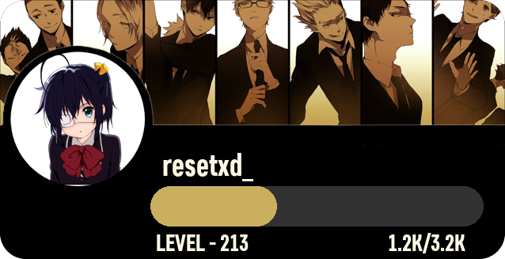
card2
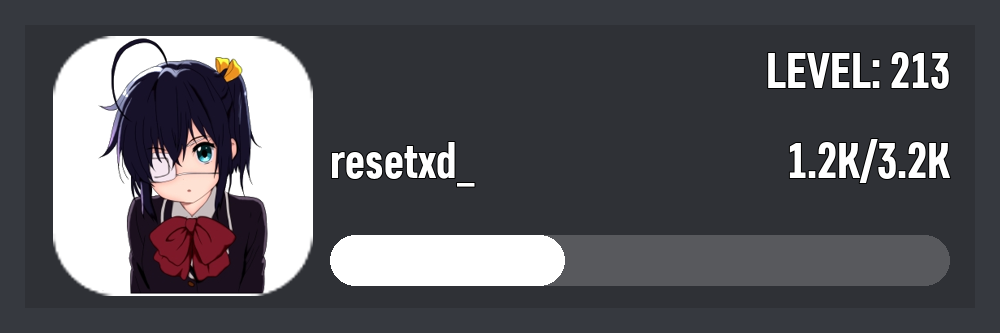
card3 same as card2 but with background
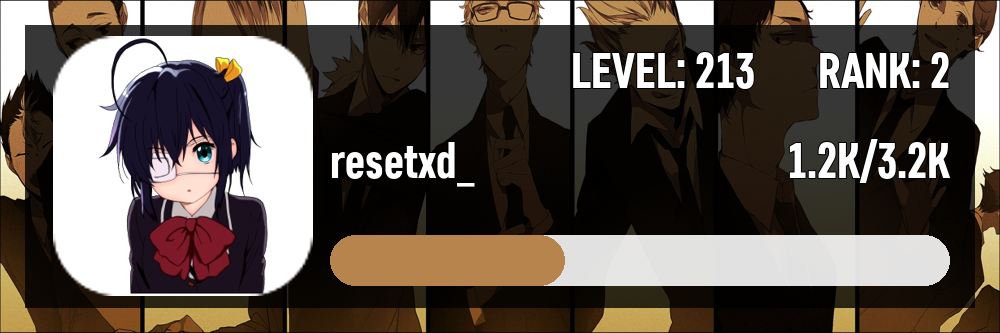
installation
for pypi version
pip install discordlevelingcard
for github developement version
pip install git+https://github.com/krishsharma0413/DiscordLevelingCard
How To Use
If you don't provide path then the method will return bytes which can directly be used in discord.py/disnake/pycord/nextcord 's File class.
Example
since no path was provided, it returns bytes which can directly be used in discord.py and its fork's File class.
from disnake.ext import commands
from DiscordLevelingCard import RankCard, Settings
import disnake

client = commands.Bot()
# define background, bar_color, text_color at one place
card_settings = Settings(
    background="url or path to background image",
    text_color="white",
    bar_color="#000000"
)

@client.slash_command(name="rank")
async def user_rank_card(ctx, user:disnake.Member):
    await ctx.response.defer()
    a = RankCard(
        settings=card_settings,
        avatar=user.display_avatar.url,
        level=1,
        current_exp=1,
        max_exp=1,
        username="cool username"
    )
    image = await a.card1()
    await ctx.edit_original_message(file=disnake.File(image, filename="rank.png")) # providing filename is very important
Documentation
RankCard class
__init__ method
RankCard(
    settings: Settings,
    avatar:str,
    level:int,
    current_exp:int,
    max_exp:int,
    username:str,
    rank: Optional[int] = None
)
-
settings- Settings class from DiscordLevelingCard. -
avatar- avatar image url. -
level- level of the user. -
current_exp- current exp of the user. -
max_exp- max exp of the user. -
username- username of the user. -
rank- rank of the user. (optional)
methods
card1card2card3
Sandbox class
__init__ method
RankCard(
    settings: Settings,
    avatar:str,
    level:int,
    current_exp:int,
    max_exp:int,
    username:str,
    cacheing:bool = True,
    rank: Optional[int] = None
)
-
settings- Settings class from DiscordLevelingCard. -
avatar- avatar image url. -
level- level of the user. -
current_exp- current exp of the user. -
max_exp- max exp of the user. -
username- username of the user. -
rank- rank of the user. (optional) -
cacheing- if set toTruethen it will cache the image and will not regenerate it again. (default isTrue)
methods
custom_card1
Settings class
__init__ method
Settings(
    background: Union[PathLike, BufferedIOBase, str],
    bar_color: Optional[str] = 'white',
    text_color: Optional[str] = 'white',
    background_color: Optional[str]= "#36393f"

)
-
background- background image url or file-object inrbmode.4:1aspect ratio recommended.
-
bar_color- color of the bar [example: "white" or "#000000"] -
text_color- color of the text [example: "white" or "#000000"] -
background_color- color of the background [example: "white" or "#000000"]
card1 method
RankCard.card1(resize: int = 100)
attribute
resize: resize the final image. (default is 100, treat it as a percentage.)
returns
byteswhich can directly be used withindiscord.Fileclass.
card2 method
RankCard.card2(resize: int = 100)
attribute
resize: resize the final image. (default is 100, treat it as a percentage.)
returns
byteswhich can directly be used withindiscord.Fileclass.
card3 method
RankCard.card3(resize: int = 100)
attribute
resize: resize the final image. (default is 100, treat it as a percentage.)
returns
byteswhich can directly be used withindiscord.Fileclass.
custom_card1 method
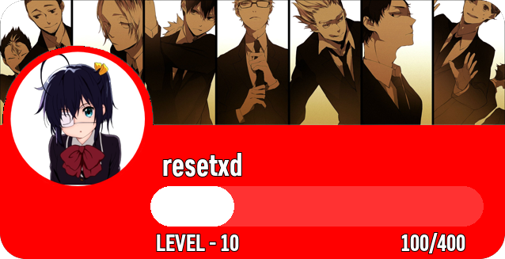
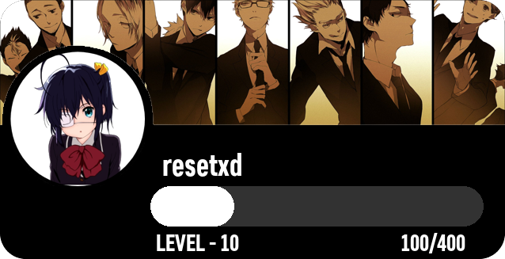
Sandbox.custom_card1(card_colour:str = "black", resize: int = 100)
attribute
resize: resize the final image. (default is 100, treat it as a percentage.)card_colour: color of the card. (default is black)
returns
byteswhich can directly be used withindiscord.Fileclass.
examples
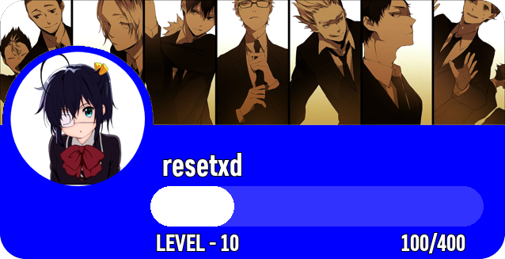
custom_canvas method
Sandbox.custom_canvas(
    resize:int = 100,

    senstivity:int = 200,
    card_colour: str = "black",

    border_width: int = 25,
    border_height: int = 25,

    avatar_frame: str = "curvedborder",
    avatar_size: int = 260,
    avatar_position: tuple = (53, 36),

    text_font: str = "levelfont.otf",

    username_position: tuple = (330,130),
    username_font_size: int = 50,

    level_position: tuple = (500,40),
    level_font_size: int = 50,

    exp_position: tuple = (775,130),
    exp_font_size: int = 50,

)
attribute
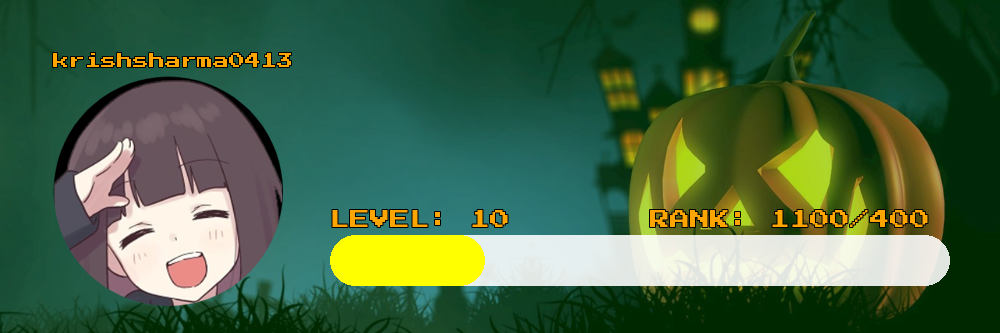
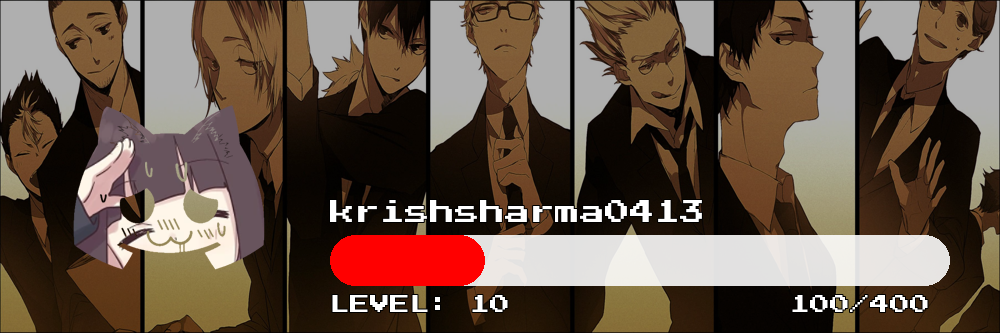
has_background: if set toTruethen it will add a background to the image. (default isTrue)background_colour: color of the background. (default isblack)canvas_size: size of the canvas. (default is(1000, 333))resize: resize the final image. (default is 100, treat it as a percentage.)overlay: A list of overlays to be placed on the background. (Default is[[(1000-50, 333-50),(25, 25), "black", 200]].)avatar_frame:circlesquarecurvedborderhexagonor path to a self created mask. (Default iscurvedborder.)text_font: Default islevelfont.otfor path to a custom otf or ttf file type font.avatar_size: size of the avatar. (default is260)avatar_position: position of the avatar. (default is(53, 36))username_position: position of the username. (default is(330,130))username_font_size: font size of the username. (default is50)level_position: position of the level. (default is(500,40))level_font_size: font size of the level. (default is50)exp_position: position of the exp. (default is(775,130))exp_font_size: font size of the exp. (default is50)exp_bar_width: width of the exp bar. (default is619)exp_bar_height: height of the exp bar. (default is50)exp_bar_background_colour: color of the exp bar background. (default iswhite)exp_bar_position: position of the exp bar. (default is(330, 235))exp_bar_curve: curve of the exp bar. (default is30)extra_text: A list of extra text to be placed on the image. (Default isNone.)exp_bar: The calculated exp of the user. (Default isNone.)
returns
byteswhich can directly be used withindiscord.Fileclass.
examples
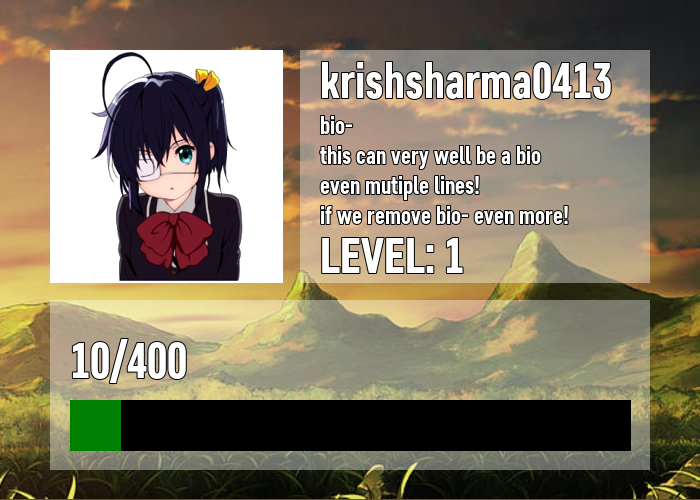
An Example that i really loved was this one, here is the code for it as well. (you might have to tweak a lot to make it work for you though. )
from DiscordLevelingCard import Sandbox, Settings
import asyncio
from PIL import Image

setting = Settings(
    background="./bg.jpg",
    bar_color="green",
    text_color="white")

async def main():
    rank = Sandbox(
        username="krishsharma0413",
        level=1,
        current_exp=10,
        max_exp=400,
        settings=setting,
        avatar=Image.open("./avatarimg.png")
    )
    result = await rank.custom_canvas(
        avatar_frame="square",
        avatar_size=233,
        avatar_position=(50, 50),
        exp_bar_background_colour = "black",
        exp_bar_height=50,
        exp_bar_width=560,
        exp_bar_curve=0,
        exp_bar_position=(70, 400),
        username_position=(320, 50),
        level_position=(320, 225),
        exp_position=(70, 330),
        canvas_size=(700, 500),

        overlay=[[(350, 233),(300, 50), "white", 100],
                 [(600, 170),(50, 300), "white", 100]],

        extra_text=[
            ["bio-", (320, 110), 25, "white"],
            ["this can very well be a bio", (320, 140), 25, "white"],
            ["even mutiple lines!", (320, 170), 25, "white"],
            ["if we remove bio- even more!", (320, 200), 25, "white"],
            ]

    )

    # you don't need this line if you are using this in discord.py
    Image.open(result).save("result.png", "PNG")


asyncio.run(main())
and this is how it looks :D
if you want to see changelog then click here
please star the repository if you like it :D
1 maintainer

Metadata
1 maintainer
Release files for discordlevelingcard 0.6.0
For a detailed explanation of source distributions (sdists) and built distributions (wheels), please see the package formats documentation.
Source distribution (sdist)
| File | Size | Uploaded | Provenance | Actions |
|---|---|---|---|---|
| discordlevelingcard-0.6.0.tar.gz | 69.3 kB | Without provenance | Details for discordlevelingcard-0.6.0.tar.gz |
Built distribution (wheel)
| File | Interpreter | ABI | Platform | Actions Reset |
|---|---|---|---|---|
| discordlevelingcard-0.6.0-py3-none-any.whl | Python 3 | none | any | Details for discordlevelingcard-0.6.0-py3-none-any.whl |
Total release size: 142.1 kB
Release files / discordlevelingcard-0.6.0.tar.gz
| Download URL | discordlevelingcard-0.6.0.tar.gz |
|---|---|
| Size | 69.3 kB |
| Tags | Source |
|
SHA-256 checksum How to use checksums |
075f2c7b271c6c853e1d14e4c06f6370bd5dde12c4b38baf45eee924404752f0
|
|
BLAKE2b-256 checksum How to use checksums |
13fa98758387ff05f8f849d40ff411c038a70348194bad987f6e95ce550171b0
|
| Upload date | |
|
Uploaded using Trusted Publishing? What is trusted publishing? |
No |
| Uploaded via |
poetry/1.1.13 CPython/3.9.4 Windows/10
|
Release files / discordlevelingcard-0.6.0-py3-none-any.whl
| Download URL | discordlevelingcard-0.6.0-py3-none-any.whl |
|---|---|
| Size | 72.8 kB |
| Tags | Python 3 |
|
SHA-256 checksum How to use checksums |
ef61894ecc925b8b58bda1b7450780baac7e5ab944fbc3de9d15c59bce0fa3d0
|
|
BLAKE2b-256 checksum How to use checksums |
41009daa68c97a0036276abc6c300c0a52a63cb6c308257291f7cecdf5a8cc54
|
| Upload date | |
|
Uploaded using Trusted Publishing? What is trusted publishing? |
No |
| Uploaded via |
poetry/1.1.13 CPython/3.9.4 Windows/10
|
Security for discordlevelingcard 0.6.0
Provenance
Provenance describes where a file came from. On PyPI, provenance is shared via attestations, which provide a verifiable record of the build or publishing details. View details, limitations and caveats.
No provenance found
None of the files in this release were uploaded with provenance metadata.
A note on package security
PyPI is a repository for distributing packages, not a service for auditing them. While third-party security researchers and our staff do their best to detect and remove malicious packages, PyPI cannot guarantee the quality, security or suitability of any given package.
To learn more about protecting yourself from malicious actors, visit our package security documentation.














