

Divide Et Impera And Scan (and also merge the scan results)





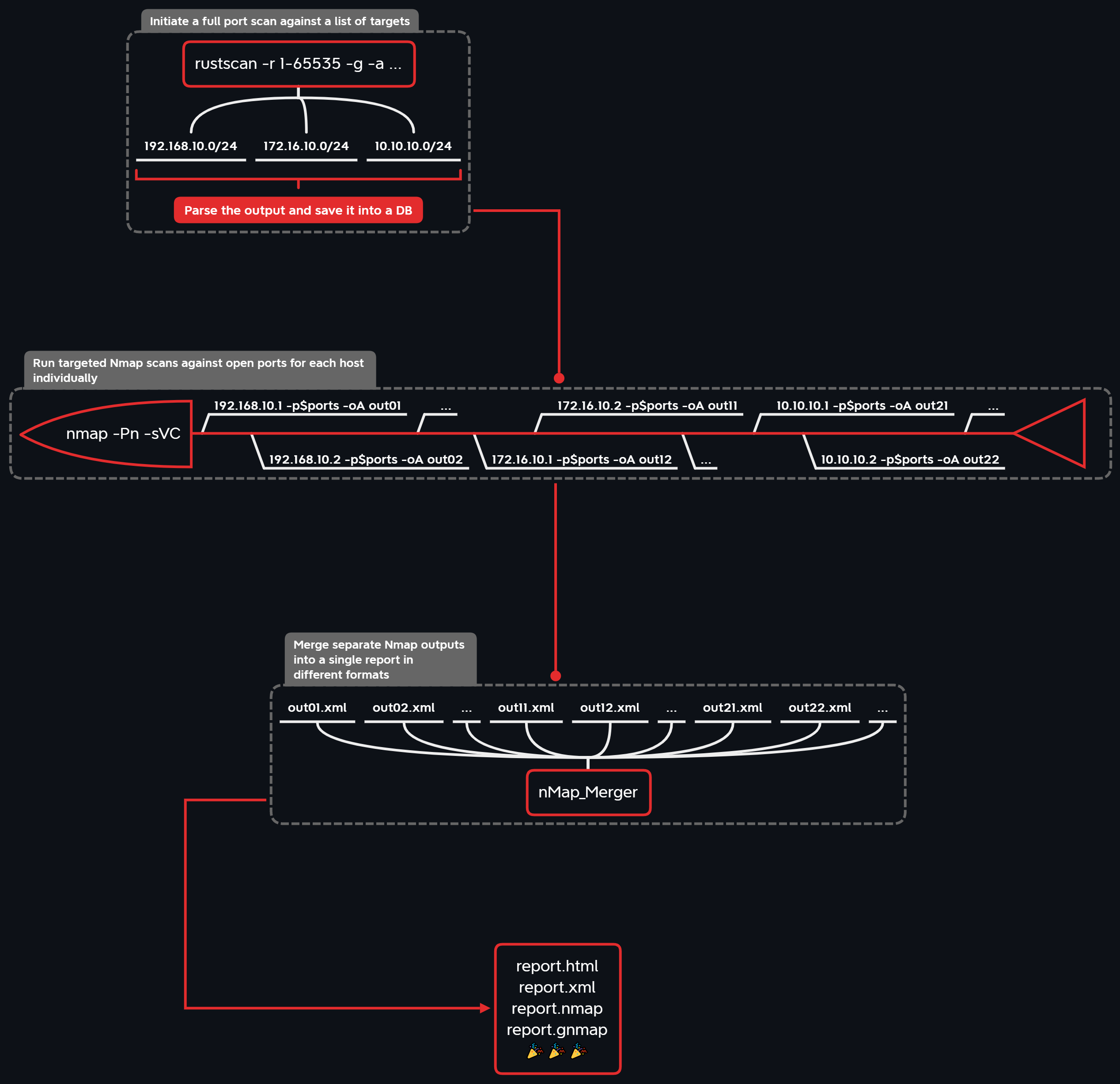
DivideAndScan is used to efficiently automate port scanning routine by splitting it into 3 phases:
- Discover open ports for a bunch of targets.
- Run Nmap individually for each target with version grabbing and NSE actions.
- Merge the results into a single Nmap report (different formats available).
For the 1st phase a fast port scanner is intended to be used (Masscan / RustScan / Naabu), whose output is parsed and stored in a database (TinyDB). Next, during the 2nd phase individual Nmap scans are launched for each target with its set of open ports (multiprocessing is supported) according to the database data. Finally, in the 3rd phase separate Nmap outputs are merged into a single report in different formats (XML / HTML / simple text / grepable) with nMap_Merger.
Potential use cases:
- Pentest engagements / red teaming with a large scope to enumerate.
- Cybersecurity wargames / training CTF labs.
- OSCP certification exam.
How It Works
How to Install
Prerequisites
To successfully divide and scan we need to get some good port scanning tools.
📑 Note: if you don't feel like messing with dependecies on your host OS, skip to the Docker part.
Nmap
sudo apt install nmap sudo xsltproc -y
sudo nmap --script-updatedb
Masscan
cd /tmp
git clone https://github.com/robertdavidgraham/masscan.git
cd masscan
make
sudo make install
cd && rm -rf /tmp/masscan
RustScan
cd /tmp

wget -qO- https://api.github.com/repos/RustScan/RustScan/releases/latest \
| grep "browser_download_url.*amd64.deb" \
| cut -d: -f2,3 \
| tr -d \" \
| wget -qO rustscan.deb -i-

sudo dpkg -i rustscan.deb
cd && rm /tmp/rustscan.deb

sudo wget https://gist.github.com/snovvcrash/c7f8223cc27154555496a9cbb4650681/raw/a76a2c658370d8b823a8a38a860e4d88051b417e/rustscan-ports-top1000.toml -O /root/.rustscan.toml
Naabu
sudo mkdir /opt/projectdiscovery
cd /opt/projectdiscovery

wget -qO- https://api.github.com/repos/projectdiscovery/naabu/releases/latest \
| grep "browser_download_url.*linux-amd64.tar.gz" \
| cut -d: -f2,3 \
| tr -d \" \
| sudo wget -qO naabu.tar.gz -i-

sudo tar -xzf naabu.tar.gz
sudo mv naabu-linux-amd64 naabu
sudo rm LICENSE.md naabu.tar.gz README.md
sudo ln -s /opt/projectdiscovery/naabu /usr/local/bin/naabu
Installation
DivideAndScan is available on PyPI as divideandscan, though I recommend installing it from GitHub with pipx in order to always have the bleeding-edge version:
~$ pipx install -f "git+https://github.com/snovvcrash/DivideAndScan.git"
~$ das
For debbugging purposes you can set up a dev environment with poetry:
~$ git clone https://github.com/snovvcrash/DivideAndScan
~$ cd DivideAndScan
~$ poetry install
~$ poetry run das
📑 Note: DivideAndScan uses sudo to run all the port scanners, so it will ask for the password when scanning commands are invoked.
Using from Docker
You can run DivideAndScan in a Docker container as follows:
~$ docker run -it --rm --name das -v `pwd`:/app snovvcrash/divideandscan
Since the tool requires some input data and produces some output data, you should specify your current working directory as the mount point at /app within the container. You may want to set an alias to make the base command shorter:
~$ alias das='docker run -it --rm --name das -v `pwd`:/app snovvcrash/divideandscan'
~$ das
How to Use
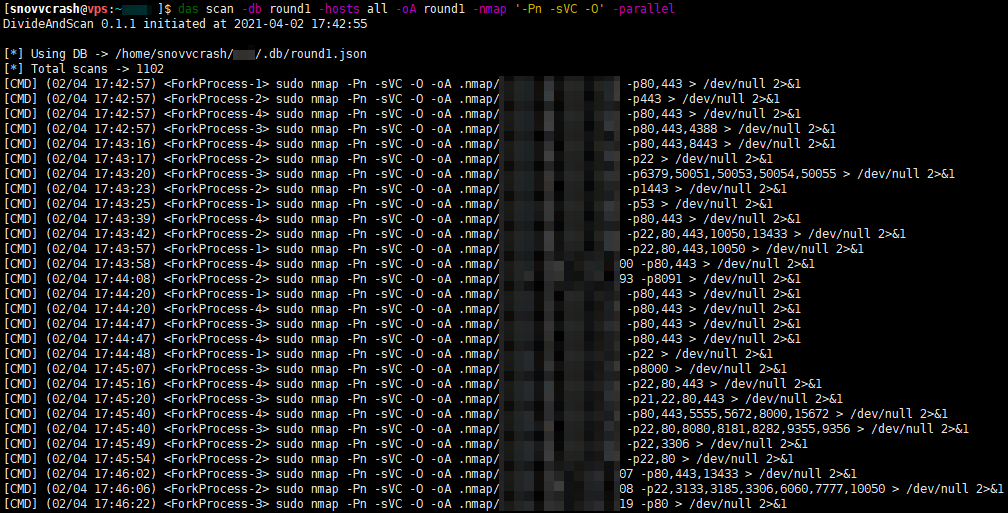
More examples coming soon at snovvcrash.rocks...
0. Preparations
|
Make a new directory to start DivideAndScan from. The tool will create subdirectories in CWD to store the output, so I recommend launching it from a clean directory to stay organized: ~$ mkdir divideandscan
~$ cd divideandscan
|
1. Filling the DB
|
Provide the ⚠️ Warning: please, make sure that you understand what you're doing, because nearly all port scanning tools can damage the system being tested if used improperly. # Masscan example
~$ das add -db testdb masscan '--rate 1000 -iL hosts.txt --open -p1-65535'
# RustScan example
~$ das add -db testdb rustscan '-b 1000 -t 2000 -u 5000 -a hosts.txt -r 1-65535 -g --no-config'
# Naabu example
~$ das add -db testdb naabu '-rate 1000 -iL hosts.txt -p - -silent -s s'
When the module completes its work, a hidden directory |
2. Targeted Scanning
|
Launch targeted Nmap scans with the # Scan by hosts
~$ das scan -db testdb -hosts all -oA report1
~$ das scan -db testdb -hosts 192.168.1.0/24,10.10.13.37 -oA report1
~$ das scan -db testdb -hosts hosts.txt -oA report1
# Scan by ports
~$ das scan -db testdb -ports all -oA report2
~$ das scan -db testdb -ports 22,80,443,445 -oA report2
~$ das scan -db testdb -ports ports.txt -oA report2
To start Nmap simultaneously in multiple processes, specify the ~$ das scan -db testdb -hosts all -oA report -parallel [-proc 4]
The output format is selected with Also, you can inspect the contents of the database with ~$ das scan -db testdb -hosts all -show
|
3 (Optional). Merging the Reports
|
In order to generate a report independently of the # Merge outputs by hosts
~$ das report -db testdb -hosts all -oA report1
~$ das report -db testdb -hosts 192.168.1.0/24,10.10.13.37 -oA report1
~$ das report -db testdb -hosts hosts.txt -oA report1
# Merge outputs by ports
~$ das report -db testdb -ports all -oA report2
~$ das report -db testdb -ports 22,80,443,445 -oA report2
~$ das report -db testdb -ports ports.txt -oA report2
📑 Note: keep in mind that the |
Help
usage: das [-h] {add,scan,report} ...

 -----------------------------------------------------------------------------------------------
|  ________  .__      .__    .___        _____              .____________                       |
|  \______ \ |__|__  _|__| __| _/____   /  _  \   ____    __| _/   _____/ ____ _____    ____    |
|   |    |  \|  \  \/ /  |/ __ |/ __ \ /  /_\  \ /    \  / __ |\_____  \_/ ___\\__  \  /    \   |
|   |    `   \  |\   /|  / /_/ \  ___//    |    \   |  \/ /_/ |/        \  \___ / __ \|   |  \  |
|  /_______  /__| \_/ |__\____ |\___  >____|__  /___|  /\____ /_______  /\___  >____  /___|  /  |
|          \/                 \/    \/        \/     \/      \/       \/     \/     \/     \/   |
|  {@snovvcrash}            {https://github.com/snovvcrash/DivideAndScan}             {vX.Y.Z}  |
 -----------------------------------------------------------------------------------------------

positional arguments:
  {add,scan,report}
    add              run a full port scan {masscan,rustscan,naabu} and add the output to DB
    scan             run targeted Nmap scans against hosts and ports from DB
    report           merge separate Nmap outputs into a single report in different formats

optional arguments:
  -h, --help         show this help message and exit

Psst, hey buddy... Wanna do some organized p0r7 5c4nn1n6?
ToDo
- Add projectdiscovery/naabu parser
- Add armada scanner (?) parser
Support
If this tool has been useful for you, feel free to buy me a beer coffee!

1 maintainer

Metadata
1 maintainer
Release files for divideandscan 0.1.3
For a detailed explanation of source distributions (sdists) and built distributions (wheels), please see the package formats documentation.
Source distribution (sdist)
| File | Size | Uploaded | Provenance | Actions |
|---|---|---|---|---|
| divideandscan-0.1.3.tar.gz | 17.9 kB | Without provenance | Details for divideandscan-0.1.3.tar.gz |
Built distribution (wheel)
| File | Interpreter | ABI | Platform | Actions Reset |
|---|---|---|---|---|
| divideandscan-0.1.3-py3-none-any.whl | Python 3 | none | any | Details for divideandscan-0.1.3-py3-none-any.whl |
Total release size: 34.0 kB
Release files / divideandscan-0.1.3.tar.gz
| Download URL | divideandscan-0.1.3.tar.gz |
|---|---|
| Size | 17.9 kB |
| Tags | Source |
|
SHA-256 checksum How to use checksums |
659e87bd7384de881cc8413bb9849c915d77640f7c39066243bd8d41dba0b555
|
|
BLAKE2b-256 checksum How to use checksums |
c86251ba258ecc36839d800aa899b4dd55982f7b1c34e0d4117835c2cc1afe5a
|
| Upload date | |
|
Uploaded using Trusted Publishing? What is trusted publishing? |
No |
| Uploaded via |
poetry/1.1.6 CPython/3.7.7 Linux/5.4.0-1043-azure
|
Release files / divideandscan-0.1.3-py3-none-any.whl
| Download URL | divideandscan-0.1.3-py3-none-any.whl |
|---|---|
| Size | 16.0 kB |
| Tags | Python 3 |
|
SHA-256 checksum How to use checksums |
43a9a6cc7e1ce1795466409422d88f230e5b0d9c3b7ca14b80f513289c3a4b7b
|
|
BLAKE2b-256 checksum How to use checksums |
7b81aaad0074d73aeb095c8fbeedec2e501b9ebc638f19037cc74cef5b8ecc53
|
| Upload date | |
|
Uploaded using Trusted Publishing? What is trusted publishing? |
No |
| Uploaded via |
poetry/1.1.6 CPython/3.7.7 Linux/5.4.0-1043-azure
|
Security for divideandscan 0.1.3
Provenance
Provenance describes where a file came from. On PyPI, provenance is shared via attestations, which provide a verifiable record of the build or publishing details. View details, limitations and caveats.
No provenance found
None of the files in this release were uploaded with provenance metadata.
A note on package security
PyPI is a repository for distributing packages, not a service for auditing them. While third-party security researchers and our staff do their best to detect and remove malicious packages, PyPI cannot guarantee the quality, security or suitability of any given package.
To learn more about protecting yourself from malicious actors, visit our package security documentation.














