
What it does?
Can’t remember Class-Based-Views parameters? Are you tired of reiterating the same mundane steps while adding a new view? Try django-addview.
How it works?
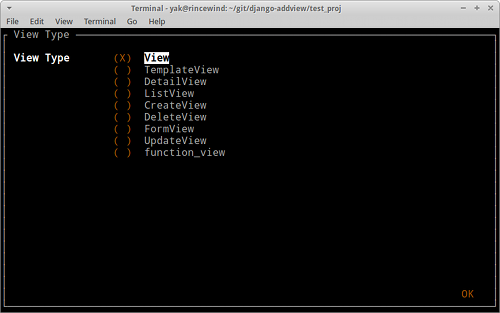
Django-addview provides you with a simple ncurses based gui to add new class-based or functional view.
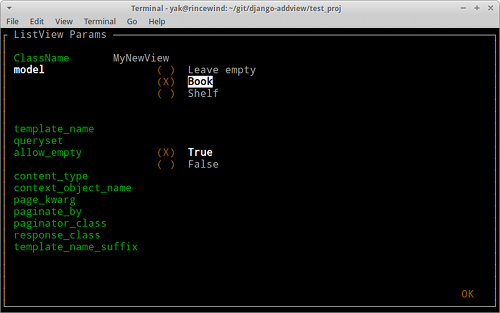
Creates class declaration (fill needed parameters, select a model from the dropdown etc.)
Remembers all class-based attributes for you
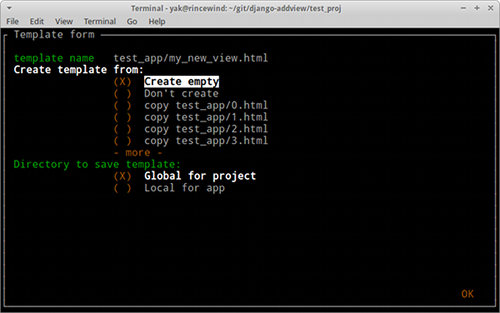
Creates template (empty, or copied from existing one)
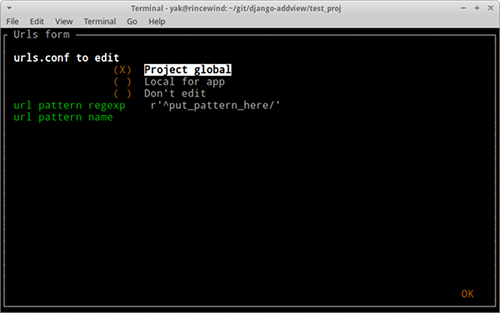
Adds entry to urls.py
Cares about all imports
Installation
pip install django_addview
And add to settings.py:
INSTALLED_APPS = (
    ...
    'django_addview',
)
Usage
./manage.py addview app_name
Remember: What you type inside app is what you get inside your code, so if you want to have a string you have to quote it. For example:
template_name "test_app/my_view.html"
Configuration
Django-addview expects only one config variable. It’s : ADDVIEW_GLOBAL_TEMPLATE_DIR = ... which points to directory where you keep your project templates (It’s good practice to keep templates inside one directory per project unless you write reusable app).
Django-addview can create your views in two locations. One is ADDVIEW_GLOBAL_TEMPLATE_DIR and second is templates directory inside your apps directory. You choose between them while adding view in gui.
Example of configuration:
SITE_ROOT = os.path.join(os.path.dirname(os.path.realpath(__file__)), '..')
ADDVIEW_GLOBAL_TEMPLATE_DIR = os.path.join(SITE_ROOT, 'templates')
Screenshots
1 maintainer

Release files for django-addview 0.1.2
For a detailed explanation of source distributions (sdists) and built distributions (wheels), please see the package formats documentation.
Source distribution (sdist)
| File | Size | Uploaded | |
|---|---|---|---|
| django-addview-0.1.2.tar.gz | 10.9 kB | Details |
Release files / django-addview-0.1.2.tar.gz
| Download URL | django-addview-0.1.2.tar.gz |
|---|---|
| Size | 10.9 kB |
| Tags | Source |
|
SHA-256 checksum How to use checksums |
3ca0ab95adc7c6d69d5e18b388c9eaf87fc09613aee16c5b9957ab88eb185f2c
|
|
BLAKE2b-256 checksum How to use checksums |
8c2836b231d3b1a3cdb2080fff2ddac09489f78b183dbd7a38af7cba63494d32
|
| Upload date | |
|
Uploaded using Trusted Publishing? What is trusted publishing? |
No |














