
Adding views in Django as easy as pie.

Project description
What it does?
Can’t remember Class-Based-Views parameters? Are you tired of reiterating the same mundane steps while adding a new view? Try django-addview.
How it works?
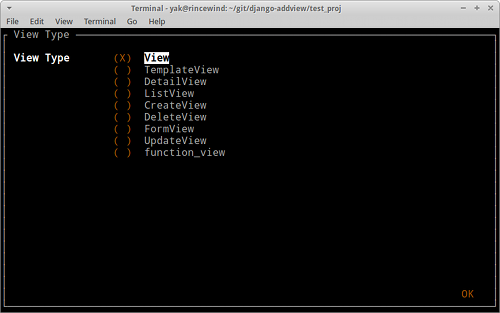
Django-addview provides you with a simple ncurses based gui to add new class-based or functional view.
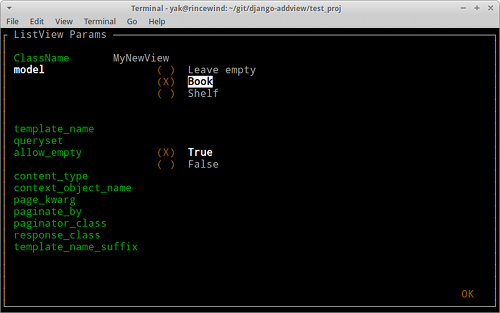
Creates class declaration (fill needed parameters, select a model from the dropdown etc.)
Remembers all class-based attributes for you
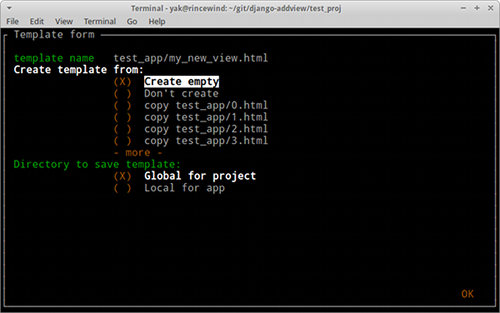
Creates template (empty, or copied from existing one)
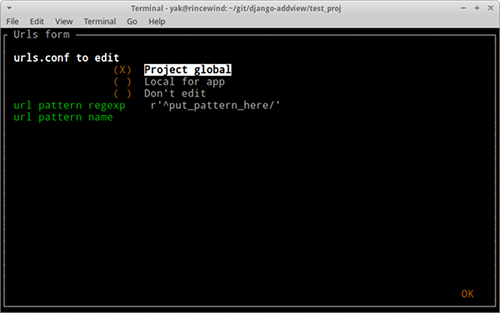
Adds entry to urls.py
Cares about all imports
Installation
pip install django_addview
And add to settings.py:
INSTALLED_APPS = (
    ...
    'django_addview',
)
Usage
./manage.py addview app_name
Remember: What you type inside app is what you get inside your code, so if you want to have a string you have to quote it. For example:
template_name "test_app/my_view.html"
Configuration
Django-addview expects only one config variable. It’s : ADDVIEW_GLOBAL_TEMPLATE_DIR = ... which points to directory where you keep your project templates (It’s good practice to keep templates inside one directory per project unless you write reusable app).
Django-addview can create your views in two locations. One is ADDVIEW_GLOBAL_TEMPLATE_DIR and second is templates directory inside your apps directory. You choose between them while adding view in gui.
Example of configuration:
SITE_ROOT = os.path.join(os.path.dirname(os.path.realpath(__file__)), '..')
ADDVIEW_GLOBAL_TEMPLATE_DIR = os.path.join(SITE_ROOT, 'templates')
Screenshots
Release history Release notifications | RSS feed


Download files
Download the file for your platform. If you're not sure which to choose, learn more about installing packages.
Source Distribution
File details
Details for the file django-addview-0.1.2.tar.gz.
File metadata
- Download URL: django-addview-0.1.2.tar.gz
- Upload date:
- Size: 10.9 kB
- Tags: Source
- Uploaded using Trusted Publishing? No
File hashes
| Algorithm | Hash digest | |
|---|---|---|
| SHA256 |
3ca0ab95adc7c6d69d5e18b388c9eaf87fc09613aee16c5b9957ab88eb185f2c
|
|
| MD5 |
c0e7644c1b067299fe83c4bd82332dc6
|
|
| BLAKE2b-256 |
8c2836b231d3b1a3cdb2080fff2ddac09489f78b183dbd7a38af7cba63494d32
|






