
Django-catalog
Application allows to organize objects in tree hierarhy.
This Documentation is poor for now, but it contains instructions how to set up application with default settings.
Download & Install:
Download
From python package index::
pip install djang-catalog
From github::
pip install -e git://github.com/redsolution/django-catalog.git@2.0.0#egg=Django-catalog
Quick install
Include applications into INSTALLED_APPS:
INSTALLED_APPS += [
...
'mptt',
'catalog',
'catalog.contrib.defaults',
...
]
Include catalog in urls.py:
urlpatterns += patterns('',
    url(r'^catalog/', include('catalog.urls.by_slug')),
)
Run manage.py syncdb
For more complicated installation options look into documentation.
Features
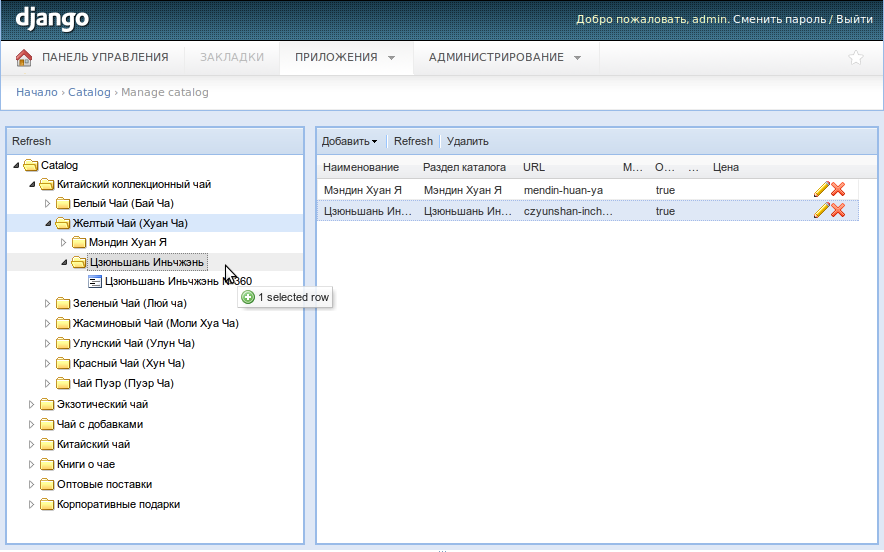
Nice admin interface with drag-n-grop manipulations.
Generic model relationship architechture (any model can be included in catalog tree)
Useful templatetags library
Hightly customizable
Screenshot:
Redsolution CMS classifiers:
6 maintainers


Metadata
6 maintainers
Release files for django-catalog 2.1.1
For a detailed explanation of source distributions (sdists) and built distributions (wheels), please see the package formats documentation.
Source distribution (sdist)
| File | Size | Uploaded | Provenance | |
|---|---|---|---|---|
| django-catalog-2.1.1.tar.gz | 31.8 kB | Without provenance | Details |
Release files / django-catalog-2.1.1.tar.gz
| Download URL | django-catalog-2.1.1.tar.gz |
|---|---|
| Size | 31.8 kB |
| Tags | Source |
|
SHA-256 checksum How to use checksums |
c09f7ecf77f01bb9f191a2b3379c0c60cb6cf463481a20a1499d3b6be4976119
|
|
BLAKE2b-256 checksum How to use checksums |
135042678125531c711f50427533447a59be3fa8e6a61365c6088bacaaeff484
|
| Upload date | |
|
Uploaded using Trusted Publishing? What is trusted publishing? |
No |
Security for django-catalog 2.1.1
Provenance
Provenance describes where a file came from. On PyPI, provenance is shared via attestations, which provide a verifiable record of the build or publishing details. View details, limitations and caveats.
No provenance found
None of the files in this release were uploaded with provenance metadata.
A note on package security
PyPI is a repository for distributing packages, not a service for auditing them. While third-party security researchers and our staff do their best to detect and remove malicious packages, PyPI cannot guarantee the quality, security or suitability of any given package.














