


This application provides simple, extensible contact-form functionality for Django sites.
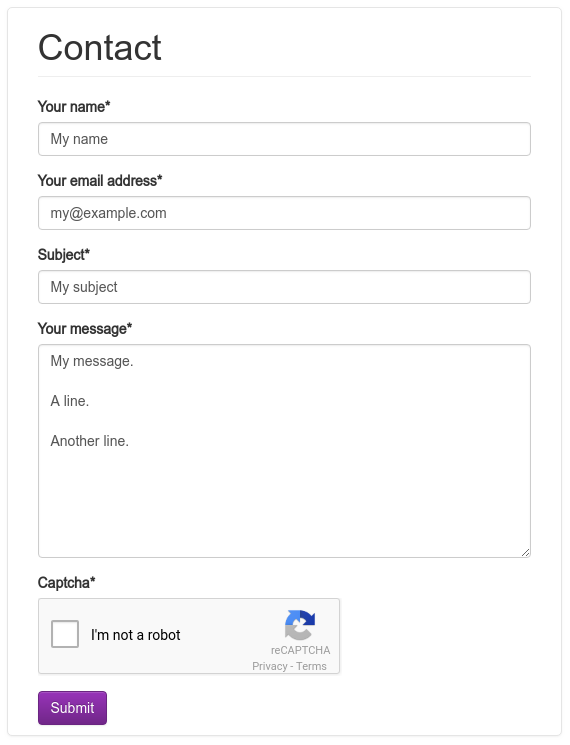
Mail header ‘From: “Your Name” <your@email.com>’, so it’s easy to reply to the sender.
Subject provided by the user.
Uses reCAPTCHA to block spam robots.
Quick start
Requirements:
Python (2.7, 3.4, 3.5, 3.6)
Django (1.11, 2.0)
To use the contact_forms.forms.ReCaptchaContactForm form:
Install django-contact-form-recaptcha:
pip install django-contact-form-recaptchaObtain the reCAPTCHA API keys from https://www.google.com/recaptcha.
Supply the API keys for django-contact-form-recaptcha to use. You can either place them in the Django settings RECAPTCHA_PUBLIC_KEY and RECAPTCHA_PRIVATE_KEY, or in the environment variables PYTHON_RECAPTCHA_PUBLIC_KEY and PYTHON_RECAPTCHA_PRIVATE_KEY.
Add the application captcha in the Django settings:
INSTALLED_APPS = [
    ...
    'captcha',
]
Then use the following URLconf:
from django.conf.urls import include, url


urlpatterns = [
    # ... other URL patterns for your site ...
    url(r'^contact/', include('contact_form.recaptcha_urls')),
]
If you’re using Django 2.0, you can do:
from django.urls import include, path


urlpatterns = [
    # ... other URL patterns for your site ...
    path('contact/', include('contact_form.recaptcha_urls')),
]
Create your templates in your templates directory:
contact_form/contact_form.html
contact_form/contact_form_sent.html
contact_form/contact_form.txt
contact_form/contact_form_subject.txt
Or you can use the templates provided by this package. Remember to add the application contact_form in the Django settings.
Emails are sent to the MANAGERS defined in your Django settings:
MANAGERS = [('John', 'john@example.com'),]
Full documentation for all functionality is included and is also available online.
Originally forked from django-contact-form.
1 maintainer

Metadata
1 maintainer
Release files for django-contact-form-recaptcha 1.6.1
For a detailed explanation of source distributions (sdists) and built distributions (wheels), please see the package formats documentation.
Source distribution (sdist)
| File | Size | Uploaded | Provenance | |
|---|---|---|---|---|
| django-contact-form-recaptcha-1.6.1.tar.gz | 55.5 kB | Without provenance | Details |
Built distribution (wheel)
| File | Interpreter | ABI | Platform | Reset |
|---|---|---|---|---|
| django_contact_form_recaptcha-1.6.1-py2.py3-none-any.whl | Python 3, Python 2 | none | any | Details |
Total release size: 79.8 kB
Release files / django-contact-form-recaptcha-1.6.1.tar.gz
| Download URL | django-contact-form-recaptcha-1.6.1.tar.gz |
|---|---|
| Size | 55.5 kB |
| Tags | Source |
|
SHA-256 checksum How to use checksums |
71e2edc16008c838b5e99185550438ecc6e9682ff330f731cd32bfc934087025
|
|
BLAKE2b-256 checksum How to use checksums |
400e44ac274e92346b53cb6173e7ea3d8c250f5fe3fcb933fcfe40dd948c7ec6
|
| Upload date | |
|
Uploaded using Trusted Publishing? What is trusted publishing? |
No |
| Uploaded via |
twine/1.12.1 pkginfo/1.4.2 requests/2.20.1 setuptools/40.6.2 requests-toolbelt/0.8.0 tqdm/4.28.1 CPython/3.6.6
|
Release files / django_contact_form_recaptcha-1.6.1-py2.py3-none-any.whl
| Download URL | django_contact_form_recaptcha-1.6.1-py2.py3-none-any.whl |
|---|---|
| Size | 24.3 kB |
| Tags | Python 2 Python 3 |
|
SHA-256 checksum How to use checksums |
50f908f6d00447095edfa8059dd50a2b330ecde8f7c978a11128cc648cea3269
|
|
BLAKE2b-256 checksum How to use checksums |
83d056d08b3437b2584086d943a5053c7e2758242c0f8cf12c3ec5d2862cf6ff
|
| Upload date | |
|
Uploaded using Trusted Publishing? What is trusted publishing? |
No |
| Uploaded via |
twine/1.12.1 pkginfo/1.4.2 requests/2.20.1 setuptools/40.6.2 requests-toolbelt/0.8.0 tqdm/4.28.1 CPython/3.6.6
|
Security for django-contact-form-recaptcha 1.6.1
Provenance
Provenance describes where a file came from. On PyPI, provenance is shared via attestations, which provide a verifiable record of the build or publishing details. View details, limitations and caveats.
No provenance found
None of the files in this release were uploaded with provenance metadata.
A note on package security
PyPI is a repository for distributing packages, not a service for auditing them. While third-party security researchers and our staff do their best to detect and remove malicious packages, PyPI cannot guarantee the quality, security or suitability of any given package.
To learn more about protecting yourself from malicious actors, visit our package security documentation.














