
django-crispy-bulma
This project is an early work in progress. You should not use this package yet, as it is poorly documented and is missing many important features. We'll remove this header when it's ready to use.
About
This is a Django application to add django-crispy-forms layout objects for Bulma.
It is a fork of crispy-forms-bulma by Jure Hotujec, with the intention
of adding support for Django 2.0+, as well as for components found in the bulma-extensions library.
Installation
You can install django-crispy-bulma from PyPI by running pip install django-crispy-bulma. Make sure you also have django-crispy-forms installed, as it will not work without it. In order to activate it, you'll need to modify your projects settings.py file.
First, add django-crispy-bulma to your INSTALLED_APPS:
INSTALLED_APPS = [
    'crispy_forms',
    'django_crispy_bulma',
    # ...
]
Next, add the following to the bottom of the file in order to configure crispy_forms to use the bulma template pack:
CRISPY_ALLOWED_TEMPLATE_PACKS = (
    "bootstrap",
    "uni_form",
    "bootstrap3",
    "bootstrap4",
    "bulma",
)

CRISPY_TEMPLATE_PACK = "bulma"
You may also need to use Layout objects or form objects from django_crispy_bulma in order to build certain objects, like the UploadField. See the documentation below for specifics on objects like these.
EmailField
The EmailField looks like this:
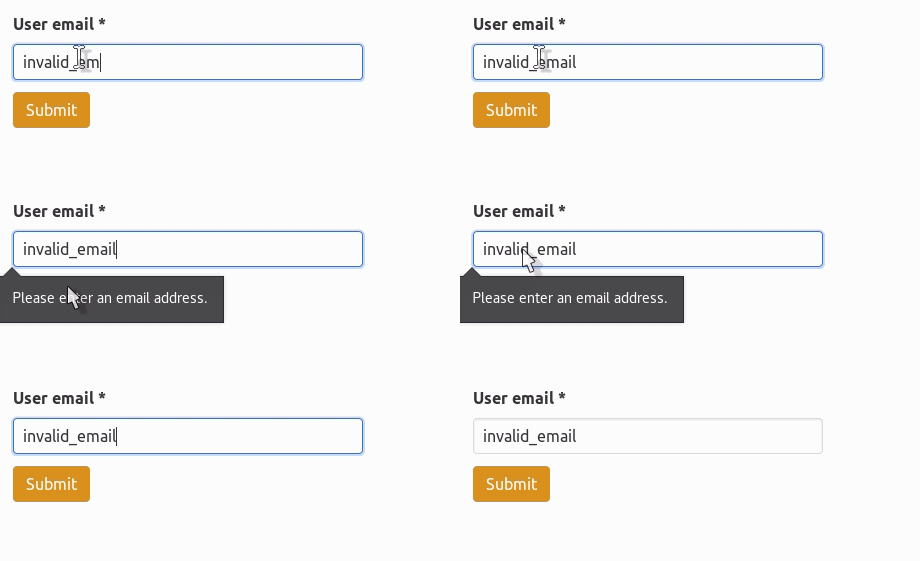
An EmailField can be created simply, like any other field in your form. For example:
from django.forms import Form
from django_crispy_bulma.forms import EmailField

class MyForm(Form):
    my_email = EmailField(
        label="email",
        required=True
    )
IconField
If you'd like to render a field with an icon in it, you'll need to make use of the Crispy Forms layout object,
and the IconField from our package. See below for an example:

from crispy_forms.helper import FormHelper
from crispy_forms.layout import Layout
from django.forms import Form, CharField

from django_crispy_bulma.layout import IconField

class SetupForm(Form):
    def __init__(self, *args, **kwargs):
        super().__init__(*args, **kwargs)

        self.helper = FormHelper(self)

        self.helper.layout = Layout(
            IconField("username", icon_prepend="user"),
        )

    username = CharField(
        label="Username",
        required=True,
    )
Note that IconField also supports an icon_append keyword argument. This field only supports font-awesome icons.
UploadField
The UploadField looks like this:
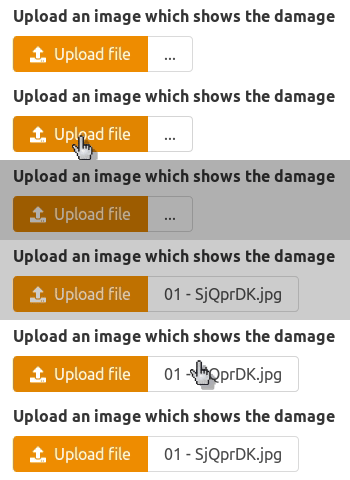
To create these with CrispyForms, you'll need both a form object and a layout object from our package. Here's an example of how to use them.
from crispy_forms.helper import FormHelper
from crispy_forms.layout import Layout
from django import forms
from django_crispy_bulma.layout import UploadField
from django_crispy_bulma.forms import ImageField, FileField

class MyForm(forms.Form):
    my_image = ImageField(
        label="Upload an image of your dog",
        required=False
    )
    my_file = FileField(
        label="Upload your actual dog in .dog format",
        required=True
    )

    def __init__(self, *args, **kwargs):
        super().__init__(*args, **kwargs)
        self.helper = FormHelper()

        self.helper.layout = Layout(
            UploadField("my_image"),
            UploadField("my_file"),
        )
A little bit of javascript is needed in order to get the filename to display after a file upload is successful.
Written in vanilla JS, this might look something like this:
window.onload = function() {
    // Apply this to all upload fields
    const upload_fields = document.querySelectorAll(".file");
    for (let i = 0; i < upload_fields.length; i++) {
        let input = upload_fields[i].querySelector(".file-input");
        let filename = upload_fields[i].querySelector(".file-name");

        input.onchange = function() {
            filename.textContent = input.files[0].name;
        }
    }
};
For your convenience, we provide a script that handles this in our companion package, django-simple-bulma. We highly recommend you use these two packages together.
1 maintainer

Metadata
1 maintainer
Release files for django-crispy-bulma 0.2
For a detailed explanation of source distributions (sdists) and built distributions (wheels), please see the package formats documentation.
Source distribution (sdist)
| File | Size | Uploaded | |
|---|---|---|---|
| django-crispy-bulma-0.2.tar.gz | 14.7 kB | Details |
Built distribution (wheel)
| File | Interpreter | ABI | Platform | Reset |
|---|---|---|---|---|
| django_crispy_bulma-0.2-py3-none-any.whl | Python 3 | none | any | Details |
Total release size: 46.2 kB
Release files / django-crispy-bulma-0.2.tar.gz
| Download URL | django-crispy-bulma-0.2.tar.gz |
|---|---|
| Size | 14.7 kB |
| Tags | Source |
|
SHA-256 checksum How to use checksums |
6ce8f6df87442040fbba39baede7aba7026d71359376e3ce7eecb7695b09c02b
|
|
BLAKE2b-256 checksum How to use checksums |
6fedd371fe5ed301e5184cbeac9bd5cf0dfe2fe637e4db2194b81679d15cb9c3
|
| Upload date | |
|
Uploaded using Trusted Publishing? What is trusted publishing? |
No |
| Uploaded via |
twine/3.1.1 pkginfo/1.5.0.1 requests/2.22.0 setuptools/41.2.0 requests-toolbelt/0.9.1 tqdm/4.40.2 CPython/3.7.5
|
Release files / django_crispy_bulma-0.2-py3-none-any.whl
| Download URL | django_crispy_bulma-0.2-py3-none-any.whl |
|---|---|
| Size | 31.5 kB |
| Tags | Python 3 |
|
SHA-256 checksum How to use checksums |
72a61a1ed87611c87347553f57879dd05e21b4cedffaf9c676971488a0f065b2
|
|
BLAKE2b-256 checksum How to use checksums |
9ec6c4473904bd2e1015b273af708ec1981bd46e010308982122fa8403aedd2b
|
| Upload date | |
|
Uploaded using Trusted Publishing? What is trusted publishing? |
No |
| Uploaded via |
twine/3.1.1 pkginfo/1.5.0.1 requests/2.22.0 setuptools/41.2.0 requests-toolbelt/0.9.1 tqdm/4.40.2 CPython/3.7.5
|














