
Interactive and user friendly querying of Django project DBs.
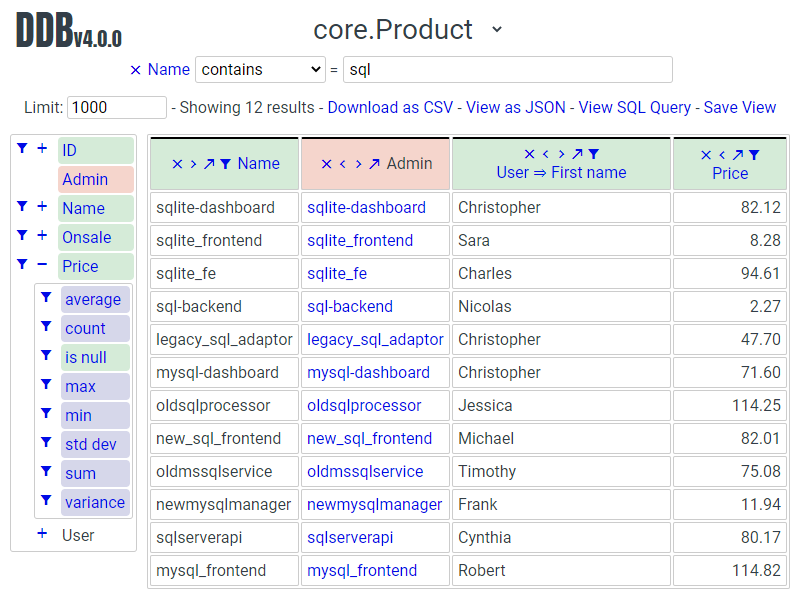
Features
- Zero config, if it's in the admin it's in the browser
- Select fields (including calculated fields), aggregate, filter, sort and pivot
- Automatically follow OneToOneFields and ForeignKeys
- Respects per user admin permissions
- Share views simply by sharing URLs
- Save views and optionally make them available to services like Google sheets
- Download views as CSV or JSON
Roadmap (in no particular order)
- UI improvements
- ToMany support
- Advanced filtering
- PII controls
- Graphs
Demo
There is a live demo site available. The Django project is a small e-commerce site selling microservices.
Source: https://github.com/tolomea/data-browser-demo
Admin: https://data-browser-demo.herokuapp.com/admin/
Data Browser: https://data-browser-demo.herokuapp.com/data-browser/
Because it's hosted on Heroku free tier it might take a while to respond to the first page load.
Installation
- Run
pip install django-data-browser - Add
"data_browser"to installed_apps. - Add
path("data-browser/", include("data_browser.urls"))to your urls. - Run
python manage.py migrate.
Settings
| Name | Docs Section | Function |
|---|---|---|
| DATA_BROWSER_ALLOW_PUBLIC | Security | Allow selected saved views to be accessed without admin login in limited circumstances. |
| DATA_BROWSER_DEV | Development | Enable proxying frontend to JS dev server. |
| DATA_BROWSER_FE_DSN | Sentry | The DSN the frontend sentry should report to, disabled by default. |
Security
There are two types of Django views in the Data Browser.
Queries can only be accessed by Django "staff members" and support general querying of the database (checked against the users admin permissions).
Views can be accessed by anyone but they can only be used to access a query that has been saved and made public and they have long random URL's.
You can use the admin permission data_browser | view | Can make a saved view publically available to restrict who can make views public. To be public the view must be marked as public and owned by someone who has the permission. Users without the permission can not mark views as public and can not edit any view that is marked public.
Additionally the entire public views system is gated by the Django settings value DATA_BROWSER_ALLOW_PUBLIC.
Sentry
The frontend code has builtin Sentry support, it is disabled by default. To enable it set the Django settings value DATA_BROWSER_FE_DSN, for example to set it to the Data Browser project Sentry use:
DATA_BROWSER_FE_DSN = "https://af64f22b81994a0e93b82a32add8cb2b@o390136.ingest.sentry.io/5231151"
Version numbers
The Data Browser uses the standard Major.Minor.Patch version numbering scheme.
Patch versions may include bug fixes and minor features.
Minor versions are for significant new features.
Major versions are for major features, significant changes to existing functionality and breaking changes.
Patch and Minor versions should never contain breaking changes and should always be backward compatible. A breaking change is a change that makes backward incompatible changes to one or more of the following:
- The query URL format.
- The json, csv etc data formats.
request.databrowser.- Invalidates saved views.
- Changes the URL's of public saved views.
Customization and Performance
get_queryset
The Data Browser does it's fetching in two stages.
First it does a single DB query to get the majority of the data. To construct the queryset for this it will call get_queryset on the ModelAdmin of the current Model. It uses .values() to fetch only the data it needs from the database and it will inline all referenced models to ensure it doesn't do multiple queries.
Secondly for any calculated fields it will then fetch the complete objects that are needed for those calculated fields. To construct the querysets for these it will call get_queryset on their associated ModelAdmins. These calls are aggregated so it will only make one per model.
As a simple example. If you did a query against the Book model for the fields:
book.namebook.author.namebook.author.agebook.publisher.name
Where the author.age is actually a property on the Author Model then it would do the following two queries:
BookAdmin.get_queryset().values("name", "author__name", "author__id", "publisher__name")
AuthorAdmin.get_queryset().in_bulk(pks=...)
Where the pks passed to in_bulk in the second query came from author__id in the first.
When the Data Browser calls the admin get_queryset functions it will put some context in request.databrowser. This means you can test to see if the Data Browser is making the call as follows:
if request.databrowser:
    # Data Browser specific customization
This is particularly useful if you want to route the Data Browser to a DB replica.
The context includes a calculated_fields member that is set when doing the second stage requests for calculated fields. You can use this to do conditional prefetching or annotating to support those fields like this:
if not hasattr(request, "databrowser") or "my_field" in request.databrowser[`calculated_fields`]:
	# do prefetching and annotating associated with my_field
get_fieldsets
The Data Browser also calls get_fieldsets to find out what fields the current user can access. When it does this it always passes a newly constructed instance of the relevant model. This is necessary to work around Django's User admin messing with the fieldsets when None is passed.
As with get_queryset the Data Browser will set request.databrowser when calling get_fieldsets and you can test this to detect it and make Data Browser specific customizations.
URL Format
The query URL format is query/<model>/<fields>.<format>?<filters>.
Model is a Django app and model name for example library.Book
Fields are a series of comma separated fields, where each field is the path to that field from the model with the parts separated by __, e.g. author__name. This path structure also includes aggregates and functions e.g. author__birthday__month__count. Fields can be pivoted (where appropriate) by prefixing them with &. And sorted by suffixing with a direction +/- and a priority e.g. author__birthday+1.
Filters use the same __ path format as fields including a lookup e.g. author__name__contains=Joe.
Format determines the returned data format, the currently available formats are:
| Format | Details |
|---|---|
| html | Load the interactive Javascript frontend. |
| csv | Standard CSV format. |
| json | Standard JSON format, the JS frontend uses this for all data access. |
| ctx | See the JSON encoded config context passed to the JS on page load. |
Development
The easiest way to develop this is against your existing client project.
The compiled Javascript is checked into the repo, so if only want to mess with the Python then it's sufficient to:
- Install the Data Browser in editable mode
pip install -e <directory to your git clone>.
If you want to modify the Javascript then you also need to:
- Enable proxying to the JS dev server by adding
DATA_BROWSER_DEV = Trueto your settings. - Run the Javascript dev server with
WDS_SOCKET_PORT=3000 PUBLIC_URL=data_browser npm start. TheWDS_SOCKET_PORTis so the proxied JS can find it's dev server. ThePUBLIC_URLtells the JS dev server what path to serve from and should be the same as the URL you have mounted the Data Browser on in your urls file.
To run the Python tests, in the top level of your git clone run pip install -r requirements.txt then pytest.
There is also pre-commit config for lint etc to enable this run pip install pre-commit && pre-commit install then lint will run on git commit. The linting includes Black and isort autoformatting.
To build the JS, move the files around appropriately and recreate the wheels run build.sh.
During development it can be useful to look at the .ctx and .json views. The .ctx view will show you the initial context being passed to the Javascript on page load. The .json view is the actual API request the Javascript uses to fetch query results.
Structure

Terminology
| Term | Meaning |
|---|---|
| aggregate | Corresponds to a Django aggregation function. |
| bound query | A query that has been validated against the config. |
| calculated field | A field that can not be sorted or filtered, generally a field whose value comes from a property or function on the Admin or Model. |
| concrete field | A field that can be sorted and filtered, generally anything that came directly from the ORM. |
| config | Information that doesn't change based on the particular query, includes all the models and their fields. |
| field name | Just the name of the field e.g. created_time. |
| field path | Includes information on how to reach the model the field is on e.g. ["order","seller","created_time"]. |
| function | Corresponds to a Django database function for transforming a value, e.g. ExtractYear. |
| model name | Fullstop separated app and model names e.g. myapp.MyModel, also includes synthetic 'models' for hosting aggregate and function fields. |
| model path | Like field path for the model the field is on. |
| model | In Python the actual model class, in Javascript the model name as above. |
| pretty... | User friendly field, and path values |
| query | The information that changes with the query being done, in the Javascript this also includes the results. |
| type | A data type, like string or number |
| view | A saved query. |
Most of the code deals with "models" that have "fields" that have "types".
In this context a "model" is just anything which might have fields.
An important consequence of this is that most types also have associated models which hold that types aggregate and function fields.
The special meanings of foreignkeys, aggregates, functions and calculated fields is confined to orm.py and orm_fields.py.
Fields have 5 main properties.
| Property | Meaning and impact |
|---|---|
| name | The only required one. |
| type | If set then this field can be added to a query and will return results of the specified type. |
| concrete | Can this field be sorted and filtered. Requires type to be set. |
| can_pivot | The field goes on the outside of a pivot table and as such can be pivoted. |
| model | If set then this field has additional nested fields that are detailed on the given model. |
Release History
| Version | Date | Summary |
|---|---|---|
| 2.0.5 | 2020-06-20 | Bug fixes |
| 2.0.4 | 2020-06-18 | Fix Py3.6 support |
| 2.0.3 | 2020-06-14 | Improve filtering on aggregates when pivoted. |
| 2.0.2 | 2020-06-14 | Improve fonts and symbols. |
| 2.0.1 | 2020-06-14 | Improve sorting when pivoted. |
| 2.0.0 | 2020-06-14 | Pivot tables. All public view URL's have changed. The JSON data format has changed. |
| 1.2.6 | 2020-06-08 | Bug fixes |
| 1.2.5 | 2020-06-08 | Bug fixes |
| 1.2.4 | 2020-06-03 | Calculated fields interact better with aggregation. |
| 1.2.3 | 2020-06-02 | JS error handling tweaks |
| 1.2.2 | 2020-06-01 | Minor fix |
| 1.2.1 | 2020-05-31 | Improved date handling |
| 1.2.0 | 2020-05-31 | Support for date functions "year", "month" etc and filtering based on "now" |
| 1.1.6 | 2020-05-24 | Stronger sanitizing of URL strings |
| 1.1.5 | 2020-05-23 | Fix bug aggregating time fields |
| 1.1.4 | 2020-05-23 | Fix breaking bug with GenericInlineModelAdmin |
| 1.1.3 | 2020-05-23 | Cosmetic fixes |
| 1.1.2 | 2020-05-22 | Cosmetic fixes |
| 1.1.1 | 2020-05-20 | Cosmetic fixes |
| 1.1.0 | 2020-05-20 | Aggregate support |
| 1.0.2 | 2020-05-17 | Py3.6 support |
| 1.0.1 | 2020-05-17 | Small fixes |
| 1.0.0 | 2020-05-17 | Initial version |
1 maintainer

Metadata
1 maintainer
Release files for django-data-browser 2.0.5
For a detailed explanation of source distributions (sdists) and built distributions (wheels), please see the package formats documentation.
Source distribution (sdist)
| File | Size | Uploaded | Provenance | Actions |
|---|---|---|---|---|
| django-data-browser-2.0.5.tar.gz | 324.8 kB | Without provenance | Details for django-data-browser-2.0.5.tar.gz |
Built distribution (wheel)
| File | Interpreter | ABI | Platform | Actions Reset |
|---|---|---|---|---|
| django_data_browser-2.0.5-py3-none-any.whl | Python 3 | none | any | Details for django_data_browser-2.0.5-py3-none-any.whl |
Total release size: 648.4 kB
Release files / django-data-browser-2.0.5.tar.gz
| Download URL | django-data-browser-2.0.5.tar.gz |
|---|---|
| Size | 324.8 kB |
| Tags | Source |
|
SHA-256 checksum How to use checksums |
84b9aa7724557798a308e1d6daec90558cd8453acee5999e0a0663734070086c
|
|
BLAKE2b-256 checksum How to use checksums |
704a4a20cce9cbd012889c38f36f73f28e776f7151ac412811984af79dcac58c
|
| Upload date | |
|
Uploaded using Trusted Publishing? What is trusted publishing? |
No |
| Uploaded via |
twine/3.1.1 pkginfo/1.5.0.1 requests/2.23.0 setuptools/47.3.1 requests-toolbelt/0.9.1 tqdm/4.45.0 CPython/3.8.0
|
Release files / django_data_browser-2.0.5-py3-none-any.whl
| Download URL | django_data_browser-2.0.5-py3-none-any.whl |
|---|---|
| Size | 323.6 kB |
| Tags | Python 3 |
|
SHA-256 checksum How to use checksums |
ddf456b5d867d5d9f7baaa82174bb6fdfd515f8e5135a23a71265faabc415fbc
|
|
BLAKE2b-256 checksum How to use checksums |
ac2686846ad20b7483bca0f8357dddc41f3508ef12e69aa685f107fb0f7dfb03
|
| Upload date | |
|
Uploaded using Trusted Publishing? What is trusted publishing? |
No |
| Uploaded via |
twine/3.1.1 pkginfo/1.5.0.1 requests/2.23.0 setuptools/47.3.1 requests-toolbelt/0.9.1 tqdm/4.45.0 CPython/3.8.0
|
Security for django-data-browser 2.0.5
Provenance
Provenance describes where a file came from. On PyPI, provenance is shared via attestations, which provide a verifiable record of the build or publishing details. View details, limitations and caveats.
No provenance found
None of the files in this release were uploaded with provenance metadata.
A note on package security
PyPI is a repository for distributing packages, not a service for auditing them. While third-party security researchers and our staff do their best to detect and remove malicious packages, PyPI cannot guarantee the quality, security or suitability of any given package.
To learn more about protecting yourself from malicious actors, visit our package security documentation.














