
DJANGO-DATA-VALIDATION

** :warning: this app is still in alpha. expect breaking changes :warning: **
A Django app to manage the validation of your data. Inspired by django-data-tests
read the documentation: https://django-data-validation.readthedocs.io
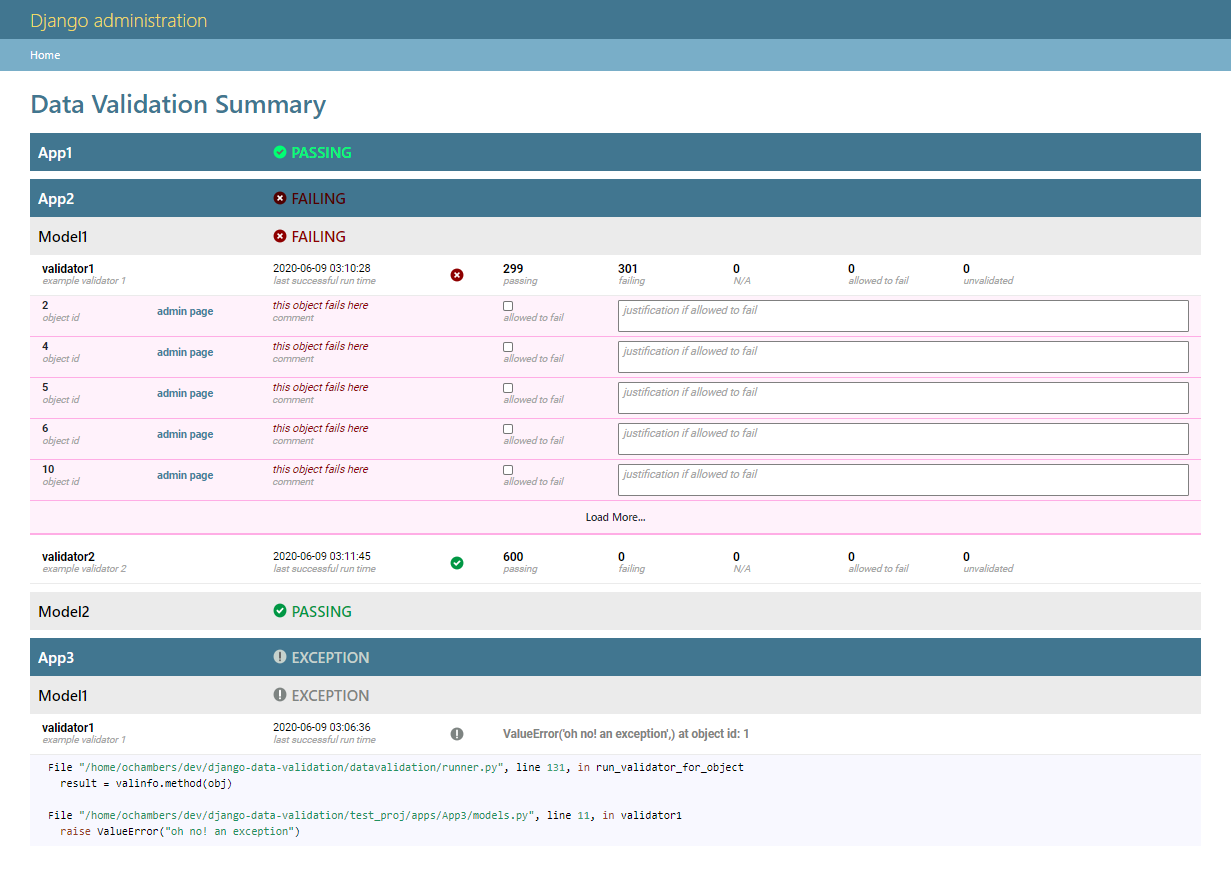
write tests on your Django models and view the summary in the admin
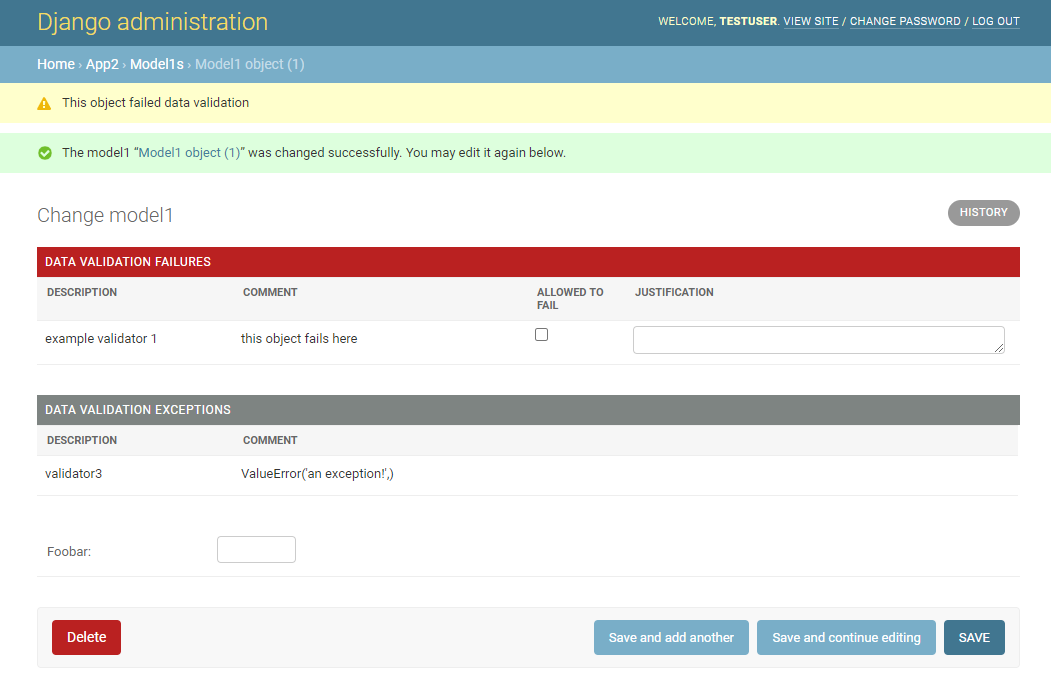
run the validation when adding/changing an object via django admin
Quick Start
Requirements
python >= 3.6
django >= 2.2
djangorestframework (tested against 3.11)
Installation
clone the repo
git clone https://github.com/VersBersh/django-data-validation.gitchange to the django-data-validation directory and install with pip
pip install .In your project, add rest_framework and datavalidation to INSTALLED_APPS
INSTALLED_APPS = (
    ...
    "rest_framework",
    "datavalidation.apps.DataValidationConfig",
    ...
)
from your project directory run the database migrations
./manage.py migrate datavalidationWhen running the django-admin server the static files for the datavalidation admin will be served automatically (assuming "django.contrib.staticfiles" is in INSTALLED_APPS). Otheriwse, you should also run
./manage.py collectstaticBasic Usage
On any django model that has data that you would like to validate, add a method decorated with @data_validator that returns PASS, FAIL or NA. For instance if you have a model with a start and end time, you can add a data_validator to check that the start time is always before the end time
from django.db import models
from datavalidation import data_validator, PASS, FAIL, NA

class YourModel(models.Model):
    ...
    start_time = models.DateTimeField()
    end_time = models.DateTimeField(blank=True, null=True)
    ...

    @data_validator
    def check_start_time(self):
        """ check that the start time is before end time """
        if self.end_time is None:
            return NA("end time not set")
        elif self.start_time < self.end_time:
            return PASS
        else:
            return FAIL("end time is before start time!")
To run the validation for all models
./manage.py validateor for a specific model
./manage.py validate yourapp.YouModelSee Writing Data Validators for more details and examples of data validators
Optionally, you can add the data_validaiton.models.DataValidationMixin to your models to provide some additional methods for querying the validation results
from datavalidation.models import DataValidationMixin

class YouModel(DataValidationMixin, models.Model):
    ...

# in a shell
print(YouModel.datavalidation_status)
>>> Status.PASSING  # hopefully :)
Finally, you can also add data_validaiton.admin.DataValidationMixin to your django admin classes to review the data in the admin. See Setting up the Admin for details.
1 maintainer

Metadata
1 maintainer
Release files for django-data-validation 0.0.1
For a detailed explanation of source distributions (sdists) and built distributions (wheels), please see the package formats documentation.
Source distribution (sdist)
| File | Size | Uploaded | Provenance | Actions |
|---|---|---|---|---|
| django-data-validation-0.0.1.tar.gz | 1.1 MB | Without provenance | Details for django-data-validation-0.0.1.tar.gz |
Built distribution (wheel)
| File | Interpreter | ABI | Platform | Actions Reset |
|---|---|---|---|---|
| django_data_validation-0.0.1-py3-none-any.whl | Python 3 | none | any | Details for django_data_validation-0.0.1-py3-none-any.whl |
Total release size: 2.3 MB
Release files / django-data-validation-0.0.1.tar.gz
| Download URL | django-data-validation-0.0.1.tar.gz |
|---|---|
| Size | 1.1 MB |
| Tags | Source |
|
SHA-256 checksum How to use checksums |
fcab65483107afd8241a19e9501f8173a0a5a5e814584fa8370ecc76e19e550f
|
|
BLAKE2b-256 checksum How to use checksums |
9815cceaf8d7cd78145c7c31deab4c04cd92f7c6cba209e11a011ce59e04ed12
|
| Upload date | |
|
Uploaded using Trusted Publishing? What is trusted publishing? |
No |
| Uploaded via |
twine/3.2.0 pkginfo/1.5.0.1 requests/2.24.0 setuptools/40.6.2 requests-toolbelt/0.9.1 tqdm/4.47.0 CPython/3.6.9
|
Release files / django_data_validation-0.0.1-py3-none-any.whl
| Download URL | django_data_validation-0.0.1-py3-none-any.whl |
|---|---|
| Size | 1.2 MB |
| Tags | Python 3 |
|
SHA-256 checksum How to use checksums |
ebd37b7725374d2ff21618b0bb08f0bdb2a9abbd78d09b8a9f3aedf60ce01358
|
|
BLAKE2b-256 checksum How to use checksums |
8ab80acf112974c60a3ff41fd50b5687c9ebcb15f352308b3509a44e7e4b93f5
|
| Upload date | |
|
Uploaded using Trusted Publishing? What is trusted publishing? |
No |
| Uploaded via |
twine/3.2.0 pkginfo/1.5.0.1 requests/2.24.0 setuptools/40.6.2 requests-toolbelt/0.9.1 tqdm/4.47.0 CPython/3.6.9
|
Security for django-data-validation 0.0.1
Provenance
Provenance describes where a file came from. On PyPI, provenance is shared via attestations, which provide a verifiable record of the build or publishing details. View details, limitations and caveats.
No provenance found
None of the files in this release were uploaded with provenance metadata.
A note on package security
PyPI is a repository for distributing packages, not a service for auditing them. While third-party security researchers and our staff do their best to detect and remove malicious packages, PyPI cannot guarantee the quality, security or suitability of any given package.
To learn more about protecting yourself from malicious actors, visit our package security documentation.













