




Django Datawatch
With Django Datawatch you are able to implement arbitrary checks on data, review their status and even describe what to do to resolve them. Think of nagios/icinga for data.
Check execution backends
Synchronous
Will execute all tasks synchronously which is not recommended but the most simple way to get started.
Celery
Will execute the tasks asynchronously using celery as a task broker and executor. Requires celery 5.0.0 or later.
Other backends
Feel free to implement other task execution backends and send a pull request.
Install
$ pip install django-datawatch
Add django_datawatch.apps.DjangoDatawatchConfig to your INSTALLED_APPS
Celery beat database scheduler
If the datawatch scheduler should be run using the celery beat database scheduler, you need to install django_celery_beat.
Add django_datawatch.tasks.django_datawatch_scheduler to the CELERYBEAT_SCHEDULE of your app.
This task should be executed every minute e.g. crontab(minute='*/1'), see example app.
Write a custom check
Create checks.py inside your module.
from datetime import datetime

from celery.schedules import crontab

from django_datawatch.datawatch import datawatch
from django_datawatch.base import BaseCheck, CheckResponse
from django_datawatch.models import Result


@datawatch.register
class CheckTime(BaseCheck):
    run_every = crontab(minute='*/5')  # scheduler will execute this check every 5 minutes

    def generate(self):
        yield datetime.now()

    def check(self, payload):
        response = CheckResponse()
        if payload.hour <= 7:
            response.set_status(Result.STATUS.ok)
        elif payload.hour <= 12:
            response.set_status(Result.STATUS.warning)
        else:
            response.set_status(Result.STATUS.critical)
        return response

    def get_identifier(self, payload):
        # payload will be our datetime object that we are getting from generate method
        return payload

    def get_payload(self, identifier):
        # as get_identifier returns the object we don't need to process it
        # we can return identifier directly
        return identifier

    def user_forced_refresh_hook(self, payload):
        payload.do_something()
.generate
Must yield payloads to be checked. The check method will then be called for every payload.
.check
Must return an instance of CheckResponse.
.get_identifier
Must return a unique identifier for the payload.
.user_forced_refresh_hook
A function that gets executed when the refresh is requested by a user through the ResultRefreshView.
This is used in checks that are purely based on triggers, e.g. when a field changes the test gets executed.
trigger check updates
Check updates for individual payloads can also be triggered when related datasets are changed. The map for update triggers is defined in the Check class' trigger_update attribute.
trigger_update = dict(subproduct=models_customer.SubProduct)
The key is a slug to define your trigger while the value is the model that issues the trigger when saved. You must implement a resolver function for each entry with the name of get__payload which returns the payload or multiple payloads (as a list) to check (same datatype as .check would expect or .generate would yield).
def get_subproduct_payload(self, instance):
    return instance.product
define an individual queue
You can force specific checks to run in different queues (e.g. in the celery backend).
Set the queue parameter of your Check class to the name of the queue.
Exceptions
DatawatchCheckSkipError
raise this exception to skip current check. The result will not appear in the checks results.
Run your checks
A management command is provided to queue the execution of all checks based on their schedule. Add a crontab to run this command every minute and it will check if there's something to do.
$ ./manage.py datawatch_run_checks
$ ./manage.py datawatch_run_checks --slug=example.checks.UserHasEnoughBalance
Refresh your check results
A management command is provided to forcefully refresh all existing results for a check. This comes in handy if you changes the logic of your check and don't want to wait until the periodic execution or an update trigger.
$ ./manage.py datawatch_refresh_results
$ ./manage.py datawatch_refresh_results --slug=example.checks.UserHasEnoughBalance
Get a list of registered checks
$ ./manage.py datawatch_list_checks
Clean up your database
Remove the unnecessary check results and executions if you've removed the code for a check.
$ ./manage.py datawatch_clean_up
Settings
DJANGO_DATAWATCH_BACKEND = 'django_datawatch.backends.synchronous'
DJANGO_DATAWATCH_RUN_SIGNALS = True
DJANGO_DATAWATCH_BACKEND
You can chose the backend to run the tasks. Supported are 'django_datawatch.backends.synchronous' and 'django_datawatch.backends.celery'.
Default: 'django_datawatch.backends.synchronous'
DJANGO_DATAWATCH_RUN_SIGNALS
Use this setting to disable running post_save updates during unittests if required.
Default: True
celery task queue
Datawatch supported setting a specific queue in release < 0.4.0
With the switch to celery 4, you should use task routing to define the queue for your tasks, see http://docs.celeryproject.org/en/latest/userguide/routing.html
To be able to run specific tasks in a different queue, one can use the queue attribute on the Check subclass. This is meant to be a string representing the name of the queue. This is currently only supported by the celery backend.
Migrating from 3.x to 4.x
In 4.x, the base check class supports two new methods (get_assigned_users and get_assigned_groups). This is a breaking change as the old get_assigned_user and get_assigned_group methods have been removed.
This change allows checks to assign multiple users and groups to a check. If you have implemented custom checks, you need to update your code to return a list of users and groups instead of a single user and group. e.g.
From
from django_datawatch.base import BaseCheck

class CustomCheck(BaseCheck):
    ...
    def get_assigned_user(self, payload, result) -> Optional[AbstractUser]:
        return None # or a user
    def get_assigned_group(self, payload, result) -> Optional[Group]:
        return None # or a group
To
from django_datawatch.base import BaseCheck

class CustomCheck(BaseCheck):
    ...
    def get_assigned_users(self, payload, result) -> Optional[List[AbstractUser]]:
        return None  # or a list of users
    def get_assigned_groups(self, payload, result) -> Optional[List[Group]]:
        return None  # or a list of groups
Tagging Results
Django Datawatch supports tagging individual check results. You can add, edit, and remove tags for each result directly through the web interface.
Usage
- Manage tags: Open the result detail and click on the Tags link to manage tags. Each tag includes a label, a type (color/status), and the user who created it.


- Tag display: Tags are displayed as colored badges in the results overview, based on their type.

CONTRIBUTE
Dev environment
- Latest Docker with the integrated compose plugin
Please make sure that no other container is using port 8000 as this is the one you're install gets exposed to: http://localhost:8000/
Setup
We've included an example app to show how django_datawatch works. Start by launching the included docker container.
docker compose up -d
Then setup the example app environment.
docker compose run --rm app migrate
docker compose run --rm app loaddata example
The installed superuser is "example" with password "datawatch".
Run checks
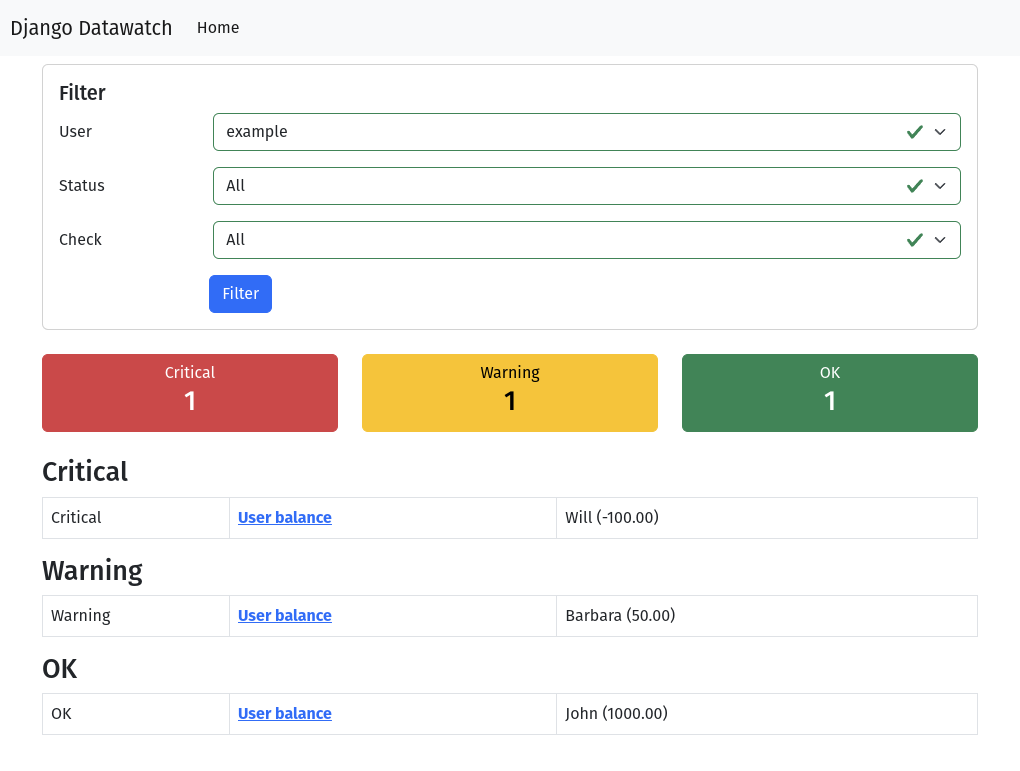
Open http://localhost:8000/, log in and then go back to http://localhost:8000/. You'll be prompted with an empty dashboard. That's because we didn't run any checks yet. Let's enqueue an update.
docker compose run --rm app datawatch_run_checks --force
The checks for the example app are run synchronously and should be updated immediately. If you decide to switch to the celery backend, you should now start a celery worker to process the checks.
docker compose run --rm --entrypoint celery app -A example worker -l DEBUG
To execute the celery beat scheduler which runs the datawatch scheduler every minute, just run:
docker compose run --rm --entrypoint celery app -A example beat --scheduler django_celery_beat.schedulers:DatabaseScheduler
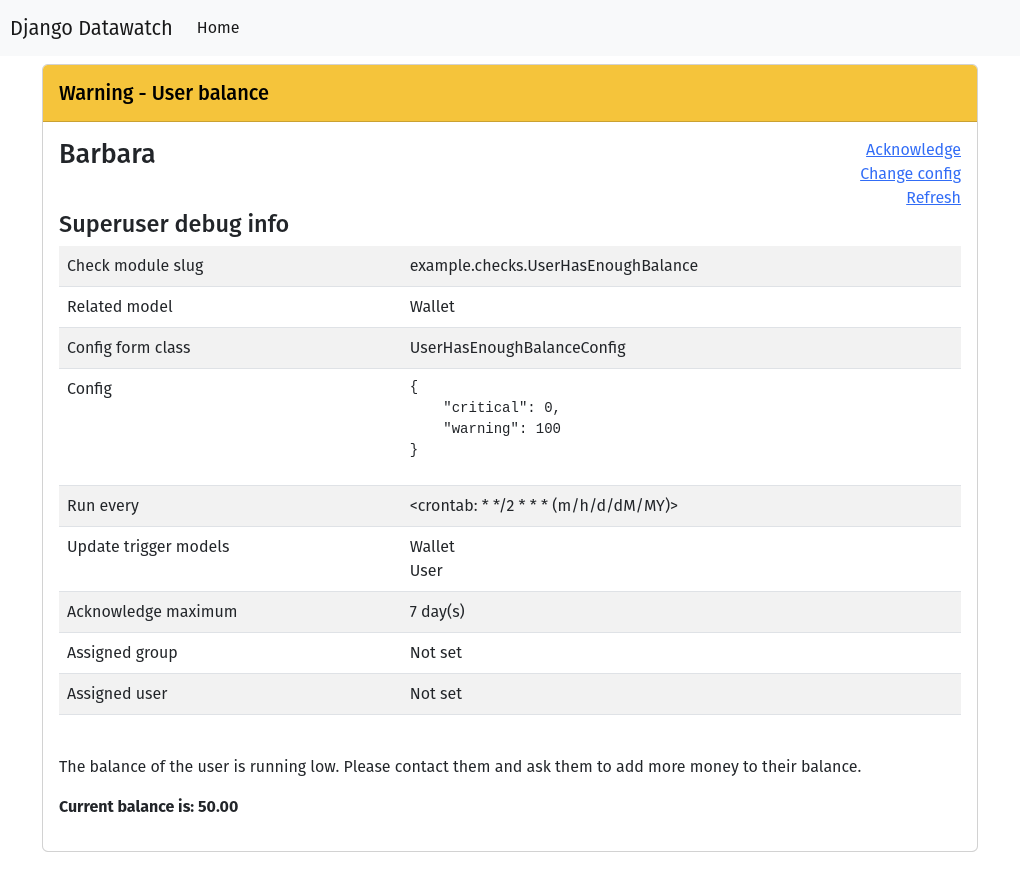
You will see some failed check now after you refreshed the dashboard view.
Run the tests
docker compose run --rm app test
Translations
Collect and compile translations for all registered locales
docker compose run --rm app makemessages --no-location --all
docker compose run --rm app compilemessages
Making a new release
This project makes use of RegioHelden's reusable GitHub workflows.
Make a new release by manually triggering the Open release PR workflow.
1 maintainer

Metadata
1 maintainer
Release files for django-datawatch 8.0.0
For a detailed explanation of source distributions (sdists) and built distributions (wheels), please see the package formats documentation.
Source distribution (sdist)
| File | Size | Uploaded | Provenance | |
|---|---|---|---|---|
| django_datawatch-8.0.0.tar.gz | 34.4 kB | Without provenance | Details |
Built distribution (wheel)
| File | Interpreter | ABI | Platform | Reset |
|---|---|---|---|---|
| django_datawatch-8.0.0-py3-none-any.whl | Python 3 | none | any | Details |
Total release size: 90.4 kB
Release files / django_datawatch-8.0.0.tar.gz
| Download URL | django_datawatch-8.0.0.tar.gz |
|---|---|
| Size | 34.4 kB |
| Tags | Source |
|
SHA-256 checksum How to use checksums |
a9fe2d4347dcd8ec25573bc14f4028ecfe24dc6d1d25d82af32f41c3315458aa
|
|
BLAKE2b-256 checksum How to use checksums |
b27ad27c8a92949c2426ef8441efaff13e002bfd1efaaac18dbef40b74f84761
|
| Upload date | |
|
Uploaded using Trusted Publishing? What is trusted publishing? |
Yes |
| Uploaded via |
uv/0.9.22 {"installer":{"name":"uv","version":"0.9.22","subcommand":["publish"]},"python":null,"implementation":{"name":null,"version":null},"distro":{"name":"Ubuntu","version":"24.04","id":"noble","libc":null},"system":{"name":null,"release":null},"cpu":null,"openssl_version":null,"setuptools_version":null,"rustc_version":null,"ci":true}
|
Release files / django_datawatch-8.0.0-py3-none-any.whl
| Download URL | django_datawatch-8.0.0-py3-none-any.whl |
|---|---|
| Size | 56.0 kB |
| Tags | Python 3 |
|
SHA-256 checksum How to use checksums |
8bf729dd6ee23c43fd6eb52b6d27bc4dee61de888b65081d6f5a898be835bbfe
|
|
BLAKE2b-256 checksum How to use checksums |
3c6db4104ee48969fd7e6a38cda07e0be4ec5c6ae4714a198a338d68a8a87936
|
| Upload date | |
|
Uploaded using Trusted Publishing? What is trusted publishing? |
Yes |
| Uploaded via |
uv/0.9.22 {"installer":{"name":"uv","version":"0.9.22","subcommand":["publish"]},"python":null,"implementation":{"name":null,"version":null},"distro":{"name":"Ubuntu","version":"24.04","id":"noble","libc":null},"system":{"name":null,"release":null},"cpu":null,"openssl_version":null,"setuptools_version":null,"rustc_version":null,"ci":true}
|
Security for django-datawatch 8.0.0
Provenance
Provenance describes where a file came from. On PyPI, provenance is shared via attestations, which provide a verifiable record of the build or publishing details. View details, limitations and caveats.
No provenance found
None of the files in this release were uploaded with provenance metadata.
A note on package security
PyPI is a repository for distributing packages, not a service for auditing them. While third-party security researchers and our staff do their best to detect and remove malicious packages, PyPI cannot guarantee the quality, security or suitability of any given package.














