
Introduction
Lightweight set of middleware classes that inject visual indicators for each type of environment that a project is deployed to. Inspired by this article.
Quickstart
Install the package: pip install django-envi.
Add the 'envi' app to your INSTALLED_APPS.
Install the desired middleware class to MIDDLEWARE_CLASSES:
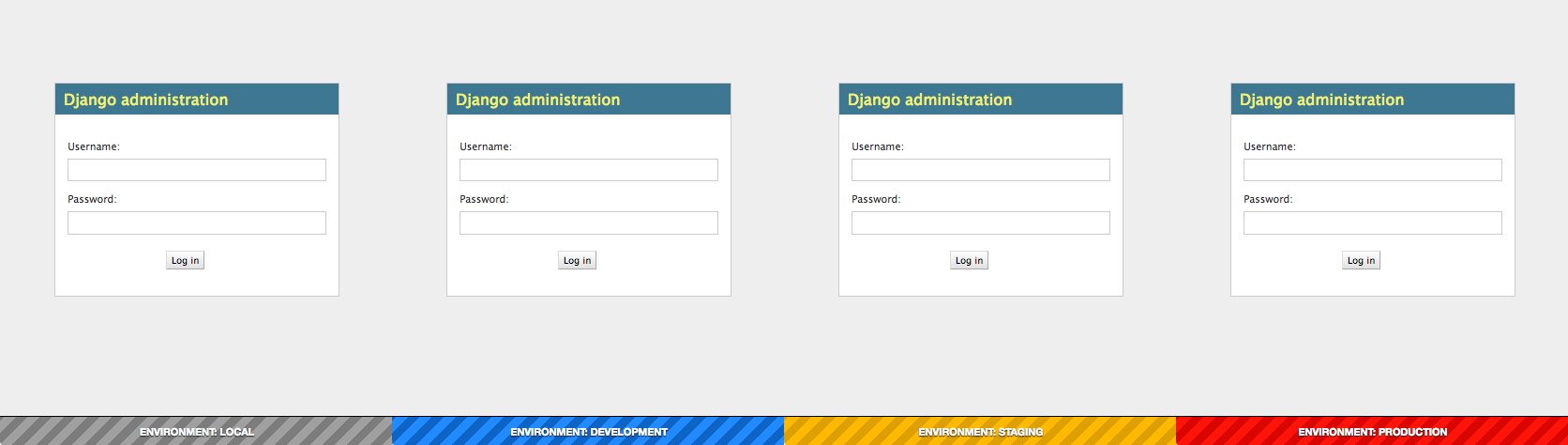
envi.middleware.EnviFooterMiddleware injects a sticky footer to all pages that displays the current environment.
In each environment’s settings file, add the ENVIRONMENT_KEY setting, with the corresponding environment key string. See below.
Built-in environments
There are a number of built-in environment definitions:
'local': A striped grey banner. Appears site-wide (default).
'dev': A striped blue banner. Appears site-wide.
'staging': A striped yellow banner. Appears site-wide.
'production': A striped red banner. Only appears in /admin.
Configuration
The following settings are supported in your settings.py:
ENVI_ENVIRONMENT_KEY: A string representing the key to use to search the ENVI_ENVIRONMENTS settings dictionary. Defaults to 'local'.
ENVI_ENVIRONMENTS: A dictionary containing key-value pairs consisting of environment keys (as strings) mapped to dictionaries representing an environment definition. By default, there are 4 built-in environments available for selection.
ENVI_ENVIRONMENT: The current environment. This can either be defined explicitly (see Creating environments), otherwise it will be set to the corresponding dictionary by looking up the ENVI_ENVIRONMENT_KEY within the ENVI_ENVIRONMENTS dictionary.
Creating environments
Environments can be created using the following dictionary structure:
CUSTOM_ENV = {
    # Required for all subclasses of EnviBaseMiddleware.
    "SHOW_IN_ADMIN": True,
    "SHOW_IN_SITE": True,

    # Only required for subclasses of EnviBaseTemplateMiddleware.
    "CONTEXT": {
        # The contents of this dictionary will be passed to the template
        # being rendered. You can add anything you want here.
        "CONTENT": "ENVIRONMENT: STAGING",
        "COLOR_A": "#ffba1e",
        "COLOR_B": "#dba11a",
    },
}
Then, this environment definition can be either:
Added to the ENVI_ENVIRONMENTS dictionary, and activated by setting the ENVI_ENVIRONMENT_KEY to the respective key.
ENVI_ENVIRONMENTS = {
    "custom_key_1": CUSTOM_ENV,
    "custom_key_2": OTHER_CUSTOM_ENV,
}

ENVI_ENVIRONMENT_KEY = "custom_key_1"
Used to set the ENVI_ENVIRONMENT value directly.
ENVI_ENVIRONMENT = CUSTOM_ENV
Advanced usage
The implementation of django-envi makes it easy to customize.
Extending via templates
TODO: How to.
Extending via subclassing
TODO: How to.
Compatability
The latest build of django-envi has been tested on the following versions of Django:
2.0.1
1.11.9 (LTS)
1.8.18 (LTS)
Changelog
Version |
Description |
|---|---|
0.2.1 |
Bugfix to prevent adding the banner to AJAX requests. Thanks to @marksweb for the PR. Also adds backwards compatability for Django versions < 1.10. |
0.2 |
Repackaged without unnecessary docs/images directory. All documentation can be found in README.rst. |
0.1.2 |
Fixes reference to nonexistent template. Manifest issue. |
0.1.1 |
Renamed to django-envi. |
0.1 |
Initial version. |
1 maintainer

Metadata
1 maintainer
Release files for django-envi 0.2.1
For a detailed explanation of source distributions (sdists) and built distributions (wheels), please see the package formats documentation.
Source distribution (sdist)
| File | Size | Uploaded | |
|---|---|---|---|
| django-envi-0.2.1.tar.gz | 6.1 kB | Details |
Release files / django-envi-0.2.1.tar.gz
| Download URL | django-envi-0.2.1.tar.gz |
|---|---|
| Size | 6.1 kB |
| Tags | Source |
|
SHA-256 checksum How to use checksums |
21ad64840d15960927449e531869322a75d52d2f00a551d2f88773b53278d2e0
|
|
BLAKE2b-256 checksum How to use checksums |
e71b4c2b9bdbd42fe636c9623bf08ae2a3af4d37be97ddc3bf374490e6804384
|
| Upload date | |
|
Uploaded using Trusted Publishing? What is trusted publishing? |
No |














