
Here’s the situation. You’re on a website and you think to yourself, “whoa, this site is gnarly! I’d really like to stay up to date with this.” You hesitate. Will you be inundated with irrelevant content on Twitter, etc.?
Although this information is readily available and often a click or two away, these additional clicks create an unnecessary barrier to entry. The goal of flux is to make it possible to quickly assess the utility of following a particular feed of content and whether the flux of relevant content will be useful for you. Currently, flux supports:
Twitter via python-twitter
RSS via feedparser
Facebook via fbconsole
LinkedIn via oauth2
Quick start
Install flux with pip:
[shell]$ pip install django-flux
Add flux to the INSTALLED_APPS in settings.py of your django project:
INSTALLED_APPS += ('flux', )Run syncdb to create the necessary tables:
[shell]$ python manage.py syncdb
Make sure the admin is enabled on your site and add accounts to monitor by visiting the admin page of your site (e.g., http://localhost:8000/admin/flux/account/add)
Run the update_flux management command:
[shell]$ python manage.py update_flux
Use the flux_timeseries template tag on Account instances (account below) in your templates:
<link rel="stylesheet" href="{{STATIC_URL}}flux/css/timeseries.css" />

{% load flux %}
{% flux_timeseries account %}
and you should see something like this:
Customize the styling and layout by altering the CSS, and content accordingly or by taking advantage of any of the other ways of displaying the flux information:

Labels on mouseover with bars
Optionally include labels for the bars with d3.js by including the following in your templates:
<link rel="stylesheet" href="{{STATIC_URL}}flux/css/timeseries.css" />
<link rel="stylesheet" href="{{STATIC_URL}}flux/css/bar_mouseover_labels.css" />

{% load flux %}
{% flux_timeseries account %}

<script src="//d3js.org/d3.v2.js"></script>
<script src="//ajax.googleapis.com/ajax/libs/jquery/1.8.3/jquery.min.js"></script>
<script src="{{STATIC_URL}}flux/js/bar_mouseover_labels.js"></script>
and you should see something like this:

Sparklines
Optionally include sparklines with d3.js by including the following in your templates:
<link rel="stylesheet" href="{{STATIC_URL}}flux/css/timeseries.css" />
<link rel="stylesheet" href="{{STATIC_URL}}flux/css/sparkline.css" />

{% load flux %}
{% flux_timeseries account %}

<script src="//d3js.org/d3.v2.js"></script>
<script src="//ajax.googleapis.com/ajax/libs/jquery/1.8.3/jquery.min.js"></script>
<script src="{{STATIC_URL}}flux/js/sparkline.js"></script>
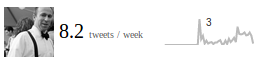
and you should see something like this:

Labels on mouseover of sparkline
Optionally include labels for each sparkline with d3.js by including the following in your templates:
<link rel="stylesheet" href="{{STATIC_URL}}flux/css/timeseries.css" />
<link rel="stylesheet" href="{{STATIC_URL}}flux/css/sparkline.css" />

{% load flux %}
{% flux_timeseries account %}

<script src="//d3js.org/d3.v2.js"></script>
<script src="//ajax.googleapis.com/ajax/libs/jquery/1.8.3/jquery.min.js"></script>
<script src="{{STATIC_URL}}flux/js/sparkline.js"></script>
<script src="{{STATIC_URL}}flux/js/sparkline_mouseover_labels.js"></script>
and you should see something like this:
Production usage
To have the Accounts monitored be continuously updated, add the following line to your crontab on your production server:
0 0 * * * python /path/to/manage.py update_flux
Account configuration
Account.type=”twitter”
Account.name is the Twitter username (e.g., for http://twitter.com/DsAtweet, Account.name=”DsAtweet”).
No additional information is needed to access Twitter Accounts and Account.other is ignored.
Account.type=”rss”
Account.name is the full URL of the RSS feed you want to track (e.g., for http://datascopeanalytics.com/rss/, Account.name=”http://datascopeanalytics.com/rss/”).
No additional information is needed to access Twitter Accounts and Account.other is ignored.
Account.type=”facebook”
Account.name is the name of the Facebook page that you want to track (e.g., for http://facebook.com/datascopeanalytics, Account.name=”datascopeanalytics”)
The Account.other JSON must also include several attributes in order to authenticate to the Facebook API using fbconsole with something like:
{
    "app_id":"123456789012345",                          // [0-9]+
    "client_secret": "1234567890abcdef1234567890abcdef", // [0-9a-f]+
    "scope": ["read_stream"],
    "email":"facebook.email@here.com",
    "password": "this.is.your.facebook.password"
}
Account.type=”linkedin”
Account.name is the name of the LinkedIn company page that you want to track (e.g., for http://linkedin.com/company/datascope-analytics-llc, Account.name=”datascope-analytics-llc”)
The Account.other JSON must also include several attributes in order to authenticate to the LinkedIn API with something like:
{
    "api_key": "1234567890ab",                      // [0-9a-f]+
    "api_secret": "1234567890ABCDEF",               // [0-9a-zA-Z]+
    "token":"12345678-90ab-cdef-1234-567890abcdef", // [0-9a-f\-]+
    "secret":"12345678-90ab-cdef-1234-567890abcdef" // [0-9a-f\-]+
}
Contribute!
Clone the code from github
Setup the virtualenv by following the instructions in example_project/virtualenv_requirements.txt
Edit, test, and share your code. See the issues page for inspiration and to coordinate with the community.
1 maintainer

Metadata
1 maintainer
Release files for django-flux 0.3.0
For a detailed explanation of source distributions (sdists) and built distributions (wheels), please see the package formats documentation.
Source distribution (sdist)
| File | Size | Uploaded | |
|---|---|---|---|
| django-flux-0.3.0.tar.gz | 19.0 kB | Details |
Release files / django-flux-0.3.0.tar.gz
| Download URL | django-flux-0.3.0.tar.gz |
|---|---|
| Size | 19.0 kB |
| Tags | Source |
|
SHA-256 checksum How to use checksums |
1de8782d41b81c7d56a5a122e08dcb86df9033b3d935135391080128dc309a5b
|
|
BLAKE2b-256 checksum How to use checksums |
07235f936523f1f57adb9e6680fbccf4b05b690d2e13bcd5e6a0fc5f38954b0c
|
| Upload date | |
|
Uploaded using Trusted Publishing? What is trusted publishing? |
No |














