

- Version:
0.4
- Docs:
- Download:
- Source:
Change Log
- 0.4*
Django 1.9/1.10/1.11 compatibility
Cleaner error messages
Form within a form fixes
- 0.3
Django 1.6/1.7/1.8 compatibility
Python 3.4 compatibility
Form argument can now be dynamic
- 0.2
Fix Django 1.5 install issue
- 0.1.3
Fixed bug when a form’s initial value evaludated to False
pep8 related fixes
Getting Started
django-formfield is a form field that accepts a django form as its first argument, and validates as well as render’s each form field as expected. Yes a form within a form, within a dream? There are two types of fields available, FormField and ModelFormField. For ModelFormField the data is stored in json. For FormField data is simply returned as a python dictionary (form.cleaned_data)
Installation
Installation is easy using pip or easy_install.
pip install django-formfield
or
easy_install django-formfield
Add to installed apps
INSTALLED_APPS = (
    ...
    'formfield',
    ...
)
Example
from django.db import models
from django import forms

from formfield import ModelFormField

class PersonMetaForm(forms.Form):
    age = forms.IntegerField()
    sex = forms.ChoiceField(choices=((1, 'male'), (2, 'female')), required=False)


class Person(models.Model):
    name = CharField(max_length=200)

    meta_info = ModelFormField(form=PersonMetaForm)
Which will result in something like this (using the admin)
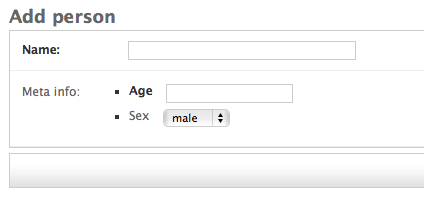
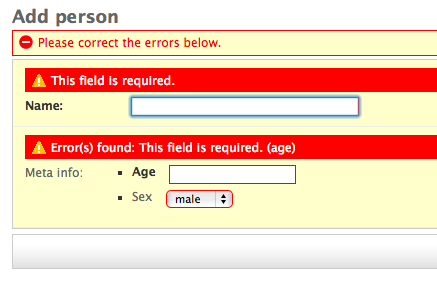
The ModelFormField is automatically set to null=True, blank=True, this is because validation is done on the inner form. As a result you will see something like the following if we hit save on the change form:
If we supply the change for valid data you should get a python dictionary when retrieving the data:
>>> person = Person.objects.get(pk=1)
>>> person.meta_info
{u'age': 12, u'sex': u'1'}
The form is the only thing forcing valid input, behind the scenes the data is being serialized into json. Therefore on the python level we can supply meta_info any valid json::
>>> from sample_app.models import Person
>>> data = {'some': 'thing', 'is': 'wrong', 'here': 'help!'}
>>> p = Person.objects.create(name="Joan", meta_info=data)
>>> p.meta_info
{'is': 'wrong', 'some': 'thing', 'here': 'help!'}


Release files for django-formfield 0.4
For a detailed explanation of source distributions (sdists) and built distributions (wheels), please see the package formats documentation.
Source distribution (sdist)
| File | Size | Uploaded | |
|---|---|---|---|
| django-formfield-0.4.tar.gz | 807.2 kB | Details |
Release files / django-formfield-0.4.tar.gz
| Download URL | django-formfield-0.4.tar.gz |
|---|---|
| Size | 807.2 kB |
| Tags | Source |
|
SHA-256 checksum How to use checksums |
b63aa33c03e3cb1082ce74d680c440c726025bbe4e65d24c2f828645e8643fb1
|
|
BLAKE2b-256 checksum How to use checksums |
88bd99ef29f54cc4898bf53c8b30cc147c3188c05af5a02b0d10e26a51c63b96
|
| Upload date | |
|
Uploaded using Trusted Publishing? What is trusted publishing? |
No |














