
django-janitor allows you to use [bleach](https://bleach.readthedocs.io/) to clean HTML stored in arbitrary Models.
This is useful when you’ve got HTML content stored in a 3rd-party app, but you’d like to use a whitelist for allowed HTML tags.
## Features
django-janitor listens for a Models’ pre_save signal, and runs it’s content through bleach.
Allowed HTML tags, attributes, and css are specified in a whitelist
Whitelists are managed in Django’s Admin
There are (sensible) default whitelists included
## Requirements
Requires Bleach
Works with Django 1.11
NOTE on upgrading to version 0.5.0: This version officially supports Python 3 and Django 1.11. Prior versions of this app included south migrations and only supported something like Django 1.4. If you’re previously used this, you’ll have to figure out how to upgrade your existing models (sorry).
## Installation
To install the most recent release:
pip install django-janitor
Or to install from the current repository:
pip install git+https://github.com/bradmontgomery/django-janitor
Then, add janitor to your installed apps, and run the migrations.
python manage.py migrate
## Usage
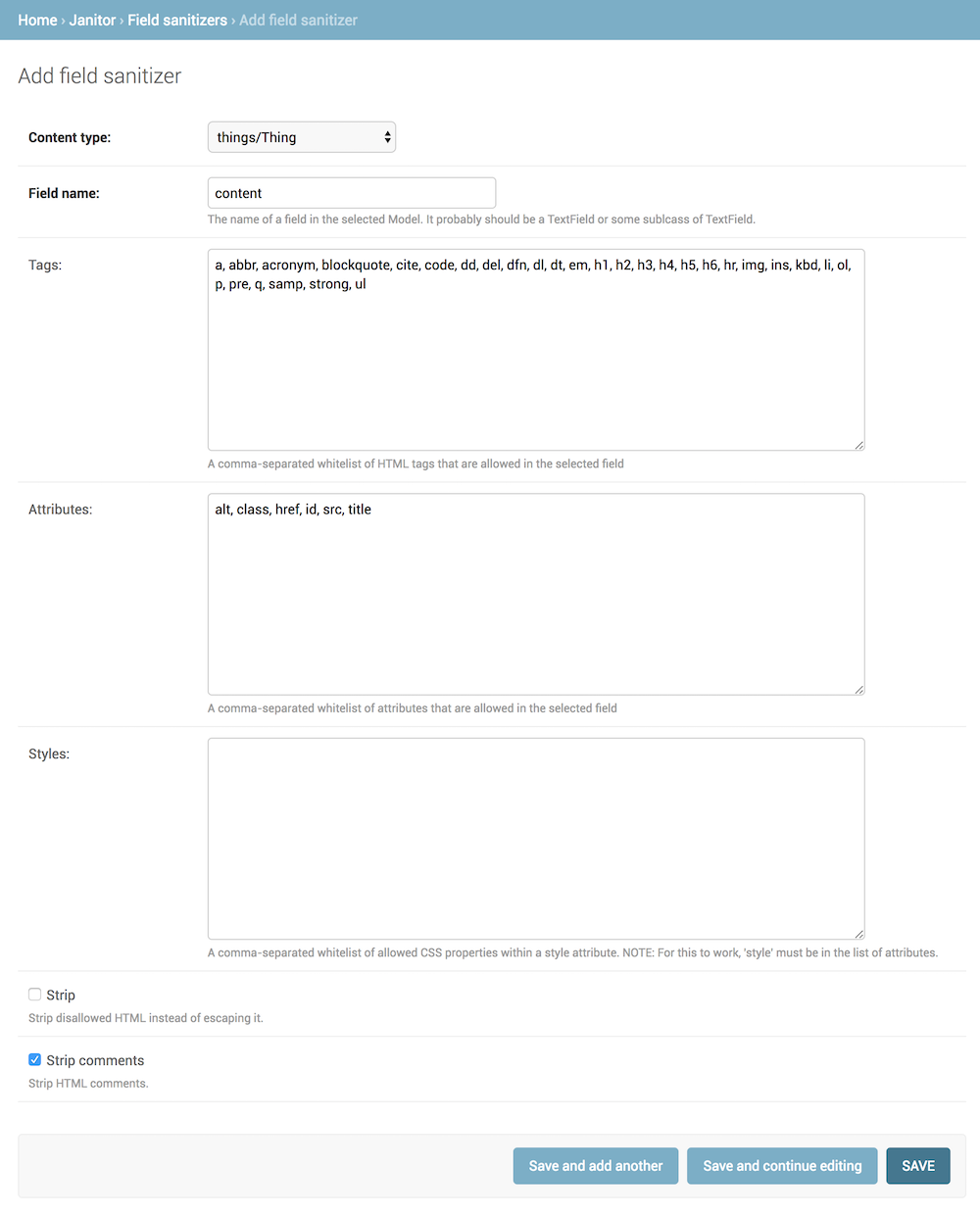
Visit the Janitor app in Django’s Admin, and create a new Field sanitizer. Then select the Model and specify the fieldname which should be cleaned. After you set up the whitelists for Tags, Attributes, etc, save the Field sanitizer.
From now on, when the Model is saved, it’s content in will be cleaned using bleach.
## Tests
There are a few tests in janitor/tests. You can run these with:
python manage.py tests janitor
## Management Commands
There are a few managment commands avaialable to make it easier to use django-janitor. The first is clean_all which will look at all of the models that have a related Field Sanitizer, calling the models’ save method to trigger the pre_save signal (which forces the fields to be cleaned):
python manage.py clean_all
This is useful if you’ve created a FieldSanitizer for a model with existing content.
The second management command is clean_model, which works in a similar fashion, but allows you to specify an app and a model:
python manage.py clean_model myapp.MyModel
Finally, list_html_elements and list_html_elements_for_model exist to help you discover what HTML tags are being used in existing content. While these commands do require that a FieldSanitizer be configured for existing Models, they may be used to help you decide which tags to include in a whitelist.
You should run these commands before using clean_all or clean_model to see what sort of data exists before it’s cleaned:
python manage.py list_html_elements
Or:
python manage.py list_html_elements_for_model myapp.MyModel
1 maintainer

Metadata
1 maintainer
Release files for django-janitor 0.5.1
For a detailed explanation of source distributions (sdists) and built distributions (wheels), please see the package formats documentation.
Source distribution (sdist)
| File | Size | Uploaded | Provenance | Actions |
|---|---|---|---|---|
| django-janitor-0.5.1.tar.gz | 11.1 kB | Without provenance | Details for django-janitor-0.5.1.tar.gz |
Release files / django-janitor-0.5.1.tar.gz
| Download URL | django-janitor-0.5.1.tar.gz |
|---|---|
| Size | 11.1 kB |
| Tags | Source |
|
SHA-256 checksum How to use checksums |
420bef9da6e9866abcd26f42ba606ff9b93741babca10b7a3f29bd91c1971261
|
|
BLAKE2b-256 checksum How to use checksums |
5ab67d9e7c1c75d98223acf684094975c14fe47d0485eace495c2ce0f1f70715
|
| Upload date | |
|
Uploaded using Trusted Publishing? What is trusted publishing? |
No |
Security for django-janitor 0.5.1
Provenance
Provenance describes where a file came from. On PyPI, provenance is shared via attestations, which provide a verifiable record of the build or publishing details. View details, limitations and caveats.
No provenance found
None of the files in this release were uploaded with provenance metadata.
A note on package security
PyPI is a repository for distributing packages, not a service for auditing them. While third-party security researchers and our staff do their best to detect and remove malicious packages, PyPI cannot guarantee the quality, security or suitability of any given package.
To learn more about protecting yourself from malicious actors, visit our package security documentation.















