
Django json widget is an alternative widget that makes it easy to edit the jsonfield field of django.


Project description
django-json-widget

An alternative widget that makes it easy to edit the new Django’s field JSONField (PostgreSQL specific model fields)
Quickstart
Install django-json-widget:
pip install django-json-widget
Add it to your INSTALLED_APPS:
INSTALLED_APPS = (
    ...
    'django_json_widget',
    ...
)
Add the widget in your admin.py:
from django.contrib import admin
from django.db.models import JSONField
from django_json_widget.widgets import JSONEditorWidget
from .models import YourModel


@admin.register(YourModel)
class YourModelAdmin(admin.ModelAdmin):
    formfield_overrides = {
        JSONField: {'widget': JSONEditorWidget},
    }
You can also add the widget in your forms.py:
from django import forms
from django_json_widget.widgets import JSONEditorWidget
from .models import YourModel


class YourForm(forms.ModelForm):
    class Meta:
        model = YourModel

        fields = ('jsonfield',)

        widgets = {
            'jsonfield': JSONEditorWidget
        }
Configuration
You can customize the JSONEditorWidget with the following options:
width: Width of the editor as a string with CSS size units (px, em, % etc). Defaults to 90%.
height: Height of the editor as a string CSS size units. Defaults to 550px.
options: A dict of options accepted by the JSON editor. Options that require functions (eg. onError) are not supported.
mode (deprecated): The default editor mode. This argument is redundant because it can be specified as a part of options. Preserved for backwards compatibility with version 0.2.0.
attrs: HTML attributes to be applied to the wrapper element. See the Django Widget documentation.
Accessing JsonEditor Instance
The JsonEditor instance is automatically exposed for external access through two methods:
Window object: Available as window['FIELD_ID_editor'] where FIELD_ID is the field’s HTML ID
DOM element: Available as container.jsonEditor property on the widget’s container element
Example usage for external JavaScript access:
// Access via window object
var editor = window['id_jsonfield_editor'];
editor.set({'key': 'new value'});

// Access via DOM element
var container = document.getElementById('id_jsonfield');
var editor = container.jsonEditor;
editor.set({'key': 'new value'});
This allows you to programmatically call JsonEditor methods like set(), get(), update(), etc. from custom JavaScript code running in your admin pages or forms.
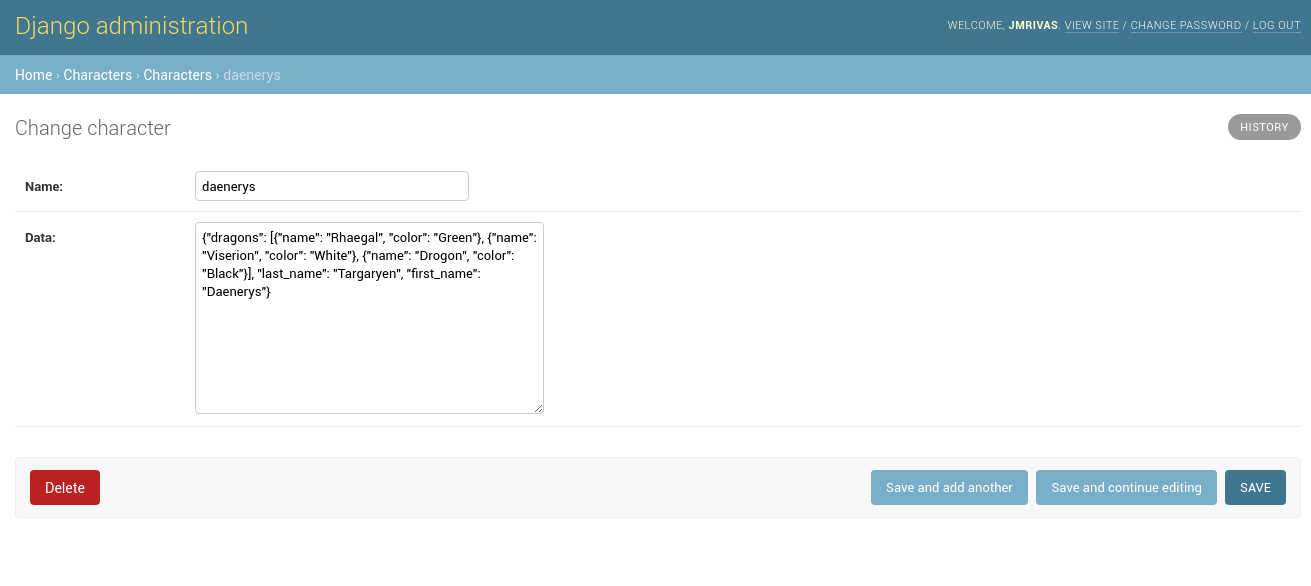
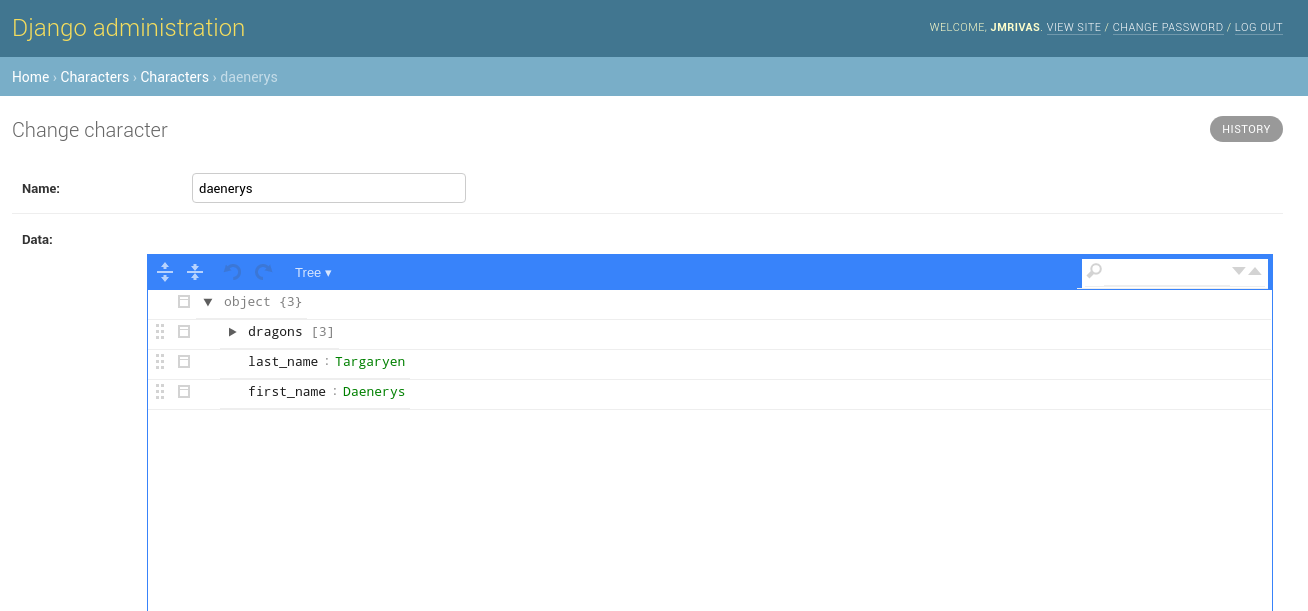
JSONEditorWidget widget
Before:
After:
Development Guide
Read the contribution guide.
Credits
Tools used in rendering this package:
Changelog
2.1.1 (2025-12-12)
Issue #108: respect Django admin color scheme setting for JSON editor.
2.1.0 (2025-10-24)
Issue #114: expose editor instance to window object and DOM element.
2.0.4 (2025-10-11)
Fix dark mode CSS support #107
2.0.3 (2025-07-29)
2.0.2 (2025-07-28)
Fix Version 2.0.1 causes rendering HTML scripts issue #80
2.0.1 (2024-03-02) ——————=
Fixed Version 2.0.0 causes issues with Django 4.x due to missing sourcemaps issue #83
2.0.0 (2024-03-24)
Fix default paths for static files #53
Stop declaring support for Django versions before 3.2 #65
Avoid HTML injection via unsafe JSON injection #64
Remove source map reference from JS bundle #70
Add dark mode CSS support #82
Updated documentation
1.1.1 (2021-02-17)
Fix for issue #51, updates the bundled libs to 9.1.9 and additional notes for Django 3.1 changes
1.1.0 (2021-02-05)
Added functionality to override version of JSONEditor to use
update readme for django 3.1
1.0.1 (2020-04-17)
Stop resolving paths to the static files
1.0.0 (2020-01-16)
Update Makefile
Make Stable the project
0.3.0 (2020-01-16)
Update requirements.txt
Fixed static to work with CDN tools like django-storages
Make widget more configurable
Fixed an incompatibility with Python 2.7
update jsoneditor to latest version
Release history Release notifications | RSS feed


Download files
Download the file for your platform. If you're not sure which to choose, learn more about installing packages.
Source Distribution
Built Distribution
Filter files by name, interpreter, ABI, and platform.
If you're not sure about the file name format, learn more about wheel file names.
Copy a direct link to the current filters
File details
Details for the file django_json_widget-2.1.1.tar.gz.
File metadata
- Download URL: django_json_widget-2.1.1.tar.gz
- Upload date:
- Size: 384.0 kB
- Tags: Source
- Uploaded using Trusted Publishing? No
- Uploaded via: twine/5.0.0 CPython/3.13.6
File hashes
| Algorithm | Hash digest | |
|---|---|---|
| SHA256 |
dc8102e2fa9accd0f661ea1988c9389f8fbbcb8a4bb9cbfb8fa0525b3c1265c1
|
|
| MD5 |
1f5aa24711358889c88eea17dd0f5847
|
|
| BLAKE2b-256 |
f930923ff229ee284bf2fac7a289ca446fb2725d94b2a34c7cb006c4f811e6c0
|
File details
Details for the file django_json_widget-2.1.1-py2.py3-none-any.whl.
File metadata
- Download URL: django_json_widget-2.1.1-py2.py3-none-any.whl
- Upload date:
- Size: 293.7 kB
- Tags: Python 2, Python 3
- Uploaded using Trusted Publishing? No
- Uploaded via: twine/5.0.0 CPython/3.13.6
File hashes
| Algorithm | Hash digest | |
|---|---|---|
| SHA256 |
2fa3d6fb6dba9436a29ad2cee23fa794381f54a6678ec7d74e990ae081d9800b
|
|
| MD5 |
d5906137005bdd8a07bc5f8bbd6a08be
|
|
| BLAKE2b-256 |
196abdbcc079d11d312e463565819089fe83ae6c7f17f274effa4777ca069f64
|






