
django-lazypage
django 页面异步加载解决方案

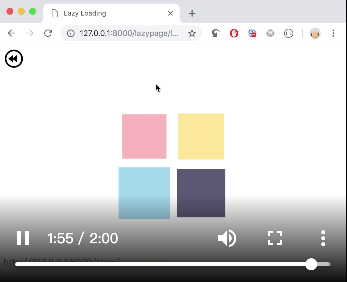
解决由于后端请求处理时间较长导致前端长时间无响应的用户体验问题。
效果示例 https://tools.athenagu.com/test_slow_page/?s=8
使用步骤:
1 安装
$ pip install django-lazypage
2 引入 app
# settings.py
INSTALLED_APPS = (
    'django.contrib.auth',
    'django.contrib.contenttypes',
    'django.contrib.sessions',
    'django.contrib.sites',
    'django.contrib.messages',
    'django.contrib.staticfiles',
    'django.contrib.admin',
    'myapp',
    'lazypage',  # <--- 引入 app
)
3 用 lazypage_decorator 装饰 view
# views.py
# -*- coding: utf-8 -*-

import time
from django.http import HttpResponse
from django.shortcuts import render_to_response
from lazypage.decorators import lazypage_decorator  # <--- 引入装饰器

def index(request):
    return render_to_response('index.html', locals())

@lazypage_decorator  # <--- 在原来的 view 上添加 lazypage_decorator 装饰器即可
def test_slow_page(request):
    s = int(request.GET.get('s', 8))
    print(s)
    time.sleep(s)
    return HttpResponse('I am a slow page!')
4 配置 urls
# urls.py
from django.conf.urls import url, include
from views import *
import lazypage.urls  # <--- 引入 lazypage 路由

urlpatterns = [
    url(r'^$', index),
    url(r'^test_slow_page/$', test_slow_page),
    url(r'^lazypage/', lazypage.urls.get_urls()),  # <--- 添加 lazypage 的路由
]
5 migrate
# 最后需要跑一次 migrate 创建 LazyStore 表
$ python manage.py migrate
完成以上步骤后,访问 /test_slow_page/ 就可以看到效果了
进阶配置:
可在 settings.py 中添加 lazypage 配置项,按自己的实际需求设定参数
LAZYPAGE = {
    'EXPIRED_SECONDS': 3600,  # 页面最长等待超时,默认 3600 秒,超过还没加载出来的页面,将报错。所以这里建议设置一个足够大的值
    'POLLING_SECONDS': 5,     # 等待加载页面的刷新间隔(秒),间隔越短越能第一时间看到加载完成后的页面

    'ASYNC_BY_CELERY': False,  # 是否使用 celery 来做生成页面内容的异步任务,默认为否,即使用另开一个线程的方式来实现异步生成页面
    'CELERY_APP': None,  # ASYNC_BY_CELERY 为 True 时生效,这里需要是一个 Celery 实例,或是一个引入实例的路径(如:"myproj.celery.app")
    # 关于 celery 以及在 django 中应用的相关内容可以查看官方文档:
    # http://docs.celeryproject.org/
    # http://docs.celeryproject.org/en/latest/django/first-steps-with-django.html

    'STORE_BY_REDIS': False,   # 是否使用 redis 来存储异步加载出来的页面内容,默认为否,即使用数据库存储
    'REDIS_HOST': '127.0.0.1', # STORE_BY_REDIS 为 True 是生效,redis 的 host 地址
    'REDIS_PORT': '6379',	   # 同上,redis 的端口号
    'REDIS_PASSWORD': '',      # 同上,redis 的连接密码
    'REDIS_DB': '2',           # 同上,redis 使用的库序号
    # 当使用 redis 储存页面内容时,就不必执行 migrate 创建 LazyStore 了
}
1 maintainer

Metadata
1 maintainer
Release files for django-lazypage 0.3.16
For a detailed explanation of source distributions (sdists) and built distributions (wheels), please see the package formats documentation.
Source distribution (sdist)
| File | Size | Uploaded | Provenance | Actions |
|---|---|---|---|---|
| django-lazypage-0.3.16.tar.gz | 9.9 kB | Without provenance | Details for django-lazypage-0.3.16.tar.gz |
Release files / django-lazypage-0.3.16.tar.gz
| Download URL | django-lazypage-0.3.16.tar.gz |
|---|---|
| Size | 9.9 kB |
| Tags | Source |
|
SHA-256 checksum How to use checksums |
a111901497f82cac7c99ad1872c80617cf0f0bb43c3f749c3e14a29cfca1a3f6
|
|
BLAKE2b-256 checksum How to use checksums |
d0ee23693059e5c70253291272b6ef0a676b57616aec92524e1654fb17d19b81
|
| Upload date | |
|
Uploaded using Trusted Publishing? What is trusted publishing? |
No |
| Uploaded via |
twine/1.13.0 pkginfo/1.5.0.1 requests/2.21.0 setuptools/40.8.0 requests-toolbelt/0.9.1 tqdm/4.32.1 CPython/3.7.3
|
Security for django-lazypage 0.3.16
Provenance
Provenance describes where a file came from. On PyPI, provenance is shared via attestations, which provide a verifiable record of the build or publishing details. View details, limitations and caveats.
No provenance found
None of the files in this release were uploaded with provenance metadata.
A note on package security
PyPI is a repository for distributing packages, not a service for auditing them. While third-party security researchers and our staff do their best to detect and remove malicious packages, PyPI cannot guarantee the quality, security or suitability of any given package.
To learn more about protecting yourself from malicious actors, visit our package security documentation.














