
Enables developers to implement login with email or username or any other field on your user model in django

Project description


Django Multiple Authentication allows you to use either email or username field or any other field on your user model for your user authentication.
- Source code
https://github.com/KoredeDavid/django-multiple-authentication/
- Documentation
https://django-multiple-authentication.readthedocs.io/en/latest/
Rationale
Django’s default authentication only accepts username for user authentication. So the package allows you to use either email or username or any other stuff on your user table for user authentication. It works with django’s in-built authentication function, so it works as long as django’s authentication function is called.
Requirements
Python >= 3.6
Django (3.0, 3.1, 3.2, 4.0, 4.1)
These are the officially supported python and django package versions. Other versions will probably work.
Installation
Django Multiple Authentication can be installed with pip:
pip install django
pip install django-multiple-authentication
Project Configuration
Add multiple_auth to your list of INSTALLED_APPS in your settings.py :
 INSTALLED_APPS = [
     ...
     "multiple_auth",
]
Now we tell django what AUTHENTICATION_BACKENDS we want to use for user authentication. Update your settings.py with this:
AUTHENTICATION_BACKENDS = (
    'multiple_auth.backends.MultipleAuthentication',
)
Usage & Illustration
Startup up a new project like this if you haven’t
django-admin startproject sampleproject

cd sampleproject

python manage.py makemigrations

python manage.py migrate
Create a superuser
python manage.py createsuperuser --username=test --email=test@email.comIt will bring a prompt to set password. So just set your password and you’re done creating a user.
Now we tell django what AUTHENTICATION_BACKENDS we want to use for user authentication. Update your settings.py with this:
AUTHENTICATION_BACKENDS = (
    'multiple_auth.backends.MultipleAuthentication',
)
Add MULTIPLE_AUTH settings (a dictionary) to your settings.py. Include a key of auth_fields a value of the list of field(s) in your User Model you want to accept for your authentication.
You can use one or more fields. For illustration, we will be using the username and email fields. So update your settings like this:
MULTIPLE_AUTH = {
    'auth_fields': ['username', 'email']
}
You can test it with your login page or your API. It works also on the django-admin panel.
Note that the the auth_fields is not just limited two fields you can have one, two or more fields.
One Field:
MULTIPLE_AUTH = {
    'auth_fields': ['id']
}
Two OR More fields
MULTIPLE_AUTH = {
    'auth_fields': ['email', 'username', 'phone_number', 'id', ...]
}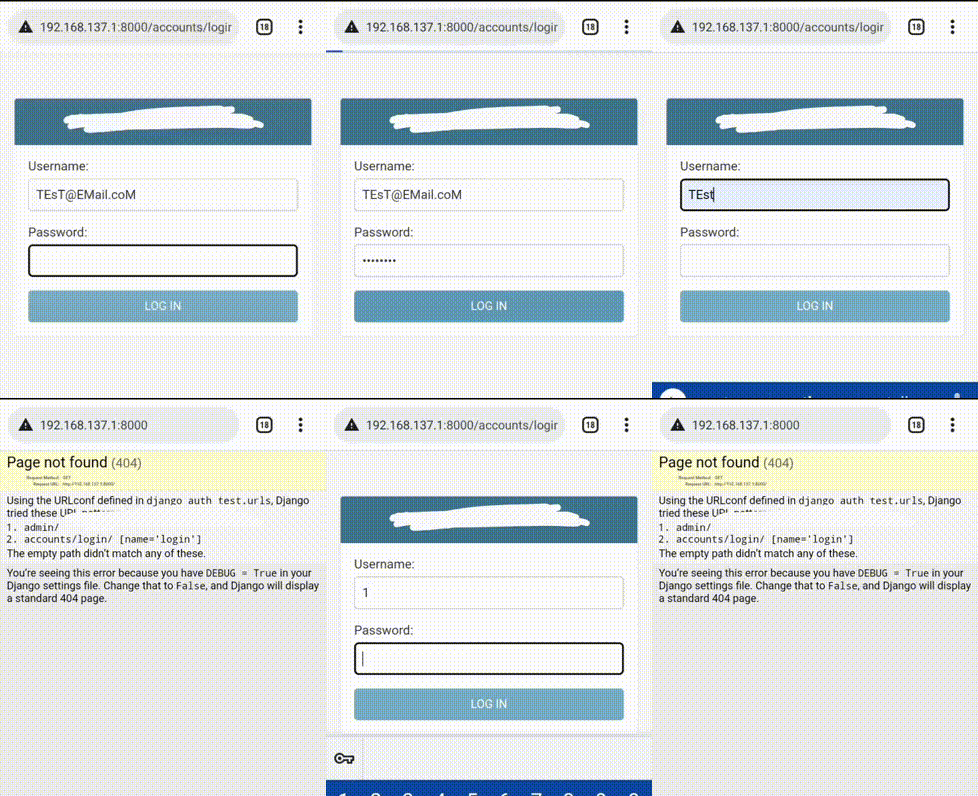
Here’s a GIF showing a user logging in with his ``email``, ``username`` and ``id``.
Release history Release notifications | RSS feed

Download files
Download the file for your platform. If you're not sure which to choose, learn more about installing packages.
Source Distribution
Built Distribution
Filter files by name, interpreter, ABI, and platform.
If you're not sure about the file name format, learn more about wheel file names.
Copy a direct link to the current filters
File details
Details for the file django-multiple-authentication-2.0.5.tar.gz.
File metadata
- Download URL: django-multiple-authentication-2.0.5.tar.gz
- Upload date:
- Size: 5.1 kB
- Tags: Source
- Uploaded using Trusted Publishing? No
- Uploaded via: twine/4.0.1 CPython/3.8.10
File hashes
| Algorithm | Hash digest | |
|---|---|---|
| SHA256 |
1d0a69b102edbc4c9bbae11f9be342c1634d69e40885170382a7931767fdb540
|
|
| MD5 |
4fcfdeb0d4f91f5fe2796bdb4c2eb56d
|
|
| BLAKE2b-256 |
8f71e1b60a64286e8b20343ad43cc63fc867c6a050b4b92c9f9b977093f5a408
|
File details
Details for the file django_multiple_authentication-2.0.5-py3-none-any.whl.
File metadata
- Download URL: django_multiple_authentication-2.0.5-py3-none-any.whl
- Upload date:
- Size: 6.1 kB
- Tags: Python 3
- Uploaded using Trusted Publishing? No
- Uploaded via: twine/4.0.1 CPython/3.8.10
File hashes
| Algorithm | Hash digest | |
|---|---|---|
| SHA256 |
52dcfdd578f2bc2584f9b2930f0f3e13fc291a1bf429b0f207c89677bf4c537a
|
|
| MD5 |
a093fbdf8aeb3a877df8c0d918a366d9
|
|
| BLAKE2b-256 |
6999a750dcbcf06db6466d8c657b0624f2b9dd5be97081a4f49b45189178cf3a
|






