
# django-papertrail
An elegant solution for keeping a relational log of chronological events in a Django application.
[](https://pypi.python.org/pypi/django-papertrail)
[](https://pypi.python.org/pypi/django-papertrail)
[](https://circleci.com/gh/FundersClub/django-papertrail)
## Installation
To install `django-papertrail`:
```
$ pip install django-papertrail
```
To enable `django-papertrail` in your project you need to add it to `INSTALLED_APPS` in your projects
`settings.py` file:
```python
INSTALLED_APPS = (
...
'papertrail',
...
)
```
After that, you should migrate:
```
$ python manage.py migrate
```
## Using it
```python
import papertrail
###########################################################################
# Creating entries
###########################################################################
# Basic usage. Timestamp defaults to now
papertrail.log('cache-flushed', 'Cache was flushed!')
# Optional data
papertrail.log(
'periodic-cleanup-ran',
'Periodic cleanup task executed.',
data={
'success': True,
'cleaned_objects': 100,
}
)
# Optional targets
papertrail.log(
'user-logged-in',
u'{} logged in'.format(request.user.get_full_name()),
targets={
'user': request.user,
}
)
# Optional timestamp
papertrail.log(
'user-joined',
'User joined site',
targets={
'user': request.user,
},
timestamp=request.user.date_joined,
)
# Multiple targets
user1 = User.objects.get(...)
user2 = User.objects.get(...)
papertrail.log(
'user-followed',
'User followed another user',
targets={
'follower': user1,
'following': user2,
},
)
###########################################################################
# Querying the papertrail
###########################################################################
# Gettying all papertrail entries that points to user1, without taking
# into account the target relationship name
qs = papertrail.related_to(user)
entry = qs.first()
print '[{}] {} ({}) - {}'.format(
entry.timestamp, entry.type, entry.message, entry.data
)
# Get all entry that points to both users
# (Will only return entries that have both user1 and user2 in their
# targets)
qs = papertrail.related_to(user1, user2)
# Query specific relationships, such as user1 following user2
qs = papertrail.related_to(follower=user1, following=user2)
# Filtering entry by a specific type (or any Django ORM filter)
qs = papertrail.filter(type='user-followed')
# And chaining
qs = papertrail.filter(type='user-followed').related_to(follower=user1)
# Get all the users that have followed a specific user (user1). This might
# look a bit confusing at first, but can be very useful.
# The objects_represented filter allows filtering a given queryset to contain
# only elements that have a specific papertrail entry pointing at them.
all_users = get_user_model().objects.all()
users_who_followed_user1 = (papertrail
# Narrow down to only user-followed entries that followed user1
.filter(type='user-followed')
.related_to(following=user1)
# Return a User queryset that only has the users for which we have a
# user-followed entry that has a followed target pointing at them
.objects_represented(all_users, 'followed')
)
# objects_not_represented does the same, but returns a queryset that
# excludes any object that has a papertrail entry pointing at it:
# Get all users who never logged in
users_who_never_logged_in = (papertrail
.filter(type='user-logged-in')
.objects_not_represented(all_users, 'user')
)
```
## Admin integration
`django-papertrail` provides a Django admin integration to both view entries
(simple Django admin Entry list, usually available under /admin/papertrail/entry/)
as well as a more advanced intergration for objects you want to keep track of.
The advanced integration provides two useful functionalities:
1) Change tracking - whenever an object for which the integration is enabled is
added/edited/deleted, a papertrail entry will be created
2) A convenient link to view all papertrail entries pointing to the object
being viewed as well as an integrated papertrail viewer:

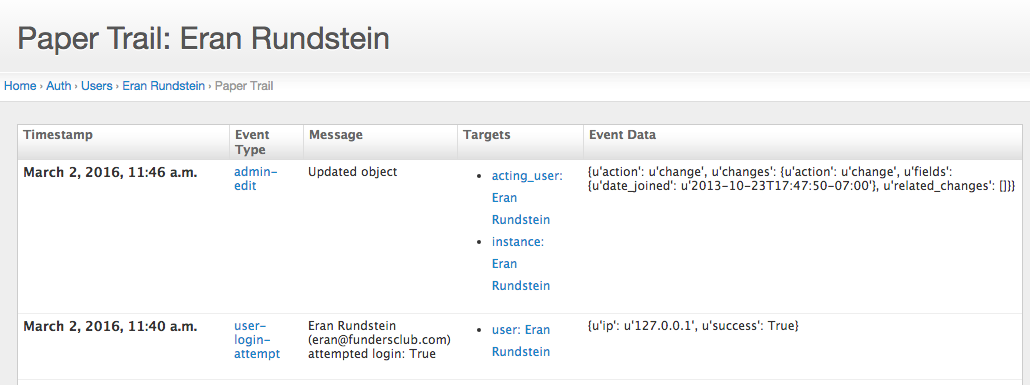
To enable the integration, your `ModelAdmin` class needs to inherit from `AdminEventLoggerMixin`:
```python
from papertrail.admin import AdminEventLoggerMixin
class MyObjectAdmin(AdminEventLoggerMixin, admin.ModelAdmin):
pass
# The admin papertrail viewer can have filters:
papertrail_type_filters = {
'Login events': (
'user-logged-in',
'user-logged-out',
),
'Social events': (
'user-followed',
'user-unfollowed',
),
}
```
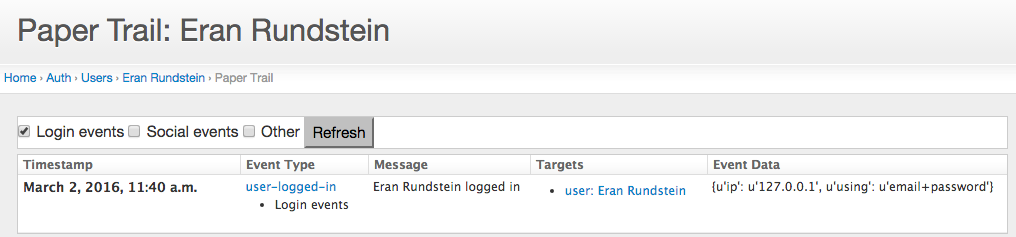
A viewer with filters would look like this:
Maintained by [Eran Rundstein @eranrund](https://www.github.com/eranrund/)
An elegant solution for keeping a relational log of chronological events in a Django application.
[](https://pypi.python.org/pypi/django-papertrail)
[](https://pypi.python.org/pypi/django-papertrail)
[](https://circleci.com/gh/FundersClub/django-papertrail)
## Installation
To install `django-papertrail`:
```
$ pip install django-papertrail
```
To enable `django-papertrail` in your project you need to add it to `INSTALLED_APPS` in your projects
`settings.py` file:
```python
INSTALLED_APPS = (
...
'papertrail',
...
)
```
After that, you should migrate:
```
$ python manage.py migrate
```
## Using it
```python
import papertrail
###########################################################################
# Creating entries
###########################################################################
# Basic usage. Timestamp defaults to now
papertrail.log('cache-flushed', 'Cache was flushed!')
# Optional data
papertrail.log(
'periodic-cleanup-ran',
'Periodic cleanup task executed.',
data={
'success': True,
'cleaned_objects': 100,
}
)
# Optional targets
papertrail.log(
'user-logged-in',
u'{} logged in'.format(request.user.get_full_name()),
targets={
'user': request.user,
}
)
# Optional timestamp
papertrail.log(
'user-joined',
'User joined site',
targets={
'user': request.user,
},
timestamp=request.user.date_joined,
)
# Multiple targets
user1 = User.objects.get(...)
user2 = User.objects.get(...)
papertrail.log(
'user-followed',
'User followed another user',
targets={
'follower': user1,
'following': user2,
},
)
###########################################################################
# Querying the papertrail
###########################################################################
# Gettying all papertrail entries that points to user1, without taking
# into account the target relationship name
qs = papertrail.related_to(user)
entry = qs.first()
print '[{}] {} ({}) - {}'.format(
entry.timestamp, entry.type, entry.message, entry.data
)
# Get all entry that points to both users
# (Will only return entries that have both user1 and user2 in their
# targets)
qs = papertrail.related_to(user1, user2)
# Query specific relationships, such as user1 following user2
qs = papertrail.related_to(follower=user1, following=user2)
# Filtering entry by a specific type (or any Django ORM filter)
qs = papertrail.filter(type='user-followed')
# And chaining
qs = papertrail.filter(type='user-followed').related_to(follower=user1)
# Get all the users that have followed a specific user (user1). This might
# look a bit confusing at first, but can be very useful.
# The objects_represented filter allows filtering a given queryset to contain
# only elements that have a specific papertrail entry pointing at them.
all_users = get_user_model().objects.all()
users_who_followed_user1 = (papertrail
# Narrow down to only user-followed entries that followed user1
.filter(type='user-followed')
.related_to(following=user1)
# Return a User queryset that only has the users for which we have a
# user-followed entry that has a followed target pointing at them
.objects_represented(all_users, 'followed')
)
# objects_not_represented does the same, but returns a queryset that
# excludes any object that has a papertrail entry pointing at it:
# Get all users who never logged in
users_who_never_logged_in = (papertrail
.filter(type='user-logged-in')
.objects_not_represented(all_users, 'user')
)
```
## Admin integration
`django-papertrail` provides a Django admin integration to both view entries
(simple Django admin Entry list, usually available under /admin/papertrail/entry/)
as well as a more advanced intergration for objects you want to keep track of.
The advanced integration provides two useful functionalities:
1) Change tracking - whenever an object for which the integration is enabled is
added/edited/deleted, a papertrail entry will be created
2) A convenient link to view all papertrail entries pointing to the object
being viewed as well as an integrated papertrail viewer:


To enable the integration, your `ModelAdmin` class needs to inherit from `AdminEventLoggerMixin`:
```python
from papertrail.admin import AdminEventLoggerMixin
class MyObjectAdmin(AdminEventLoggerMixin, admin.ModelAdmin):
pass
# The admin papertrail viewer can have filters:
papertrail_type_filters = {
'Login events': (
'user-logged-in',
'user-logged-out',
),
'Social events': (
'user-followed',
'user-unfollowed',
),
}
```
A viewer with filters would look like this:

Maintained by [Eran Rundstein @eranrund](https://www.github.com/eranrund/)
1 maintainer

Release files for django-papertrail 1.1.9
For a detailed explanation of source distributions (sdists) and built distributions (wheels), please see the package formats documentation.
Source distribution (sdist)
| File | Size | Uploaded | |
|---|---|---|---|
| django-papertrail-1.1.9.tar.gz | 14.3 kB | Details |
Release files / django-papertrail-1.1.9.tar.gz
| Download URL | django-papertrail-1.1.9.tar.gz |
|---|---|
| Size | 14.3 kB |
| Tags | Source |
|
SHA-256 checksum How to use checksums |
632518456966a9e9d48b59c16e82ade96a59f48b24974087957119c705e053a3
|
|
BLAKE2b-256 checksum How to use checksums |
8ad28b862dbd01e149d66099aa81f37d4ffb213fa532d2507da3e2980ce63929
|
| Upload date | |
|
Uploaded using Trusted Publishing? What is trusted publishing? |
No |
| Uploaded via |
twine/1.9.1 pkginfo/1.4.1 requests/2.18.4 setuptools/36.6.0 requests-toolbelt/0.8.0 tqdm/4.19.4 CPython/2.7.10
|














