
Django RQ Jobs
Provides scheduled jobs management from the Django Admin using Django-RQ
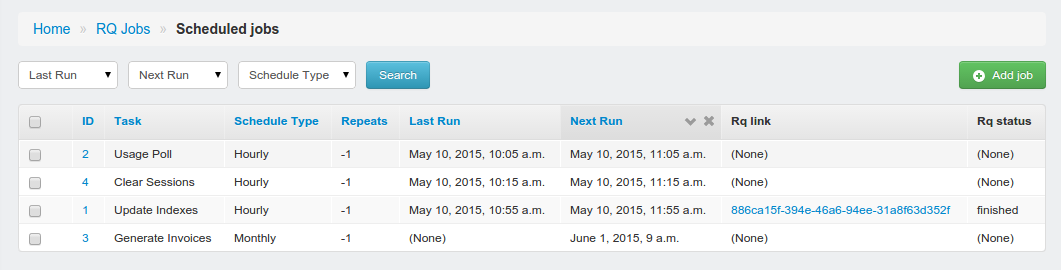
Admin Screenshot
Requirements
Installation
Make sure you have Django-RQ up and running before you do anything. This app is just a simple admin plugin to manage your scheduled tasks and management commands.
Install the package with pip install django-rq-jobs
Add django_rq_jobs to INSTALLED_APPS in settings.py:
INSTALLED_APPS = (
    # other apps
    "django_rq",
    "django_rq_jobs",
)
Add RQ_JOBS_MODULE in settings.py. A string or a tuple of strings designating all modules where you keep your jobs. Anything marked with the Django RQ’s @job decorator will show up in the admin.
# A singe module:
RQ_JOBS_MODULE = 'myapp.tasks'

# or with multiple modules:
RQ_JOBS_MODULE = (
    'myapp.tasks',
    'anotherapp.tasks',
)
Run python manage.py migrate to create the job model.
Open your Django admin and find the RQ Jobs scheduled job section and schedule something.
Schedule the heartbeat python manage.py rqjobs with your favorite scheduler. This can be cron, Heroku scheduler or anything else you prefer. Make sure you set the heartbeat interval to something sensible; 5 or 10 minutes is usually enough, but run it every minute if you want. Execution of the jobs is deferred to RQ anyway.
Notes
Supports once, hourly, daily, weekly, monthly, quarterly and yearly scheduled tasks.
Limited run schedules: Set the ‘Repeats’ on a task to the maxium number of repeats you want. The task gets deleted once the counter reaches zero. Defaults to -1 for eternal.
Arguments are a dict: {'one': 1, 'two': 2, 'three': 3}
RQ Jobs will try to link a job to a queue task status in Django RQ. Usually these job reports don’t exist much longer than a few minutes unless they fail. So if you are seeing None in the RQ status, that usually means things went well.
If you haven’t run the heartbeat manage.py rqjobs for a while and missed some scheduled jobs, RQ Jobs will play catch-up with every heartbeat. This way limited run schedules don’t get compromised.
Scheduling Management Commands
If you want to schedule regular Django management commands, it’s easiest to add them using Django’s management wrapper. So if you wanted to schedule `manage.py clearsessions’ :
from django.core import management

@job
def clear_sessions():
    return management.call_command('clearsessions')
This will automagically appear as ‘Clear Sessions’ in the admin interface.
Acknowledgements
Impossible without the excellent Django-RQ and RQ projects. Thanks to Arrow for making dates easy.
1 maintainer

Metadata
1 maintainer
Release files for django-rq-jobs 0.1.5.1
For a detailed explanation of source distributions (sdists) and built distributions (wheels), please see the package formats documentation.
Source distribution (sdist)
| File | Size | Uploaded | Provenance | |
|---|---|---|---|---|
| django-rq-jobs-0.1.5.1.tar.gz | 9.5 kB | Without provenance | Details |
Release files / django-rq-jobs-0.1.5.1.tar.gz
| Download URL | django-rq-jobs-0.1.5.1.tar.gz |
|---|---|
| Size | 9.5 kB |
| Tags | Source |
|
SHA-256 checksum How to use checksums |
3932817f7fcffc891f8c8fa967ae990f617900df5b7a914a1af846c423222ce9
|
|
BLAKE2b-256 checksum How to use checksums |
7f05b35f54683bcd892cb7eec5ac6a366f378b30237ada8531f14dd27f6a894e
|
| Upload date | |
|
Uploaded using Trusted Publishing? What is trusted publishing? |
No |
Security for django-rq-jobs 0.1.5.1
Provenance
Provenance describes where a file came from. On PyPI, provenance is shared via attestations, which provide a verifiable record of the build or publishing details. View details, limitations and caveats.
No provenance found
None of the files in this release were uploaded with provenance metadata.
A note on package security
PyPI is a repository for distributing packages, not a service for auditing them. While third-party security researchers and our staff do their best to detect and remove malicious packages, PyPI cannot guarantee the quality, security or suitability of any given package.
To learn more about protecting yourself from malicious actors, visit our package security documentation.














