



django-scatter-auth is a pluggable Django app that enables login/signup via Scatter (EOS extension wallet). The user authenticates themselves by digitally signing the hostname with their wallet’s private key.
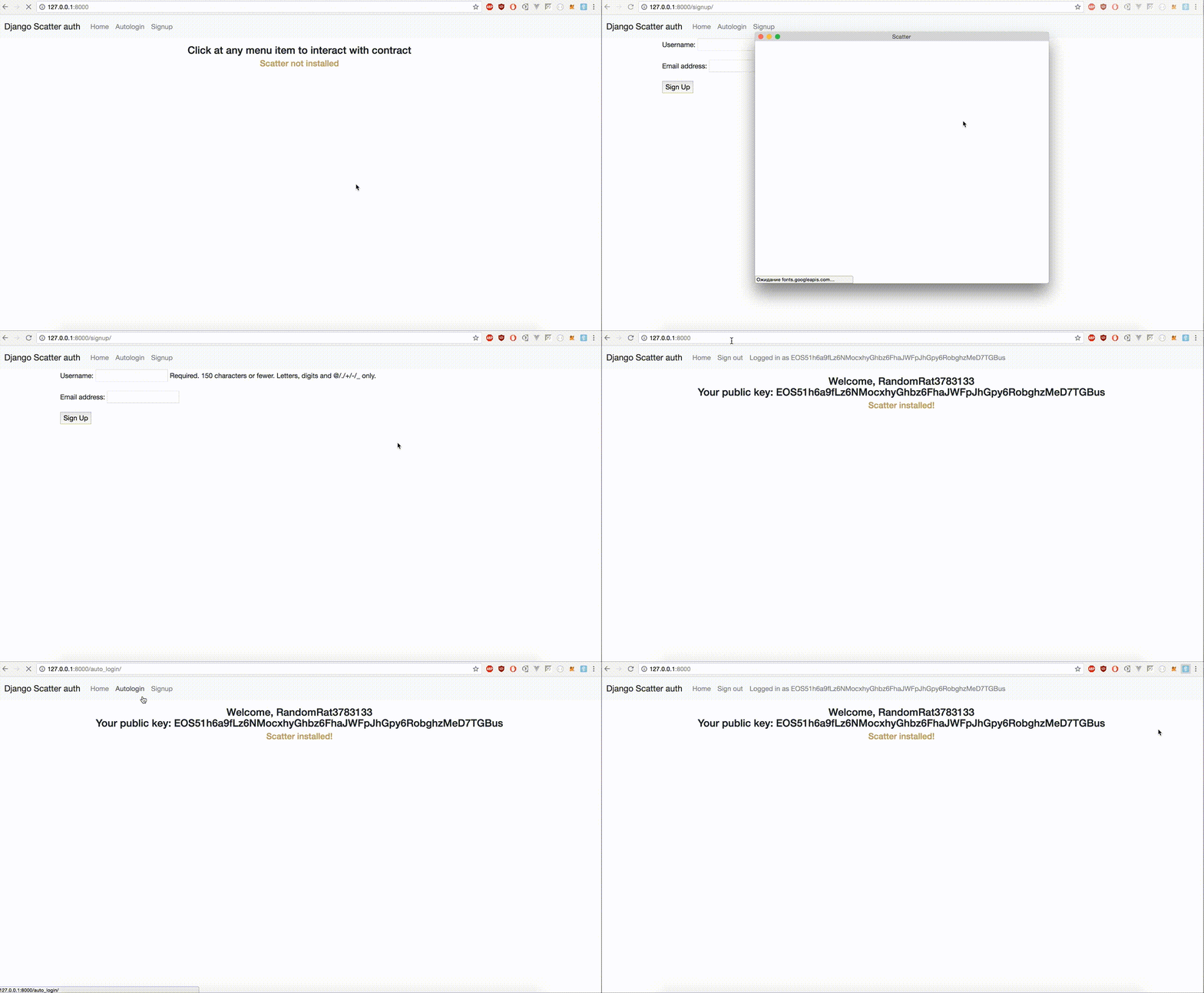
Documentation
The full documentation is at https://django-scatter-auth.readthedocs.io.
Example project
https://github.com/Bearle/django-scatter-auth/tree/master/example
You can check out our example project by cloning the repo and heading into example/ directory. There is a README file for you to check, also.
Features
Scatter API login, signup
Scatter Django forms for signup, login
Checks signature (validation)
Uses hostname signing as proof of private key posession
Easy to set up and use (just one click)
Custom auth backend
VERY customizable - uses Django settings, allows for custom User model
Vanilla Javascript helpers included
Quickstart
Install django-scatter-auth with pip:
pip install django-scatter-auth
Add it to your INSTALLED_APPS:
INSTALLED_APPS = (
    ...
    'scatterauth.apps.scatterauthConfig',
    ...
)
Set ‘scatterauth.backend.ScatterAuthBackend’ as your authentication backend:
AUTHENTICATION_BACKENDS = [
'django.contrib.auth.backends.ModelBackend',
'scatterauth.backend.ScatterAuthBackend'
]
Set your User model’s field to use as public key storage:
SCATTERAUTH_USER_PUBKEY_FIELD = 'username'And if you have some other fields you want to be in the SignupForm, add them too:
SCATTERAUTH_USER_SIGNUP_FIELDS = ['email',]Add django-scatter-auth’s URL patterns:
from scatterauth import urls as scatterauth_urls


urlpatterns = [
    ...
    url(r'^', include(scatterauth_urls)),
    ...
]
Add some javascript to handle login:
<script src="{% static 'scatterauth/js/scatterauth.js' %}"></script>var login_url = '{% url 'scatterauth_login_api' %}';
document.addEventListener('scatterLoaded', scatterExtension => {
console.log('scatter loaded');
if (scatter.identity) {
console.log("Identity found");
loginWithAuthenticate(login_url,console.log,console.log,console.log,console.log, function (resp) {
window.location.replace(resp.redirect_url);
});
} else {
console.log('identity not found, have to signup');
}
});You can access signup using {% url ‘scatterauth_signup’ %} and API signup using {% url ‘scatterauth_signup_api’ %}.
If you have any questions left, head to the example app https://github.com/Bearle/django-scatter-auth/tree/master/example
Important details and FAQ
If you set a custom public key field (SCATTERAUTH_USER_PUBKEY_FIELD), it MUST be unique (unique=True).
This is needed because if it’s not, the user can register a new account with the same public key as the other one, meaning that the user can now login as any of those accounts (sometimes being the wrong one).
How do i deal with user passwords or Password is not set
There should be some code in your project that generates a password using User.objects.make_random_password and sends it to a user email. Or, even better, sends them a ‘restore password’ link. Also, it’s possible to copy signup_view to your project, assign it a url, and add the corresponding lines to set some password for a user.
Why don’t i have to sign a message? It’s needed in django-web3-auth, how this app is secure?
This app uses scatter’s authenticate function to handle message signing - hostname being the signed message. This means that the user & the client share knowledge of the original message and the server can verify client’s possession of the private key corresponding to the public key.
Running Tests
Does the code actually work?
source <YOURVIRTUALENV>/bin/activate
(myenv) $ pip install tox
(myenv) $ tox
Credits
Tools used in rendering this package:
History
0.2.0 (2020-03-14)
Added support for Scatter-Desktop
0.1.1 (2018-09-10)
Fixed signup bug in js - added ‘pubkey_field_name’ param
0.1.0 (2018-08-13)
First release on PyPi
1 maintainer

Metadata
1 maintainer
Release files for django-scatter-auth 0.2.0
For a detailed explanation of source distributions (sdists) and built distributions (wheels), please see the package formats documentation.
Source distribution (sdist)
| File | Size | Uploaded | |
|---|---|---|---|
| django-scatter-auth-0.2.0.tar.gz | 12.8 kB | Details |
Built distribution (wheel)
| File | Interpreter | ABI | Platform | Reset |
|---|---|---|---|---|
| django_scatter_auth-0.2.0-py2.py3-none-any.whl | Python 2, Python 3 | none | any | Details |
Total release size: 28.6 kB
Release files / django-scatter-auth-0.2.0.tar.gz
| Download URL | django-scatter-auth-0.2.0.tar.gz |
|---|---|
| Size | 12.8 kB |
| Tags | Source |
|
SHA-256 checksum How to use checksums |
9c9c6f425b9d8f804d5920631b90a83b438e38357fc4ad58de9668d4aed771f9
|
|
BLAKE2b-256 checksum How to use checksums |
cd1e340e720b7fa0a7c3fc386802b23586a4ce8c63d206d0c9aef97484106857
|
| Upload date | |
|
Uploaded using Trusted Publishing? What is trusted publishing? |
No |
| Uploaded via |
Python-urllib/3.7
|
Release files / django_scatter_auth-0.2.0-py2.py3-none-any.whl
| Download URL | django_scatter_auth-0.2.0-py2.py3-none-any.whl |
|---|---|
| Size | 15.8 kB |
| Tags | Python 2 Python 3 |
|
SHA-256 checksum How to use checksums |
8d7421166f836941f20bb971c9d6ffb8d46c470a4108d22715babbdb831230d1
|
|
BLAKE2b-256 checksum How to use checksums |
9843d40686d8a4324630e4b431cacc5bdb9934aec656f23eec696517f7177706
|
| Upload date | |
|
Uploaded using Trusted Publishing? What is trusted publishing? |
No |
| Uploaded via |
twine/3.1.1 pkginfo/1.5.0.1 requests/2.23.0 setuptools/40.0.0 requests-toolbelt/0.9.1 tqdm/4.43.0 CPython/3.7.2
|














