













django-treenode
Probably the best abstract model / admin for your tree based stuff.
Features
- Fast - get
ancestors,children,descendants,parent,root,siblings,treewith no queries - Synced - in-memory model instances are automatically updated
- Compatibility - you can easily add
treenodeto existing projects - No dependencies
- Easy configuration - just extend the abstract model / model-admin
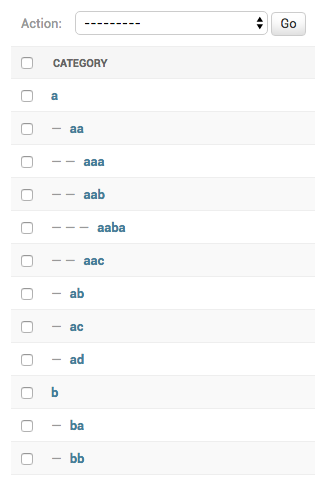
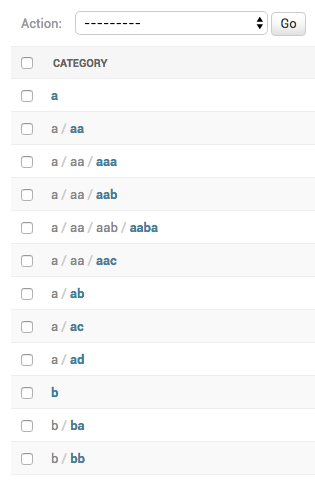
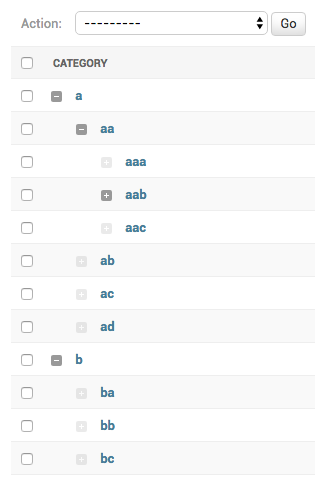
- Admin integration - great tree visualization: accordion, breadcrumbs or indentation
| indentation (default) | breadcrumbs | accordion |
|---|---|---|
 |
 |
 |
Installation
- Run
pip install django-treenode - Add
treenodetosettings.INSTALLED_APPS - Make your model inherit from
treenode.models.TreeNodeModel(described below) - Make your model-admin inherit from
treenode.admin.TreeNodeModelAdmin(described below) - Run
python manage.py makemigrationsandpython manage.py migrate
Configuration
models.py
Make your model class inherit from treenode.models.TreeNodeModel:
from django.db import models

from treenode.models import TreeNodeModel


class Category(TreeNodeModel):

    # the field used to display the model instance
    # default value 'pk'
    treenode_display_field = "name"

    name = models.CharField(max_length=50)

    class Meta(TreeNodeModel.Meta):
        verbose_name = "Category"
        verbose_name_plural = "Categories"
The TreeNodeModel abstract class adds many fields (prefixed with tn_ to prevent direct access) and public methods to your models.
:warning: If you are extending a model that already has some fields, please ensure that your model existing fields names don't clash with TreeNodeModel public methods/properties names.
admin.py
Make your model-admin class inherit from treenode.admin.TreeNodeModelAdmin.
from django.contrib import admin

from treenode.admin import TreeNodeModelAdmin
from treenode.forms import TreeNodeForm

from .models import Category


class CategoryAdmin(TreeNodeModelAdmin):

    # set the changelist display mode: 'accordion', 'breadcrumbs' or 'indentation' (default)
    # when changelist results are filtered by a querystring,
    # 'breadcrumbs' mode will be used (to preserve data display integrity)
    treenode_display_mode = TreeNodeModelAdmin.TREENODE_DISPLAY_MODE_ACCORDION
    # treenode_display_mode = TreeNodeModelAdmin.TREENODE_DISPLAY_MODE_BREADCRUMBS
    # treenode_display_mode = TreeNodeModelAdmin.TREENODE_DISPLAY_MODE_INDENTATION

    # use TreeNodeForm to automatically exclude invalid parent choices
    form = TreeNodeForm

admin.site.register(Category, CategoryAdmin)
settings.py
You can use a custom cache backend by adding a treenode entry to settings.CACHES, otherwise the default cache backend will be used.
CACHES = {
    "default": {
        "BACKEND": "django.core.cache.backends.filebased.FileBasedCache",
        "LOCATION": "...",
    },
    "treenode": {
        "BACKEND": "django.core.cache.backends.locmem.LocMemCache",
    },
}
Usage
Methods/Properties
deletedelete_treeget_ancestorsget_ancestors_countget_ancestors_pksget_ancestors_querysetget_breadcrumbsget_childrenget_children_countget_children_pksget_children_querysetget_depthget_descendantsget_descendants_countget_descendants_pksget_descendants_querysetget_descendants_treeget_descendants_tree_displayget_first_childget_indexget_last_childget_levelget_orderget_parentget_parent_pkset_parentget_priorityset_priorityget_rootget_root_pkget_rootsget_roots_querysetget_siblingsget_siblings_countget_siblings_pksget_siblings_querysetget_treeget_tree_displayis_ancestor_ofis_child_ofis_descendant_ofis_first_childis_last_childis_leafis_parent_ofis_rootis_root_ofis_sibling_ofupdate_tree
delete
Delete a node if cascade=True (default behaviour), children and descendants will be deleted too,
otherwise children's parent will be set to None (then children become roots):
obj.delete(cascade=True)
delete_tree
Delete the whole tree for the current node class:
cls.delete_tree()
get_ancestors
Get a list with all ancestors (ordered from root to parent):
obj.get_ancestors()
# or
obj.ancestors
get_ancestors_count
Get the ancestors count:
obj.get_ancestors_count()
# or
obj.ancestors_count
get_ancestors_pks
Get the ancestors pks list:
obj.get_ancestors_pks()
# or
obj.ancestors_pks
get_ancestors_queryset
Get the ancestors queryset (ordered from parent to root):
obj.get_ancestors_queryset()
get_breadcrumbs
Get the breadcrumbs to current node (included):
obj.get_breadcrumbs(attr=None)
# or
obj.breadcrumbs
get_children
Get a list containing all children:
obj.get_children()
# or
obj.children
get_children_count
Get the children count:
obj.get_children_count()
# or
obj.children_count
get_children_pks
Get the children pks list:
obj.get_children_pks()
# or
obj.children_pks
get_children_queryset
Get the children queryset:
obj.get_children_queryset()
get_depth
Get the node depth (how many levels of descendants):
obj.get_depth()
# or
obj.depth
get_descendants
Get a list containing all descendants:
obj.get_descendants()
# or
obj.descendants
get_descendants_count
Get the descendants count:
obj.get_descendants_count()
# or
obj.descendants_count
get_descendants_pks
Get the descendants pks list:
obj.get_descendants_pks()
# or
obj.descendants_pks
get_descendants_queryset
Get the descendants queryset:
obj.get_descendants_queryset()
get_descendants_tree
Get a n-dimensional dict representing the model tree:
obj.get_descendants_tree()
# or
obj.descendants_tree
get_descendants_tree_display
Get a multiline string representing the model tree:
obj.get_descendants_tree_display()
# or
obj.descendants_tree_display
get_first_child
Get the first child node:
obj.get_first_child()
# or
obj.first_child
get_index
Get the node index (index in node.parent.children list):
obj.get_index()
# or
obj.index
get_last_child
Get the last child node:
obj.get_last_child()
# or
obj.last_child
get_level
Get the node level (starting from 1):
obj.get_level()
# or
obj.level
get_order
Get the order value used for ordering:
obj.get_order()
# or
obj.order
get_parent
Get the parent node:
obj.get_parent()
# or
obj.parent
get_parent_pk
Get the parent node pk:
obj.get_parent_pk()
# or
obj.parent_pk
set_parent
Set the parent node:
obj.set_parent(parent_obj)
get_priority
Get the node priority:
obj.get_priority()
# or
obj.priority
set_priority
Set the node priority:
obj.set_priority(100)
get_root
Get the root node for the current node:
obj.get_root()
# or
obj.root
get_root_pk
Get the root node pk for the current node:
obj.get_root_pk()
# or
obj.root_pk
get_roots
Get a list with all root nodes:
cls.get_roots()
# or
cls.roots
get_roots_queryset
Get root nodes queryset:
cls.get_roots_queryset()
get_siblings
Get a list with all the siblings:
obj.get_siblings()
# or
obj.siblings
get_siblings_count
Get the siblings count:
obj.get_siblings_count()
# or
obj.siblings_count
get_siblings_pks
Get the siblings pks list:
obj.get_siblings_pks()
# or
obj.siblings_pks
get_siblings_queryset
Get the siblings queryset:
obj.get_siblings_queryset()
get_tree
Get a n-dimensional dict representing the model tree:
cls.get_tree()
# or
cls.tree
get_tree_display
Get a multiline string representing the model tree:
cls.get_tree_display()
# or
cls.tree_display
is_ancestor_of
Return True if the current node is ancestor of target_obj:
obj.is_ancestor_of(target_obj)
is_child_of
Return True if the current node is child of target_obj:
obj.is_child_of(target_obj)
is_descendant_of
Return True if the current node is descendant of target_obj:
obj.is_descendant_of(target_obj)
is_first_child
Return True if the current node is the first child:
obj.is_first_child()
is_last_child
Return True if the current node is the last child:
obj.is_last_child()
is_leaf
Return True if the current node is leaf (it has not children):
obj.is_leaf()
is_parent_of
Return True if the current node is parent of target_obj:
obj.is_parent_of(target_obj)
is_root
Return True if the current node is root:
obj.is_root()
is_root_of
Return True if the current node is root of target_obj:
obj.is_root_of(target_obj)
is_sibling_of
Return True if the current node is sibling of target_obj:
obj.is_sibling_of(target_obj)
update_tree
Update tree manually, useful after bulk updates:
cls.update_tree()
Bulk Operations
To perform bulk operations it is recommended to turn off signals, then triggering the tree update at the end:
from treenode.signals import no_signals

with no_signals():
    # execute custom bulk operations
    pass

# trigger tree update only once
YourModel.update_tree()
FAQ
Custom tree serialization
How can I serialize a tree using a custom data structure?
This has been discussed here.
Testing
# clone repository
git clone https://github.com/fabiocaccamo/django-treenode.git && cd django-treenode

# create virtualenv and activate it
python -m venv venv && . venv/bin/activate

# upgrade pip
python -m pip install --upgrade pip

# install requirements
pip install -r requirements.txt -r requirements-test.txt

# install pre-commit to run formatters and linters
pre-commit install --install-hooks

# run tests
tox
# or
python runtests.py
# or
python -m django test --settings "tests.settings"
License
Released under MIT License.
Supporting
- :star: Star this project on GitHub
- :octocat: Follow me on GitHub
- :blue_heart: Follow me on Bluesky
- :moneybag: Sponsor me on Github
See also
-
django-admin-interface- the default admin interface made customizable by the admin itself. popup windows replaced by modals. 🧙 ⚡ -
django-cache-cleaner- clear the entire cache or individual caches easily using the admin panel or management command. 🧹✨ -
django-colorfield- simple color field for models with a nice color-picker in the admin. 🎨 -
django-email-validators- no more invalid or disposable emails in your database. ✉️ ✅ -
django-extra-settings- config and manage typed extra settings using just the django admin. ⚙️ -
django-maintenance-mode- shows a 503 error page when maintenance-mode is on. 🚧 🛠️ -
django-redirects- redirects with full control. ↪️ -
python-benedict- dict subclass with keylist/keypath support, I/O shortcuts (base64, csv, json, pickle, plist, query-string, toml, xml, yaml) and many utilities. 📘 -
python-codicefiscale- encode/decode Italian fiscal codes - codifica/decodifica del Codice Fiscale. 🇮🇹 💳 -
python-fontbro- friendly font operations. 🧢 -
python-fsutil- file-system utilities for lazy devs. 🧟♂️
1 maintainer

Metadata
1 maintainer
Release files for django-treenode 0.25.0
For a detailed explanation of source distributions (sdists) and built distributions (wheels), please see the package formats documentation.
Source distribution (sdist)
| File | Size | Uploaded | |
|---|---|---|---|
| django_treenode-0.25.0.tar.gz | 30.0 kB | Details |
Built distribution (wheel)
| File | Interpreter | ABI | Platform | Reset |
|---|---|---|---|---|
| django_treenode-0.25.0-py3-none-any.whl | Python 3 | none | any | Details |
Total release size: 52.3 kB
Release files / django_treenode-0.25.0.tar.gz
| Download URL | django_treenode-0.25.0.tar.gz |
|---|---|
| Size | 30.0 kB |
| Tags | Source |
|
SHA-256 checksum How to use checksums |
d14d0eb3571c227ce11147210d62a8f87b568bbb30fa76a5be9b9e6d514157c3
|
|
BLAKE2b-256 checksum How to use checksums |
cb2b09f04b44b3583a911ae4f5d0e3360a23d529704c9e9115fce2520b7d4420
|
| Upload date | |
|
Uploaded using Trusted Publishing? What is trusted publishing? |
Yes |
| Uploaded via |
twine/7.0.0 CPython/3.13.14
|
Provenance
Provenance describes where a file came from. On PyPI, provenance is shared via attestations, which provide a verifiable record of the build or publishing details. View details, limitations and caveats.


PyPI Publish Attestation
PyPI verified that this artifact, at this checksum, originated from the publisher listed below.
Signed by GitHub Actions, verified by PyPI on Aug 26, 2026.
Transparency logRelease files / django_treenode-0.25.0-py3-none-any.whl
| Download URL | django_treenode-0.25.0-py3-none-any.whl |
|---|---|
| Size | 22.3 kB |
| Tags | Python 3 |
|
SHA-256 checksum How to use checksums |
f47caab5440420870b6287602b3ee401ca354416d44b24ab97579be5ea658927
|
|
BLAKE2b-256 checksum How to use checksums |
e1ac2140e8c20e2a47457ec23302273527d3430bf5c09edb8940d74c0725c138
|
| Upload date | |
|
Uploaded using Trusted Publishing? What is trusted publishing? |
Yes |
| Uploaded via |
twine/7.0.0 CPython/3.13.14
|
Provenance
Provenance describes where a file came from. On PyPI, provenance is shared via attestations, which provide a verifiable record of the build or publishing details. View details, limitations and caveats.
PyPI Publish Attestation
PyPI verified that this artifact, at this checksum, originated from the publisher listed below.
Signed by GitHub Actions, verified by PyPI on Aug 26, 2026.
Transparency log













