
treewidget for Django
Provides the model fields TreeForeignKey, TreeOneToOneField, TreeManyToManyField
for tree models with a tree widget for django. Uses jstree (thanks to vakata).
Tested with django-mptt 0.17 and django-treebeard 4.7 with Django 5.2.
Installation
pip install django-treewidget- place
'treewidget'inINSTALLED_APPS - for AJAX tree updates add the routes to your urls.py,
e.g.
url(r'^treewidget/', include('treewidget.urls'))
Usage
Just replace any foreign key, m2m or one2one tree model field with the provided counterpart. jstree depends on jQuery to work. This module does not provide a jQuery version, use the admin version or place your own version along with your other assets.
Customization
The fields understand two additional arguments:
- settings: Dictionary containing the optional boolean values for 'show_buttons'
(shows "Expand", "Collapse" and "Selected" buttons), 'search' (for in-tree search),
'dnd' (drag and drop support) and 'sort' (apply tree order in frontend). Defaults to
{}. - treeoptions: Settings directly applied to
jstree. Must be a JSON string, if given as argument to a field, otherwise a python dictionary. Defaults totreewidget.fields.TREEOPTIONS. Note that some widget settings will override treeoptions to keep working.
Both settings can be provided project wide in settings.py as TREEWIDGET_SETTINGS and
TREEWIDGET_TREEOPTIONS.
It is possible to render a deeper nested subtree by overriding the default
formatter. Just set the parent id to '#' in the formatter's render method for the entries,
that should appear at top level.
NOTE: If you use a prefiltered queryset which data does not form a well-formed tree
containing all parents up to the top level, jstree cannot render it correctly.
With 'filtered' in settings set to True those querysets will be rendered by
adding missing nodes as not selectable. Make sure, that this does not leak
sensitive tree data (if so, resort to subtree rendering).
Example
from django.db import models
from mptt.models import MPTTModel
from treewidget.fields import TreeForeignKey

class Mptt(MPTTModel):
    name = models.CharField(max_length=32)
    parent = TreeForeignKey('self', blank=True, null=True, on_delete=models.CASCADE)

    def __str__(self):
        return self.name
Renders like this:
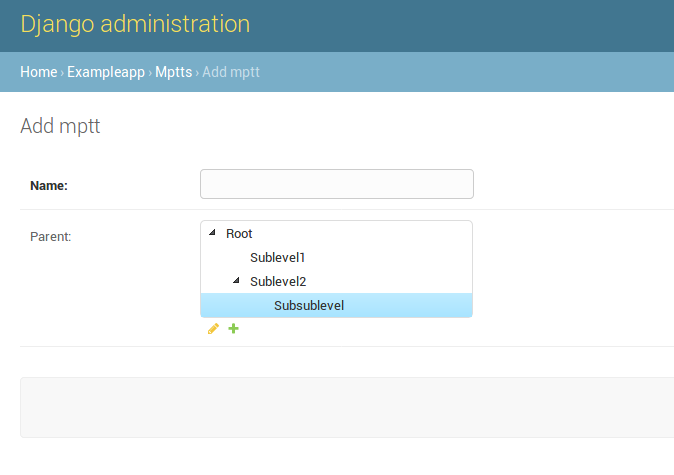
To run the provided example project:
$> cd example
$> pip install Django~=4.2
$> pip install -r requirements.txt
$> ./manage.py migrate
$> ./manage.py createsuperuser
$> ./manage.py loaddata initial_data
$> ./manage.py runserver
and point your browser to http://localhost:8000/admin/exampleapp/example/add/.
After login you see the widgets in action with different settings.
Also see exampleapp.Example model in admin to get an idea of several tree rendering options.
1 maintainer

Download files
Download the file for your platform. If you're not sure which to choose, learn more about installing packages.
Source Distribution
File details
Details for the file django-treewidget-0.4.4.tar.gz.
File metadata
- Download URL: django-treewidget-0.4.4.tar.gz
- Upload date:
- Size: 145.7 kB
- Tags: Source
- Uploaded using Trusted Publishing? No
- Uploaded via:
twine/3.4.1 importlib_metadata/4.0.1 pkginfo/1.5.0.1 requests/2.21.0 requests-toolbelt/0.9.1 tqdm/4.45.0 CPython/3.6.7
File hashes
| Algorithm | Hash digest | |
|---|---|---|
| SHA256 |
cd7963918a40afe5bd6de9916e8bf732dc4e0f7bfc5e0f288f129001652b0be2
|
|
| MD5 |
249552a93c548285278d255e68417cf2
|
|
| BLAKE2b-256 |
cc21d25e5fbbc7d7ed431efdcc106f2cf1b72d54568b34a2df74d12552494475
|














