
Django Deploy on Server

Project description
Compatibility
- Django 1.8+
- Python 3.x +
- Python 2.x +
- Support OS : Ubuntu (Debian Derivatives)
- Centos (not yet)
You should check this package.
Installations
sudo apt-get install python-pip
sudo apt-get install python3-pip
sudo apt-get install virtualenv
Package
pip install djeasy
#or
pip3 install djeasy
Configuration
This is important this project. Because your project doesn't match this directory doesn't work.
- You must add requirements.txt
# Example Project ;
DjangoBlog
├── DjangoBlog
│   ├── __init__.py
│   ├── settings.py
│   └── urls.py
│   └── wsgi.py
├── Blog
│    ├── __init__.py
│    └── admin.py
│    └── apps.py
│    └── tests.py
│    └── views.py
requirements.txt ---> Add!!
Example requirements.txt : https://goo.gl/0Y9yCB
-
Do not forget to add the requirements.txt file.
-
Django Settings.py ALLOWED_HOSTS = [] server ip or domain add.
DjEasy
djeasy
Output :
--create                      Create a new site.
--nginx                       Nginx restart
Site Publishing Steps
- You must create virtualenv for your project and this package.
- NOT : You should know virtualenv name to use djeasy.
You can follow this;
cd /home/ # as you wish. My recommended in your /home/ directory.

virtualenv -p python3 DjangoEnv # example name : DjangoEnv
- Upload or clone your project in server directory like /home/
Example :
cd /home/
git clone https://github.com/AliYmn/aliyaman.org
mv aliyaman.org DjangoBlog # to change name
- Let's run the package.
We'll finish the process in four steps.
djeasy --create
- You can give any name you want for nginx and gunicorn name. But you should don't keep in mind names, because you'll use this for restart nginx and gunicorn.
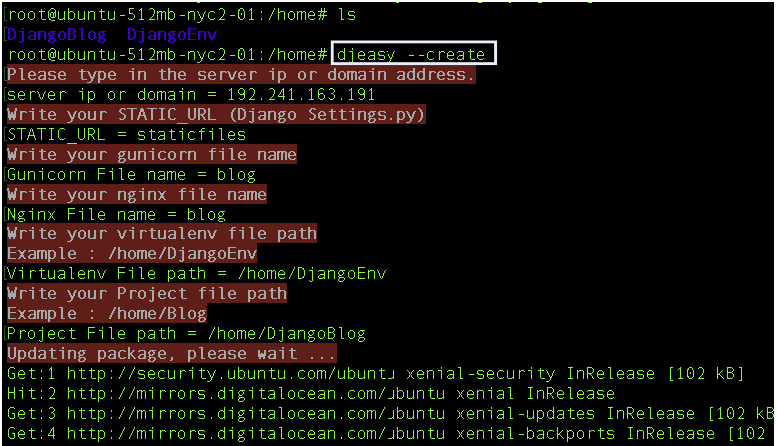
NOT : You can write multiple site. For example, example1.com example2.com
Example;
server ip or domain = 192.241.163.191 example.com blog.example.com
- Restart the server
Commands used ;
--nginx                        Nginx restart
gunicorn_name --gunicorn       Gunicorn restart
Example;
djeasy --nginx
djeasy DjangoBlog --gunicorn
Output;

Process completed successfully.
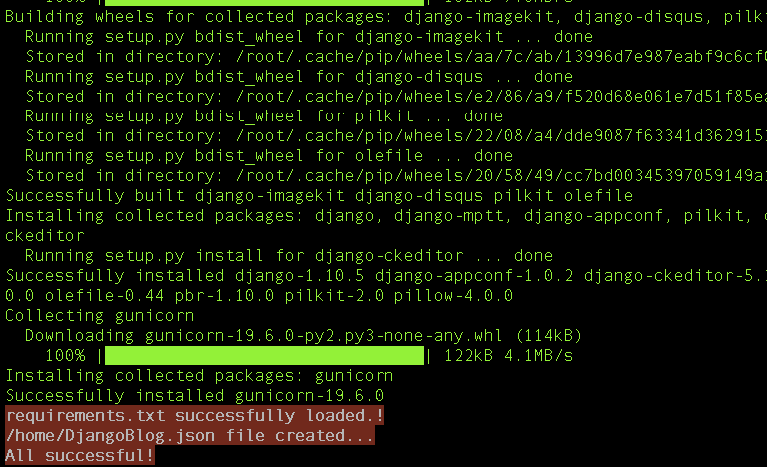
NOT : The Json file is saved in the home directory, please do not delete it.
Release history Release notifications | RSS feed


Download files
Download the file for your platform. If you're not sure which to choose, learn more about installing packages.
Source Distribution
File details
Details for the file djeasy-2.0.3.tar.gz.
File metadata
- Download URL: djeasy-2.0.3.tar.gz
- Upload date:
- Size: 8.2 kB
- Tags: Source
- Uploaded using Trusted Publishing? No
- Uploaded via: twine/4.0.1 CPython/3.8.13
File hashes
| Algorithm | Hash digest | |
|---|---|---|
| SHA256 |
303bd4dbbddf83b25c39cea533f93a64145245914474bcced29b7964ec5a4818
|
|
| MD5 |
bb198edef181ad77ba4b12dfae13d18e
|
|
| BLAKE2b-256 |
62149de114726e7bf51b3b2828c5bd245db1c6c4214cbe65e621260f8a66d991
|






