






DM-engine is a Python implementation of Distributed Morphology (DM).
Distributed Morphology is a framework from theoretical linguistics that is used to describe the morphology (word structure) of natural languages. This package provides an engine that calculates the word forms that are generated by a given DM analysis.
Analyses are entered as plain-text files in the human-friendly YAML format. Minimally, they consist of a title, an inventory of feature values, a list of insertable vocabulary items (VIs), and a list of inputs to be processed (see the example below). The dmengine command-line tool calculates the results and generates a detailed transcript of all calculations for later inspection. The resulting YAML file can be converted into a LaTeX-based report that can directly be compiled into a PDF file.
Links
Issue Tracker: https://github.com/xflr6/dmengine/issues
Download: https://pypi.org/project/dmengine/#files
Installation
This package runs under Python 3.10+, use pip to install:
$ pip install dmengineThis will also install the PyYAML and oset packages from PyPI as required dependencies.
Converting the results to a PDF report also requires a LaTeX distribution (TeX Live and MikTeX should work). Make sure its executables are on your systems’ path.
Usage
Create a plain text file that defines your analysis:
# example.yaml - simple demonstration of the analysis definition syntax
title: English verbal agreement
features:
- value: V
  category: pos
- value: Nom
  category: case
- value: +1
  category: person
- value: +2
  category: person
- value: +3
  category: person
- value: -pl
  category: number
- value: +pl
  category: number
vis:
- exponent: sleep
  features: [ V ]
- exponent: -s
  features: [ Nom, +3, -pl ]
- exponent: -Ø
  features: [ Nom ]
paradigms:
- name: Intransitive paradigm
  headers: [ [1, 2, 3], [sg, pl] ]
  inputs:
  - [ [V], [Nom, +1, -pl] ]
  - [ [V], [Nom, +1, +pl] ]
  - [ [V], [Nom, +2, -pl] ]
  - [ [V], [Nom, +2, +pl] ]
  - [ [V], [Nom, +3, -pl] ]
  - [ [V], [Nom, +3, +pl] ]
Save your analysis definition to a file ending with .yaml (e.g. example.yaml).
Open a shell (command line window) and navigate to the directory of your definition file.
Calculate the results of the analyis with the dmengine command creating a PDF report:
$ dmengine example.yaml --pdfThis will create three files:
example-results.yaml – plain-text file with the results in YAML format
example-results.tex – LaTeX source for the result report
example-results.pdf – PDF output of the report compiled with pdflatex
Results
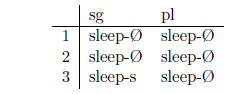
Go to the outputs section of the report. It provides a paradigm table of the calculated results:
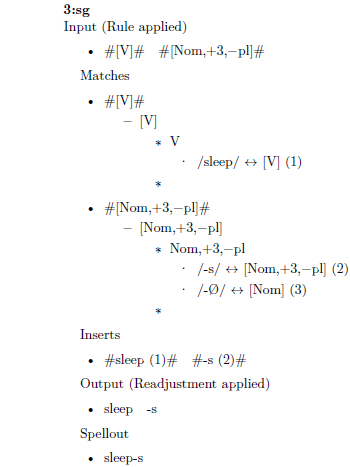
The log section of the report contains detailed information about each individual input and the derivation of the output.
Invocation options
Check the usage of the dmengine command:
$ dmengine --help

usage: dmengine [-h] [--version] [--report] [--pdf] [--view]
                filename [directory]

Calculates a given Distributed Morphology (DM) analysis

positional arguments:
  filename    dm analysis .yaml definition file
  directory   analysis results output directory

optional arguments:
  -h, --help  show this help message and exit
  --version   show program's version number and exit
  --report    create a LaTeX report from the results
  --pdf       render the report to PDF (implies --report)
  --view      open the report in viewer app (implies --pdf)
Rules
Analyses can use the following types of rules that manipulate the input before insertion:
impoverishment – feature deletion
obliteration – head removal
fission – head feature extraction
fusion – head merging
copy – head duplication
add – features addition
metathesis – head position swapping
The following types of readjustment rules are supported (manipulating the output after insertion):
delete – exponent removal
copy – exponent duplication
metathesis – exponent position swapping
transform – regular expression search & replace
Contexts
The insertion of vocabulary items and the application of pre-insertion rules can be restricted to the following context types:
this_head – the processed head must have the features
left_head – the left-adjacent head must have the features
right_head – the right-adjacent head must have the features
any_head – any input head must have the features
anywhere – features must be matched somewhere in the input
TODO
check expected spell-out for each input
delete_matching: yes/no
delete_other: all, given, none
set_delete: global, slot, vi
See also
Raphael Finkel provides web-based engines for calculating Paradigm Function Morphology and Network Morphology analyses.
License
dmengine is distributed under the MIT license.


Release files for dmengine 0.4.1
For a detailed explanation of source distributions (sdists) and built distributions (wheels), please see the package formats documentation.
Source distribution (sdist)
| File | Size | Uploaded | |
|---|---|---|---|
| dmengine-0.4.1.tar.gz | 64.0 kB | Details |
Built distribution (wheel)
| File | Interpreter | ABI | Platform | Reset |
|---|---|---|---|---|
| dmengine-0.4.1-py3-none-any.whl | Python 3 | none | any | Details |
Total release size: 100.6 kB
Release files / dmengine-0.4.1.tar.gz
| Download URL | dmengine-0.4.1.tar.gz |
|---|---|
| Size | 64.0 kB |
| Tags | Source |
|
SHA-256 checksum How to use checksums |
3d7aa7d6c05cfbc99479c9b2737f3ca55a5e3dcd6300f53a9e547f32afa6fc03
|
|
BLAKE2b-256 checksum How to use checksums |
252957081b9575f371c394270f64b9edfbc7fbebed9a87011a0f1f7eaea013d3
|
| Upload date | |
|
Uploaded using Trusted Publishing? What is trusted publishing? |
No |
| Uploaded via |
twine/6.2.0 CPython/3.14.0
|
Release files / dmengine-0.4.1-py3-none-any.whl
| Download URL | dmengine-0.4.1-py3-none-any.whl |
|---|---|
| Size | 36.6 kB |
| Tags | Python 3 |
|
SHA-256 checksum How to use checksums |
8af9aa3d017992e9471cc6397b3becfb6d30dd370c38c159147110fe95bc2165
|
|
BLAKE2b-256 checksum How to use checksums |
e2af5c78dd12fbced64e4e2cdcf8ac92c4e9b48f4fbf79cd577bd24ad8bc837b
|
| Upload date | |
|
Uploaded using Trusted Publishing? What is trusted publishing? |
No |
| Uploaded via |
twine/6.2.0 CPython/3.14.0
|














