
This release is a pre-release and may not be stable for production use.
Amazon DocumentDB Demo Construct
Installing
Pypi (Python)
pip install docdbdemo
npm (JavaScript and TypeScript)
npm install @richardhboyd/doc_db_lib
Usage
Python
from aws_cdk import (
    core
)
from docdbdemo import DocDbLib


class MyStack(core.Stack):

    def __init__(self, scope: core.Construct, id: str, **kwargs) -> None:
        super().__init__(scope, id, **kwargs)

        DocDbLib(self, "MyDocDBClient")
TypeScript
import cdk = require('@aws-cdk/core');
import docdbdemo = require('@richardhboyd/doc_db_lib');

export class DocDbClientTsStack extends cdk.Stack {
  constructor(scope: cdk.App, id: string, props?: cdk.StackProps) {
    super(scope, id, props);

    new docdbdemo.DocDbLib(this, "MyDocDBClient");
  }
}
Diagram
Interacting
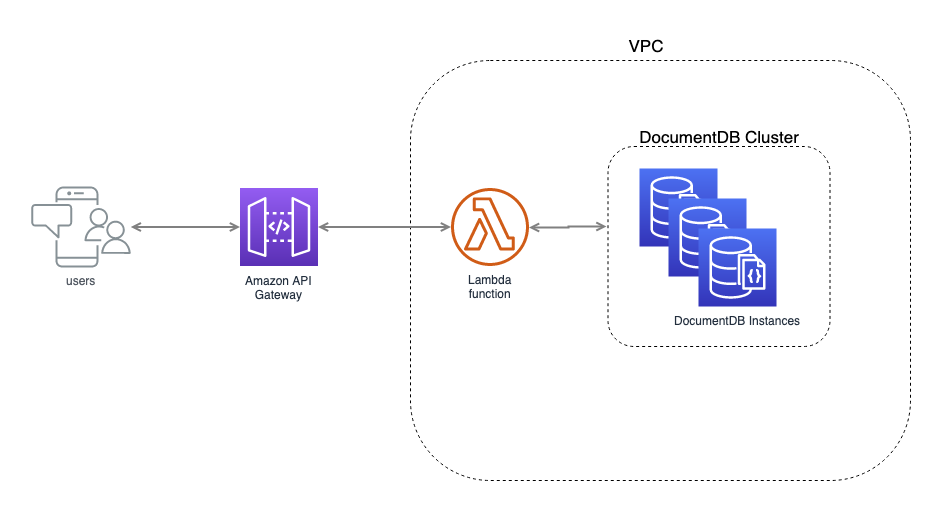
Deploying the stack will create an Amazon DocumentDB Cluster with one instance in each availability zone created by the CDK's VPC Construct, a Lambda function that can put items into the database and fetch them out again, and an API to send requests to the Lambda Funciton.
The stack will output an APIGateway endpoint that will front the created DocumentDB.
Outputs:
DocDbClientTsStack.MyDocDBClientMyDocDbApiMyDocDBApiEndpoint74609B36 = https://gv8ooq7zti.execute-api.us-east-1.amazonaws.com/prod/
Let's look at how we use this new API.
Putting a document in the DocumentDB
API=https://gv8ooq7zti.execute-api.us-east-1.amazonaws.com/prod
curl -H "Content-Type: application/json" -d '{"bestCoder":"@allenmichael", "worstCoder":"singledigit"}' -X POST $API/document
Getting a document out of the database
API=https://gv8ooq7zti.execute-api.us-east-1.amazonaws.com/prod
curl -H "Content-Type: application/json" $API/document?bestCoder=@allenmichael
Testing this out we see
$ curl -H "Content-Type: application/json" -d '{"bestCoder":"@allenmichael", "worstCoder":"@singledigit"}' -X POST $API/document

{"id": "5d7bd032c7866a33171a1261"}

$ curl -H "Content-Type: application/json" $API/document?bestCoder=@allenmichael

{'_id': ObjectId('5d7bcfe6c7866a33171a125f'), 'bestCoder': '@allenmichael', 'worstCoder': '@singledigit'}
1 maintainer

Metadata
1 maintainer
Release files for docdbdemo 0.1.0a6
For a detailed explanation of source distributions (sdists) and built distributions (wheels), please see the package formats documentation.
Source distribution (sdist)
| File | Size | Uploaded | |
|---|---|---|---|
| docdbdemo-0.1.0a6.tar.gz | 751.0 kB | Details |
Built distribution (wheel)
| File | Interpreter | ABI | Platform | Reset |
|---|---|---|---|---|
| docdbdemo-0.1.0a6-py3-none-any.whl | Python 3 | none | any | Details |
Total release size: 1.5 MB
Release files / docdbdemo-0.1.0a6.tar.gz
| Download URL | docdbdemo-0.1.0a6.tar.gz |
|---|---|
| Size | 751.0 kB |
| Tags | Source |
|
SHA-256 checksum How to use checksums |
27ef93cb0ee4820d7a4404a0073ab0ef23ccd628def4d8f9b17991d052288cb5
|
|
BLAKE2b-256 checksum How to use checksums |
6b7fb746dfdd5a38efce506149dee79ac96fe625b025c50469c0ce132d57e9c2
|
| Upload date | |
|
Uploaded using Trusted Publishing? What is trusted publishing? |
No |
| Uploaded via |
twine/1.14.0 pkginfo/1.5.0.1 requests/2.22.0 setuptools/39.0.1 requests-toolbelt/0.9.1 tqdm/4.35.0 CPython/3.6.5
|
Release files / docdbdemo-0.1.0a6-py3-none-any.whl
| Download URL | docdbdemo-0.1.0a6-py3-none-any.whl |
|---|---|
| Size | 749.2 kB |
| Tags | Python 3 |
|
SHA-256 checksum How to use checksums |
923a0e4cc4284c607caf45750eb1c5b983556692ce5ba513931b7e7e21064c80
|
|
BLAKE2b-256 checksum How to use checksums |
538bdbe512101a2064c47d56d601f70c3fb8716bd2666469ccc8ac088a84e221
|
| Upload date | |
|
Uploaded using Trusted Publishing? What is trusted publishing? |
No |
| Uploaded via |
twine/1.14.0 pkginfo/1.5.0.1 requests/2.22.0 setuptools/39.0.1 requests-toolbelt/0.9.1 tqdm/4.35.0 CPython/3.6.5
|














