
Docker Hub CLI



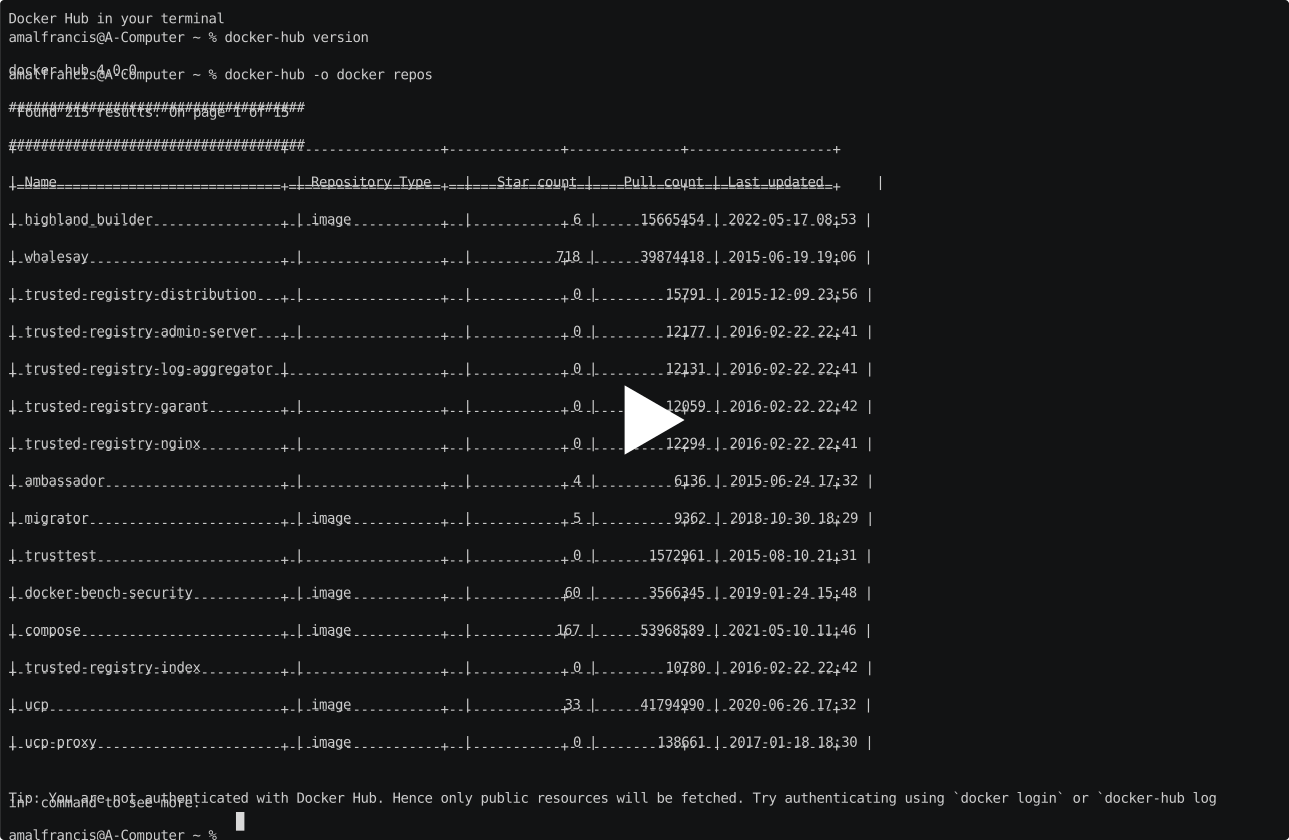
A CLI tool to access Docker Hub from your terminal.
Installation
Note: Minimum Python 3.8 is required.
You should have pip installed in your system.
pip install docker-hub
If you have Pip 3 also in the system do:
pip3 install docker-hub
Usage
1. Authenticate with Docker Hub
If you are already logged in using docker login command, then the token in Docker engine config will be used. Otherwise you can choose to proceed without authenticating which will query docker hub without token and list only public resources. To authenticate for viewing private resources do docker-hub login command; this will save auth token in docker-hub's config file so that you don't need to login every time.
If you want to authenticate for the only current command (to not persist auth tokens in config), make use of the following env variables:
DOCKER_HUB_USERNAME- Your Docker Hub usernameDOCKER_HUB_PASSWORD- Your Docker Hub password
Pass the mentioned envs with your command and docker-hub will try to do authentication without prompting for credentials.
e.g.:
DOCKER_HUB_USERNAME=hello DOCKER_HUB_PASSWORD=world docker-hub repos --orgname docker
2. Querying an organization for repositories
To query repositories in an organization use repos argument. The organization to query can be passed as --orgname or -o parameter.
e.g.: Get repos in organization named "docker"
docker-hub repos --orgname docker
3. Querying the tags of a repository
To query tags of a repository use tags argument. The organization of repository can be passed as --orgname or -o parameter. The repository to query can be passed as --reponame or -r parameter.
e.g.: Get tags of repository "ucp" in organization named "docker"
docker-hub tags --orgname docker --reponame ucp
If you want to display all pages result then use option --all-pages or -a
docker-hub tags --orgname docker --reponame ucp --all-pages
4. Querying a user profile
To query a user profile use users argument. The username to query can be passed as --username or -u parameter.
e.g.: Get profile of user named "docker"
docker-hub users --username docker
5. Querying the auto-builds of a repository
To query auto-builds of a repository use builds argument. The organization of repository can be passed as --orgname or -o parameter. The repository to query can be passed as --reponame or -r parameter.
e.g.: Get build of repository "ucp" in organization named "docker"
docker-hub builds --orgname docker --reponame ucp
6. Querying an organization for auto-build queue
To query the auto-build repositories with pending builds use the queue argument. The organization to query can be passed as --orgname or -o parameter.
e.g.: Get the building queue for organization named "docker"
docker-hub queue --orgname docker
7. Setting and getting config values
Config values can be set or get using config argument. Currently supported config names:
- orgname - orgname to use in case of
--orgnameis not provided.
A config can be set using set command and passing config name along with it's corresponding value.
e.g.: Set value for config "orgname"
docker-hub config set orgname docker
A config value can be get using get command and passing config name.
e.g.: Get value for config "orgname"
docker-hub config get orgname
To list all config values that are currently present:
docker-hub config
Notes:
-
Only 15 results will be displayed at once. You can fetch remaining pages by passing
--pageor-pparameter.e.g.: Get 3rd page
docker-hub repos --orgname docker --page 3
-
The results can be displayed in 2 formats:
- json - Displays result as JSON string.
- table - Displays results as nicely formatted table.
--formator-fparameter can be used to specify the format in which result must be displayed.e.g.:
- Display in json format
docker-hub repos --orgname docker --format json
- Display in table format
docker-hub repos --orgname docker --format table
Development
Questions, problems or suggestions? Please post them on the issue tracker.
You can contribute changes by forking the project and submitting a pull request. Feel free to contribute :heart_eyes:
UNDER MIT LICENSE
The MIT License (MIT)
Copyright (c) 2016 Amal Francis
Permission is hereby granted, free of charge, to any person obtaining a copy of this software and associated documentation files (the "Software"), to deal in the Software without restriction, including without limitation the rights to use, copy, modify, merge, publish, distribute, sublicense, and/or sell copies of the Software, and to permit persons to whom the Software is furnished to do so, subject to the following conditions:
The above copyright notice and this permission notice shall be included in all copies or substantial portions of the Software.
THE SOFTWARE IS PROVIDED "AS IS", WITHOUT WARRANTY OF ANY KIND, EXPRESS OR IMPLIED, INCLUDING BUT NOT LIMITED TO THE WARRANTIES OF MERCHANTABILITY, FITNESS FOR A PARTICULAR PURPOSE AND NONINFRINGEMENT. IN NO EVENT SHALL THE AUTHORS OR COPYRIGHT HOLDERS BE LIABLE FOR ANY CLAIM, DAMAGES OR OTHER LIABILITY, WHETHER IN AN ACTION OF CONTRACT, TORT OR OTHERWISE, ARISING FROM, OUT OF OR IN CONNECTION WITH THE SOFTWARE OR THE USE OR OTHER DEALINGS IN THE SOFTWARE.
1 maintainer

Metadata
1 maintainer
Release files for docker-hub 5.0.0
For a detailed explanation of source distributions (sdists) and built distributions (wheels), please see the package formats documentation.
Source distribution (sdist)
| File | Size | Uploaded | Provenance | Actions |
|---|---|---|---|---|
| docker_hub-5.0.0.tar.gz | 12.9 kB | Without provenance | Details for docker_hub-5.0.0.tar.gz |
Built distribution (wheel)
| File | Interpreter | ABI | Platform | Actions Reset |
|---|---|---|---|---|
| docker_hub-5.0.0-py2.py3-none-any.whl | Python 3, Python 2 | none | any | Details for docker_hub-5.0.0-py2.py3-none-any.whl |
Total release size: 33.0 kB
Release files / docker_hub-5.0.0.tar.gz
| Download URL | docker_hub-5.0.0.tar.gz |
|---|---|
| Size | 12.9 kB |
| Tags | Source |
|
SHA-256 checksum How to use checksums |
a02eee2bda72a271a82a989d6cf3e17b965a34f4cf8a1f98bd62a43102b5e1ae
|
|
BLAKE2b-256 checksum How to use checksums |
4ddb29c341f789a4da2ea91a7def32af228446044e503de3c8de545e2654f6d1
|
| Upload date | |
|
Uploaded using Trusted Publishing? What is trusted publishing? |
No |
| Uploaded via |
twine/6.1.0 CPython/3.9.23
|
Release files / docker_hub-5.0.0-py2.py3-none-any.whl
| Download URL | docker_hub-5.0.0-py2.py3-none-any.whl |
|---|---|
| Size | 20.0 kB |
| Tags | Python 2 Python 3 |
|
SHA-256 checksum How to use checksums |
b5b5d709465c8fcd37b19052abd7cd12f539d11f424cff8ee40e6cfd3dadeb35
|
|
BLAKE2b-256 checksum How to use checksums |
e72aad495588394f9710f21ed20f18126777b02aa3f870ebd47005195780a406
|
| Upload date | |
|
Uploaded using Trusted Publishing? What is trusted publishing? |
No |
| Uploaded via |
twine/6.1.0 CPython/3.9.23
|
Security for docker-hub 5.0.0
Provenance
Provenance describes where a file came from. On PyPI, provenance is shared via attestations, which provide a verifiable record of the build or publishing details. View details, limitations and caveats.
No provenance found
None of the files in this release were uploaded with provenance metadata.
A note on package security
PyPI is a repository for distributing packages, not a service for auditing them. While third-party security researchers and our staff do their best to detect and remove malicious packages, PyPI cannot guarantee the quality, security or suitability of any given package.
To learn more about protecting yourself from malicious actors, visit our package security documentation.














